New Mac Mini and Mac Studio Add Genlock Support for Camera Syncing - MacRumorsOpen MenuShow RoundupsShow Forums menuVisit ForumsOpen Sidebar
Skip to Content

New Mac Mini and Mac Studio Add Genlock Support for Camera Syncing
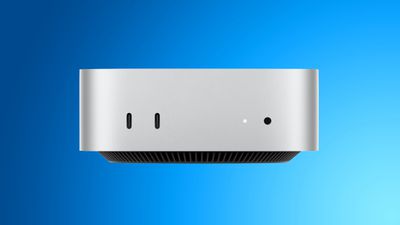
mac mini blueApple's new Mac mini and Mac Studio feature genlock support over USB-C, allowing users to precisely synchronize a display with a camera such as the iPhone 17 Pro, without the need for additional equipment.

It keeps multiple cameras and displays locked to the same timing signal, stopping footage from drifting out of sync during a multi-camera shoot.

Popular Stories

Mac mini vs Studio Feature Sans Text 1

Apple Caught Off Guard by AI Demand for Mac Mini and Mac Studio

Sunday August 30, 2026 8:52 am PDT by
Apple's unusually timed announcement of new Mac mini and Mac Studio models this week was driven by unexpectedly strong enterprise appetite for AI hardware, according to The Information. Apple normally releases new Mac models in the autumn, closer to October or November, making this week's announcement unusually early, falling just before the anticipated arrival of new iPhone models. The...
Mac Studio Feature

Apple Seemingly Made a Mistake When Announcing the New Mac Studio

Monday August 31, 2026 11:19 am PDT by
Apple's press release for the new Mac Studio with M5 Max and M5 Ultra chips last week initially stated that the computer had "next-generation SSD architecture built on PCIe Gen 6." However, as spotted by the French blog MacGeneration, Apple removed the PCIe 6.0 mention from the announcement shortly after it was published. The press release still mentions that the new Mac Studio has a...
Mac mini M6 chip

M6 Chip Benchmark Surfaces Ahead of New Mac Mini Launch Next Week

Tuesday September 15, 2026 9:38 am PDT by
The first unverified benchmark result for Apple's new M6 chip surfaced in the Geekbench 7 database today, offering a look at the chip's performance gains. The new Mac mini will be Apple's first device to be equipped with the M6 chip, which is 2nm. Here is how the M6 chip scored: Single-core CPU score: 4,071 Multi-core CPU score: 22,783 Here are the average M5 chip scores for...

Top Rated Comments

3 weeks ago
Video Guy here. I work in live event video—concerts, conferences, corporate. This feature is for us, and it is really a ‘finally’ moment on two fronts.

1) Our “display” outputs aren’t used for more monitors on our desk. They are video outputs that go to switchers and giant LED walls and projectors. If we wanted to have multiple display outputs stitched together, they must be exactly in sync, otherwise you see tearing on the seams. MacOS does not do this natively, and that’s why we have to use beefy PCs with special graphics cards that can do this with display outputs.

2) If you shoot an LED wall with a camera and they aren’t synced with each other, you get visible scan lines on the wall through the camera’s eye. Not a good look.

Genlock is a special signal used in broadcast environments that tells all the video gear when to start “drawing” the image, so everything scans at the same rate in the same timing. The only way to have multiple displays synced and have cameras not see scan lines, they all need to be “locked” to the same scan frequency.

If this implementation is done well (and if it works how we hope it does), this one little after-though of a bullet point will be a game changer for Mac’s in live-event environments.
Score: 11 Votes (Like | Disagree)
atonaldenim Avatar
3 weeks ago
Same here, and I work in video. I think it has to do with live video streaming and seamlessly switching in between multiple cameras.

Let’s say you have two cameras both recording at 30 frames per second. Without genlock synchronizing the timing of those 30 frames per second, each camera’s 30 frames would be recording at different intervals of time as measured in milliseconds.

So if you’re trying to switch camera angles in a live feed, there could be a 1-frame hiccup caused by the difference in the two cameras’ clocks that might be perceptible as a slight visual glitch.

Genlock is meant to synchronize the 2 cameras’ clocks so each of their 30 frames per second are both being captured at the same millisecond.

I think that’s how it works, it’s a pretty niche thing, but maybe if you’re a high end live streamer or TV studio this matters you?
Score: 11 Votes (Like | Disagree)
Will Co Avatar
3 weeks ago

Can someone elaborate what this means? I’m not exactly following.

Same here, and I work in video. I think it has to do with live video streaming and seamlessly switching in between multiple cameras.

Let’s say you have two cameras both recording at 30 frames per second. Without genlock synchronizing the timing of those 30 frames per second, each camera’s 30 frames would be recording at different intervals of time as measured in milliseconds.

So if you’re trying to switch camera angles in a live feed, there could be a 1-frame hiccup caused by the difference in the two cameras’ clocks that might be perceptible as a slight visual glitch.

Genlock is meant to synchronize the 2 cameras’ clocks so each of their 30 frames per second are both being captured at the same millisecond.

I think that’s how it works, it’s a pretty niche thing, but maybe if you’re a high end live streamer or TV studio this matters you?
My take might be a bit old-school, but Genlock is also about syncing the capture frame rate with the playback frame rate. So if you're recording someone in front of a display, the display frame generation and camera capture periods are perfectly synchronised and this stops the flickering or black bars that sometimes appear on the recorded copy of the display.
Score: 7 Votes (Like | Disagree)
3 weeks ago

Can someone elaborate what this means? I’m not exactly following.
It lets you take a video of a computer display without the "strobing" or "tearing" effect that you can get if the screen refresh is slightly out of sync with the camera.

Used to be horrendous with old school 50/60Hz CRTs (which actually went blank between scans) and pretty essential when filming around computers or CCTVs. Didn't think it was such an issue with modern LCDs, but I guess you;d get tearing on moving graphics...

Was also used to enable overlay computer graphics/captioning on (analogue) video in 80s/90s interactive video systems but I can't imagine that's still a thing in the days of digityal compositing.

(I'm getting a "1990 called" vibe... but I guess some people still need it)
Score: 2 Votes (Like | Disagree)
3 weeks ago
Genlock is also essential for ‘stitching’ displays together… and opens the door to Macs being able to output a display that is over 8K.

Think giant LED panel builds used at big events or stadium signs that are not the standard 16x9 or even the newly supported 5K Ultrawide Support thats in macOS Golden Gate. (E.g. 20K pixels wide).

For what it’s worth it’s not there yet… as AVFoundation (macOS’s hardcoded maximum for external outputs are 8192 for height and 8192 for width.) limits this and why PCs with GPUs (with the GPU being what usually supports gen lock with multiple outputs from a video card) are still required for things of that nature.

And in case you made it this far… macOS and third party apps (I.e. Adobe AE) CAN create video files over this hard limit… but macOS can NOT play them back over an external display output at full resolution (not to mention the caps of the version of DisplayPort and HDMI AND even the physical cable to account for in terms of bandwidth).
Score: 2 Votes (Like | Disagree)
3 weeks ago
Don't think I have a use for this. However good to see the new Macs supporting this feature.
Score: 2 Votes (Like | Disagree)