Which iOS 27 CarPlay Features Actually Work in Your Car? - MacRumorsOpen MenuShow RoundupsShow Forums menuVisit ForumsOpen Sidebar
Skip to Content

Which iOS 27 CarPlay Features Actually Work in Your Car?

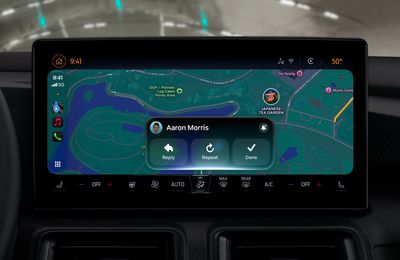
In iOS 27, available now, CarPlay gets its biggest update in years, but some features depend on what type of car you have rather than your iPhone model. Some of the biggest additions won't do anything in the vast majority of vehicles on the road today. Here's how the new features pan out.
ios 27 carplay liquid glass

Works in Any CarPlay Vehicle

  • Custom widgets: In iOS 27, CarPlay is no longer limited to Apple's handful of stock widgets. Any compatible widget from your iPhone's Home Screen can now be added to the CarPlay dashboard. To do so, go to Settings ➝ General ➝ CarPlay, tap your car, then tap Widgets ➝ Add Widgets. You can drag widgets to rearrange them, tap to remove them, and toggle Smart Rotate and Widget Suggestions.
  • Audio scrubbing: The Now Playing screen now has a proper progress bar, allowing you to drag to any point in a song or podcast rather than having to tap skip repeatedly. There's also a persistent mini-player that keeps artwork and controls on screen while you browse.
  • Apple Music Filters: In Apple Music on CarPlay, you can filter your library to sort playlists, albums, artists, and songs by categories like "Favorites" or "All Playlists." Apple says third-party music apps can adopt it too.
  • New wallpapers: New wave designs found in iOS 27 and macOS 27 are now available in CarPlay in 14 color options. In previous years, most of Apple's platforms shipped with their own distinct wallpaper. This year, they all share a design called "Celosia," featuring sweeping, overlapping curves and soft shadows inspired by layered flower petals or folded paper.
  • Maps improvements: Apple extended natural language search to navigation, and that also works with Apple Maps in CarPlay. You can ask Siri for directions that avoid toll roads, highways, and more.
  • Better wireless reliability: Apple says wireless CarPlay connections are more dependable in iOS 27, with improved GPS accuracy and better navigation heading detection. These are phone-side changes, so no new hardware is required.

Needs the Right Car

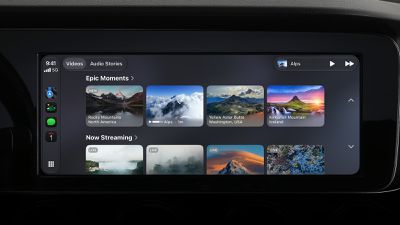
  • Video apps: Apple made a song and dance about this feature, but it's the one that fewest people can use right now. Video browsing in the CarPlay interface requires automakers to certify AirPlay video integration for the vehicle. In other words, an iOS update alone can't enable it. That makes sense when you think about it – playback only works when the vehicle is parked (it switches to audio if you shift into drive) and the car needs to be able to share its drive state with iOS. As of writing, no manufacturer has announced plans to support the feature.
  • Sharing routes to your car's own screens: Navigation apps can now pass route data to a vehicle's built-in infotainment or digital instrument cluster, including EV charging stops and range. Again though, your car has to support it, so your mileage may vary (no pun intended).

Needs a Supported iPhone

  • Siri AI: The upgraded Siri now handles back-and-forth conversation in the car, while chats sync to the Siri app on your iPhone so you can pick them up later. It does however require an iPhone that supports Apple Intelligence, plus there's a Siri AI waitlist to get access, which you can join on your iPhone in Settings ➝ Siri.
CarPlay iOS 27 Video Apps

Video apps in Carplay require dedicated vehicle support

One to Watch

Apple has given developers a voice control template that any category of CarPlay app can adopt for voice conversations. But nothing will change until individual app makers make use of it, so expect this to arrive gradually.

Bottom Line

If you have a car with CarPlay and a recent iPhone running iOS 27, you'll immediately be able to take advantage of third-party widgets, audio scrubbing, new wallpapers, and Maps improvements. For video and route sharing, you'll need to wait for your car's manufacturer to add support. iOS 27 was released on September 14 and is available to download now.


Related Roundups: CarPlay, iOS 27, iPadOS 27

Popular Stories

iOS 27 Next to iPhone

Here's When iOS 27 Rolls Out Today in Every Time Zone [Update: It's Out]

Sunday September 13, 2026 3:00 am PDT by
Update 10:04 a.m.: iOS 27 is rolling out now, though it may take a bit for all users to see it, so keep checking! Apple is about to release iOS 27, which will finally deliver more advanced Siri AI capabilities as well as a variety of other refinements, improvements, and new features to iPhones. It's Apple's biggest software update of the year, and Apple announced at Wednesday's iPhone event...
iOS 27 Icon iPhone

iOS 27 Available Now With These 8 New Features

Monday September 14, 2026 9:00 am PDT by
Update — 10 a.m. Pacific Time: Apple has released iOS 27. During its iPhone 18 Pro and iPhone Duo event last week, Apple announced that iOS 27 will be released widely on Monday, September 14. iOS 27 should be available around 10 a.m. Pacific Time / 1 p.m. Eastern Time today via the Settings app, under General → Software Update. Below, we have highlighted eight new features and...
iPhone Handoff Feature

iOS 27 Introduces New 'iPhone Handoff' Feature

Wednesday September 2, 2026 12:35 pm PDT by
Apple has added a new "iPhone Handoff" feature to iOS 27 that will allow you to switch between two iPhones while using the same phone number on each device. This functionality was briefly mentioned during the WWDC 2026 keynote in June, on a slide that listed hundreds of new features coming in iOS 27 and corresponding software updates, but Apple never shared any further details at the time. ...

Top Rated Comments

Jpcope Avatar
6 hours ago at 05:08 am
The scrubbing feature is HUGE. Been waiting for this forever
Score: 11 Votes (Like | Disagree)
michaeljk Avatar
5 hours ago at 05:41 am
This could be really great for me and many others like me. I have type 1 diabetes. I use a Continuous Glucose Monitor. I have a phone app that tells me every five minutes where my blood sugar is, and where it is headed. Up until now, when driving, I need to actually pick up my phone, hit the Dexcom app button, find the right screen in the app, and then can see my blood sugar. Now, finally, I can add the widget to CarPlay, so I get near-realtime information about my blood sugar just by looking at my dash. Huge!
Score: 5 Votes (Like | Disagree)
4 hours ago at 06:46 am
I drive a 2025 BMW X2. In iOS 26, Apple Maps could display on the instrument cluster behind the steering wheel and the HUD would show turn-by-turn directions. However, the center main screen would only show a high-level overview of the entire route.

With iOS 27 CarPlay, I can still display Apple Maps behind the wheel, but the center screen now simultaneously shows the regular, real-time moving map. This is a big improvement.
Score: 3 Votes (Like | Disagree)
hortod1 Avatar
2 hours ago at 08:52 am
As someone that rents cars on a regular basis there needs to be a way to save CarPlay preferences, specifically apps and layout. Every time I connect to a new car it defaults to a new car setup, having to take time to fix everything, or deal with a million apps that I don’t use and completely out of any logical order
Score: 2 Votes (Like | Disagree)
4 hours ago at 07:12 am
The one thing I always wait for in CarPlay updates is something that should seem so obvious: scrolling song titles in Apple Music if said title is too long to fit in the allotted screen space. I come across so many songs that have titles (and/or album names) that are only partially visible because they are longer than 2-3 words. If scrolling would be a distraction while driving, perhaps making the font smaller for longer titles would work. But displaying cut-off song titles as if a printer ran out of ink is so un-Apple.
Score: 2 Votes (Like | Disagree)
3 hours ago at 07:55 am

I haven’t been seeing the “mini player” outside of Music or Podcasts. I had assumed it would be in the top right corner while navigating with Maps, but it isn’t… not sure if this is due to the relatively small (by today’s standards) 8” screen in my ‘22 4Runner?
Nah, I only see it in Spotify. Which sucks because my '22 Armada doesn't have a physical pause button anywhere, nor on it's own Now Playing that permanently occupies the right third of the display outside CarPlay. So I still have to go INTO Spotify to pause if I'm using maps or another app. Honestly just having a play/pause that lives in all the empty space on the 'dock' would be better than an occasionally-usable miniplayer.
Score: 1 Votes (Like | Disagree)