watchOS 27.2 Code Hints at iPhone-Style Screenshot Previews - MacRumorsOpen MenuShow RoundupsShow Forums menuVisit ForumsOpen Sidebar
Skip to Content

watchOS 27.2 Code Hints at iPhone-Style Screenshot Previews

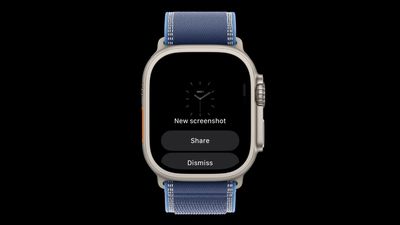
watchOS 27.2 could introduce a feature that lets Apple Watch screenshots be previewed with options to share or delete, similar to how screenshots work on the iPhone.
watchos 27 2 screenshot
Signs of the feature were found in watchOS 27.2 by code explorer pdfu. The option is hidden behind a feature flag that's not enabled, but it could be introduced in a later watchOS 27.2 beta.


Right now, taking a screenshot on the Apple Watch sends it directly to the iPhone Photos app with no confirmation screen. It's easy to accidentally take a screenshot since it only requires pressing the Digital Crown and side button at the same time.

On the iPhone, taking a screenshot shows either a full-screen preview or a thumbnail preview depending on your settings, but both options let you save, share, or delete the screenshot with a couple taps.

Screenshots on Apple Watch are disabled by default but can be turned on through the Settings app on the watch or the Apple Watch app on iPhone. An option to save or delete screenshots would add more control than a simple on or off toggle.

Related Roundups: watchOS 26, watchOS 27
Related Forum: Apple Watch

Popular Stories

watchos 27

PSA: watchOS 27 Removes This Useful Feature From Your Apple Watch

Thursday September 17, 2026 1:34 am PDT by
Apple released watchOS 27 on September 14, bringing a new Audio Intelligence feature set to its latest Apple Watch models, but as a result, owners of previous models are set to lose out doubly in the process. Apple Watch Series 12 and Ultra 4 models later this year will get Live Rewind, a feature that provides a transcript of any spoken audio that was picked up by the device in the last 15...
watchos 27

Apple Releases watchOS 27 With Siri AI, New Watch Face, Smart Stack Improvements and More

Monday September 14, 2026 10:03 am PDT by
Apple today released watchOS 27, the newest version of the operating system that runs on the Apple Watch. watchOS 27 is compatible with the Apple Watch Series 9 and later, the Apple Watch Ultra 2 and later, and the Apple Watch SE 3. watchOS 27 can be downloaded for free on a compatible device through the Settings app on the watch. The update introduces support for Siri AI, a more capable...
watchos 26 hypertension alert

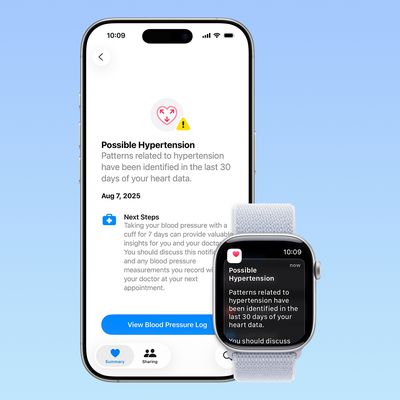
Upgrading to Apple Watch Series 12 Could Cost You Hypertension Notifications

Thursday September 10, 2026 11:57 am PDT by
Some Apple Watch users who upgrade to the Series 12 or the Ultra 4 might temporarily lose access to hypertension notifications. On the watchOS feature availability page, Apple says notifications might not be available on the Series 12 or Ultra 4 at launch because regulatory clearances are in process. Hypertension Notifications may not be available on Apple Watch Series 12 or Ultra 4 in your ...

Top Rated Comments

mattkally Avatar
16 hours ago at 10:38 am
Useless.
Score: 7 Votes (Like | Disagree)
awshucks Avatar
16 hours ago at 10:51 am
I have the screenshot feature turned off anyways. They’re not really useful on my watch.
Score: 3 Votes (Like | Disagree)
Rychiar Avatar
16 hours ago at 10:39 am
I've never taken a screenshot of my watch that wasn't accidental....
Score: 3 Votes (Like | Disagree)
fj_doebz Avatar
16 hours ago at 10:39 am
Hell no. What a stupid feature. It’s not “easy to accidentally take a screen shot” as you describe. No one accidentally presses both side buttons at once. This just adds an extra step to an already awkward process. Apple clearly doesn’t believe in “if it ain’t broke…”
Score: 3 Votes (Like | Disagree)
16 hours ago at 11:23 am
Right up there with CarPlay screenshots in terms of usefulness.
Score: 2 Votes (Like | Disagree)
16 hours ago at 11:07 am
Good to know about this. Hopefully if it is made available, there will be an option to turn this off and have the current default method of taking screenshot.
Score: 2 Votes (Like | Disagree)
Latest Stories
How to Check Your Mac's Manufacture Date in macOS 27
3 hours ago
What's Gone in macOS Golden Gate and What's Next in macOS 28
11 hours ago
TestFlight App Gets New iOS 27 Features
12 hours ago
Google Photos Wardrobe Feature Comes to iOS
14 hours ago
Apple Music to Host Free Head Trip Festival Livestream
14 hours ago
watchOS 27.2 Code Hints at iPhone-Style Screenshot Previews
17 hours ago
Beats 360 Headphones Now Available in Apple Stores
17 hours ago
Apple Shares New Video Promoting iOS 27 Parental Controls
17 hours ago
Apple Has Announced 12 New Products in the Past Month
17 hours ago
Apple Watch Ultra 2 vs. Ultra 4 Buyer's Guide: Should You Upgrade?
18 hours ago
Here's When Apple TV is Airing Free 'Peanuts' Holiday Specials This Year
18 hours ago
Square Announces Apple Business Integration
20 hours ago
AirPods Pro 3 on Sale for $199 This Week on Amazon
20 hours ago
Qualcomm Announces Renewed Agreement With Apple
20 hours ago
Apple Confirms iPhone 18 Pro Bug Fix Update is Coming Next Week
21 hours ago
Full iPhone 4 'Antennagate' Q&A Video Surfaces After 16 Years
21 hours ago
Meta Did a 'One More Thing' and It's an AI Tamagotchi
1 day ago
iPhone Handoff in iOS 27: How It Works, Pricing, and Carrier Support
1 day ago
ChatGPT in Siri 'Persistently Underperforming,' Says OpenAI
1 day ago
You Can Now Try Apple's Unreleased Copland OS in Your Browser
2 days ago
iOS 27.0.1 is Coming Soon
2 days ago
Apple Releases watchOS 27.0.1 With Fix for Restart Bug
2 days ago
Disney+ and Hulu Raise Prices Again, Ad-Free Plans Now $21.49
2 days ago
Apple Sports App Updated With Even More Soccer Leagues
2 days ago
AirTag 2 4-Pack Hits $79.99 on Amazon, Matching Record Low
2 days ago
Siri AI Coming to HomePod
2 days ago
iPhone Air vs. iPhone 18 Pro Buyer's Guide: Which Should You Buy?
2 days ago
Apple Podcasts Subscriptions Will Soon Support Video
2 days ago
Apple Watch Ultra 3 Drops to Record Low $599.97 on Amazon [Updated]
2 days ago
AT&T Responds to iOS 27's New iPhone Handoff Feature
2 days ago