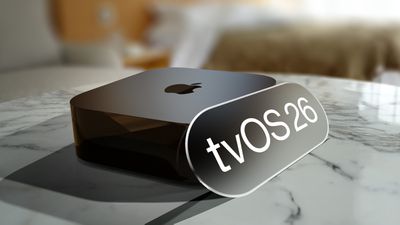
Apple today released tvOS 26.4, the fourth update to the tvOS operating system that came out last fall. tvOS 26.4 is available for the Apple TV 4K and the Apple TV HD, and it comes over a month after Apple released tvOS 26.3.
tvOS 26.4 can be downloaded using the Settings app on the Apple TV. Open up Settings and go to System > Software Update to get the new software. Apple TV owners who have automatic software updates activated will be upgraded to tvOS 26.4 automatically.
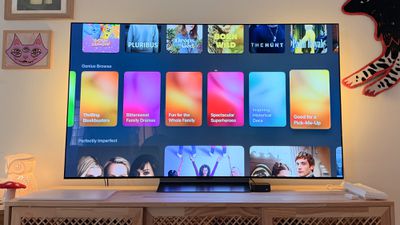
Apple added a new Genius Browse section to the Apple TV app in tvOS 26.4. Genius Browse is a content discovery feature that provides recommendations for TV shows and movies across multiple suggested categories. Suggestions vary based on content preferences, and the options are updated regularly.
The update removes the dedicated iTunes Movies and iTunes TV Shows apps that Apple started phasing out in 2023, which means wishlists will no longer be available. Apple sent emails to affected customers with instructions on how to transfer wishlist content to the Apple TV app watchlist.
tvOS 26.4 also adds more easily accessible customization options for subtitles, and it improves Apple TV Audio Format settings with an option for Continuous Audio Connection for HDMI output.
Full release notes for tvOS 26.4 are available through Apple's tvOS support document.
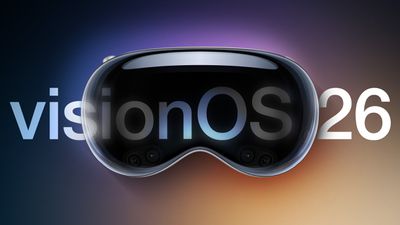
Apple today released visionOS 26.4, the fourth update to the visionOS 26 operating system that launched in September. visionOS 26.4 comes 1.5 months after Apple released visionOS 26.3.
visionOS 26.4 can be downloaded on all Vision Pro headsets by navigating to the Settings app, selecting the General section, and choosing the Software Update option. To install an update, the Vision Pro headset needs to be removed, and there is a software progress bar available on the exterior EyeSight display.
Apple's release notes say that visionOS 26.4 includes bug fixes and security improvements, along with improved Spatial Audio and eight new emoji characters. New additions include distorted face, fight cloud, landslide, ballet dancer, treasure chest, trombone, orca, and hairy creature.
This update introduces 8 new emoji, along with other features, bug fixes, and security updates for your Apple Vision Pro This update includes the following enhancements:
- Support for AirPods Max 2 - 8 new emoji including an orca, trombone, landslide, ballet dancer, and distorted face are available in the emoji keyboard - Spatial Audio starts faster in familiar spaces by remembering the acoustic properties of rooms you’ve been in before
visionOS 26.4 is recommended for all Vision Pro users.
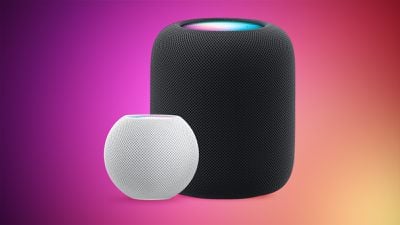
Alongside iOS 26.4, iPadOS 26.4, and macOS Tahoe 26.4, Apple has released new HomePod 26.4 software for the HomePod and the HomePod mini. The update comes a little over a month after Apple released HomePod Software 26.3.
According to Apple's release notes, HomePod Software 26.4 includes performance and stability improvements.
HomePod software is installed automatically on the HomePod unless the feature is disabled, but the HomePod can also be manually updated in the Home app on iPhone, iPad, or Mac by tapping on the More button, choosing Home Settings, and then selecting the Software Update option.
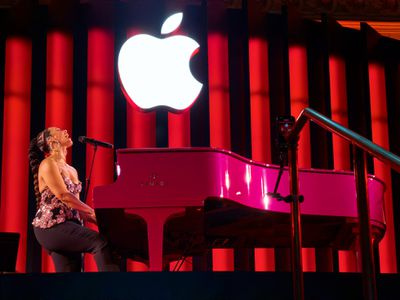
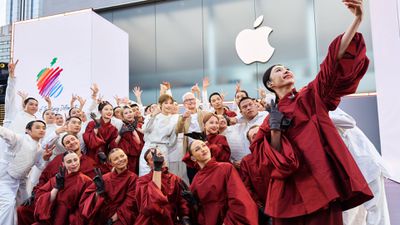
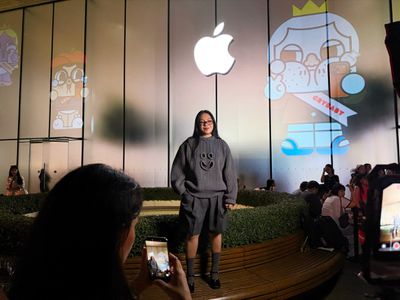
Apple has been celebrating its upcoming 50th anniversary by hosting special events around the world, making stops in the United States, China, South Korea, and Thailand so far. Over the coming days, the celebrations will continue in the UK, France, Canada, Mexico, India, Japan, and Australia, while China will get an encore performance.
MacRumors has been invited to attend one of Apple's 50th-anniversary celebrations in London this week, but we are keeping specific details under wraps in order to avoid spoiling Apple's surprise. Stay tuned for our coverage of the event.
Apple Stores in Paris, France and Vancouver, Canada will be hosting special Today at Apple sessions tied to the company's 50th anniversary this week, with more details about those events outlined in our previous reporting.
Apple is also planning to host celebrations in Mexico, India, and Japan over the coming days, according to a source familiar with the matter.
On his Instagram page last week, Australian composer Bailey Pickles said Apple asked him to compose and perform music for its upcoming 50th-anniversary celebration at the Opera House, where Apple will soon be illuminating artwork.
From March 25 to March 27, the Opera House's eastern sails will be illuminated with artwork created in the Procreate app on the iPad by a group of 10 emerging Australian artists. Through free Today at Apple sessions earlier this month, the public also had the opportunity to create and submit artwork for potential illumination.
Apple said selected artworks from both commissioned artists and public submissions will be curated and projected onto the Opera House's eastern sails on March 25 at 8:30 p.m. local time, and on March 26 and March 27 at 8 p.m. local time. Pickles did not say exactly when he will be performing at the world-famous venue, but it is clear that the 50th-anniversary celebration will involve a mix of artwork and music.
China is getting an encore 50th-anniversary celebration, as Apple will be hosting a special Today at Apple session at its Jing'an store in Shanghai, China on March 28, and there may be a surprise performance outside of the store as well.
South Korean boy band CORTIS performed at Apple's Myeongdong store in Seoul last week. ↓
Molly Yllom, the artist behind the Crybaby universe, led a special Today at Apple session at Apple's Iconsiam store in Bangkok last week. ↓
Apple turns 50 on April 1.
"At Apple, we're more focused on building tomorrow than remembering yesterday," said Apple's CEO Tim Cook, in a public letter. "But we couldn't let this milestone pass without thanking the millions of people who make Apple what it is today."
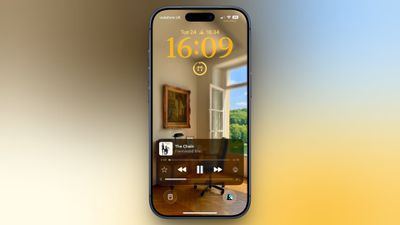
Your iPhone's Lock Screen has built-in media playback controls that appear whenever music, a podcast, or other audio is playing. What you might not realize is that those controls can also include a volume slider that lets you adjust the volume without you having to unlock your iPhone or fumble for the physical buttons.
Originally, Apple included a volume slider in the Lock Screen media player by default, but it quietly removed the function in iOS 16. It eventually returned as an option in iOS 18.2, but Apple decided to bury it in Accessibility settings, where it's easy to overlook. The setting is still available in iOS 26, and it's super-simple to enable.
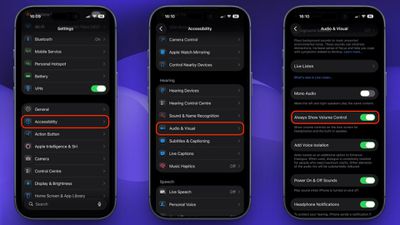
Here's how to turn it on:
Open Settings on your iPhone.
Tap Accessibility.
Under "Hearing," tap Audio & Visual.
Toggle on the switch next to Always Show Volume Control.
The next time you play audio, a volume slider will appear in the Lock Screen's media player underneath the existing playback controls. It's especially useful when your iPhone is propped up on a desk or sitting on a nightstand, since you don't need to pick it up just to change the volume.
To turn it off again, just head back to Settings ➝ Accessibility ➝ Audio & Visual and toggle off Always Show Volume Control.
As expected, Apple has officially announced that ads are coming to the Apple Maps app on the iPhone and iPad in the U.S. and Canada starting "this summer."
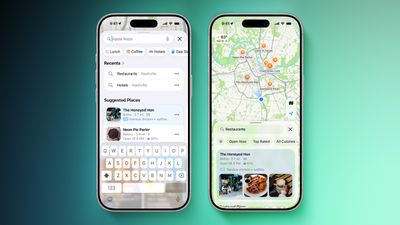
Apple says businesses in the U.S. and Canada only will be able to place ads in search results and at the top of a new "Suggested Places" section in the app.
"Ads on Maps will appear when users search in Maps, and can appear at the top of a user's search results based on relevance, as well as at the top of a new Suggested Places experience in Maps, which will display recommendations based on what's trending nearby, the user's recent searches, and more," says Apple.
Similar to the ads that are already shown in App Store search results on the iPhone and iPad, ads in Apple Maps will have an "Ad" label, and Apple promises strong privacy protections. For example, Apple says a user's location and the ads they see and interact with in Apple Maps are not associated with a user's Apple Account.
"Maps with ads is just as private as Maps without ads," says Apple. "Where you go and the ads you see and interact with are not associated with your Apple Account. Personal data stays on your device, is not collected or stored by Apple Ads, and is not shared with third parties."
The introduction of ads in Apple Maps will obviously help to further increase Apple's services revenue, but the move will disappoint some customers.
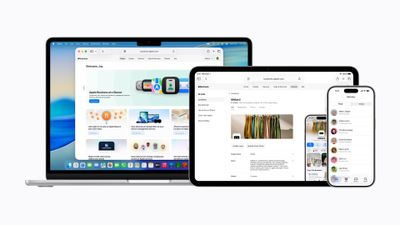
Apple today announced Apple Business, a new all-in-one platform that unifies device management, productivity tools, and customer outreach features.
The service is designed to be a consolidated replacement for several of Apple's existing business-focused offerings, including Apple Business Essentials, Apple Business Manager, and Apple Business Connect. It provides organizations with a single interface to manage devices, employees, communications, and customer engagement across Apple's ecosystem.
Apple Business incorporates built-in mobile device management (MDM), which allows companies to configure device settings, security policies, apps, and user groups from one place. Apple Business app will allow employees to install work-related apps, access colleague contact information, and request support.
New "Blueprints" enable administrators to preconfigure devices with specific settings and apps, facilitating zero-touch deployment so that employees can begin using devices immediately after unboxing. Zero-touch deployment is available when devices are purchased through Apple or authorized resellers.
The platform introduces Managed Apple Accounts with what Apple describes as "cryptographic separation" between personal and work data, allowing employees to use the same device for both purposes without commingling information. Account provisioning can be automated through integrations with identity providers such as Google Workspace and Microsoft Entra ID.
Additional features include the ability to create user groups, assign roles, distribute apps through the App Store, and access an Admin API for large-scale deployments, covering device, user, audit, and MDM service data.
Apple Business also adds integrated email, calendar, and directory services tied to custom domains. Businesses can either bring an existing domain or purchase one through the platform. These tools include features such as calendar delegation and a company directory with personalized contact cards.
In addition to internal management tools, Apple Business introduces new tools for customer engagement. The platform will allow businesses to manage how their brand and locations appear across Apple services, consolidating features previously available in Apple Business Connect.
These include brand profiles with logos and details, customizable place cards in Apple Maps with photos, hours, and actions such as ordering or reservations, and analytics showing how users discover and interact with locations. Branded communications will extend to the Mail app and iCloud Mail, as well as order tracking in Wallet, and that businesses using Tap to Pay on iPhone can display their branding during transactions.
Apple also announced a new advertising feature tied to Apple Maps, scheduled to launch in the United States and Canada later this summer. Businesses will be able to create ads that appear at the top of search results in Maps, as well as within a new Suggested Places experience.
Apple Business will be available starting April 14 in more than 200 countries and regions as a free service for new and existing users of its prior business platforms, with certain features limited to specific regions. Optional paid services for additional iCloud storage and AppleCare+ will remain available within the platform.
Apple Business Essentials, Apple Business Manager, and Apple Business Connect will be discontinued once Apple Business launches, with existing data such as claimed locations and account information automatically migrated to the new system. Business Essentials customers will no longer be charged monthly fees for device management after the transition.
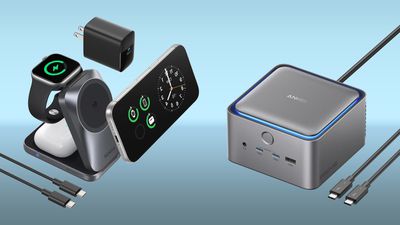
Anker's new Prime 3-in-1 Wireless Charging Station has been marked down to $119.99 today on Amazon, down from $149.99, with no need for a coupon. This accessory just launched last month, and Amazon's price is within $4 of the all-time low we tracked a few weeks back.
Note: MacRumors is an affiliate partner with Amazon. When you click a link and make a purchase, we may receive a small payment, which helps us keep the site running.
This deal, and many of the others we've collected below, are part of early deals for Amazon's Big Spring Sale, which officially kicks off tomorrow. Because of this, you'll need to have an Amazon Prime membership in order to get some of these discounts, including the Prime 3-in-1 Wireless Charging Station.
The Prime 3-in-1 Wireless Charging Station features Qi2.2 support, which lets a compatible MagSafe iPhone charge at up to 25W. It's the same speed as Apple's MagSafe charger, and it is 10W faster than the standard Qi2 MagSafe chargers. You can also simultaneously charge an Apple Watch and AirPods with the device.
There are plenty of other Anker discounts happening on Amazon this week, including the Prime 14-in-1 Thunderbolt 5 Dock back at its all-time low price of $339.99, down from $399.99. Anker's popular 3-in-1 MagSafe-Compatible Charging Cube is also down to a new all-time low price of $92.98, down from $129.99.
If you're on the hunt for more discounts, be sure to visit our Apple Deals roundup where we recap the best Apple-related bargains of the past week.
Deals Newsletter
Interested in hearing more about the best deals you can find in 2026? Sign up for our Deals Newsletter and we'll keep you updated so you don't miss the biggest deals of the season!
Apple's progress toward under-display Face ID and a fully uninterrupted iPhone display is encountering ongoing challenges, with a new report indicating that the company is likely to focus on incremental reductions to the Dynamic Island rather than major front-facing design changes in the near term.
A new post from Weibo user "Fixed Focus Digital" suggests that Apple's development of under-display technologies is not advancing as smoothly as previously anticipated, casting doubt on expectations for significant front-facing design changes in upcoming iPhone models. According to the leaker, Apple's near-term approach is expected to prioritize refining existing solutions rather than introducing a fully hidden front camera and Face ID system.
The latest information aligns with a growing body of mixed reports surrounding the iPhone 18 Pro models. Earlier claims from multiple sources, including Bloomberg's Mark Gurman and display industry analyst Ross Young, indicated that Apple would reduce the size of the Dynamic Island, likely by relocating some Face ID components beneath the display.
Other sources have cast doubt on the extent of these changes. Weibo leaker "Digital Chat Station" recently claimed that the iPhone 18 Pro models may reuse much of their existing front-facing design, with Face ID and the Dynamic Island remaining "largely unchanged" and more ambitious under-display implementations pushed to a later generation.
In the same series of posts, Fixed Focus Digital also commented on Apple's upcoming foldable iPhone, describing the device as "ultra-flat, moderately sized, and affordably priced," and claimed that supply chain expectations for production volumes are relatively high.
Ultra-flat, moderately sized, and affordably priced—there is simply no reason for the iPhone Fold to fail. At least on the supply side, inventory expectations are quite substantial. However, if sales do end up flopping... Apple's stock price is going to take a nosedive.
The iPhone 18 Pro, iPhone 18 Pro Max, and Apple's first foldable iPhone are expected to be announced in the fall.
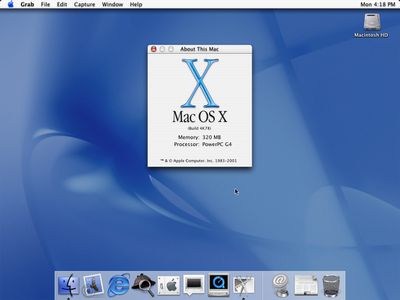
"Mac OS X is the future of the Mac, and we hope it will delight our customers with its unrivaled power and ease of use," said Steve Jobs, in 2001. "The Public Beta has generated incredible feedback and support from Mac users and developers, which has helped us to make Mac OS X the most advanced operating system ever."
Mac OS X was a next-generation, UNIX-based operating system for the Mac, succeeding the classic Mac OS operating system. It ushered in Apple's iconic "Aqua" interface, the Dock, an improved Finder app with hierarchical navigation, and more.
"Mac OS X is the most important software from Apple since the original Macintosh operating system in 1984 that revolutionized the entire industry," said Jobs.
In the U.S., Mac OS X was priced at $129. Apple stopped charging for macOS releases in 2013, when OS X Mavericks was released free of charge.
Mac OS X was renamed to OS X in 2012 and to macOS in 2016:
Mac OS X 10.0 (2001): "Cheetah"
Mac OS X 10.1 (2001): "Puma"
Mac OS X 10.2 (2002): Jaguar
Mac OS X 10.3 (2003): Panther
Mac OS X 10.4 (2005): Tiger
Mac OS X 10.5 (2007): Leopard
Mac OS X 10.6 (2009): Snow Leopard
Mac OS X 10.7 (2011): Lion
OS X 10.8 (2012): Mountain Lion
OS X 10.9 (2013): Mavericks
OS X 10.10 (2014): Yosemite
OS X 10.11 (2015): El Capitan
macOS 10.12 (2016): Sierra
macOS 10.13 (2017): High Sierra
macOS 10.14 (2018): Mojave
macOS 10.15 (2019): Catalina
macOS 11 (2020): Big Sur
macOS 12 (2021): Monterey
macOS 13 (2022): Ventura
macOS 14 (2023): Sonoma
macOS 15 (2024): Sequoia
macOS 26 (2025): Tahoe
Mac OS X was a big part of Apple's renaissance, which began when Jobs returned to the company in the late 1990s. Big hits in those first few years after his return included the iMac in 1998, the iBook in 1999, and Mac OS X and the iPod in 2001. In this sense, it is poetic that this milestone comes just a week ahead of Apple's 50th anniversary.
A coalition of Europe's biggest broadcasters is pushing the EU to bring smart TV platforms like Apple TV and virtual assistants like Siri under the bloc's toughest tech regulation, reports Reuters.
The Association of Commercial Television and Video on Demand Services in Europe (ACT), whose members include Disney, NBCUniversal, Paramount+, and Sky, sent a letter on Monday to EU antitrust chief Teresa Ribera arguing that smart TV operating systems from Google, Amazon, Apple, and Samsung should be designated as gatekeepers under the Digital Markets Act (DMA).
Under the DMA, any platform with more than 45 million monthly active EU users and a market valuation above €75 billion is presumed to be a gatekeeper, subject to obligations designed to curb self-preferencing and increase interoperability.
To evidence their claim, the broadcasters cited market data showing Android TV's share grew from 16 percent to 23 percent between 2019 and 2024, while Amazon Fire OS climbed from 5 percent to 12 percent. Samsung's Tizen holds 24 percent, but Apple TV's share was not referenced.
The ACT also wants virtual assistants like Alexa and Siri brought under the DMA, arguing that the current lack of regulation has left AI assistants free to act as de facto gatekeepers for media content across phones, smart speakers, and car infotainment systems.
The European Commission confirmed it received the letter and is reviewing it. So far, Apple, Google, Amazon, and Samsung have not commented.
Apple's App Store, iOS, and Safari are already classified as DMA gatekeepers. A separate review into whether Apple Maps and Apple Ads meet the threshold was concluded last month, with regulators ruling that neither qualified due to low usage in Europe.
Notably, the broadcasters' letter asks the Commission to apply the DMA based on "qualitative criteria," even where platforms don't hit the usual quantitative benchmarks outlined in the regulations.
The request may sound like it's on shaky ground, but the DMA does actually have a provision for this circumstance – the EC can designate a company as a gatekeeper even if it doesn't meet the hard numeric thresholds stated above. It can look instead at factors like the platform's size, number of business users, network effects, lock-in, and structural market characteristics. In fact, this is how the Commission designated iPadOS as having gatekeeper status, even though it didn't meet the quantitative threshold.
In practice, though, the Commission is likely to be cautious about using this approach because it's messier than quantitative rules and easier to challenge in court. Apple is very likely to contest it, especially given that Apple TV's market share appears to be relatively small. Whether the same will apply to Siri is another matter, since it's tied to the iPhone and the EU already considers that a gatekeeper platform.
Note: Due to the political or social nature of the discussion regarding this topic, the discussion thread is located in our Political News forum. All forum members and site visitors are welcome to read and follow the thread, but posting is limited to forum members with at least 100 posts.
Apple is moving more decisively to reduce its reliance on Chinese manufacturers ahead of the launch of a wave of new products with OLED panels, DigiTimes reports.
Apple has apparently accelerated efforts to diversify its OLED sourcing away from Chinese suppliers such as BOE, which have historically played an important role in the company's display supply chain. The impact on BOE has already been substantial. DigiTimes says the company's dedicated Apple OLED production line in Mianyang, Sichuan saw utilization rates fall from approximately 82% in 2024 to 48% by February 2026.
Shipments to Apple have also declined sharply, dropping by more than 40% compared to initial expectations. OLED panel shipments from Sichuan to Apple's assembly partners in Vietnam fell by over 50% year over year in February, underscoring the speed of the transition.
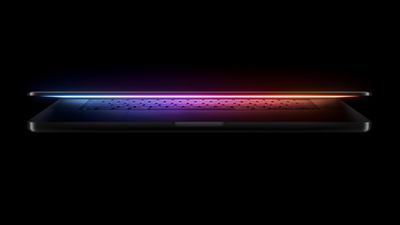
In place of Chinese suppliers, Apple is increasingly depending on reliable South Korean display manufacturers such as Samsung Display and LG Display. DigiTimes says future Apple devices, including the iPhone 18 Pro, the first foldable iPhone, and upcoming MacBook Pro and iPad mini models, are expected to depend predominantly on OLED panels sourced from these companies. All of these products are expected to launch this year, with OLED coming to the MacBook Pro and iPad mini for the first time.
The realignment reflects a broader shift in Apple's component sourcing strategy that has been underway for several years, as the company seeks to mitigate supply chain risk. Apple has already diversified final assembly across countries such as India and Vietnam.
Anthropic are out with yet another update to Claude AI: the company's Claude Code and Cowork tools can now remotely control your Mac on your behalf.
When Claude lacks a direct connector for a given app like Slack or Google Calendar, it falls back to controlling the computer like a human, using the screen to navigate.
In Claude Cowork and Claude Code, you can now enable Claude to use your computer to complete tasks. When Claude doesn't have access to the tools it needs, it will point, click, and navigate what's on your screen to perform the task itself. It can open files, use the browser, and run dev tools automatically – with no setup required.
The capability pairs with Dispatch (released last week) which lets you assign Claude tasks from your iPhone and return to finished work on your desktop. In the YouTube video embedded below, Anthropic's demo shows a user asking Claude to export a pitch deck as a PDF and attach it to a meeting invite, all while the user is away from their Mac.
"Computer use is still early compared to Claude's ability to code or interact with text," notes Anthropic. "Claude can make mistakes, and while we continue to improve our safeguards, threats are constantly evolving. We recommend starting with the apps you trust and not working with sensitive data."
The new feature is essentially Anthropic's version of OpenClaw, the open-source AI agent that went viral earlier this year. OpenClaw runs locally and connects to messaging apps like WhatsApp and Telegram, using a plugin-based "skills" system to execute tasks ranging from file management to browser automation. It's powerful, but notoriously tricky to configure safely.
In contrast, Claude's version is more locked down. The system uses a permission-first approach, and requests user access before touching a new app. It's currently also Mac-only, whereas OpenClaw supports macOS, Windows, and Linux.
The new feature is now available in research preview for Claude Pro and Max subscribers.
Earlier this month, Claude was updated with support for inline visual content that aims to help provide clearer answers. Anthropic also rolled out a memory import tool that allows users to import conversations and memories from other AI providers into Claude, so new users don't need to start from scratch when they switch.
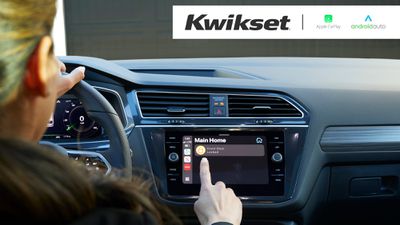
Lock maker Kwikset today added CarPlay integration to the Kwikset app, which means iPhone owners can lock or unlock Kwikset smart locks directly from the car's dashboard.
The feature works with Kwikset locks that are controlled with the Kwikset app, and it allows locks to be accessed without the need to open the app on an iPhone. When arriving home or leaving, vehicle owners can use CarPlay to unlock or lock their home's doors.
When an iPhone is connected to CarPlay, the Kwikset app is shown alongside other third-party apps, so users can choose their home and lock or unlock their home door with a tap.
Kwikset new CarPlay functionality is designed for Kwikset locks that include the Halo Touch, Halo Keypad, Halo Touchscreen, Halo Select, and Halo Select Plus. The feature does not work with Kwikset Halo locks that are set to Matter mode. Kwikset is also adding the same integration for Android Auto.
Apple is planning to include ads in Apple Maps search results as soon as this summer, reports Bloomberg. Apple is aiming to earn more money from its services division, and it could announce plans for Maps ads as early as this month.
Ads in Apple Maps will be similar to ads in Google Maps. Retailers and brands will be able to bid for ads associated with search categories. Starbucks, for example, might display an ad when someone searches for coffee. Restaurants will be able to bid for search terms, and the highest bidder's ads will appear at the top of the results for a given term.
Apple plans to display ads in the iPhone app, Mac app, iPad app, and on the web. We first started hearing about ads in the Maps app last year, but now the feature is nearing completion.
Revenue from ads could make up for current and future changes to the App Store that could limit the money that Apple earns, or from the loss of any search deals with Google due to ongoing regulatory issues.
In January, Apple said that it would show additional ads in App Store search results starting on March 3, expanding the number of ad slots in search. App Store searches previously showed just one ad, but Apple is rolling out multiple ad slots. Apple expanded App Store ads in the UK and Japan first, and will bring them to other markets like the U.S. by the end of March.
Apple also rebranded its ad business from "Search Ads" to "Apple Ads" last year as part of its plan to show ads in more places.
Apple plans to open a store at the Mítikah shopping mall in the south of Mexico City, according to a recently-deleted page on real estate company Allux's website.
Apple Vía Santa Fe in Mexico City
The page listed Apple as a future tenant in the mall, which is set to expand into an adjacent area previously occupied by the older Centro Coyoacán shopping mall. It is unclear when Apple's store would open, and the plans could change.
It is unclear why the page was deleted, but Apple has a culture of secrecy.
Apple has two other stores in Mexico City — one is inside the Vía Santa Fe shopping mall, and the other is at the Antara open-air shopping center.
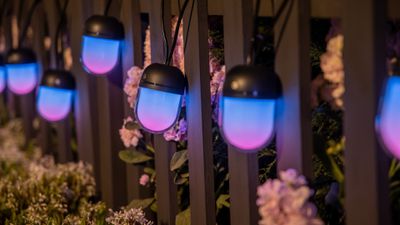
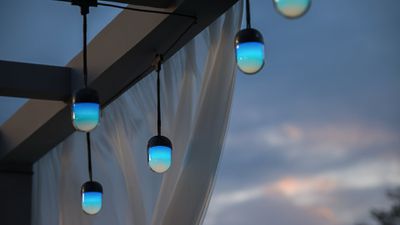
Govee today introduced its newest lighting product, Matter-enabled string lights with chromatic bulbs that have multiple LEDs inside. The Govee Chromatic String Lights feature large, pill-shaped bulbs that can display multiple colors at once, creating unique lighting effects.
Priced starting at $170, the Chromatic String Lights come in a 32.8-foot strand with 10 bulbs or a 65.6-foot strand with 20 bulbs. I was able to test out the lights ahead of launch, and I haven't seen string lights quite like them before.
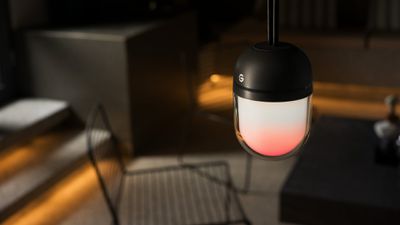
Govee put 55 RGB LEDs inside each bulb, and the LEDs can be controlled semi-individually, with combinations of colors, shadows, and patterns able to make visually attractive scenes. The lights support millions of colors, and three layered cycling effects can be added per bulb. Patterns control how the lights change, and there are a lot of different options to choose from. Govee has tons of pre-installed scenes to select from, but there are also options to create your own with custom colors and patterns, or use AI to come up with something based on a text-based suggestion.
The lights have rich colors and the multi-color effect works well, but some colored LED lights struggle with certain shades. Govee's orange colors are more yellow than orange, and purple is more pink. I can get a truer orange by choosing a shade of red or setting a gradient that shifts between different colors, but most of the "orange" shades in Govee's app aren't true orange. The same goes for purple. It's not easy to photograph colored lights, so I don't have an example, but purple in particular is a color some RGB lights often struggle with.
The bulbs are large for string lights, and I'd say they're similar to a large egg. The top is black, the cord is black, and the bottom is a dual-layer shell with a diffusing layer covered by clear plastic. The shape and the multi-layer shell produce some aesthetic lighting combinations, though I didn't like how much cord there is to deal with.
10 bulbs spread across 33 feet is around one bulb per three feet (or 20 for 65 feet). I would have liked a shorter strand with more closely situated bulbs, or more bulbs on the longer strand. That said, these are large bulbs, and just 10 can put off enough light for a small patio. At full brightness in a shade of white, they put off a surprising amount of light. Govee says they're 240 lumens, which sounds about right. With the diffusion layer, they aren't hard to look at even at max brightness. I did test these at night and during the day. They look great at night, but the colors are visible during the day, and indoors with other lights on.
Outdoors at night, it'd be the perfect amount of light for eating dinner or just chilling on a deck. I don't have these permanently outside because I'm not sure how to arrange 10 lights over my deck without it looking unusual. The 20 bulb strand is probably the better fit for most outdoor spaces, unless the area is small. You can connect multiple strands together, but that would get expensive quickly.
Govee added T-shaped clips for each light, so you can decide how far you want them to hang down. You can clip the strands between two of the lights together to establish the length, and if you make them long, it can eat up some of the cord so there's less to deal with. I tested them at about three inches, but they can be longer or shorter. It was a hassle getting the clips on, but worth it for the length customization.
I wish I had a more sophisticated way to say this, but with the 55 LEDs in each bulb, Govee's lights have effects that are just plain cool. There's a "bubbles" effect that combines bubbles of one color with another base color, "ghost" that uses shadow to make it look like something is moving in the bulbs, and a whole range of gradients in different colors. Each bulb can have a gradient of colors, or colors can be set to shift between bulbs. Govee goes above and beyond with pre-set scenes. There are around 120 scene options, and most of those have a dozen color palettes to choose from. There are scenes for every holiday, plus some that are nature or planet-themed or aimed at waking up or going to sleep.
The Govee app has so much going on that I find it confusing. There's too much to choose from, and too many different tools to experiment with. You can choose a Scene from the Scene tab, but there's also a color tab where you can pick one color or paint colors on each bulb, and the DIY section is separate from the color section, even though it has a somewhat similar purpose. I'm still not entirely sure what Finger Sketch does, and AI is also its own tab. Govee also has a random color feature, an Effects lab, and a Color Slider that's distinct from the Color section. Some of these options could be combined into something that's more user-friendly to use and less chaotic.
Since there are so many scenes, it's easiest to use those, but I did like choosing colors for each bulb. I think most people will get used to the app interface after using the lights for a short period of time, but it takes experimentation. Kids will love playing with these lights, since there are so many colors and patterns to play with. I don't think these are the lights that are appropriate for a sophisticated outdoor dinner party, but they'd be ideal for a night time pool party. You can do soft, elegant scenes with fewer colors, or choose nice white light effects, but if you're not planning to go all out taking advantage of the multi-color ability, there are better lights to get.
I haven't had these lights long enough to test how they hold up over time, but they do have IP67 waterproofing and Govee says they can be used outdoors year-round. They're supposed to last for "more than 10 years" under typical outdoor conditions.
You can use the Chromatic String Lights with HomeKit, because they're Matter-enabled. You can turn the lights on, turn them off, or set them to a single color with the Home app or with Siri, but for most color options, you're going to need the Govee app. HomeKit is useful for automations with other HomeKit devices, so you can have the Govee lights come on with other HomeKit-enabled lights or when motion is detected, but I otherwise haven't used HomeKit for much. You can also connect them to other Matter platforms, including Amazon Alexa and Google Home.
The lights are priced at $169.99 for the 33-foot strand or $299.99 for the 66-foot strand, and they can be purchased from Amazon or the Govee website as of today.
Note: Govee provided MacRumors with the 33-foot Chromatic String Lights for the purpose of this review. No other compensation was received.
As part of its WWDC 2026 announcement, Apple said that it plans to announce this year's Swift Student Challenge Winners on Thursday, March 26.
Apple's Swift Student Challenge tasks students with creating an original coding project using Swift Playgrounds or Xcode. This year's event began on February 6, and Apple accepted submissions through Saturday, February 28 before judging began.
Apple plans to choose winners based on submissions that demonstrate "excellence in innovation, creativity, social impact, or inclusivity."
All Swift Student Challenge Winners in 2026 will be eligible to enter the lottery process to attend Apple's June 8 WWDC Special Event at the Apple Park campus in Cupertino, California.
Apple will also recognize Distinguished Winners whose submissions are "truly exceptional." Distinguished Winners will be invited to Cupertino for a three-day experience that will include the Special Event keynote viewing along with other activities, and these winners will not need to enter the lottery to visit Apple Park.
Students who entered the challenge can expect to receive an email notifying them about their status later this week.



 Note: MacRumors is an affiliate partner with Amazon. When you click a link and make a purchase, we may receive a small payment, which helps us keep the site running.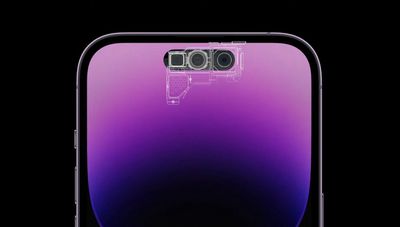

 Mac OS X 10.0 screenshot


 Apple Vía Santa Fe in Mexico City