How to Use App Privacy Report in the iOS 15.2 Beta - MacRumorsOpen MenuShow RoundupsShow Forums menuVisit ForumsOpen Sidebar
Skip to Content

How to Use App Privacy Report in the iOS 15.2 Beta

Apple in the iOS 15.2 beta introduced App Privacy Report, a feature that was first shown off at WWDC. App Privacy Report is designed to provide users with information on how often apps are accessing sensitive info provided to them through privacy permissions, such as location, contacts, camera, microphone, and photos.
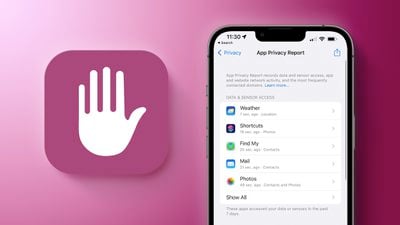
App Privacy Feature 2
Apple also displays network activity, letting you know which domains apps are contacting in the background.

How to Turn on App Privacy Report

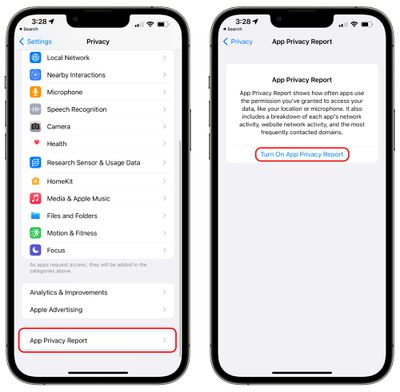
App Privacy Report can be enabled in the Settings app by following these instructions.

  1. Open up the Settings app.
  2. Scroll down and tap on Privacy.
  3. In the Privacy section of the Settings app, scroll down and tap on App Privacy Report. app privacy report turn on
  4. Tap on Turn on App Privacy Report.

If you already had "Record App Activity" enabled in the iOS 15/iOS 15.1 updates, App Privacy Report will be automatically on and it will already be populated with data. If you did not, you may need to use apps and websites for a few minutes before you start seeing data.

Using App Privacy Report

Apple shows data from the last seven days, and the app is split up into several sections to make it easier to get to what you want to know.
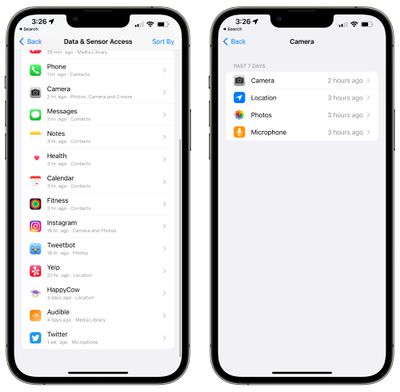
app privacy report camera

Data & Sensor Access

In this section, Apple provides a list of apps that have accessed sensors and data granted to them through privacy permissions, so your most sensitive information.
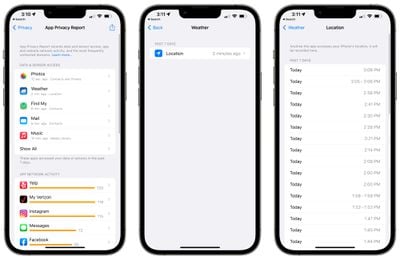
app privacy report data
Data & Sensor access will tell you when apps have accessed the following:

  • Contacts
  • Location
  • Photos
  • Camera
  • Microphone
  • Media Library

If you tap on an individual app and then tap on the permission that you want to view more about, App Privacy Report will give you a list of every time the app accessed the data in question.

App Network Activity

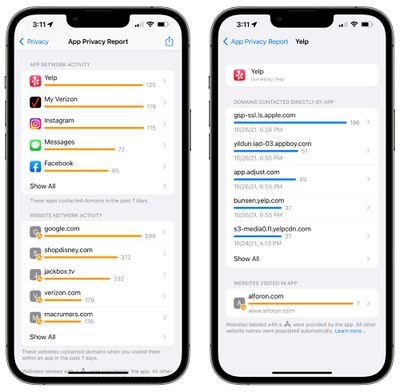
With App Network Activity, you can view a list of all of the different domains that your apps have contacted across the last seven days.
app privacy report app network
This includes various internal domains used by apps, but it also lets you see what third-party websites and services are accessed, such as tracking or analytics tools.

You can tap on any app in the list to see a rundown of all of the domains that have been contacted. If you have Instagram installed, for example, you'll see URLs for things like DoubleClock, Google Analytics, Google Tag Manager, and more, along with internal Instagram and Facebook URLs.

At the bottom of each app's data, you can also get a list of the web sites that you visited within the app.

Website Network Activity

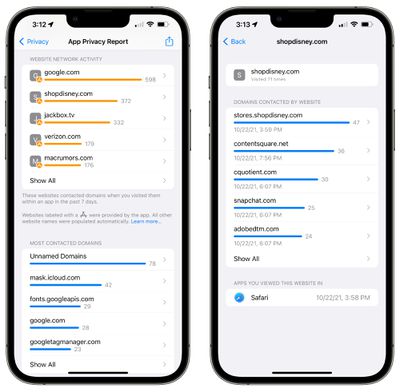
Website Network Activity is basically identical to App Network Activity, but it shows you all of the domains contacted by the websites that you visited in Safari and other apps.
app privacy report website network activity
This will show you all of the different trackers and analytics sites that websites are using.

Most Contacted Domains

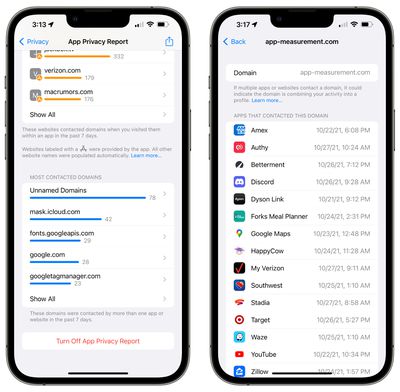
Most Contacted Domains is an aggregated list of the domains that apps have contacted most often, and it is usually populated by various trackers and analytics domains.
app privacy report contacted domains
In this section, you can tap on any of the domains in the list to see which apps or websites used that particular domain.

How to Turn Off App Privacy Report

If you don't want to use App Privacy Report, you can follow these steps:

  1. Open up the Settings app.
  2. Scroll down and tap on Privacy.
  3. In the Privacy section of the Settings app, scroll down and tap on App Privacy Report.
  4. Tap on Turn Off App Privacy Report.

Note that turning off App Privacy Report will delete all collected data. Once it's turned on again, Apple will again begin aggregating data from apps.

Guide Feedback

Have questions about App Privacy Report, know of a feature we left out, or want to offer feedback on this guide? Send us an email here.


Related Forum: iOS 15

Popular Stories

iOS 27 Next to iPhone

Here's When iOS 27 Rolls Out Today in Every Time Zone [Update: It's Out]

Sunday September 13, 2026 3:00 am PDT by
Update 10:04 a.m.: iOS 27 is rolling out now, though it may take a bit for all users to see it, so keep checking! Apple is about to release iOS 27, which will finally deliver more advanced Siri AI capabilities as well as a variety of other refinements, improvements, and new features to iPhones. It's Apple's biggest software update of the year, and Apple announced at Wednesday's iPhone event...
iOS 27 Icon iPhone

iOS 27 Available Now With These 8 New Features

Monday September 14, 2026 9:00 am PDT by
Update — 10 a.m. Pacific Time: Apple has released iOS 27. During its iPhone 18 Pro and iPhone Duo event last week, Apple announced that iOS 27 will be released widely on Monday, September 14. iOS 27 should be available around 10 a.m. Pacific Time / 1 p.m. Eastern Time today via the Settings app, under General → Software Update. Below, we have highlighted eight new features and...
Apple iCloud Plus expansion hero

iCloud+ Now Includes Apple TV, Apple Arcade, and Curated Apple Music Stations in Over 100 Countries

Tuesday September 15, 2026 1:43 am PDT by
Apple today announced a new subscription initiative that turns paid iCloud+ subscriptions into a broader services bundle in more than 100 countries. In select countries, Apple says every paid iCloud+ plan, including the cheapest 50GB tier, now includes Apple TV and Apple Arcade "at no additional cost," while family sharing extends the storage, TV and Arcade access to up to five people....

Top Rated Comments

BWhaler Avatar
64 months ago
Great feature. Thank you Apple.

Next release, please give us:

1. iCloud full encryption
2. IP filtering for apps, not just Safari and Mail
3. Make it impossible for Facebook and Google and the other dark data mining companies to fingerprint our devices.
Score: 9 Votes (Like | Disagree)
64 months ago
Does it tell us how often our iCloud photos are being examined?
Score: 5 Votes (Like | Disagree)
Populus Avatar
64 months ago
Hey, Juli, I wholeheartedly appreciate all this posts explaining this new privacy focused feature.
As I already said on another post, this will probably make me jump to iOS 15, as I don’t quite trust the Privacy sheets on the App Store. This -I assume- is much more reliable.

Thank you!
Score: 4 Votes (Like | Disagree)
NightFox Avatar
64 months ago
A good feature, but I think people are overestimating its impact. the vast majority of iPhone users either aren't going to know this feature exists or won't ever use it. Then there's the 'little knowledge is a dangerous thing' - does anyone remember when custom keyboard apps were first allowed and the panic the system access requests caused? It's not always readily apparent when an app legitimately needs access to a resource to work properly.
Score: 3 Votes (Like | Disagree)
zorinlynx Avatar
64 months ago
Holy crap, this is astounding. Aside from the privacy benefits, I can see this being good for helping people track down unusual battery drain. If there's stuff hitting the network in the background that would explain it for a lot of people.

I'm tempted to hop back on the beta train to try this, but will probably wait until b2.
Score: 3 Votes (Like | Disagree)
64 months ago

I tried using this when I first upgrade to iOS 15 but when it came time to checking the data, I had to export it. I didn’t know what application to open it with. And it looked like a bunch of garbled code. Did I do something wrong?
It's in a format called "json" which is the predominant format for exchanging data, can be read by many applications etc. But it's just data.

Now in 15.2, it seems like Apple added functionality that reads this same data and presents it in the GUI, so the set of features is evolving/improving.
Score: 3 Votes (Like | Disagree)