Top 10 Hidden Force Touch Features on Apple Watch - MacRumorsOpen MenuShow RoundupsShow Forums menuVisit ForumsOpen Sidebar
Skip to Content

Top 10 Hidden Force Touch Features on Apple Watch

Force Touch is one of those Apple Watch features that's so discreet and unassuming it's easy for users to forget it even exists. That's a shame, because just like 3D Touch on iPhone, Apple has implemented the haptic feedback technology across the entire watchOS interface, putting additional hidden functionality right at your fingertips.

In this article, we've collected 10 of our favorite Force Touch features that work on Apple's digital timepiece. Some are more well known than others, but hopefully you'll learn at least one thing new about what a firm press on your Apple Watch screen can do.

1. Clear All Notifications
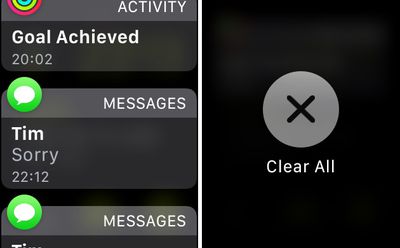
Clear all notifications
The Apple Watch's notifications dropdown can get busy pretty quickly, especially if you often forget to dismiss an incoming alert after reading it. Rather than deleting notifications one by one, you can clear all of them with a Force Touch gesture. Simply press firmly on the Notifications panel and tap the Clear All option.

2. Create and Remove Watch Faces

To create a custom watch face with a background picture, open the Apple Watch Photos app and select a photo. Next, press firmly on the display, tap the Create Watch Face option that pops up, and then select the Photos Face. Alternatively, you can select Kaleidoscope Face to make the picture the basis of a new animating Kaleidoscope.
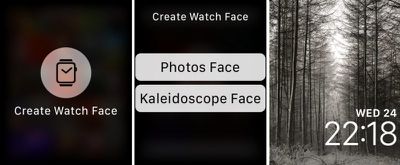
create watch face
When you're done, return to the current active watch face and swipe left or right to find your new creation. If you later decide you don't like your new watch face, press down on it to enter Customize Mode, and swipe up on the offending item to delete.

3. Compose a New Message

Opening the Mail and Messages apps, you'd be forgiven for thinking the Apple Watch only supports replies. That's because the option to compose a new message is revealed with a Force Touch gesture: Press firmly on the display and tap the New Message button that appears.
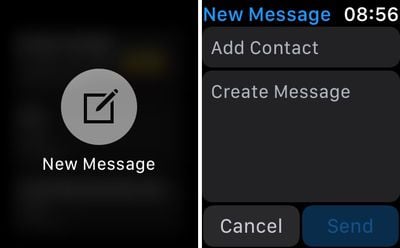
new message
You'll now be able to choose a recipient from your Contacts, input a subject if it's an email you're sending, and write your message using dictation, a scribble, or a short pre-defined phrase. Tap send when you're done.

4. Change Move Goal and Get a Weekly Activity Summary
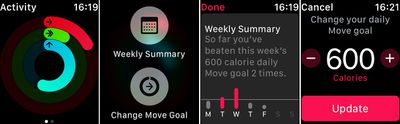
Activity force touch
Press down on the Activity screen to reveal a Weekly Summary option that shows how many times you've beaten your daily move goal so far this week.

If you're beating your move goal far too easily – or if you need a little help closing that long red ring on a daily basis – press down on the Activity screen again and tap the Change Move Goal button to adjust the amount of calories you're aiming to burn.

5. Stream Music to an AirPlay Device
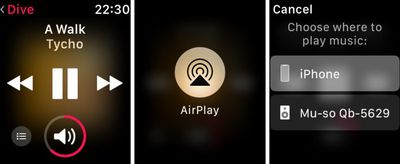
stream to airplay
If you store music on your Apple Watch, you probably listen to it over connected Bluetooth headphones. But did you know it's also possible to stream it to any audio device that supports AirPlay?

Next time you're on the Music app's Now Playing screen, press firmly on the display and tap the AirPlay button that appears. Choose a nearby AirPlay-supporting device from the list, and you're good to go.

6. Share Your Location With a Contact
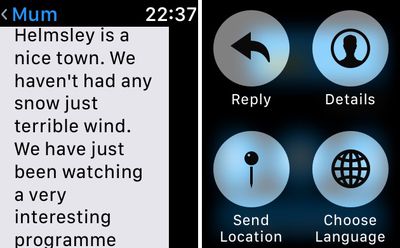
send location
To quickly send your location to someone in an iMessage, open the Messages app on your Apple Watch, select an existing conversation, and activate Force Touch by pressing firmly on the screen. Then simply select the Share Location option from the menu options that appear.

If you haven't enabled it already, you'll be asked to let Messages access your location while using the app (allow it to, otherwise this feature won't work).

7. Switch Map View and Search Local Amenities
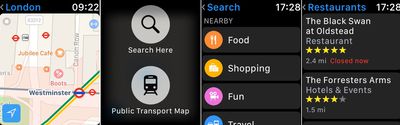
maps app force touch
Whenever you're looking at a map in the stock Maps app, don't forget that you can change to the Transit/Public Transport view at any time with a simple Force Touch. The same action will also bring up the Search Here option, which lets you dictate or scribble a search term or look up local amenities by selecting from the Food, Shopping, Fun, and Travel submenus.

8. Switch App Screen to List View
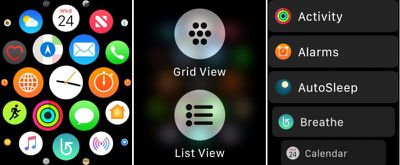
app grid view
To re-arrange Apple Watch apps in the standard Grid layout, long press the app in question and drag it to where you want it. If you still can't get on with the default Grid view, press down firmly on the screen and try the List view instead.

9. Hourly Temperature Forecast and Chance of Rain
weather force touch
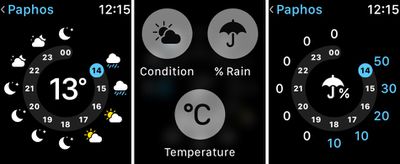
The standard forecast display on the Apple Watch's stock Weather app shows the general weather conditions for the day ahead. But there are two more forecasts available to you. A firm press on the same screen will let you check either the likelihood of rain or any changes in temperature over the next 12 hours.

10. Control Camera Settings Remotely
camera options
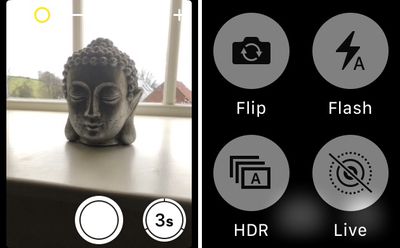
It's not just the shutter of your iPhone's camera that you can remotely control from your wrist. With the Apple Watch Camera app open, press firmly on the screen to reveal a hidden submenu offering access to your iPhone's HDR, Flash, Live Photo, and Flip controls.


Related Roundup: Apple Watch 12
Buyer's Guide: Apple Watch (Buy Now)
Related Forum: Apple Watch

Popular Stories

apple watch series 3 design

Apple Offers Steps to Fix Daylight Saving Time Bug on Apple Watch

Sunday November 1, 2026 3:34 am PST by
Apple has published a support document describing what to do if your Apple Watch continues to show time that's off by one hour after daylight savings time changes. "This incorrect time appears only on the Always On display when your wrist is down," says Apple. "When you activate the display by tapping it or raising your wrist, the time changes to the correct hour." To fix the issue, Apple says ...


siri recap live rewind

watchOS 27.3 Brings Live Rewind and Siri Recap to Apple Watch

Tuesday November 3, 2026 10:35 am PST by
With the first beta of watchOS 27.3, Apple is introducing new Audio Intelligence features it previewed for the Apple Watch Series 12 and Ultra 4 earlier this year. Powered by the S11 chip, Audio Intelligence includes Live Rewind, Siri Recap, Sound Recognition, and Shazam Music Recognition. Sound Recognition and Shazam are already on the watch, but Live Rewind and Siri Recap are now available ...
apple watch series 3 design

Apple Watch Users in Europe Report Daylight Saving Glitch

Monday October 26, 2026 5:26 am PDT by
Some Apple Watch users running watchOS 27 are reporting a daylight saving glitch after clocks went back in the UK and Europe on Sunday. In a MacRumors forums thread, five users – several in the UK and central Europe – say their watch shows the correct time when activated, but the Always-On display keeps showing summer time, leaving it an hour fast. The problem has also been reported in...

Top Rated Comments

OldSchoolMacGuy Avatar
115 months ago
Why do they have all these great features and then hide them so people don’t even know they exist?
They aren't hidden. That's like saying you never knew Mario could jump cause you never pressed the B button or why is copy and paste hidden away with a key command.
Score: 7 Votes (Like | Disagree)
115 months ago
Why do they have all these great features and then hide them so people don’t even know they exist?
They’re like right click, I believe.
Score: 5 Votes (Like | Disagree)
itsmilo Avatar
115 months ago
Why do they have all these great features and then hide them so people don’t even know they exist?
Yep reason I also hate 3D Touch. Its just not intuitive or natural.

—-

had no idea this list view grid view thing was possible :o
Score: 3 Votes (Like | Disagree)
MrGimper Avatar
115 months ago
Found the one to switch apps to list view by accident a while ago. Now use this view all the time.
Score: 3 Votes (Like | Disagree)
miniyou64 Avatar
115 months ago
Why do they have all these great features and then hide them so people don’t even know they exist?
Score: 3 Votes (Like | Disagree)
115 months ago
Great tips...thanks for putting it together.
Score: 2 Votes (Like | Disagree)
Latest Stories
Apple Store Subscription Sign-Up Controversy Exposed
4 hours ago
Siri AI Rumored to Become 'More Like an Agent' as Early as Next Year
15 hours ago
Apple Taking New Approach to Developing iOS 28 and macOS 28
16 hours ago
Early Apple Black Friday Deals on Apple Watch, MacBook Air, and More
1 day ago
'Backglow' Lets You Customize New MacBook Pro's Glowing Apple Logo
1 day ago
Top Stories: Apple Product Launches, iOS 27.3 Beta, and More
2 days ago
More Fun iPhone Duo Apps: 30 New Picks to Try
2 days ago
Hands-On With Apple's New OLED Touchscreen MacBook Pro
2 days ago
Apple Store With All-New Design Opening Soon in Southern California
2 days ago
Control the Glowing Apple Logo on Your New MacBook Pro
3 days ago
Apple Shares New 'Apple Card: Apply and Use in Minutes' Ad
3 days ago
Apple Says More Than 100,000 Apps Optimized for iPhone Duo, Here's What's Still Missing
3 days ago
Early Black Friday Deals Kickoff With Steep Discounts on Apple Watch Ultras and More
3 days ago
The MacRumors Show: iOS 27.3 Looks Like a Huge Update
3 days ago
Best Buy's Black Friday Event Begins With Sitewide Savings on Apple, TVs, More
3 days ago
Apple Releasing Yet Another Two New Products Next Week
3 days ago
MacBook Air Drops to Lowest Price in Months With Amazon's $250 Discount
3 days ago
Apple Rumored to Drop the iPhone's Action Button Next Year
3 days ago
Apple's Extended Return Policy Now in Effect for 2026 Holiday Season
3 days ago
Apple Music Classical Updated With New Icon and Refreshed Design
3 days ago
OLED iPad Mini, M6 iMac, and New MacBook Pros Available From Today
3 days ago
Apple Surveys iPhone Duo Buyers About Crease and Camera
3 days ago
Apple's First Touchscreen Mac is Now Arriving to Customers
3 days ago
Claude Gets Personal Finance Feature With Bank Account Linking
3 days ago
Apple Arcade Adds Crossy Road Rush and NBA 2K27
3 days ago
Apple's New HomeView Smart Home Hub: Here's How Much RAM It Has
3 days ago
iPad Mini vs. iPad Air Buyer's Guide: Now Just $50 Apart
3 days ago
First iOS 27.3 and macOS Golden Gate 27.3 Public Betas Now Available
4 days ago
Apple Announces a New Mac Sales Record
4 days ago
Paid $200 for Logic Pro? Apple Says You Won't Get This New Feature
4 days ago







































