Five of the Best To-Do Apps for iOS - MacRumorsOpen MenuShow RoundupsShow Forums menuVisit ForumsOpen Sidebar
Skip to Content

Five of the Best To-Do Apps for iOS

People lead busy lives, and keeping track of everything that needs to be done in a day can be tough, which is why there are an endless number of to-do and productivity apps on the App Store.

Apple offers a built-in Reminders app and a built-in Notes app, both of which can be useful, but most people who need a robust task tracking solution will want to look to a third-party app. In our latest YouTube video, we rounded up some of our favorite to-do options with a range of capabilities.

Notion (Free)

Notion is an all-in-one productivity app that's perfect if you need an app that combines note taking and wiki creation with to-do list making. It has a simple color coordinated design, but it can actually be used to create neatly organized notes and lists with a hierarchy as complex or as simple as you need it to be.
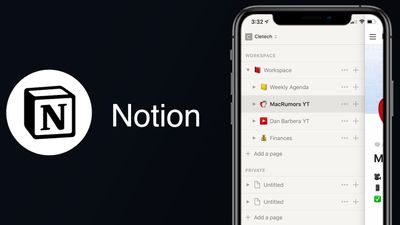
Notion copy
Notion is cross platform so it works on Mac and iOS, plus it has robust search tools, supports real-time collaboration, offers easy editing and list rearranging, and works offline.

The app is free to use, but unlocking the full range of capabilities, including unlimited "Blocks" of data and more than 5MB in file uploads costs $4 per month.

TeuxDeux ($2.99/Month)

Despite the cringeworthy name, TeuxDeux is a solid to-do app if you need something that's simple, straightforward, and free from confusing bells and whistles. It is the most barebones of the to-do apps that we've tried out, and it's an ideal choice if you want a design that's close to writing down tasks on a piece of paper.

TeuxDeux copy
Though simple, TeuxDeux offers several features that are must haves for a to-do app, such as recurring tasks, tasks that roll over to the next day if unfinished, Markdown support, easy drag and drop gesture support, and the ability to use it on both the iPhone and the desktop.

TeuxDeux is a subscription-based app and it costs $2.99 per month or $24 for a year.

Things 3 ($9.99)

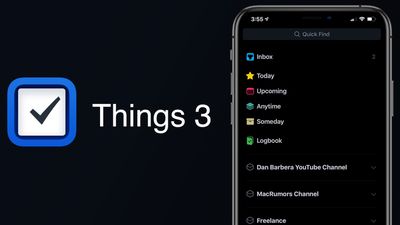
Things 3 is one of the most robust to-do apps on our list, and it's also one of the more popular to-do list options. There's a good reason for that - Cultured Code has included every feature you could ever possibly want in a task management app.
things 3 copy
The design of the app is ultimately easy to use, but it can be overwhelming at first and it does take some time to get used to the full feature set. Luckily, there's a built-in tutorial to get you acquainted with Things 3.

You can create Projects to organize different tasks, Areas to split things between work and family responsibilities, or just add a simple to-do. An inbox with sections like Today, Upcoming, Anytime, and Someday helps you keep track of what tasks need completing and when. Things 3 is the app to choose if you want to organize all aspects of your life.

Things 3 is one of the few to-do apps that's not subscription based, and it costs $9.99 to purchase. Things 3 is also available for Mac and iPad, though each app must be purchased individually.

Todoist (Free)

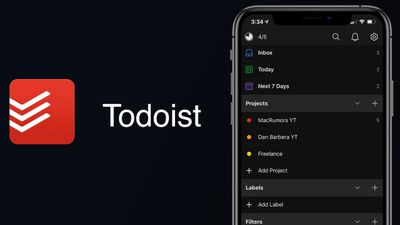
Todoist, like Things 3, is a well-known to-do and list making app. Different tasks can be organized into sections as needed, spitting up everything from work tasks to grocery lists. There's an inbox that shows you everything that needs to be done at a glance, plus sections for things that need to be done immediately and over the next week.
Todoist edited copy
Todoist makes it easy to jot down a quick to-do using natural language in the app so you can get it out of your head, and it supports recurring dates and the option to assign tasks to others for collaborative projects. Personalized productivity trends are included, so you can make sure you're staying on task.

Todoist is free to download, but the premium feature that unlocks all functionality (such as reminders) costs $3.99 per month or $35.99 per year.

Any.Do (Free)

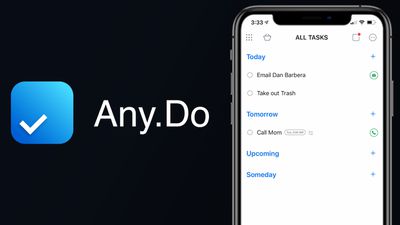
Any.do is another popular task management app that's been around for years. It has a simple interface that belies its complexity, with deep organizational options for managing daily to-dos, calendar tasks, projects, lists, and more.
Any
It offers scheduled reminders, note taking capabilities, collaborative features, calendar integration, adding to-dos from email messages, simple drag and drop gestures, and more. Using the app requires an account, but it does support Sign in with Apple to make it easy, and with an account, the app can be used across all of your devices.

Any.do is free to use, but unlocking all features requires a premium plan priced at $9.99 per month for a one month subscription, $27 for a six month subscription, or $60 for a 12 month subscription.

A premium subscription unlocks color tags, location-based reminders, advanced recurring reminders, bigger file uploads, sharing capabilities, and more.

Conclusion

There are dozens if not hundreds of to-do apps on the ‌App Store‌, and it's impossible to test them all out. If you're looking for a new to-do app, it's worth checking out the options on our list, as these are apps that we've tried and found useful.

If we missed your favorite to-do app, make sure to let us know what it is in the comments.

Popular Stories

duo aquarium

More Fun iPhone Duo Apps: 30 New Picks to Try

Friday November 6, 2026 3:27 pm PST by
When the iPhone Duo launched, we shared a list of some of the fun apps developers created for the new form factor. Two weeks out, developers are continuing to come up with fresh ideas, so we thought we'd share some of our favorites. Games Marbles Unhinged ($2.99) - Marbles Unhinged is a marble maze designed for the Duo. When you fold it, the floor turns into a ramp. If you stand the top...


apple pro tell logo

Apple Launching Five New Products Today

Thursday November 5, 2026 12:59 am PST by
Apple is launching five new products on Friday, November 6, following pre-orders that opened last week, including its first touchscreen MacBook Pro models. The following new products will be available from today: iPad mini with OLED display and A20 Pro chip iMac with M6 chip 14-inch MacBook Pro with M6 chip 14-inch MacBook Pro with OLED touchscreen 16-inch MacBook Pro with OLED...
iOS 28 AI

Apple Taking New Approach to Developing iOS 28 and macOS 28

Sunday November 8, 2026 7:42 am PST by
Apple has made a change to its development process for iOS 28, macOS 28, and corresponding software updates, according to Bloomberg's Mark Gurman. In his Power On newsletter today, he said Apple separates development of each year's new operating systems into three major stages. Typically, he said each stage consists of four weeks of coding followed by a four-week "convergence" period where...

Top Rated Comments

88 months ago
Really shocked to not see Omnifocus on this list.
Score: 13 Votes (Like | Disagree)
TheDailyApple Avatar
88 months ago
I used to use Things 3, but after it stopped working on my Watch, I ended up switching back to Apple's reminders. Apple's reminders app has pretty much caught up since iOS 13, and is more full featured on Watch. I recommend anyone who hasn't tried it giving it a chance.
Score: 5 Votes (Like | Disagree)
88 months ago
OmniFocus

Once you have your system properly set up in that app there's no going back.
The desktop app especially is noticeably native.

I used Things 2 before that but eventually got forced to switch since it was missing key features like Subtasks and Things 3 literally took years to be released.
OmniFocus had a bit of a learning curve and it takes a bit to get your perfect system set up, but once you do there are just so many more ways to organise stuff and keep you motivated. Also, the review feature is the missing feature in a lot of apps, and an absolute necessity to make sure no tasks gets forgotten in a big library.
Score: 5 Votes (Like | Disagree)
88 months ago
I've tried them all and TickTick is bar far my favorite.
Score: 4 Votes (Like | Disagree)
CarlJ Avatar
88 months ago

Really shocked to not see Omnifocus on this list.
Yes, this. You don’t have to say it’s number 1, but if it isn’t in a list of the five best, then the list is fundamentally flawed.
Score: 4 Votes (Like | Disagree)
88 months ago

I gather it’s likely still the same in iOS 13 where getting persistent reminder notifications until something is marked completed isn’t possible for third party apps? Super handy as it sticks to your lock screen until completed.
After I switched from android and was using a third party app Gtasks, on iOS I couldn’t match the always present notifications until marked completed.

I’ve just used the iOS reminders app, I’m light to medium user for personal tasks.
2Do has nagging feature that keeps reminding upto 5 times with user-defined time intervals.
Score: 4 Votes (Like | Disagree)
Latest Stories
Apple Store Subscription Sign-Up Controversy Exposed
2 hours ago
Siri AI Rumored to Become 'More Like an Agent' as Early as Next Year
12 hours ago
Apple Taking New Approach to Developing iOS 28 and macOS 28
14 hours ago
Early Apple Black Friday Deals on Apple Watch, MacBook Air, and More
1 day ago
'Backglow' Lets You Customize New MacBook Pro's Glowing Apple Logo
1 day ago
Top Stories: Apple Product Launches, iOS 27.3 Beta, and More
2 days ago
More Fun iPhone Duo Apps: 30 New Picks to Try
2 days ago
Hands-On With Apple's New OLED Touchscreen MacBook Pro
2 days ago
Apple Store With All-New Design Opening Soon in Southern California
2 days ago
Control the Glowing Apple Logo on Your New MacBook Pro
2 days ago
Apple Shares New 'Apple Card: Apply and Use in Minutes' Ad
3 days ago
Apple Says More Than 100,000 Apps Optimized for iPhone Duo, Here's What's Still Missing
3 days ago
Early Black Friday Deals Kickoff With Steep Discounts on Apple Watch Ultras and More
3 days ago
The MacRumors Show: iOS 27.3 Looks Like a Huge Update
3 days ago
Best Buy's Black Friday Event Begins With Sitewide Savings on Apple, TVs, More
3 days ago
Apple Releasing Yet Another Two New Products Next Week
3 days ago
MacBook Air Drops to Lowest Price in Months With Amazon's $250 Discount
3 days ago
Apple Rumored to Drop the iPhone's Action Button Next Year
3 days ago
Apple's Extended Return Policy Now in Effect for 2026 Holiday Season
3 days ago
Apple Music Classical Updated With New Icon and Refreshed Design
3 days ago
OLED iPad Mini, M6 iMac, and New MacBook Pros Available From Today
3 days ago
Apple Surveys iPhone Duo Buyers About Crease and Camera
3 days ago
Apple's First Touchscreen Mac is Now Arriving to Customers
3 days ago
Claude Gets Personal Finance Feature With Bank Account Linking
3 days ago
Apple Arcade Adds Crossy Road Rush and NBA 2K27
3 days ago
Apple's New HomeView Smart Home Hub: Here's How Much RAM It Has
3 days ago
iPad Mini vs. iPad Air Buyer's Guide: Now Just $50 Apart
3 days ago
First iOS 27.3 and macOS Golden Gate 27.3 Public Betas Now Available
3 days ago
Apple Announces a New Mac Sales Record
3 days ago
Paid $200 for Logic Pro? Apple Says You Won't Get This New Feature
4 days ago









































