All of the New Features in iPadOS 16.2 and iOS 16.2: Freeform App, Stage Manager External Display Support, Accidental Emergency SOS Reports and More - MacRumorsOpen MenuShow RoundupsShow Forums menuVisit ForumsOpen Sidebar
Skip to Content

All of the New Features in iPadOS 16.2 and iOS 16.2: Freeform App, Stage Manager External Display Support, Accidental Emergency SOS Reports and More

Apple today provided the first betas of iOS 16.2 and iPadOS 16.2 to developers, introducing even more new features that have been promised for the iOS 16 update.
iOS 16
We've outlined all of the changes found in the iOS 16.2 and iPadOS 16.2 betas so far in this guide.

Freeform App

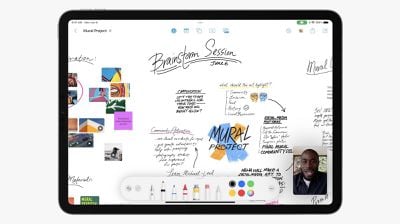
Apple debuted a new cross-platform Freeform app in iOS 16.2, iPadOS 16.2, and macOS Ventura 13.1. Designed for collaboration, Freeform can be used for jotting down notes, sketching, drawing, saving links, and more.
freeform
Multiple people can work on the same Freeform document, with updates synced for all participants in real-time. Apple says that Freeform can be used for sketching projects, designing mood boards, and brainstorming ideas, with the app serving as a creative space.

Stage Manager External Display Support

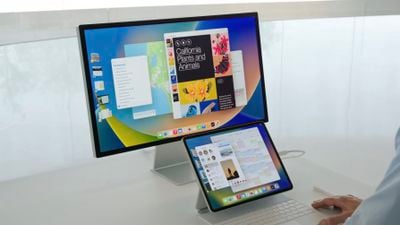
With iPadOS 16.2, Stage Manager on M1 and M2 iPads can be used with external displays once again. This is functionality that Apple removed in the first version of iPadOS 16 in order to expand ‌Stage Manager‌ to A12X and A12Z iPad Pro models.

ipados 16 stage manager
With external display support, ‌Stage Manager‌ supports up to eight apps for multitasking purposes, rather than four. This functionality is limited to ‌M1‌ and ‌M2‌ iPads.

For the ‌M1‌ or ‌M2‌ capable iPads, there is also an option to drag and drop a window from the iPad to the external monitor that is connected to your device. Dragging a window from one device to another is new in the iOS 16.2 update.

New Home App Architecture

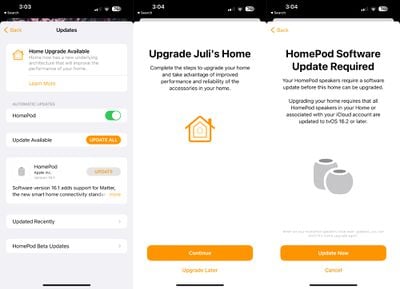
Paired with HomePod 16.2 software, iOS 16.2, iPadOS 16.2, and macOS Ventura 13.1 add support for an updated Home app architecture that comes following the addition of the Matter smart home standard.
home app architecture update 1
Apple says that the new Home app architecture will bring faster, more reliable performance in homes with many smart accessories, but it requires every device that accesses the home to be running the iOS 16.2, iPadOS 16.2, macOS Ventura 13.1, tvOS 16.2, and watchOS 9.2 betas, along with the ‌HomePod‌ 16.2 beta software.

Expanded 120Hz ProMotion Support

On devices that support ProMotion, Apple says that SwiftUI animated layout changes will support a 120Hz refresh rate, functionality that was previously missing.

Unintentional SOS Calls

Apple appears to be collecting data on accidental SOS calls with the update, and one user has reported an Apple inquiry about the call that collects system data.

Disable Wallpaper and Notifications for Always On Display

iOS 16.2 adds two toggles for disabling wallpaper and notifications when always on display is active. The feature makes for a simpler always on display interface that only shows the time and any widgets that are enabled.
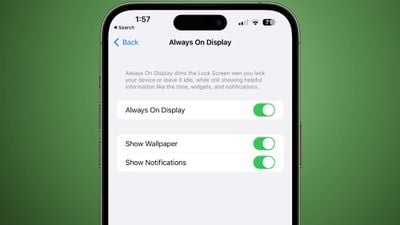
always on display options

Battery Status Shortcut

There is a new Battery Status Shortcut available that provides information about the iPhone's battery and any charger that's connected.

Software Updates

Apple has made a small tweak to the Software Updates section of the Settings app, which is available under General. The text of the software version that's installed is now bolder, making it more apparent.
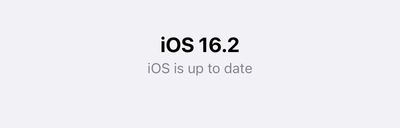
ios 16 2 software update bold

Lock Screen Sleep Widget

iOS 16.2 adds a Sleep widget to the Lock Screen, which draws from data stored in the Health app and collected by the Apple Watch or other sleep tracking devices. It provides information such as time spent in bed and sleep quality, with three variants available.
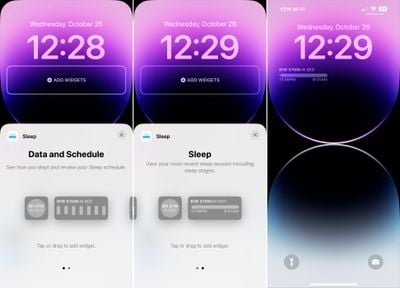
ios 16 2 sleep widget
A simple one tile widget shows the amount of time that you spent in bed, and two multi-tile options display either a bar chart that shows sleep quality or a larger widget that shows time in bed along with a visual representation. Tapping on the widget opens up the Sleep section of the Health app.

Lock Screen Medication Widget

In addition to a new Sleep widget, Apple has also added a Medications widget. There are two options, one that is a single pill icon and a second that lets you know when you need to take a medication. It will alert you if all your medications are logged or if you have no more medications for the day.
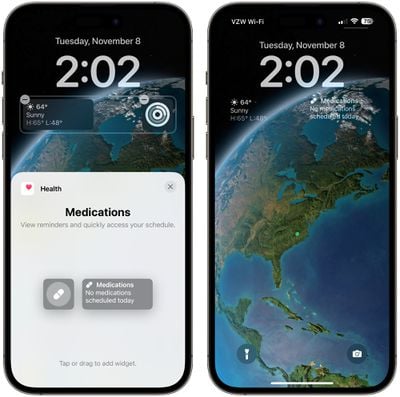
medication widget ios 16 2

5G in India

iOS 16.2 unlocks 5G service in India, and multiple carriers in the country are now supporting 5G speeds.

TV App Live Sports Scores

The iOS 16.2 beta re-adds Live Activities integration for select sports games for the built-in TV app on the iPhone. Games can be tracked in real time on the Lock Screen or the Dynamic Island on the iPhone 14 Pro models.
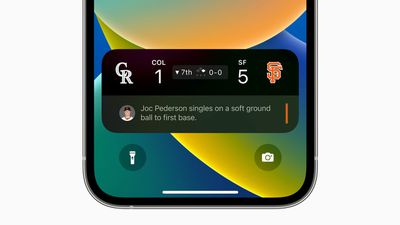
iOS 16 Live Activities Sports MLB

TV App Updates

With the iOS 16.2, iPadOS 16.2, tvOS 16.2, and macOS Ventura 13.1 updates, Apple has tweaked the TV app. There's now a "Featured" section above the "Up Next" section, making it more difficult for users to get to the TV shows they want to watch.
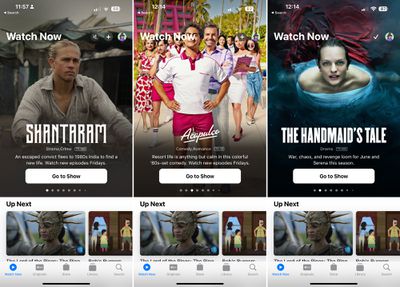
ios 16 2 tv app redesign
The Featured section content replaces Up Next in the "Watch Now" tab of the Apple TV app, with featured TV shows and movies right at the top of the interface.

Weather App News

The Weather app now integrates with Apple News, displaying relevant Weather-related news information based on your region.
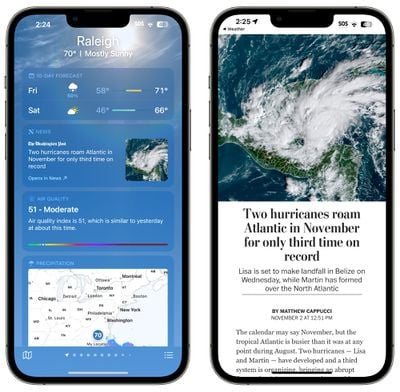
weather app news integration

Live Activities in the TV App

There is an option to get more frequent Live Activity updates from the TV app for following sports games. More frequent updates can result in faster battery drain, so you might want to disable it if you're concerned about battery life.
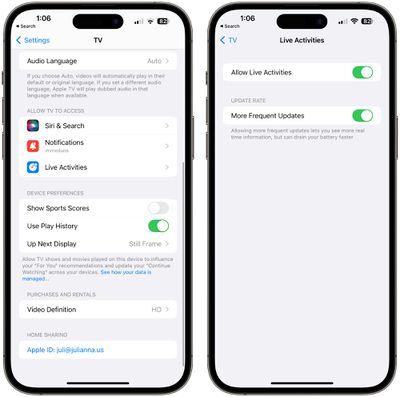
tv app live activity updates

Siri Silent Responses

In the Accessibility section of the Settings app, there is an option to set Siri to "Prefer Silent Responses" so that ‌Siri‌ will confirm requests on-device rather than out loud.
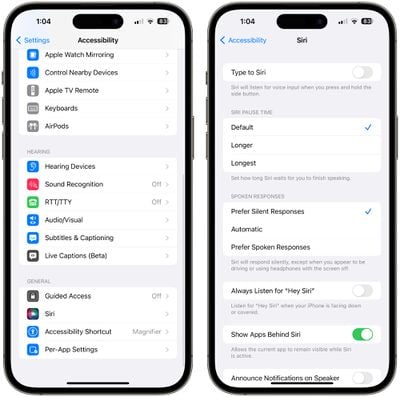
siri silent responses

ProMotion Lag Fix

The iOS 16.2 update appears to address long-running issues affecting the iPhone 13 Pro and iPhone 14 Pro models with ProMotion. These devices can experience lagging and stuttering system animations when closing and switching between apps, and multiple reports from beta testers indicate the performance has been improved in the update.

Other New Features

Know of a new feature in iOS 16.2 that we left out? Let us know in the comments below.

Popular Stories

apple pro tell logo

Apple Launching Five New Products Today

Thursday November 5, 2026 12:59 am PST by
Apple is launching five new products on Friday, November 6, following pre-orders that opened last week, including its first touchscreen MacBook Pro models. The following new products will be available from today: iPad mini with OLED display and A20 Pro chip iMac with M6 chip 14-inch MacBook Pro with M6 chip 14-inch MacBook Pro with OLED touchscreen 16-inch MacBook Pro with OLED...
duo aquarium

More Fun iPhone Duo Apps: 30 New Picks to Try

Friday November 6, 2026 3:27 pm PST by
When the iPhone Duo launched, we shared a list of some of the fun apps developers created for the new form factor. Two weeks out, developers are continuing to come up with fresh ideas, so we thought we'd share some of our favorites. Games Marbles Unhinged ($2.99) - Marbles Unhinged is a marble maze designed for the Duo. When you fold it, the floor turns into a ramp. If you stand the top...
silver iphone 18 pro

Apple Rumored to Drop the iPhone's Action Button Next Year

Friday November 6, 2026 6:07 am PST by
Apple plans to merge the iPhone's Action button with the Camera Control starting next year, according to the leaker known as "Instant Digital." In a new post on Weibo, the leaker claimed that a single press of the combined button would open the camera, while a long press would trigger the function assigned to the Action button. They explicitly clarified that the dedicated Action button would ...

Top Rated Comments

53 months ago

What exactly does SwiftUI animated layout changes will support a 120Hz refresh rate mean, I’m kinda confused
For those unaware:


View post on X

It addresses this.
Score: 16 Votes (Like | Disagree)
meboy Avatar
53 months ago
Stage Manager is possibly the worst UI/UX software design I've seen.
Can't think of anything this bad on all the versions of Windows, Linux, mobile OS.

It's clear their process was "We absolutely don't want to give people movable windows like on a traditional OS but what else can we do to make it computer like?"
How about instead of showing single apps at once we show a like overview of all apps in use. Yeah that sounds computer like.
Then came up with showing multiple windows.. but that's already there with split view. So let's make it different where it's like a blob of more than 2 apps overlaying each other.. but now you can't even see 2 apps at once so you've removed the entire purpose.


Then at the same time tried to add task switcher like thumbnails of apps but that are always on the screen because why not. We've already wasted most of the screen real estate.

It's so terribly done I can't believe more people aren't calling it out.
Score: 7 Votes (Like | Disagree)
Yeetus Avatar
53 months ago
Ah, ****... here we go again
Score: 6 Votes (Like | Disagree)
Junior Amboy Avatar
53 months ago

Stage Manager is possibly the worst UI/UX software design I've seen.
Can't think of anything this bad on all the versions of Windows, Linux, mobile OS.

It's clear their process was "We absolutely don't want to give people movable windows like on a traditional OS but what else can we do to make it computer like?"
How about instead of showing single apps at once we show a like overview of all apps in use. Yeah that sounds computer like.
Then came up with showing multiple windows.. but that's already there with split view. So let's make it different where it's like a blob of more than 2 apps overlaying each other.. but now you can't even see 2 apps at once so you've removed the entire purpose.
Then at the same time tried to add task switcher like thumbnails of apps but that are always on the screen because why not. We've already wasted most of the screen real estate.

It's so terribly done I can't believe more people aren't calling it out.
Stage Manager is useful for many people, including myself. Sure, it has quirks and bugs but I don’t agree that it’s fundamentally wrong. Fundamentally wrong against what? Against traditional computer navigation concept?

I use my iPad Pro M1 12.9 for work as an E-Commerce Manager and Stage Manager has made my workflow better. I have my emails, notes, slack and browser as one group, MS Excel, our ERP and other related work apps in another and switching is much easier. I set the display to More Space, autohide the task switcher and the dock for maximum space and I’m happy with it. I and my colleagues find Stage Manager really helpful.

Only the people who want the iPad to behave like a traditional computer think Stage Manager is bad, but the iPad is not. Why are we forcing the iPad to be one? I have a desktop for things I cannot do with the iPad.

Apple just needs to perfect the external display support, fix the resizing landscape/portrait resizing bugs, find a solution as to how the task switcher treats opened windows when the are more than 4 sets running, improve how existing windows are move around when adding another app or window, implement a top bar for each app, etc.

People love the iPad as an iPad, let’s not make it a traditional computer.
Score: 5 Votes (Like | Disagree)
53 months ago

No, that is a bad solution, as has been explained countless times across the internet ALAC is a poor choice for anyone intending to actually store audio and not at all an appropriate substitute for FLAC
And yet I have TONS of material stored in ALAC.

Maybe it's inappropriate for INTEROP, I have no idea, but it works just fine for storage (and playback on the full range of Apple devices).
Score: 2 Votes (Like | Disagree)
Gudi Avatar
53 months ago

Stage Manager is possibly the worst UI/UX software design I've seen.
ERR: Unnecessary overblown superlative detected.
[ DELETE ] [ IGNORE ] [ CANCEL ]
Score: 2 Votes (Like | Disagree)
Latest Stories
Siri AI Rumored to Become 'More Like an Agent' as Early as Next Year
5 hours ago
Apple Taking New Approach to Developing iOS 28 and macOS 28
7 hours ago
Early Apple Black Friday Deals on Apple Watch, MacBook Air, and More
1 day ago
'Backglow' Lets You Customize New MacBook Pro's Glowing Apple Logo
1 day ago
Top Stories: Apple Product Launches, iOS 27.3 Beta, and More
1 day ago
More Fun iPhone Duo Apps: 30 New Picks to Try
2 days ago
Hands-On With Apple's New OLED Touchscreen MacBook Pro
2 days ago
Apple Store With All-New Design Opening Soon in Southern California
2 days ago
Control the Glowing Apple Logo on Your New MacBook Pro
2 days ago
Apple Shares New 'Apple Card: Apply and Use in Minutes' Ad
2 days ago
Apple Says More Than 100,000 Apps Optimized for iPhone Duo, Here's What's Still Missing
2 days ago
Early Black Friday Deals Kickoff With Steep Discounts on Apple Watch Ultras and More
2 days ago
The MacRumors Show: iOS 27.3 Looks Like a Huge Update
2 days ago
Best Buy's Black Friday Event Begins With Sitewide Savings on Apple, TVs, More
2 days ago
Apple Releasing Yet Another Two New Products Next Week
2 days ago
MacBook Air Drops to Lowest Price in Months With Amazon's $250 Discount
2 days ago
Apple Rumored to Drop the iPhone's Action Button Next Year
2 days ago
Apple's Extended Return Policy Now in Effect for 2026 Holiday Season
2 days ago
Apple Music Classical Updated With New Icon and Refreshed Design
2 days ago
OLED iPad Mini, M6 iMac, and New MacBook Pros Available From Today
3 days ago
Apple Surveys iPhone Duo Buyers About Crease and Camera
3 days ago
Apple's First Touchscreen Mac is Now Arriving to Customers
3 days ago
Claude Gets Personal Finance Feature With Bank Account Linking
3 days ago
Apple Arcade Adds Crossy Road Rush and NBA 2K27
3 days ago
Apple's New HomeView Smart Home Hub: Here's How Much RAM It Has
3 days ago
iPad Mini vs. iPad Air Buyer's Guide: Now Just $50 Apart
3 days ago
First iOS 27.3 and macOS Golden Gate 27.3 Public Betas Now Available
3 days ago
Apple Announces a New Mac Sales Record
3 days ago
Paid $200 for Logic Pro? Apple Says You Won't Get This New Feature
3 days ago
Instagram's Edits Video Editor is Now Available on Mac
3 days ago