10 Things You Can Do With the Freeform App in iOS 16.2 and iPadOS 16.2 - MacRumorsOpen MenuShow RoundupsShow Forums menuVisit ForumsOpen Sidebar
Skip to Content

10 Things You Can Do With the Freeform App in iOS 16.2 and iPadOS 16.2

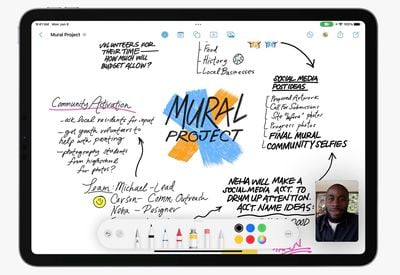
Apple with iOS 16.2 and iPadOS 16.2 is introducing the Freeform app, which is designed for brainstorming ideas, creating sketches, and collaborating with others on projects. Freeform is basically a blank canvas that you can use for anything.
freeform 1
In this guide, we've highlighted the various tools that you can use with the Freeform app on the iPhone and the iPad.

Shapes

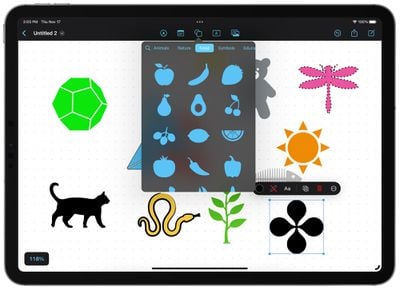
There are hundreds of pre-designed "clip art" shapes that are available in Freeform, across the following categories: Basic, Geometry, Objects, Animals, Food, Nature, Symbols, Education, Arts, Science, People, Places, Activities, Transportation, Work, and Ornaments.
freeform shapes
You can stack multiple shapes on top of one another with layering, change the color, draw over them, resize them with drag and drop gestures, break the component pieces apart and manipulate the design, add various borders, group them together, adjust opacity, and more. There are a huge number of tools for working with shapes for your projects.

Images, Scans, and Documents

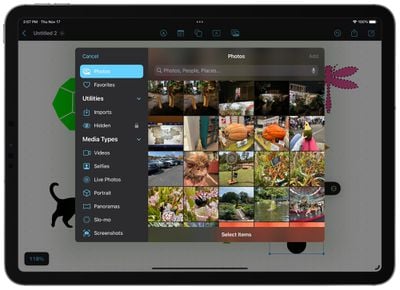
The Freeform app supports all kinds of documents. You can add photos and videos directly from your Camera Roll in the Photos app, or take a photo with your iPhone or your ‌iPad‌.

freeform add photos
‌Photos‌ and videos that you add to your project can be resized with drag and drop gestures, cropped, viewed in full, and layered with other images and shapes.
freeform add link
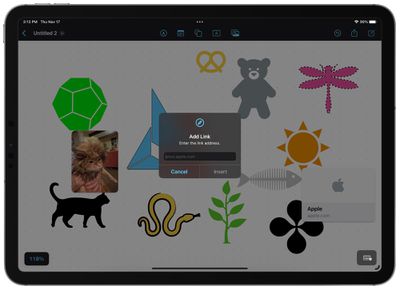
You can scan documents using the iPhone or ‌iPad‌'s camera in either color or black and white, add various documents from iCloud Drive, or add any link from Safari. Links and files are shown in little card-like tiles and can also be rearranged on the canvas with drag and drop gestures and layered over shapes, images, and other files for a visual look at your documents you've added.

Stickies

With the Freeform app you can add digital post-it notes, or Stickies as Apple calls them. The Stickies are basically the same as the Stickies app that is available for Mac. You can change the color of Stickies, choosing from one of seven, and add text.
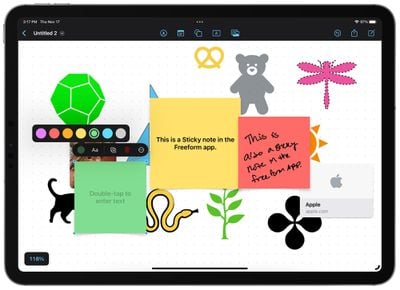
freeform stickies
On an ‌iPad‌, you can use an Apple Pencil to write directly on one of the Stickies, but if you use typed text, you also have various formatting options available like bold, bullet lists, different font sizes, and more.

Text Insertion

Using the text box, any typed text can be inserted anywhere on the Freeform canvas. Text can be as long or as short as you want, and all of the standard formatting options are available for changing font, color, size, and alignment, as well as adding styles like bolding and underlining.
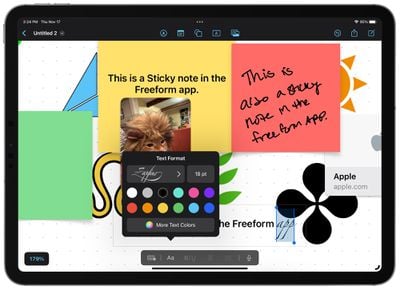
freeform add text

Drawing Tools

Freeform has the same set of drawing tools that you might be familiar with from Markup. You can draw with a finger on the iPhone, or on the ‌iPad‌, with an ‌Apple Pencil‌. There are pens, markers, and crayons to choose from, all with adjustable opacity, color, and line thickness.
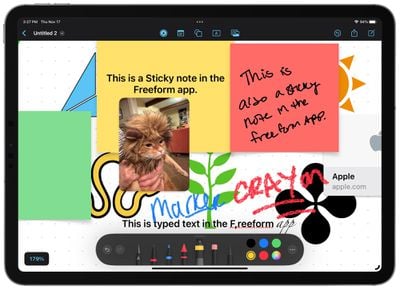
freeform writing tools
You can also access an eraser, a select tool for targeted selections of items on your canvas, and a lasso fill tool that fills lines that you draw.

Colors

Freeform has support for a huge range of colors. You can pick a simple color from a grid, choose a color from a spectrum interface, use sliders, or manually type in color hex codes for a specific shade. Favorite colors can be saved to the bottom of the interface, and opacity can be adjusted for any color as well.
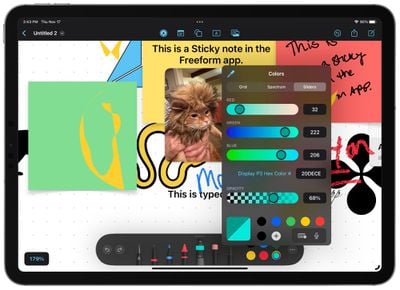
freeform colors
An eyedropper tool is available to match any color that's already on the canvas.

Object Movement

Any object in a Freeform document can be quickly rearranged and resized with drag and drop gestures. Tapping provides an interface where you can send an object to the "Back" or the "Front" for layering purposes, but there are no true layers to work with.
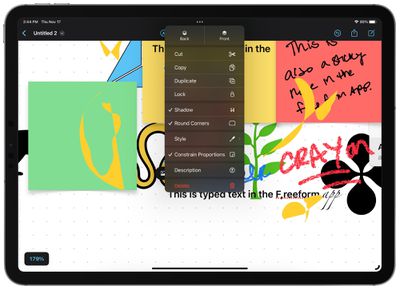
freeform object manipulation
Objects can be locked in place, duplicated, and constrained or unconstrained in proportion, useful if you want to change one dimension and not another.

File Management

Freeform boards can be saved as a PDF document or printed out, and they can also be saved to apps like Files and Dropbox. You can also email, text, and otherwise share links to boards with others.
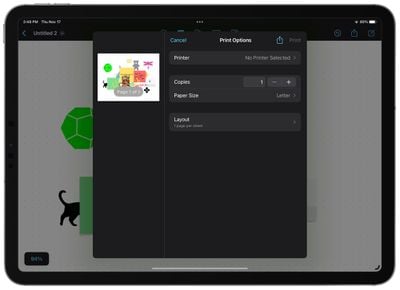
freeform printing

Multiple Boards

You can have multiple Freeform boards, which can be viewed as icons or a list, and sorted in various ways such as by name or date. Groups are available to organize a large number of boards, and there are also separate sections for Recents, Shared, and Favorites.
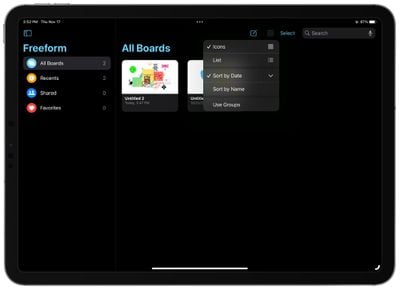
freeform multiple boards

Collaboration

Freeform has been designed as a collaboration tool, and you can share Freeform boards with other iPhone and ‌iPad‌ users. All Freeform board participants can work on the same board, adding images, texts, links, and more for group brainstorming sessions.
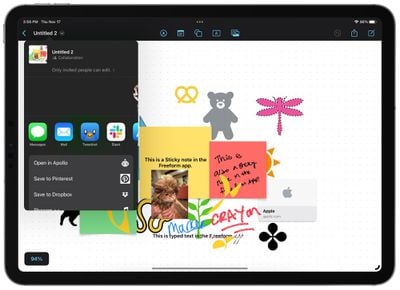
freeform collaboration
Changes made to Freeform boards are synced for all users in real time, though it is worth noting that collaboration has not yet been fully fleshed out during the beta testing process.

Availability and Device Compatibility

Apple's Freeform app is available on the iPhone, ‌iPad‌, and Mac. It requires iOS 16.2, iPadOS 16.2, or macOS Ventura 13.1 to work, and it is a standalone app that will not be available on devices not able to run these updates.


Related Forums: iOS 16, macOS Ventura

Popular Stories

duo aquarium

More Fun iPhone Duo Apps: 30 New Picks to Try

Friday November 6, 2026 3:27 pm PST by
When the iPhone Duo launched, we shared a list of some of the fun apps developers created for the new form factor. Two weeks out, developers are continuing to come up with fresh ideas, so we thought we'd share some of our favorites. Games Marbles Unhinged ($2.99) - Marbles Unhinged is a marble maze designed for the Duo. When you fold it, the floor turns into a ramp. If you stand the top...

apple pro tell logo

Apple Launching Five New Products Today

Thursday November 5, 2026 12:59 am PST by
Apple is launching five new products on Friday, November 6, following pre-orders that opened last week, including its first touchscreen MacBook Pro models. The following new products will be available from today: iPad mini with OLED display and A20 Pro chip iMac with M6 chip 14-inch MacBook Pro with M6 chip 14-inch MacBook Pro with OLED touchscreen 16-inch MacBook Pro with OLED...
silver iphone 18 pro

Apple Rumored to Drop the iPhone's Action Button Next Year

Friday November 6, 2026 6:07 am PST by
Apple plans to merge the iPhone's Action button with the Camera Control starting next year, according to the leaker known as "Instant Digital." In a new post on Weibo, the leaker claimed that a single press of the combined button would open the camera, while a long press would trigger the function assigned to the Action button. They explicitly clarified that the dedicated Action button would ...

Top Rated Comments

52 months ago

Might be useful, but advertising a whole OS update with an App that could have been released independently makes it a laughingstock.
Weird.

Since it's not something that interests you, what about it makes you laugh so hard? Being part of iOS is certainly not an issue or problem. And for sure not to get so worked up about.
Score: 17 Votes (Like | Disagree)
52 months ago
Looking forward to using this. Will be a great collaborative tool for people who create.
Score: 7 Votes (Like | Disagree)
Wildkraut Avatar
52 months ago
Might be useful, but advertising a whole OS update with an App that could have been released independently makes it a laughingstock.
Score: 7 Votes (Like | Disagree)
52 months ago

Weird.

Since it's not something that interests you, what about it makes you laugh so hard? Being part of iOS is certainly not an issue or problem. And for sure not to get so worked up about.
I don't think they're worked up or laughing hard -- I think they used "laughingstock" because it is silly and subject to ridicule given that they require an entire iOS update to get the app. Some people don't like updating firmware until a while after the release, and given all the bugs as of lately, makes sense to want Freeform but not an entirely new update.

The issue isn't that it is part of iOS but that they didn't just make it an easy download from the App Store on eligible devices. I assume this app won't be used by a vast number of iOS/iPad users so again, just odd that it required an entire update vs. an easy download.



Score: 6 Votes (Like | Disagree)
52 months ago
You forgot another thing you can do with it, delete it! New title: "11 Things You Can Do With the Freeform App in iOS 16.2 and iPadOS 16.2".
Score: 5 Votes (Like | Disagree)
lostPod Avatar
52 months ago

Since, somewhat surprisingly there is no good UX vector tool for the iPad, like Sketch for the Mac, I hope this app works for that purpose
Affinity Designer? Illustrator ?
Score: 5 Votes (Like | Disagree)
Latest Stories
Siri AI Rumored to Become 'More Like an Agent' as Early as Next Year
8 hours ago
Apple Taking New Approach to Developing iOS 28 and macOS 28
10 hours ago
Early Apple Black Friday Deals on Apple Watch, MacBook Air, and More
1 day ago
'Backglow' Lets You Customize New MacBook Pro's Glowing Apple Logo
1 day ago
Top Stories: Apple Product Launches, iOS 27.3 Beta, and More
2 days ago
More Fun iPhone Duo Apps: 30 New Picks to Try
2 days ago
Hands-On With Apple's New OLED Touchscreen MacBook Pro
2 days ago
Apple Store With All-New Design Opening Soon in Southern California
2 days ago
Control the Glowing Apple Logo on Your New MacBook Pro
2 days ago
Apple Shares New 'Apple Card: Apply and Use in Minutes' Ad
2 days ago
Apple Says More Than 100,000 Apps Optimized for iPhone Duo, Here's What's Still Missing
2 days ago
Early Black Friday Deals Kickoff With Steep Discounts on Apple Watch Ultras and More
2 days ago
The MacRumors Show: iOS 27.3 Looks Like a Huge Update
2 days ago
Best Buy's Black Friday Event Begins With Sitewide Savings on Apple, TVs, More
2 days ago
Apple Releasing Yet Another Two New Products Next Week
2 days ago
MacBook Air Drops to Lowest Price in Months With Amazon's $250 Discount
3 days ago
Apple Rumored to Drop the iPhone's Action Button Next Year
3 days ago
Apple's Extended Return Policy Now in Effect for 2026 Holiday Season
3 days ago
Apple Music Classical Updated With New Icon and Refreshed Design
3 days ago
OLED iPad Mini, M6 iMac, and New MacBook Pros Available From Today
3 days ago
Apple Surveys iPhone Duo Buyers About Crease and Camera
3 days ago
Apple's First Touchscreen Mac is Now Arriving to Customers
3 days ago
Claude Gets Personal Finance Feature With Bank Account Linking
3 days ago
Apple Arcade Adds Crossy Road Rush and NBA 2K27
3 days ago
Apple's New HomeView Smart Home Hub: Here's How Much RAM It Has
3 days ago
iPad Mini vs. iPad Air Buyer's Guide: Now Just $50 Apart
3 days ago
First iOS 27.3 and macOS Golden Gate 27.3 Public Betas Now Available
3 days ago
Apple Announces a New Mac Sales Record
3 days ago
Paid $200 for Logic Pro? Apple Says You Won't Get This New Feature
3 days ago
Instagram's Edits Video Editor is Now Available on Mac
3 days ago