Eight Hidden macOS Features You Can Access With the Option Key - MacRumorsOpen MenuShow RoundupsShow Forums menuVisit ForumsOpen Sidebar
Skip to Content

Eight Hidden macOS Features You Can Access With the Option Key

by

The Option (⌥) key – or Alt key, depending on your keyboard layout – can be used to unlock all kinds of features hidden in your Mac's operating system.
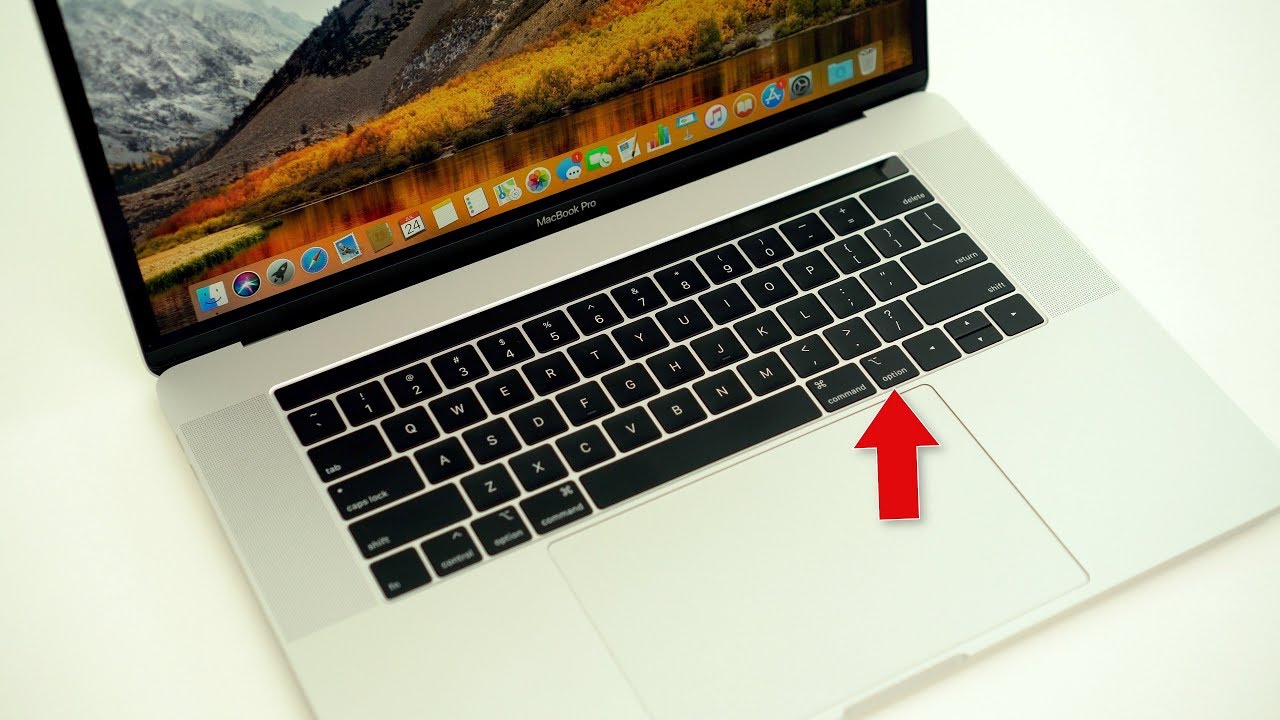

Try holding it down next time you access an app's menu bar options, for instance, and you'll often see several tweaked actions available to you.
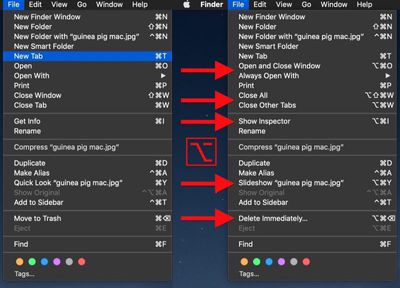
Option key finder menus

Additional Finder File actions revealed via the Option key

In the Finder File menu shown above, Open becomes Open and Close Window (if you have a file selected in Finder, selecting this opens the file and also closes the Finder window), Close Window becomes Close All, and Move to Trash becomes Delete Immediately, amongst other options.

Below are just some of our favorite uses for the Option key in macOS. Feel free to share any other Option key actions you frequently use in the comments section at the bottom of this article.

Finder View Actions

In Finder's List view, hold Option and click the triangle next to a folder to expand it, and the contents of any subfolders nested inside will also be revealed.
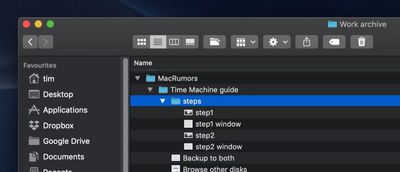
finder option key features
In Column view, you can also resize all columns in a window by Option-clicking on the column selector.

Holding the Option key when you click menu bar system icons often reveals hidden actions. Option-click the Wi-Fi icon for example and you'll see extensive information on the currently connected network.

menu bar system icons option key
Do the same for the volume icon and you'll be able to change not only the audio output device but the input device, too. Elsewhere, Option-clicking the Time Machine icon will let you Browse Other Backup Disks, and you can also Option-click the Notifications Bar icon to turn it on and off.

Safari Browser

To clear all history including cached website data and cookies, you would select Safari -> Clear History... from the Safari menu bar. If you hold the Option key though, Clear History... becomes Clear History and Keep Website Data.
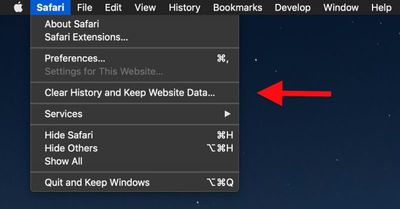
safari keep website data
Hold down the Option key when you click a tab's close button, and all other tabs will close except for that one. In Safari's File menu, the Close Tabs option also becomes Close Other Tabs with Option held down.

Preview File Formats

When you come to save or export a file in Preview, Option-click the Format dropdown to get access to several more available file types.
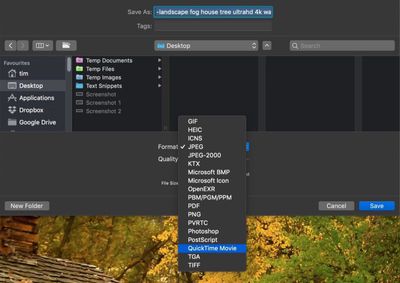
Preview file formats

Open Preference Panes

If your Mac's keyboard has icons printed on some of the functions keys, you can press them to perform special features. For example, pressing the F11/12 keys with speaker icons adjusts the volume.
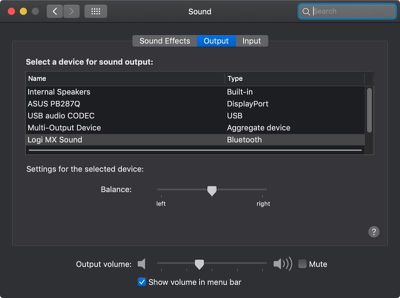
sound system preference pane
If you hold down Option when you press one of these keys, this will open the System Preference pane associated with the feature. Option-F11/12 opens the Sound pane, for instance.

Scrollbar Behavior

In the General preference pane, you can select between two forms of scrollbar behavior: Jump to the next page and Jump to the spot that's clicked.
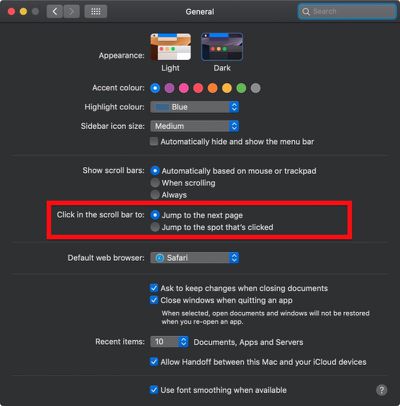
scrollbar options general preference pane
You can actually switch between the two behaviors on the fly: simply Option-click anywhere in a window's scrollbar to jump to that location in the open document or webpage.

Force Quit Apps

If an application is acting up, hold down Option and right-click its icon in the Dock to reveal a Force Quit action in the popup menu.

force quit apps from dock icon menu
You can also Option-click an app icon to bring its window to the forefront and simultaneously hide another app's active window.

Resize Windows

When you drag your mouse from one side or corner of a window to resize it, you can hold the Option key to resize the dimensions of the window from its center point instead.


option resize windows

Adjusting from one corner affects all corners with the Option key held
If you're a fan of modifier functions in macOS apps and you'd like to learn more, check out the free CheatSheet app by Media Atelier.

Top Rated Comments

Analog Kid Avatar
105 months ago
Option: the ultimate cheat code

I've got mixed feelings about this approach to UI-- on the one hand it hides unnecessary parts of the interface while making more available to "power users". On the other, it seems to go against the principle that available interactions should be obvious.

I'm always forgetting to try option in most places, and there's other places where I probably never would. The file type box in Preview? Do people find stuff like this by just spending a weekend option clicking everywhere or does Apple reference it deep in their docs somewhere?

Score: 14 Votes (Like | Disagree)
AgentAnonymous Avatar
105 months ago
Now try doing this on a tablet, “the iPad is totally a computer” people.

Score: 12 Votes (Like | Disagree)
StellarVixen Avatar
105 months ago
That's why it's called "option key", probably, because it gives you more options.
Score: 8 Votes (Like | Disagree)
105 months ago
Thanks for this! Why is Apple not telling us this? There should be a dedicated site or an article about every little secret.
This article showing various keyboard shortcuts using Option key and others dates back to Dec 2014, and I am sure there was a previous version that goes back further.

https://support.apple.com/en-us/HT201236

Also, Help menu / search on "keyboard shortcuts" has usually returned help pages for keyboard shortcuts in most Mac apps. Also in various third-party apps.

This hidden Option key behavior may not be limited to Apple. What happens when other developers start doing the same thing in their own applications? "Well, Apple did it, why can't we?" Apple needs to set a good example for all other Mac developers.
Apple and third party developers have been doing this for a long time, this is nothing new. They have been using option + <some action or key> since System 6 in 1989 or before, and making them appear in the menubar by just holding down the Option key (or other keys) since System 7 in 1990.
Score: 6 Votes (Like | Disagree)
twistedpixel8 Avatar
105 months ago
Safari - Option Click to "Quit and Keep Windows"

I never knew that was there until just now and every single time I re-open Safari I go to "History - Reopen All Windows from Last Session" so that's a time saver !

Of course I should probably just learn some other way to go back to stuff and not keep tabs open for weeks on end that doesn't end in my just parking them and forgetting about them like with the reading pane.
You don’t even have to do that - there’s an option in Safari’s preferences to “reopen all windows from last session” on launch. It’s amazing. Unless, like me, you have 20 windows minimized with around 10 tabs each. I usually go make a coffee while Safari opens them all lol.
Score: 5 Votes (Like | Disagree)
105 months ago
Now try doing this on a tablet, “the iPad is totally a computer” people.
The iPad Pro has keyboard shortcuts and an option key and a totally different interaction paradigm so, yeah, you can see people doing some of these things.
Score: 5 Votes (Like | Disagree)

Popular Stories

duo aquarium

More Fun iPhone Duo Apps: 30 New Picks to Try

Friday November 6, 2026 3:27 pm PST by
When the iPhone Duo launched, we shared a list of some of the fun apps developers created for the new form factor. Two weeks out, developers are continuing to come up with fresh ideas, so we thought we'd share some of our favorites. Games Marbles Unhinged ($2.99) - Marbles Unhinged is a marble maze designed for the Duo. When you fold it, the floor turns into a ramp. If you stand the top...
apple pro tell logo

Apple Launching Five New Products Today

Thursday November 5, 2026 12:59 am PST by
Apple is launching five new products on Friday, November 6, following pre-orders that opened last week, including its first touchscreen MacBook Pro models. The following new products will be available from today: iPad mini with OLED display and A20 Pro chip iMac with M6 chip 14-inch MacBook Pro with M6 chip 14-inch MacBook Pro with OLED touchscreen 16-inch MacBook Pro with OLED...
iOS 28 AI

Apple Taking New Approach to Developing iOS 28 and macOS 28

Sunday November 8, 2026 7:42 am PST by
Apple has made a change to its development process for iOS 28, macOS 28, and corresponding software updates, according to Bloomberg's Mark Gurman. In his Power On newsletter today, he said Apple separates development of each year's new operating systems into three major stages. Typically, he said each stage consists of four weeks of coding followed by a four-week "convergence" period where...
Latest Stories
Apple Store Subscription Sign-Up Controversy Exposed
2 hours ago
Siri AI Rumored to Become 'More Like an Agent' as Early as Next Year
12 hours ago
Apple Taking New Approach to Developing iOS 28 and macOS 28
14 hours ago
Early Apple Black Friday Deals on Apple Watch, MacBook Air, and More
1 day ago
'Backglow' Lets You Customize New MacBook Pro's Glowing Apple Logo
1 day ago
Top Stories: Apple Product Launches, iOS 27.3 Beta, and More
2 days ago
More Fun iPhone Duo Apps: 30 New Picks to Try
2 days ago
Hands-On With Apple's New OLED Touchscreen MacBook Pro
2 days ago
Apple Store With All-New Design Opening Soon in Southern California
2 days ago
Control the Glowing Apple Logo on Your New MacBook Pro
2 days ago
Apple Shares New 'Apple Card: Apply and Use in Minutes' Ad
3 days ago
Apple Says More Than 100,000 Apps Optimized for iPhone Duo, Here's What's Still Missing
3 days ago
Early Black Friday Deals Kickoff With Steep Discounts on Apple Watch Ultras and More
3 days ago
The MacRumors Show: iOS 27.3 Looks Like a Huge Update
3 days ago
Best Buy's Black Friday Event Begins With Sitewide Savings on Apple, TVs, More
3 days ago
Apple Releasing Yet Another Two New Products Next Week
3 days ago
MacBook Air Drops to Lowest Price in Months With Amazon's $250 Discount
3 days ago
Apple Rumored to Drop the iPhone's Action Button Next Year
3 days ago
Apple's Extended Return Policy Now in Effect for 2026 Holiday Season
3 days ago
Apple Music Classical Updated With New Icon and Refreshed Design
3 days ago
OLED iPad Mini, M6 iMac, and New MacBook Pros Available From Today
3 days ago
Apple Surveys iPhone Duo Buyers About Crease and Camera
3 days ago
Apple's First Touchscreen Mac is Now Arriving to Customers
3 days ago
Claude Gets Personal Finance Feature With Bank Account Linking
3 days ago
Apple Arcade Adds Crossy Road Rush and NBA 2K27
3 days ago
Apple's New HomeView Smart Home Hub: Here's How Much RAM It Has
3 days ago
iPad Mini vs. iPad Air Buyer's Guide: Now Just $50 Apart
3 days ago
First iOS 27.3 and macOS Golden Gate 27.3 Public Betas Now Available
3 days ago
Apple Announces a New Mac Sales Record
3 days ago
Paid $200 for Logic Pro? Apple Says You Won't Get This New Feature
3 days ago









































