Apple Silicon Unified Memory: How Much Mac RAM Do You Need? - MacRumorsOpen MenuShow RoundupsShow Forums menuVisit ForumsOpen Sidebar
Skip to Content

Apple Silicon Unified Memory: How Much Mac RAM Do You Need?

When choosing a new Mac, one of the most important decisions you'll make is how much memory to configure. This guide helps you to work out how much RAM you need.
apple silicon feature joeblue
With the advent of Apple silicon and its unified memory architecture in 2020, the traditional understanding of RAM has evolved, leading to new considerations for users when selecting a memory option. Unlike traditional PC RAM, where separate components like the CPU and GPU each have their own dedicated memory pools, Apple's unified memory architecture allows all processing units to access a single, shared pool of high-bandwidth, low-latency memory.

As a result, in Apple silicon systems, data doesn't need to be copied between multiple memory areas, significantly improving speed and power efficiency. By uniting memory, Apple devices with this technology theoretically deliver superior performance across multitasking, creative workflows, and demanding applications while minimizing the latency typically associated with data transfer between separate memory types. With the optimizations of macOS, this means that less memory can go further than before, for most Mac users.

All Mac models now start with 16GB of memory, up from 8GB, with the option to upgrade to higher configurations with build-to-order models. However, choosing to do so can add considerable cost to the base price of a new Mac.

To help you make the best choice for your workflow and budget, here's a breakdown of who should choose each memory tier currently available in the entire Mac lineup and why it may be the right fit for you:

  • 16GB: General users, students, and professionals with standard workloads should opt for 16GB. This configuration is perfect for those who primarily browse the web, stream content, use productivity apps, and perform multitasking. Thanks to the performance of Apple silicon and the efficiency of macOS, 16GB is more than sufficient for a smooth experience with everyday tasks.
  • 24GB: Users who need slightly more headroom for multitasking and moderate creative work should consider 24GB. This tier is ideal for those who work with slightly heavier applications such as video editing, gaming, graphic design, or coding but do not push these tasks to the absolute extreme. It provides an additional buffer for users who run multiple intensive apps simultaneously and perform more multitasking than what 16GB can handle comfortably.
  • 32GB, 36GB, or 48GB: Professionals engaging in intensive creative workflows, such as video editing in 4K, music production with multiple tracks, or large-scale coding projects, should opt for 32GB, 36GB, or 48GB. These configurations suit users who frequently use memory-heavy applications like Adobe Creative Cloud apps, Xcode, or virtual machines. It provides sufficient power for consistent performance without frequent reliance on disk swapping, even under substantial workloads.
  • 64GB: Power users and creative professionals who manage high-resolution media and extensive multitasking should choose 64GB. It is ideal for those working on large 3D modeling projects, editing 8K video, or handling complex simulations and data analysis. This memory quantity should support running multiple virtual machines or advanced software development environments without any slowdown.
  • 96GB: High-end creative professionals and developers handling intensive projects involving large datasets or media should consider 96GB. This tier offers significant overhead for those who need more than 64GB, ensuring seamless performance when editing multiple streams of high-resolution video, detailed 3D rendering, or working with substantial datasets that need to be kept in active memory.
  • 128GB: Professionals in specialized fields like film editing, data science, or engineering should look at 128GB. This memory configuration is designed for workflows that involve extremely large projects and require vast amounts of data to be kept in active memory. It is perfect for those working on high-resolution visual effects in cinema, simulation-based software, or advanced scientific computations, providing robust multitasking and peak performance across demanding tasks.
  • 192GB: Enterprise-level users, researchers, and industry professionals dealing with mission-critical, memory-intensive applications should opt for 192GB. This option is suitable for large-scale data processing, machine learning, or AI development, ensuring maximum efficiency and reducing the need for data swapping between RAM and storage. It is also ideal for developers working on complex server-side projects requiring powerful single-machine testing.

With Apple silicon's Unified Memory Architecture and macOS's efficient memory management, the base 16GB configuration now meets the needs of most users, providing a good balance of cost and performance for everyday computing tasks and moderate creative work.

The increasing importance of demanding artificial intelligence features like Apple Intelligence and the potential for more intensive applications over time mean that those with more demanding workflows or plans for longevity should consider upgrading the memory. Opting for 24GB or 32GB can provide an added buffer for the future, supporting heavier multitasking, creative software, and emerging AI features. Higher configurations, such as 64GB or more, are better for professionals in fields that require significant data handling, including video production, 3D rendering, and machine learning.

For users who already own an Apple silicon Mac, it will be worthwhile to evaluate your current system's performance to determine whether you'll need more memory next time around. Consider whether your current memory configuration handles your typical workload efficiently or if you experience slowdowns during multitasking or when using resource-intensive applications. Ultimately, your decision should balance your current workload, any anticipated future requirements, and cost—especially since adding memory can be expensive and it cannot be changed after purchase.


Popular Stories

skyrim

Skyrim Comes to Apple Silicon Macs With New Unofficial Installer

Tuesday October 20, 2026 7:56 pm PDT by
Bethesda's beloved role-playing game "The Elder Scrolls V: Skyrim" has reached multiple generations of consoles since its 2011 debut, but it never officially came to the Mac. A new unofficial project called SkyrimMT now aims to make playing and modding it on Apple silicon Macs easier than ever. Mac owners have found ways to play Skyrim over the years, including installing Windows through...

apple pro tell logo

Apple Launching Five New Products Today

Thursday November 5, 2026 12:59 am PST by
Apple is launching five new products on Friday, November 6, following pre-orders that opened last week, including its first touchscreen MacBook Pro models. The following new products will be available from today: iPad mini with OLED display and A20 Pro chip iMac with M6 chip 14-inch MacBook Pro with M6 chip 14-inch MacBook Pro with OLED touchscreen 16-inch MacBook Pro with OLED...
duo aquarium

More Fun iPhone Duo Apps: 30 New Picks to Try

Friday November 6, 2026 3:27 pm PST by
When the iPhone Duo launched, we shared a list of some of the fun apps developers created for the new form factor. Two weeks out, developers are continuing to come up with fresh ideas, so we thought we'd share some of our favorites. Games Marbles Unhinged ($2.99) - Marbles Unhinged is a marble maze designed for the Duo. When you fold it, the floor turns into a ramp. If you stand the top...

Top Rated Comments

nutmac Avatar
26 months ago
MacRumors forgot to add:

16GB: For Chrome users with 1 tab.
24GB: For Chrome users with 2 tabs.
32GB or 36GB: For Chrome users with 3 tabs.
64GB: For Chrome users with 4 tabs.
96GB: For Chrome users with 5 tabs.
128GB: For Chrome users with 6 tabs.
192GB: For Chrome users with 7 tabs.

/s
Score: 70 Votes (Like | Disagree)
26 months ago
As much as you can put to use and afford. And, if you can afford some more, then get at least 50% more spare capacity for future needs.
Score: 51 Votes (Like | Disagree)
Darajavahus Avatar
26 months ago
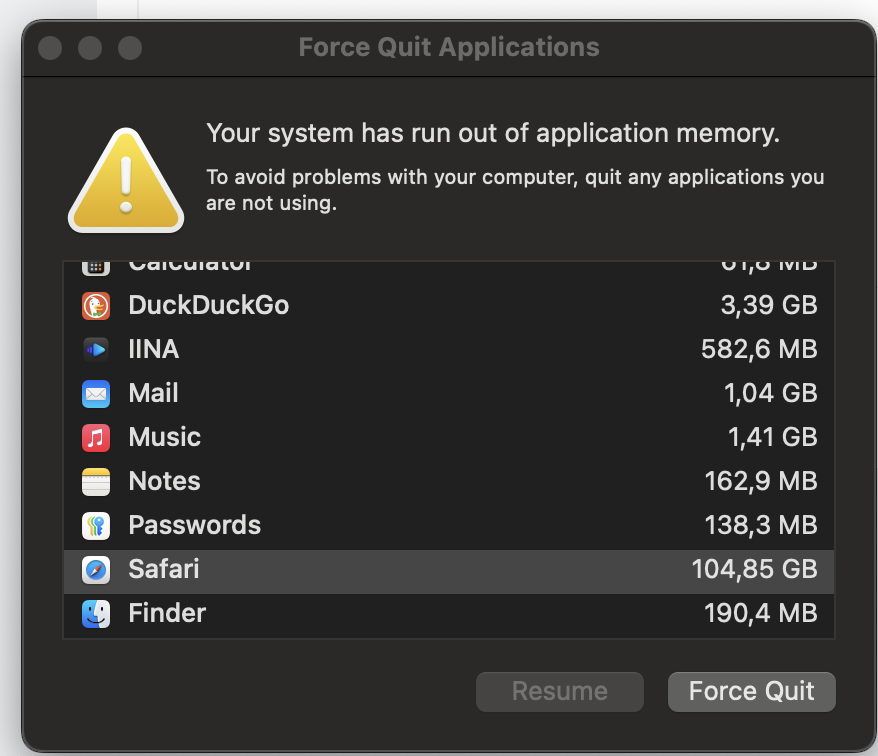
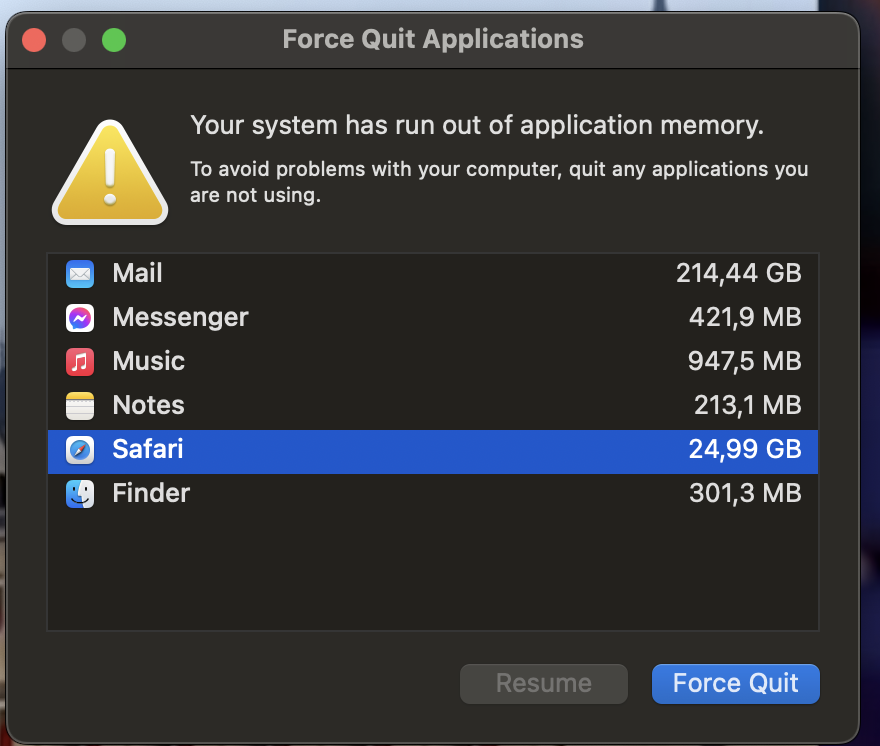
How do you explain just Mail or Safari wanting over 200GB??? I'm not Hollywood movie editor or enterprise-level researcher, I just have bunch of tabs when I'm researching what air fryer to buy and then system runs out of memory 🤷 whyyyy???

Attachment Image

Attachment Image
Score: 36 Votes (Like | Disagree)
26 months ago
This should be fun... a welcome distraction from the days events!


Says every poster to every other poster on this topic!

Attachment Image
Score: 34 Votes (Like | Disagree)
tonywalker23 Avatar
26 months ago
Don't know why anyone would ever need more than the 128mb in my PowerBook G4.
Score: 29 Votes (Like | Disagree)
26 months ago

Expect RAM use to grow over the life of your Mac. Plan accordingly...

My Advice: If you have an Apple Silicon (M1, M2, or M3) Mac now with only 8GB of RAM, consider selling it on eBay ...
The vast majority of Mac users use their computers for almost nothing. Shopping on Amazon and watching videos or maybe email. That's it. For those people, a Chromebook would work well. And even the M1 with 8GB is overkill.

Seriously, when was the last time you used Logic on an orchestral assignment with two dozen sampled tracks? And when you did, I bet it worked well enough with 16GB RAM. Most people use just one app, the web browser.
Score: 28 Votes (Like | Disagree)
Latest Stories
Siri AI Rumored to Become 'More Like an Agent' as Early as Next Year
5 hours ago
Apple Taking New Approach to Developing iOS 28 and macOS 28
6 hours ago
Early Apple Black Friday Deals on Apple Watch, MacBook Air, and More
1 day ago
'Backglow' Lets You Customize New MacBook Pro's Glowing Apple Logo
1 day ago
Top Stories: Apple Product Launches, iOS 27.3 Beta, and More
1 day ago
More Fun iPhone Duo Apps: 30 New Picks to Try
2 days ago
Hands-On With Apple's New OLED Touchscreen MacBook Pro
2 days ago
Apple Store With All-New Design Opening Soon in Southern California
2 days ago
Control the Glowing Apple Logo on Your New MacBook Pro
2 days ago
Apple Shares New 'Apple Card: Apply and Use in Minutes' Ad
2 days ago
Apple Says More Than 100,000 Apps Optimized for iPhone Duo, Here's What's Still Missing
2 days ago
Early Black Friday Deals Kickoff With Steep Discounts on Apple Watch Ultras and More
2 days ago
The MacRumors Show: iOS 27.3 Looks Like a Huge Update
2 days ago
Best Buy's Black Friday Event Begins With Sitewide Savings on Apple, TVs, More
2 days ago
Apple Releasing Yet Another Two New Products Next Week
2 days ago
MacBook Air Drops to Lowest Price in Months With Amazon's $250 Discount
2 days ago
Apple Rumored to Drop the iPhone's Action Button Next Year
2 days ago
Apple's Extended Return Policy Now in Effect for 2026 Holiday Season
2 days ago
Apple Music Classical Updated With New Icon and Refreshed Design
2 days ago
OLED iPad Mini, M6 iMac, and New MacBook Pros Available From Today
2 days ago
Apple Surveys iPhone Duo Buyers About Crease and Camera
3 days ago
Apple's First Touchscreen Mac is Now Arriving to Customers
3 days ago
Claude Gets Personal Finance Feature With Bank Account Linking
3 days ago
Apple Arcade Adds Crossy Road Rush and NBA 2K27
3 days ago
Apple's New HomeView Smart Home Hub: Here's How Much RAM It Has
3 days ago
iPad Mini vs. iPad Air Buyer's Guide: Now Just $50 Apart
3 days ago
First iOS 27.3 and macOS Golden Gate 27.3 Public Betas Now Available
3 days ago
Apple Announces a New Mac Sales Record
3 days ago
Paid $200 for Logic Pro? Apple Says You Won't Get This New Feature
3 days ago
Instagram's Edits Video Editor is Now Available on Mac
3 days ago