Here's How Interactive Widgets Work in macOS Sonoma - MacRumorsOpen MenuShow RoundupsShow Forums menuVisit ForumsOpen Sidebar
Skip to Content

Here's How Interactive Widgets Work in macOS Sonoma

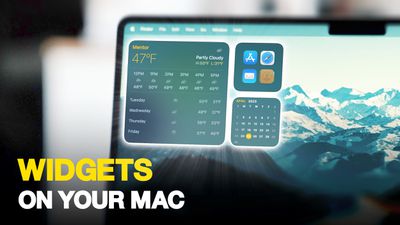
In macOS Sonoma, Apple has changed the widgets landscape. No longer do widgets have to be hidden offscreen and largely forgotten in the Notifications Center panel. Now they live right on your desktop – and they're interactive, too.
Widgets on Your Mac Thumb 3
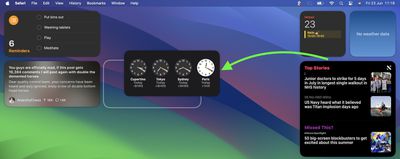
It's worth noting from the off that widgets can still be parked in Notification Center, but now they can also be dragged out onto the desktop. The first widget can be placed anywhere, then Apple provides placement guidance for subsequent widgets by displaying a widget-shaped outline, indicating where they can be snapped into position in relation to the others.
Screenshot 2023 06 23 at 11
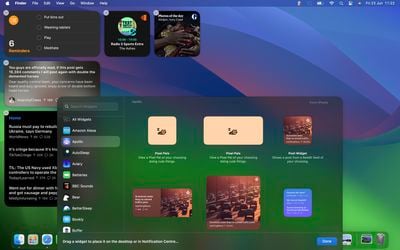
Alternatively, if you right-click on an empty space on the desktop, the menu that appears includes a new "Edit Widgets..." option. Selecting this brings up a widget gallery, which – thanks to a new Continuity feature between Apple devices – also includes widgets from your iPhone in all available sizes. So even if you don't have the corresponding Mac app, you can still use the iOS widget right on your desktop. Simply drag it from the gallery into an available space.
widgets macos
If you're running the macOS Sonoma beta, trying out iPhone widgets is a good way to get used to their interactivity until third-party developers have a chance to bake this into their Mac widgets. As it stands, only Apple's own widgets offer (sometimes buggy) interactions.

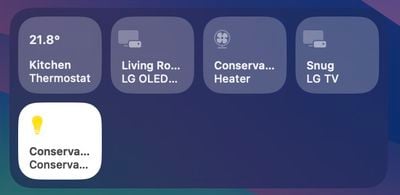
In the Home app widget, for example, you can control specific accessories by clicking the individual buttons to turn them on and off.
home widget
If you right-click a widget, any available customization options appear in the contextual menu. Widgets are available in Small, Medium, and Large sizes, and all include an option to "Remove Widget" if you want to get rid of it.
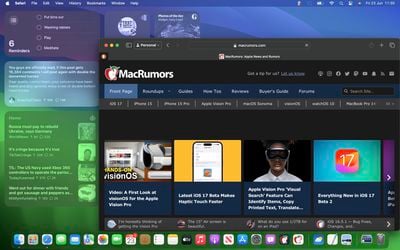
widgets fade
When not in use, widgets fade into the background by taking on the color of your wallpaper, so you can concentrate on the active app or window. There's also an option in System Settings to change the widget style to from full color to Monochrome, for a more uniform look.

Widgets have evolved in macOS Sonoma. By bringing them in from the dark and out into the open workspace of your desktop, users are actively encouraged to work alongside them. What are your thoughts on Apple's new take on Mac widgets? Are you more likely to use them in their new guise? Let us know in the comments.


Related Forum: macOS Sonoma

Popular Stories

iCloud iPhone 17 Pro

iPhone Users Who Pay for iCloud Storage Get Two New Perks on iOS 27

Thursday July 2, 2026 6:10 am PDT by
If you pay for certain iCloud+ storage plans beyond the 5GB that Apple offers for free, you will receive two more perks on iOS 27 at no additional cost. A summary of the two new iCloud+ perks on iOS 27:Increased daily usage limits for some new Apple Intelligence features, including image generation in the revamped Image Playground app. HomeKit Secure Video cameras receive generated video...
American Express Gold Apple Pay Feature

American Express Announces New Apple Pay Feature

Tuesday June 30, 2026 10:27 am PDT by
American Express today announced that you can now redeem Membership Rewards points when checking out with Apple Pay on the web and in apps on the iPhone and iPad. When checking out with Apple Pay on iOS 18 or iPadOS 18 or later, tap on your eligible American Express card (Platinum, Gold, Green, and others) and select the Membership Rewards points option. You can use points to cover all or...
series 10 apple watch titanium digital crown

Report: Apple Watch Redesign Coming Next Year With New Band System

Tuesday June 30, 2026 8:45 am PDT by
A "major overhaul" of the Apple Watch's design is due to arrive next year with a new system for connecting bands, according to a known Weibo leaker. In a set of recent posts, the leaker known as "Instant Digital" linked the new claim to older rumors about an "Apple Watch X" model, which was said to introduce a fresh design and break compatibility with the existing watch band system. Citing...

Top Rated Comments

therunningman Avatar
40 months ago

I'm surprised it has taken Apple this long to bring back widget functionality on the Mac desktop.
Absolutely!


Attachment Image
Score: 36 Votes (Like | Disagree)
ratbastard Avatar
40 months ago
Sounds a lot like an updated version of Dashboard.
Score: 31 Votes (Like | Disagree)
contacos Avatar
40 months ago

I'm surprised it has taken Apple this long to implement widget functionality on the Mac desktop.

I'm surprised it has taken Apple this long to bring back widget functionality on the Mac desktop.
Score: 24 Votes (Like | Disagree)
gwhizkids Avatar
40 months ago

Stop cluttering my desktop.
Active Desktop went nowhere, I highly doubt this will go anywhere either.
Easy response: just don’t add any widgets. Problem solved.

Not sure why you would deny this to all the rest of us who actually like this feature though.
Score: 22 Votes (Like | Disagree)
TheYayAreaLiving 🎗️ Avatar
40 months ago
Seems like you can fill your entire desktop with Widgets on Sonoma!

Check it out! 👇


Attachment Image
Score: 14 Votes (Like | Disagree)
adrianlondon Avatar
40 months ago
What's good about these (and yes, they're available on Intel macs - it's what I have) is that they're widgets from my phone's apps.

They keep themselves updated by magic (I have Bluetooth turned off on my phone and laptop). OK, it's via iCloud of course.

For example, I have desktop widgets now from iOS apps Readdle Calendars and Pedometer. They keep in sync with the phone.

Hint: Turn on the monochrome mode for widgets in Settings. They look great. You can duplicate them (in colour) in the Notification Centre thing if you wish.


Attachment Image
Score: 13 Votes (Like | Disagree)