Apple Maps: Complete Guide to iOS 13 - MacRumorsOpen MenuShow RoundupsShow Forums menuVisit ForumsOpen Sidebar
Skip to Content

Apple Maps: Complete Guide to iOS 13

Apple introduced updates to many of the built-in iOS apps in iOS 13, and Maps is no exception. The updated version of Maps has a long list of new features that are designed to make the Apple Maps app better able to compete with mapping apps from other companies.

There's a new Look Around street view level feature, a Collections feature for aggregating lists of your favorite places, a Favorites option for getting to your most frequently traveled places quickly, and some other smaller updates that are worth knowing about.

In this guide, we've highlighted all of the new features that are in the ‌Apple Maps‌ app in iOS 13.

Maps Redesign

Apple in iOS 12 debuted a rebuilt, updated Maps app that uses an Apple-designed Maps engine to bring more detailed views of things like foliage, pools, buildings, pedestrian pathways, and more.

The work done in iOS 12 is continued in iOS 13 with Apple expanding the new Maps app to the entire United States as of January 2020. Apple now plans to bring the updated Maps app to Europe.
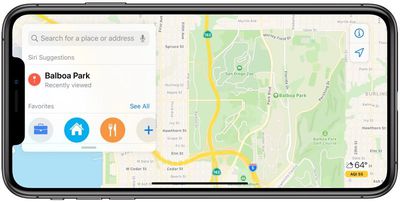
new maps app in iOS 13
Apple on stage when introducing iOS 13 mentioned these map updates and promised improved detailing for roads, beaches, parks, buildings, and more. Maps in iOS 12 overall looks similar to iOS 13 in states where new Maps have already rolled out, but there could be more detail coming in the future and there are some small changes worth pointing out.

Road Hazards and Traffic Conditions

When viewing the main Maps interface, the app now displays road hazards and traffic conditions so you can see the route ahead at a glance. Previously, this information was available, but only when turn-by-turn directions were activated.
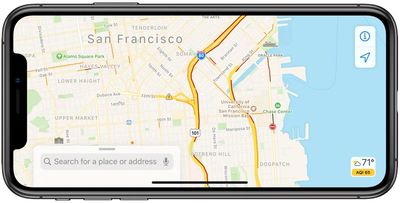
traffic conditions in maps in iOS 13
In iOS 13, traffic information is visible on the main map too.

Junction View

iOS 13 adds a Junction View option that's meant to help drivers avoid wrong turns and directional misses by lining them up in the correct lane before a turn or an elevated road.

Siri Directions

Siri gives more natural directions in iOS 13. Instead of saying something like "in 1,000 feet turn left," ‌Siri‌ might instead choose to say "turn left at the next traffic light," which is an easier instruction to follow since there's no distance estimation involved.

Venue Navigation Improvements

When you're navigating to something like a concert at a large venue, ‌Apple Maps‌ now offers up improvements that are better suited towards getting you to your end-point destination.

Real-Time Transit Schedules

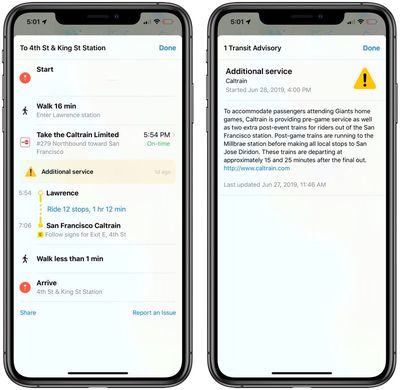
The Maps app now includes real-time transit schedules, arrival times, network stops, and system connections for transit directions to provide better overall route planning.
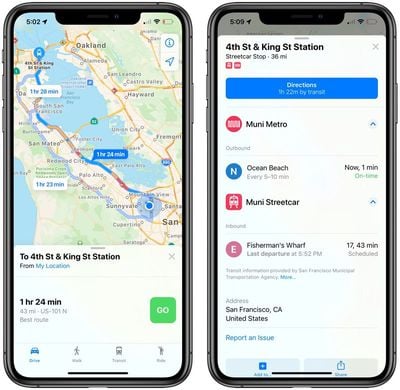
transit information in maps in iOS 13
Real-time information like outages, cancellations, and other changes are also listed in the ‌Apple Maps‌ app.

real-time notifications of traffic information in iOS 13

ETA Sharing

There's a new option to share your estimated time of arrival with friends, family, and coworkers. Your ETA will update dynamically, changing even when there's a significant traffic delay. This feature was removed from iOS 13 during the later betas, but could be re-added in the future.

Flight Status

Maps is now able to display up-to-the-minute information about flight terminals, gate locations, departure times, and more.

Place Cards for Businesses

Place Cards for businesses have been updated to be more helpful and easier to use. You'll see information like times of Today at Apple sessions when looking up an Apple Store, for example, or movie times when looking up a movie theater.

cards in maps in iOS 13

Look Around

Look Around is a new ‌Apple Maps‌ feature that's designed to be Apple's equivalent of Google Street View. Look Around offers up a street-level view of what's around you or a location you search for in the Maps app.
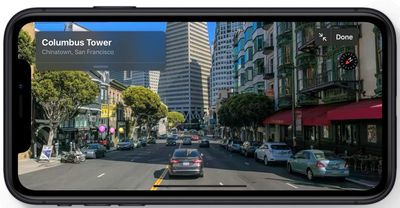
look around in maps in iOS 13
You can use Look Around in the main ‌Apple Maps‌ view whenever there's a pair of binoculars visible. Tapping on the binoculars icon delves into a close-up street level view of the location in a little card, which you can tap again to get to a full screen Look Around view.
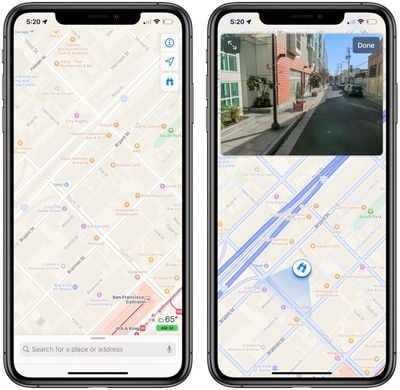
look around in maps in iOS 13
Look Around can also be brought up when searching for specific supported locations by tapping on the Look Around card in the search results.
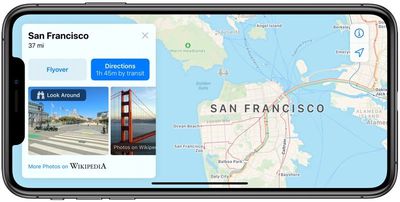
look around in maps in iOs 13
When in Look Around mode, tapping on the display lets you move through the Look Around area, and tapping a spot far off in the distance does a neat zoom in maneuver that's fun to watch.

In Look Around, all notable points of interest, like restaurants, businesses, parks, and more, are highlighted with identifying icons and place names so you can tell what's what.
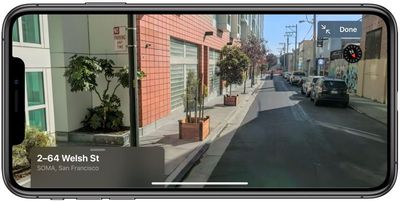
look around in apps in iOS 13
Look Around is limited to areas where a car can go because it's using data captured from a 360-degree camera on a vehicle. That means you can't zoom into areas like parks or beaches, for example, but you can see what's visible from the street.
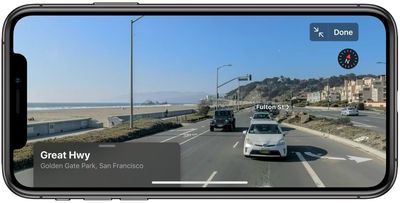
look around in maps in iOS 13
At launch, Look Around was limited to parts of California, Nevada, and Hawaii, but it has since expanded to Los Angeles, Houston, New York City, Boston, Philadelphia, and Washington, D.C. Apple plans to continue the expansion in 2019 and 2020.

Collections

Collections lets you search for and aggregate lists of different locations, such as restaurants you might want to try or places you might want to visit.
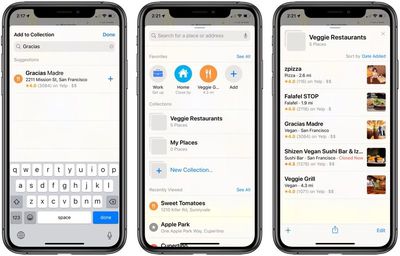
collections in maps in iOS 13
Collection lists can be shared, so you can make up lists of places for friends and family visiting you in your city and then share it with them, for example.

Favorites

Favorites is a new Maps feature that lets you search for specific places and then add them to a list. Favorites are meant for places that you visit frequently, and Home and Work are already added by default.
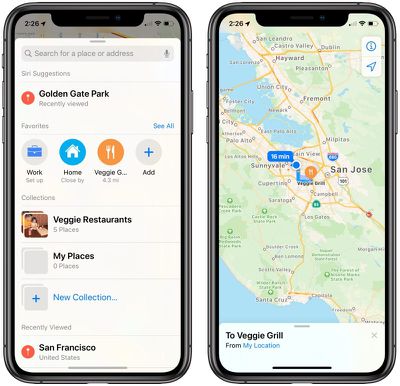
favorites in maps in iOS 13
You can add any place you go to often to the Favorites list, such as a favorite restaurant or coffee shop, or a friend's house. Tapping on one of your Favorites brings up directions to that spot right away, so think of it like a speed dial option for Maps.

Maps Feedback Form

Apple introduced a redesigned customer feedback interface in iOS 13, which is designed to make it easier for ‌Apple Maps‌ users to submit corrections for things like incorrect addresses, business locations, or operating hours.

CarPlay

All of the new features introduced in the Maps app in iOS 13, such as Favorites, Collections, and Junction View have been added to CarPlay. The Maps app in ‌CarPlay‌ also provides updated route planning, search, and navigation.

Guide Feedback

Have questions about Maps, know of an iOS 13 Maps feature we left out, or want to offer feedback on this guide? Send us an email here.


Popular Stories

duo aquarium

More Fun iPhone Duo Apps: 30 New Picks to Try

Friday November 6, 2026 3:27 pm PST by
When the iPhone Duo launched, we shared a list of some of the fun apps developers created for the new form factor. Two weeks out, developers are continuing to come up with fresh ideas, so we thought we'd share some of our favorites. Games Marbles Unhinged ($2.99) - Marbles Unhinged is a marble maze designed for the Duo. When you fold it, the floor turns into a ramp. If you stand the top...
apple pro tell logo

Apple Launching Five New Products Today

Thursday November 5, 2026 12:59 am PST by
Apple is launching five new products on Friday, November 6, following pre-orders that opened last week, including its first touchscreen MacBook Pro models. The following new products will be available from today: iPad mini with OLED display and A20 Pro chip iMac with M6 chip 14-inch MacBook Pro with M6 chip 14-inch MacBook Pro with OLED touchscreen 16-inch MacBook Pro with OLED...
iOS 28 AI

Apple Taking New Approach to Developing iOS 28 and macOS 28

Sunday November 8, 2026 7:42 am PST by
Apple has made a change to its development process for iOS 28, macOS 28, and corresponding software updates, according to Bloomberg's Mark Gurman. In his Power On newsletter today, he said Apple separates development of each year's new operating systems into three major stages. Typically, he said each stage consists of four weeks of coding followed by a four-week "convergence" period where...

Top Rated Comments

ipedro Avatar
96 months ago
Look Around fills in the last piece that I occasionally still used Google Maps for. Apple not only matched Google but beats it in my opinion. The ease of use of navigating via Flyover and now Look Around is far superior to Street View.

It was all worth the growing pains. Apple owns a critical piece of the data and experience used throughout the entire Apple ecosystem.

Remaining at the mercy of their main competitor would have been a massive strategic mistake. Steve Jobs made the right call moving to an in house Maps app.


Score: 18 Votes (Like | Disagree)
jarman92 Avatar
96 months ago
Every year I SO want to use Apple Maps, but every year I'm disappointed. Currently running iOS 13 beta in Barcelona, and Apple doesn't have one iota of transit info. Haven't even tried POIs but I imagine they're equally terrible :(
Score: 13 Votes (Like | Disagree)
Jeremy3292 Avatar
96 months ago
Unfortunately, none of these features address the main problem which is lack of an extensive database of POIs like Google has. Anyone remember iOS SIX? 7 cycles later and still no dice. Carry on
Score: 12 Votes (Like | Disagree)
utwarreng Avatar
96 months ago
How about the basic ability to plan a trip that stops at multiple destinations? Google Maps has for years allowed me to say "let's go to A, then to B, then to C, then back home." Sometimes when I have a number of different destinations, I just want to put in a list of addresses and have Apple Maps spit back, "this is the most efficient route for you to drive to all of your destinations," or at least let me manually add multiple destinations.
Score: 10 Votes (Like | Disagree)
96 months ago
Outside the US (Heck even outside of California really) Apple Maps is a barren wasteland of nothingness and shouldn't even realistically be offered.
Apple puts zero effort on outside-US.
Score: 7 Votes (Like | Disagree)
96 months ago
I would really like to ditch google maps, but Apple Maps is still 5 years behind google...

* No support for cyclists - In Europe there are many dedicated routes for bikes and e-scooters. Entirely missing.
* POIs of any kind are missing, outdated and difficult to update. I had to send a request 3 times to have a friends business updated despite the obvious (!) wrong entry.
* No direct ratings within the App, relies on 3rd party only.

EDIT: Yeah... missed the most important... as Richard above stated... the missing stops make it a show stopper some use cases.
Score: 6 Votes (Like | Disagree)
Latest Stories
Apple Store Subscription Sign-Up Controversy Exposed
3 hours ago
Siri AI Rumored to Become 'More Like an Agent' as Early as Next Year
13 hours ago
Apple Taking New Approach to Developing iOS 28 and macOS 28
15 hours ago
Early Apple Black Friday Deals on Apple Watch, MacBook Air, and More
1 day ago
'Backglow' Lets You Customize New MacBook Pro's Glowing Apple Logo
1 day ago
Top Stories: Apple Product Launches, iOS 27.3 Beta, and More
2 days ago
More Fun iPhone Duo Apps: 30 New Picks to Try
2 days ago
Hands-On With Apple's New OLED Touchscreen MacBook Pro
2 days ago
Apple Store With All-New Design Opening Soon in Southern California
2 days ago
Control the Glowing Apple Logo on Your New MacBook Pro
2 days ago
Apple Shares New 'Apple Card: Apply and Use in Minutes' Ad
3 days ago
Apple Says More Than 100,000 Apps Optimized for iPhone Duo, Here's What's Still Missing
3 days ago
Early Black Friday Deals Kickoff With Steep Discounts on Apple Watch Ultras and More
3 days ago
The MacRumors Show: iOS 27.3 Looks Like a Huge Update
3 days ago
Best Buy's Black Friday Event Begins With Sitewide Savings on Apple, TVs, More
3 days ago
Apple Releasing Yet Another Two New Products Next Week
3 days ago
MacBook Air Drops to Lowest Price in Months With Amazon's $250 Discount
3 days ago
Apple Rumored to Drop the iPhone's Action Button Next Year
3 days ago
Apple's Extended Return Policy Now in Effect for 2026 Holiday Season
3 days ago
Apple Music Classical Updated With New Icon and Refreshed Design
3 days ago
OLED iPad Mini, M6 iMac, and New MacBook Pros Available From Today
3 days ago
Apple Surveys iPhone Duo Buyers About Crease and Camera
3 days ago
Apple's First Touchscreen Mac is Now Arriving to Customers
3 days ago
Claude Gets Personal Finance Feature With Bank Account Linking
3 days ago
Apple Arcade Adds Crossy Road Rush and NBA 2K27
3 days ago
Apple's New HomeView Smart Home Hub: Here's How Much RAM It Has
3 days ago
iPad Mini vs. iPad Air Buyer's Guide: Now Just $50 Apart
3 days ago
First iOS 27.3 and macOS Golden Gate 27.3 Public Betas Now Available
3 days ago
Apple Announces a New Mac Sales Record
4 days ago
Paid $200 for Logic Pro? Apple Says You Won't Get This New Feature
4 days ago