

Apple today released iOS 15.1, the first major update to the iOS 15 operating system that was released in September. iOS 15.1 introduces new features that were delayed from iOS 15 plus it adds camera improvements for iPhone 13 Pro users.
This guide highlights everything that's been added in the iOS 15.1 update.
SharePlay
Integrated into the FaceTime app, SharePlay is a feature that's designed to allow people to do more together virtually using FaceTime. There are built-in options for listening to music with others with playlist sharing and watching TV and movies with syncing.

There's also a SharePlay screensharing component for sharing what's on your iPhone, iPad, or Mac with someone else, a feature great for group planning or assisting someone with device troubleshooting.
SharePlay was meant to be introduced as part of the initial iOS 15 update, but Apple had to delay it because it was buggy and not ready for release.
ProRes Video Capture (iPhone 13 Pro)
When the iPhone 13 Pro models launched, Apple promised that a high-quality ProRes video option would be coming in an update, and it has arrived in iOS 15.1.
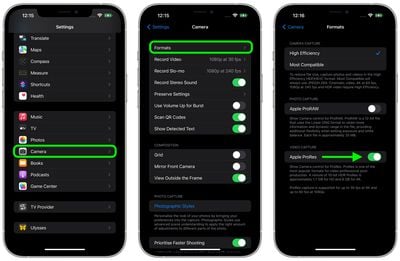
ProRes is a professional video recording format used by TV show, commercial, and movie creators, and the format offers higher color fidelity and less compression. ProRes support allows iPhone 13 Pro and Pro Max owners to capture, edit, and share professional-quality videos from their devices.
You can enable ProRes by going to the Camera section of the Settings app and tapping on "Formats." From there, toggle on "Apple ProRes."
ProRes video capture is limited to 30fps at 1080p on devices with only 128GB of storage, but higher capacity devices can record in 4K. Apple says that a one-minute 10-bit HDR ProRes video takes up 1.7GB of space when recorded in HD mode, or 6GB in 4K mode.
Auto Macro Toggle (iPhone 13 Pro)
For macro shots, the iPhone 13 Pro models switch over to the Ultra Wide lens when the iPhone's camera gets close to an object, which some people are not a fan of because it can be difficult to get a shot with the camera lenses swapping back and forth.
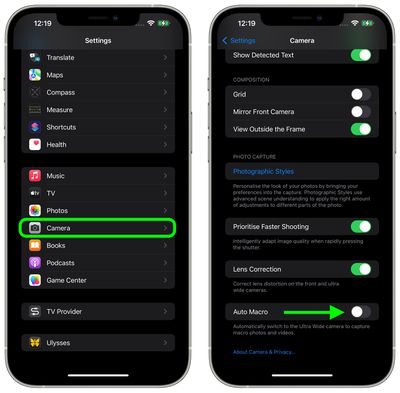
The iOS 15.1 update adds a new toggle to turn off Auto Macro, and when disabled, the Camera app will not automatically switch over to the Ultra Wide camera for macro photos and videos.
Auto Macro can be turned off in the Camera section of the Settings app by scrolling down and toggling off the "Auto Macro" option.
Lossless Audio and Dolby Atmos With Spatial Audio for HomePod
Paired with the HomePod 15.1 software, iOS 15.1 brings Lossless quality and Dolby Atmos Spatial Audio to the HomePod and the HomePod mini.
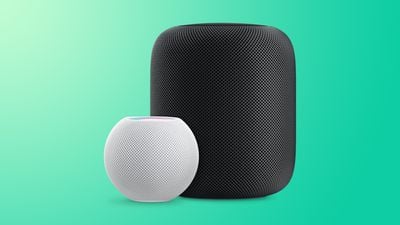
Lossless audio and Dolby Atmos can be enabled through the Home app. Open up Home Settings, tap on your profile, and then under Media, tap on Apple Music. From there, toggle on Lossless Audio and Dolby Atmos.
Vaccine Cards in the Wallet App
iPhone users who have added their COVID-19 vaccination records to the Health app on the iPhone can now use those records to generate a vaccination card in the Wallet app. The Apple Wallet vaccination card can be shown to businesses, venues, restaurants, and more that are requiring vaccines for entry.
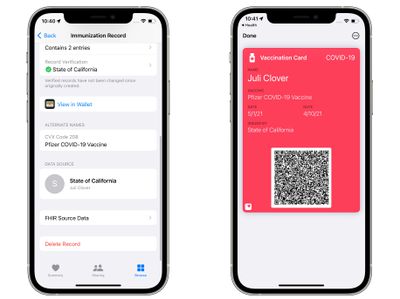
Any vaccination record available through the SMART Health Cards specification can be added to the Health app and transferred to Wallet.
California, Louisiana, New York, Virginia, Hawaii, and some Maryland counties support Smart Health Cards, as do Walmart, Sam's Club, and CVS Health. So those in the specific supported states should be able to look up their information in state databases, but those who were vaccinated through companies like Walmart and CVS can also add their information to the Health and Wallet apps because it's the same system.
Home App
There are new automations triggers that can be created based on HomeKit-enabled sensors that detect humidity, air quality, or light level.
Shortcuts
Shortcuts includes new actions for overlaying text on images or GIFs, and there are new Siri games.
iPhone 12 Battery Algorithms
For iPhone 12 models, there are updated battery algorithms that will offer better estimates of battery capacity over time.
iPad Live Text
On the iPad, the update adds the above listed features and support for Live Text in the Camera app. With Live Text, the Camera can detect text, phone numbers, addresses, and more, with the feature available on iPads that have an A12 Bionic chip or later. Live Text was already available on the iPhone.
Bug Fixes
The update includes several bug fixes for issues with Photos storage, the Weather app, the Wallet app, Wi-Fi, and more.
- Photos app may incorrectly report storage is full when importing photos and videos
- Weather app may not show current temperature for My Location, and may display colors of animated backgrounds incorrectly
- Audio playing from an app may pause when locking the screen
- Wallet may unexpectedly quit when using VoiceOver with multiple passes
- Available Wi-Fi networks may not be detected
Guide Feedback
Know of an iOS 15.1 feature we left out or want to offer feedback on this guide? Send us an email here.




















