Everything New in iOS 15.2 Beta 2: Legacy Contacts, Hide My Email Improvements, and More - MacRumorsOpen MenuShow RoundupsShow Forums menuVisit ForumsOpen Sidebar
Skip to Content

Everything New in iOS 15.2 Beta 2: Legacy Contacts, Hide My Email Improvements, and More

Apple today released the second beta of an upcoming iOS 15.2 update to developers for testing purposes, and the software update adds quite a few new features. This guide highlights everything new that we've found in the second iOS 15.2 beta.
iOS 15

Legacy Contacts

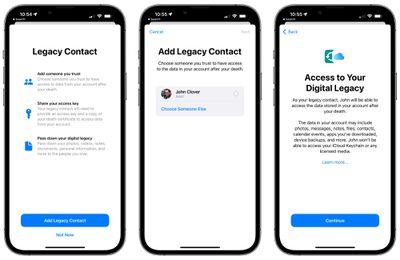
With Legacy Contacts, you can set a trusted person to be able to access your Apple ID and your data (or "Digital Legacy") after you die. The person that you designate as your contact can access your photos, messages, notes, files, contacts, calendar events, apps, device backups, and more. iCloud Keychain passwords remain inaccessible, as does licensed media.
legacy contact 2
The Legacy Contact option can be accessed by opening up the Settings app, selecting "Password & Security," and choosing "‌Legacy Contact‌" from the list. From there, you can select a trusted person to access your account after you pass away.

Find My Lost Item Scanning

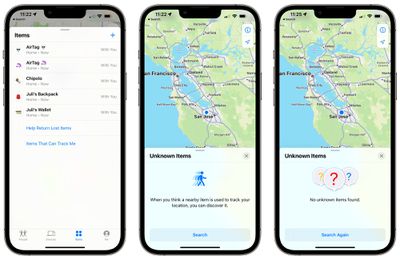
In the Find My app, Apple has added a new option for "Items That Can Track Me." Tapping on this allows users to search for nearby items that might be used to track their location.
apple unknown items scan
When activated, the Unknown Items feature scans for anything that's nearby, and will let users know either way if there's a device that belongs to someone else nearby. If an item is detected, Apple offers instructions on how to disable the device so that it can no longer be used for tracking purposes.

There's also a "Help Return Lost Items" option that also scans for nearby devices that might be lost, and it works similarly to the tracking scan. If a lost device is found, Apple provides instructions on how to find who it belongs to.

iPadOS TV app

In iPadOS 15, Apple has introduced a new design for the TV app. The TV app features a sidebar, which makes navigation between the various sections of the TV app simpler.

tv app design ios 15 2
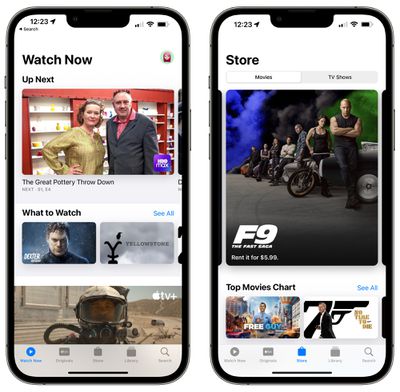
In iOS 15.2, there's a dedicated "Store" tab in the TV app for accessing movies and TV shows that can be purchased. The new design and the addition of a Store tab may help separate Apple TV+ content from paid content, as the existing design has been confusing for some users.
tv app store tab ios 15 2

Always-On Dark Mode for CarPlay Maps App

Code in iOS 15.2 suggests that there's a new option to turn Dark Mode on permanently for the CarPlay Maps app.

Hide My Email in the Mail App

You can use Hide My Email directly from the Mail app after installing the iOS 15.2 beta. When composing an email, just tap on the "From" field and select the "Hide My Email" option to generate a random email address.
ios15 mail privacy feature
Hide My Email is available to everyone who has an ‌iCloud‌+ plan, and it's a useful feature for protecting your email address.

All the emails sent to the random Apple-created email address are forwarded to you so you can respond if needed, but the person on the receiving end does not see your real email address. And if you start getting spam emails from someone, you can just delete the email address and put a stop to it.

Display Repair Restriction Changes

Apple today told The Verge that it is introducing a software update that will change an iPhone 13 policy that caused Face ID to be non-functional when repairs were made to a broken display. Apple has a microcontroller that pairs the iPhone 13 to its display, and when performing a display repair, the microcontroller must be paired to the display using Apple's tools.

Independent repair shops do not have access to those tools, and they were upset about being unable to easily perform display repairs. Apple is removing the microcontroller pairing requirement that disabled ‌Face ID‌ for iPhone 13 models with swapped displays, and code suggests that the change is in the iOS 15.2 beta.

Communication Safety

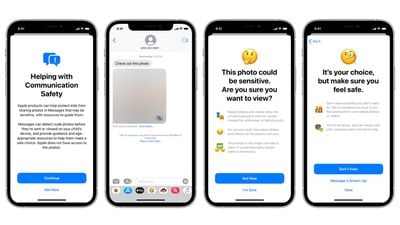
With the second beta of iOS 15.2, Apple is enabling Communication Safety in Messages for children. The feature is designed to scan incoming messages on children's devices for nudity, and it is opt-in and must be enabled by parents. It is limited to the accounts of children and is not the same as the CSAM functionality that Apple still has in development.
communication safety 1

Bugs

Apple says there are a few remaining bugs in the beta. Streaming in the Music app can cause higher CPU usage and faster battery drain, and users who import a verifiable vaccination record are not able to add it to the Wallet app at this time.

Macro Mode Toggle

iOS 15.2 adds a manual toggle for Macro mode, in the form of a flower icon that can be tapped to toggle Macro mode off when the camera is close to an object.

To get the option of the new toggle, users need to go to Settings, navigate to Camera, and turn off Auto Macro. Then, when close enough to an object, the toggle will appear automatically. Apple has also added new Preserve Settings for Auto Macro.

Guide Feedback

See a new feature in iOS 15.2 that's not listed here? Let us know in the comments.

Related Forum: iOS 15

Popular Stories

apple pro tell logo

Apple Launching Five New Products Today

Thursday November 5, 2026 12:59 am PST by
Apple is launching five new products on Friday, November 6, following pre-orders that opened last week, including its first touchscreen MacBook Pro models. The following new products will be available from today: iPad mini with OLED display and A20 Pro chip iMac with M6 chip 14-inch MacBook Pro with M6 chip 14-inch MacBook Pro with OLED touchscreen 16-inch MacBook Pro with OLED...


duo aquarium

More Fun iPhone Duo Apps: 30 New Picks to Try

Friday November 6, 2026 3:27 pm PST by
When the iPhone Duo launched, we shared a list of some of the fun apps developers created for the new form factor. Two weeks out, developers are continuing to come up with fresh ideas, so we thought we'd share some of our favorites. Games Marbles Unhinged ($2.99) - Marbles Unhinged is a marble maze designed for the Duo. When you fold it, the floor turns into a ramp. If you stand the top...
silver iphone 18 pro

Apple Rumored to Drop the iPhone's Action Button Next Year

Friday November 6, 2026 6:07 am PST by
Apple plans to merge the iPhone's Action button with the Camera Control starting next year, according to the leaker known as "Instant Digital." In a new post on Weibo, the leaker claimed that a single press of the combined button would open the camera, while a long press would trigger the function assigned to the Action button. They explicitly clarified that the dedicated Action button would ...

Top Rated Comments

simon3163 Avatar
65 months ago
So I can sit on a train and disable everyone’s AirTags ???!
Score: 9 Votes (Like | Disagree)
65 months ago
"Always-On Dark Mode for CarPlay Maps App"

How about a toggle in Maps between light and dark mode on the phone.

I have my phone set to Dark Mode, but I can't stand how the Maps is always on Dark mode also unless I change the whole system to light mode. During the day, it's really hard to read the maps on the phone in Dark mode.

So it would be nice if Apple would put a toggle in their apps that let you toggle between Light and Darks modes independently of how you have iOS set.
Score: 7 Votes (Like | Disagree)
Prof. Avatar
65 months ago
After i die, can i set up an option to nuke all my data? On all my devices?
Score: 6 Votes (Like | Disagree)
840quadra Avatar
65 months ago

Display Repair Restriction Changes

Apple today told The Verge that it is introducing a software update ('https://www.macrumors.com/2021/11/09/apple-lifting-iphone-13-display-restrictions/') that will change an iPhone 13 policy that caused Face ID to be non-functional when repairs were made to a broken display. Apple has a microcontroller that pairs the iPhone 13 to its display, and when performing a display repair, the microcontroller must be paired to the display using Apple's tools.

Independent repair shops do not have access to those tools, and they were upset about being unable to easily perform display repairs. Apple is removing the microcontroller pairing requirement that disabled Face ID for iPhone 13 models with swapped displays, and code suggests that the change is in the iOS 15.2 beta.
This is AWESOME to hear! Horray Apple for properly reacting to this issue. As a legacy Apple device owner, I enjoy my ability to repair my, and friend's phones, Macs, and other equipment.

This is Awesome!
Score: 5 Votes (Like | Disagree)
65 months ago

So I can sit on a train and disable everyone’s AirTags ???!
Sounds like you can find them. But I think the disable instructions involve removing the battery. So that gets awkward.
Score: 4 Votes (Like | Disagree)
65 months ago
Find my lost item scanning feature is good. The new TV app for iPad also looks good. Happy to hear that display repairs will not be affecting FaceID.
Score: 3 Votes (Like | Disagree)
Latest Stories
Siri AI Rumored to Become 'More Like an Agent' as Early as Next Year
6 hours ago
Apple Taking New Approach to Developing iOS 28 and macOS 28
8 hours ago
Early Apple Black Friday Deals on Apple Watch, MacBook Air, and More
1 day ago
'Backglow' Lets You Customize New MacBook Pro's Glowing Apple Logo
1 day ago
Top Stories: Apple Product Launches, iOS 27.3 Beta, and More
1 day ago
More Fun iPhone Duo Apps: 30 New Picks to Try
2 days ago
Hands-On With Apple's New OLED Touchscreen MacBook Pro
2 days ago
Apple Store With All-New Design Opening Soon in Southern California
2 days ago
Control the Glowing Apple Logo on Your New MacBook Pro
2 days ago
Apple Shares New 'Apple Card: Apply and Use in Minutes' Ad
2 days ago
Apple Says More Than 100,000 Apps Optimized for iPhone Duo, Here's What's Still Missing
2 days ago
Early Black Friday Deals Kickoff With Steep Discounts on Apple Watch Ultras and More
2 days ago
The MacRumors Show: iOS 27.3 Looks Like a Huge Update
2 days ago
Best Buy's Black Friday Event Begins With Sitewide Savings on Apple, TVs, More
2 days ago
Apple Releasing Yet Another Two New Products Next Week
2 days ago
MacBook Air Drops to Lowest Price in Months With Amazon's $250 Discount
2 days ago
Apple Rumored to Drop the iPhone's Action Button Next Year
2 days ago
Apple's Extended Return Policy Now in Effect for 2026 Holiday Season
2 days ago
Apple Music Classical Updated With New Icon and Refreshed Design
2 days ago
OLED iPad Mini, M6 iMac, and New MacBook Pros Available From Today
3 days ago
Apple Surveys iPhone Duo Buyers About Crease and Camera
3 days ago
Apple's First Touchscreen Mac is Now Arriving to Customers
3 days ago
Claude Gets Personal Finance Feature With Bank Account Linking
3 days ago
Apple Arcade Adds Crossy Road Rush and NBA 2K27
3 days ago
Apple's New HomeView Smart Home Hub: Here's How Much RAM It Has
3 days ago
iPad Mini vs. iPad Air Buyer's Guide: Now Just $50 Apart
3 days ago
First iOS 27.3 and macOS Golden Gate 27.3 Public Betas Now Available
3 days ago
Apple Announces a New Mac Sales Record
3 days ago
Paid $200 for Logic Pro? Apple Says You Won't Get This New Feature
3 days ago
Instagram's Edits Video Editor is Now Available on Mac
3 days ago









































