iOS 16 Mail App: Improved Search, Undo Send, Scheduled Send, Reminders and More - MacRumorsOpen MenuShow RoundupsShow Forums menuVisit ForumsOpen Sidebar
Skip to Content

iOS 16 Mail App: Improved Search, Undo Send, Scheduled Send, Reminders and More

With iOS 16 and iPadOS 16, Apple has added a number of improvements to the Mail app to bring it in line with competing email apps. The Mail app includes search updates, an undo send option, and tools for getting reminders about emails that you need to follow up on, plus more.
iOS 16 Mail Guide Feature
This guide covers everything that you need to know about the Mail app in iOS 16, available now, and in iPadOS 16, coming in October.

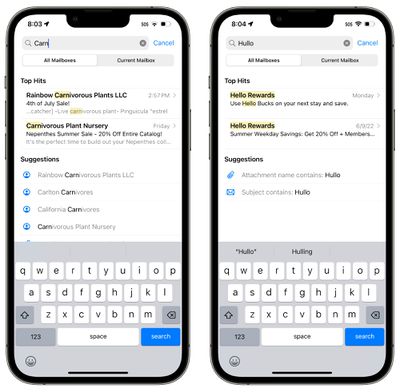
Search in the Mail app has been improved and you'll now see a wider range of suggestions when you start typing in a search term. You'll see more relevant email messages come up, and Apple also says that search corrects typos and uses synonyms for search terms.
ios 16 mail app improved search
It's not significantly different from the iOS 15 search function, but it does make search quicker, more accurate, and more intuitive to use.

Improved search is available for all users, while the typo correction feature is available in English (Australia, Canada, India, Singapore, UK, and United States).

Undo Send

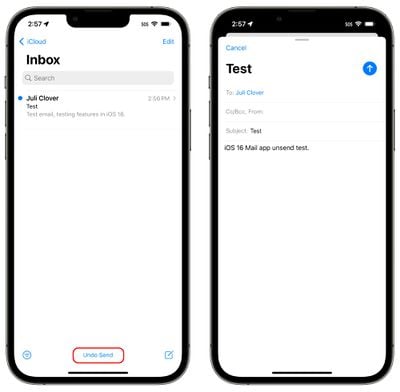
After you send an email in iOS 16 or iPadOS 16, you have a 10 second period in which to unsend the email if you make a mistake. 10 seconds is shorter than the amount of time that other mail apps like Gmail give you to unsend an email (30 seconds), but it's better than no unsend option at all.
ios 16 mail app undo send
Once you send an email in iOS 16, you'll see an "Undo Send" button at the bottom of the interface in the Mail app. You'll need to tap it within 10 seconds to unsend the email, which takes you back to the compose interface. From there, you can correct your error and resend or delete the email entirely.

Scheduled Send

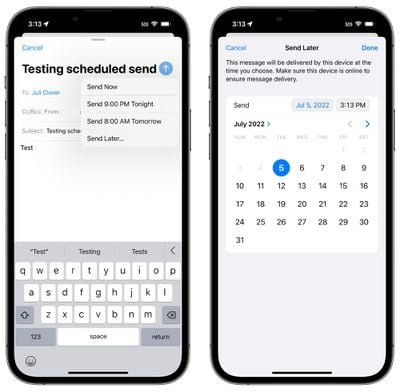
When you're ready to send an email that you've written, you can schedule a time to send it, which is a new feature in iOS 16. To do so, long press on the send icon (the blue arrow) and then select an option.
ios 16 mail app scheduled send
Apple has preset options that include "Send Now," "Send 9:00 PM Tonight," and "Send 8:00 AM Tomorrow." If those preset times don't work for you, you're able to tap on "Send Later..." and choose any date or time that you want.

Before it goes out, the email will be listed in a "Send Later" mailbox that's listed under options like Flagged and Unread. You can tap into this email inbox to see the messages you have scheduled and what time they're scheduled for.
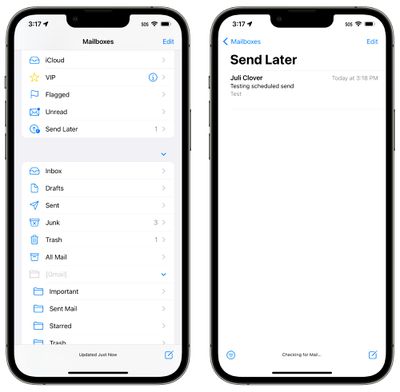
ios 16 mail app send later

Mail Reminders

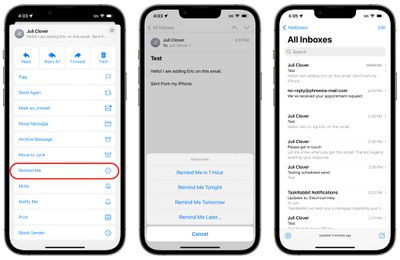
If you opened up an email and don't have the time to respond to it, you can have the Mail app remind you to get back to it later. Apple allows you to select a date and time to have messages resurface in your inbox so nothing goes missing.
ios 16 mail app remind me
To use the Remind Me feature, tap the Reply button on any email in your inbox. From there, scroll down to "Remind Me" and tap it. Apple will give you the preset options to be reminded about it in an hour, "tonight," and "tomorrow." You can also for the "Remind Me Later..." option that lets you set a specific date and time to get a reminder to respond.

When the reminder time rolls around, the Mail app will move the email to the top of your inbox with a "Remind Me" label so you can respond.

Follow Up

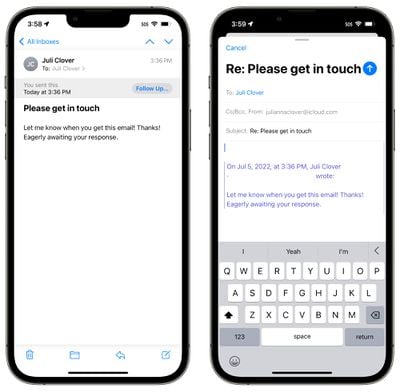
Apple has added a "Follow Up" feature that is designed to move sent email messages to the top of your inbox so you can send a follow-up if you don't hear back from the person you sent the email to.
ios 16 mail app follow up
On certain emails in your inbox where you've indicated that you're awaiting a response, you'll see a "Follow Up" option. Tapping it will take you to the compose interface with an email addressed to the person that you're waiting to hear from.

Notifications for Missing Recipients and Attachments

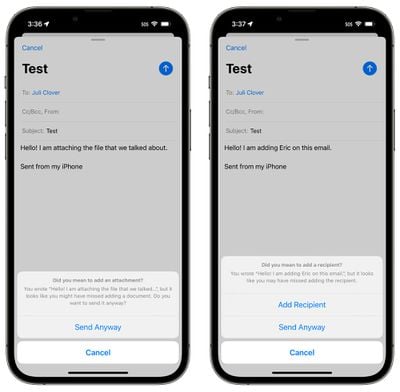
If you mention an attachment or a person that you are planning to include on an email in the body of the email and then forget to add that information, the Mail app will let you know.
ios 16 mail app missing attachment
This feature brings the Mail app in line with competing mail services like Gmail, informing you if you forget an attachment or to add someone you meant to add to an email.

Links to websites, songs in Apple Music, and more are displayed as rich links in iOS 16, rather than plaintext. This means if someone sends you a link in the mail app, you can see a preview of the contents right in the message without having to click on the link.
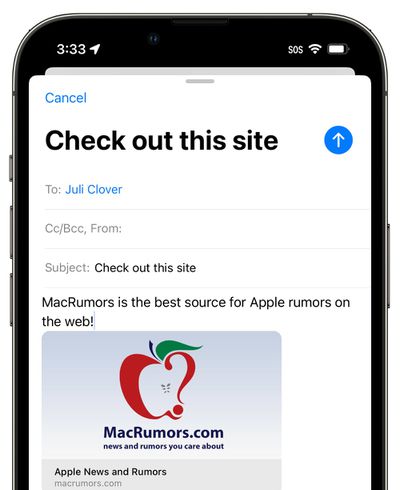
ios 16 mail app rich links
Apple already uses rich links in apps like Messages, so the iOS 16 update brings the Mail app in line with Apple's other apps.

Focus Filters for Mail

Apple in iOS 16 added a new Focus option called Filters. Filters are designed to allow users to filter out content within apps, displaying a specific Mail account or Calendar, if you have multiple. When you use a Focus with a filter set, the app with the filter will only show what you've selected, hiding everything else.
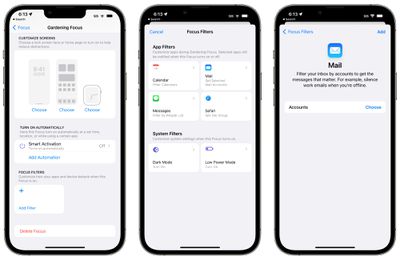
ios 16 focus filters 1
For the Mail app, you can choose any Mail account to associate with a Focus. With a filter set, when you're in that Focus, the Mail app will only show the accounts you've selected. It's useful if you want to filter out personal emails while working, and vice versa, for example.

Guide Feedback

Have questions about the iOS 16 Mail app, know of a feature we left out, or want to offer feedback on this guide? Send us an email here.


Popular Stories

apple pro tell logo

Apple Launching Five New Products Today

Thursday November 5, 2026 12:59 am PST by
Apple is launching five new products on Friday, November 6, following pre-orders that opened last week, including its first touchscreen MacBook Pro models. The following new products will be available from today: iPad mini with OLED display and A20 Pro chip iMac with M6 chip 14-inch MacBook Pro with M6 chip 14-inch MacBook Pro with OLED touchscreen 16-inch MacBook Pro with OLED...

duo aquarium

More Fun iPhone Duo Apps: 30 New Picks to Try

Friday November 6, 2026 3:27 pm PST by
When the iPhone Duo launched, we shared a list of some of the fun apps developers created for the new form factor. Two weeks out, developers are continuing to come up with fresh ideas, so we thought we'd share some of our favorites. Games Marbles Unhinged ($2.99) - Marbles Unhinged is a marble maze designed for the Duo. When you fold it, the floor turns into a ramp. If you stand the top...
silver iphone 18 pro

Apple Rumored to Drop the iPhone's Action Button Next Year

Friday November 6, 2026 6:07 am PST by
Apple plans to merge the iPhone's Action button with the Camera Control starting next year, according to the leaker known as "Instant Digital." In a new post on Weibo, the leaker claimed that a single press of the combined button would open the camera, while a long press would trigger the function assigned to the Action button. They explicitly clarified that the dedicated Action button would ...

Top Rated Comments

sirdir Avatar
57 months ago

So it just waits 10 seconds before actually sending the email? Haha
What else could it do, use magic to delete a delivered message?
Score: 16 Votes (Like | Disagree)
57 months ago
What amazes me is that we need to wait a whole year to get those improvements on the mail app.

This could be just a simple update that could be out months ago, so we don’t need to wait until October to benefit from this kind of things.
Score: 16 Votes (Like | Disagree)
JM Avatar
57 months ago
I do hope search is better. I hate the mail search so much. It will return a bunch of emails that have nothing to do with the search term.
Score: 13 Votes (Like | Disagree)
57 months ago
It would be cool if notifications of unread emails were synced so that I don’t need to open mail on every device (after reading on a different device) to get rid of the badge/notification.
Score: 11 Votes (Like | Disagree)
dumastudetto Avatar
57 months ago

Cool. Now let’s bring end to end encryption to email.
Mail already supports the most robust SSL encryption implementation on any platform.
Score: 6 Votes (Like | Disagree)
AppleTO Avatar
57 months ago
So it just waits 10 seconds before actually sending the email? Haha
Score: 6 Votes (Like | Disagree)
Latest Stories
Siri AI Rumored to Become 'More Like an Agent' as Early as Next Year
2 hours ago
Apple Taking New Approach to Developing iOS 28 and macOS 28
4 hours ago
Early Apple Black Friday Deals on Apple Watch, MacBook Air, and More
23 hours ago
'Backglow' Lets You Customize New MacBook Pro's Glowing Apple Logo
23 hours ago
Top Stories: Apple Product Launches, iOS 27.3 Beta, and More
1 day ago
More Fun iPhone Duo Apps: 30 New Picks to Try
2 days ago
Hands-On With Apple's New OLED Touchscreen MacBook Pro
2 days ago
Apple Store With All-New Design Opening Soon in Southern California
2 days ago
Control the Glowing Apple Logo on Your New MacBook Pro
2 days ago
Apple Shares New 'Apple Card: Apply and Use in Minutes' Ad
2 days ago
Apple Says More Than 100,000 Apps Optimized for iPhone Duo, Here's What's Still Missing
2 days ago
Early Black Friday Deals Kickoff With Steep Discounts on Apple Watch Ultras and More
2 days ago
The MacRumors Show: iOS 27.3 Looks Like a Huge Update
2 days ago
Best Buy's Black Friday Event Begins With Sitewide Savings on Apple, TVs, More
2 days ago
Apple Releasing Yet Another Two New Products Next Week
2 days ago
MacBook Air Drops to Lowest Price in Months With Amazon's $250 Discount
2 days ago
Apple Rumored to Drop the iPhone's Action Button Next Year
2 days ago
Apple's Extended Return Policy Now in Effect for 2026 Holiday Season
2 days ago
Apple Music Classical Updated With New Icon and Refreshed Design
2 days ago
OLED iPad Mini, M6 iMac, and New MacBook Pros Available From Today
2 days ago
Apple Surveys iPhone Duo Buyers About Crease and Camera
3 days ago
Apple's First Touchscreen Mac is Now Arriving to Customers
3 days ago
Claude Gets Personal Finance Feature With Bank Account Linking
3 days ago
Apple Arcade Adds Crossy Road Rush and NBA 2K27
3 days ago
Apple's New HomeView Smart Home Hub: Here's How Much RAM It Has
3 days ago
iPad Mini vs. iPad Air Buyer's Guide: Now Just $50 Apart
3 days ago
First iOS 27.3 and macOS Golden Gate 27.3 Public Betas Now Available
3 days ago
Apple Announces a New Mac Sales Record
3 days ago
Paid $200 for Logic Pro? Apple Says You Won't Get This New Feature
3 days ago
Instagram's Edits Video Editor is Now Available on Mac
3 days ago









































