iOS 16 Security and Privacy Features: Everything You Need to Know - MacRumorsOpen MenuShow RoundupsShow Forums menuVisit ForumsOpen Sidebar
Skip to Content

iOS 16 Security and Privacy Features: Everything You Need to Know

Every iOS update adds new privacy and security features, and iOS 16, available now, is no exception. Apple has added tools to make it easier to apply security updates, new Face ID capabilities, improvements to photo security, and more, with details on all of the new privacy and security options outlined below.

Apple Privacy Yellow

Safety Check

The Settings app houses a new "Safety Check" feature that is designed to make it easy for people to quickly reset all of the data and location access that they have granted to other people. According to Apple, Safety Check is aimed at people in domestic or intimate partner violence situations.

You can get to Safety Check by opening up the Settings app and tapping into the Privacy and Security section. From there, scroll down to Safety Check. Safety Check has two options, including an Emergency Reset and a checklist of all your data sharing options.

Note that Safety Check has a "Quick Exit" button that takes you right to the iPhone's Home Screen in case you're in danger of getting caught using it.

Emergency Reset

Emergency Reset is a one-tap option that lets you protect your iOS device with just a couple of taps. When you use Emergency Reset, it immediately stops sharing everything with all people and apps.
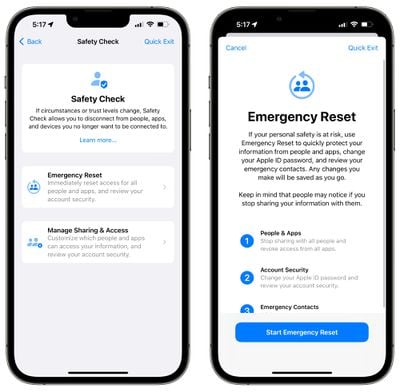
ios 16 safety check emergency reset
That includes anything you might be sharing with people, such as location information, your home data, photo albums, and more.

Emergency Reset also lets you remove all emergency contacts and reset your Apple ID and password so no one can log into your account.

Manage Sharing

For less of an emergency situation, there's a Manage Sharing and Access walkthrough that lets you see an overview of what you're sharing so you can't be secretly tracked or monitored using location sharing, shared albums, or other iPhone features.
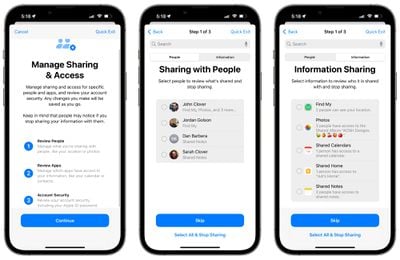
ios 16 manage sharing
You can see exactly who you're sharing data with and what data those people have access to, along with which apps have access to your data. You can select people or apps and choose the "Stop Sharing" option to turn off sharing right away.

You will also see a list of all the third-party apps that you have installed and what data they have access to, along with tools to disable that access. You can see which permissions an app has on an individual basis, or by data such as Bluetooth, Location, Contacts, and more.
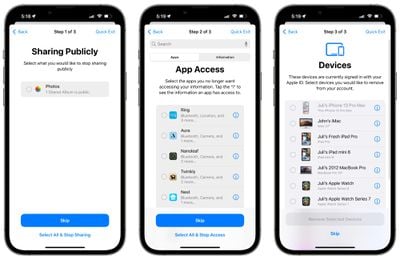
ios 16 manage sharing 2
Manage Sharing will tell you exactly which devices your iCloud account is logged into, giving you the option to log out, plus it will let you reset your ‌Apple ID‌ and password as well as deactivate Emergency contacts.

Locked Hidden and Recently Deleted Photo Albums

In the iOS 16 Photos app, the Hidden and Recently Deleted albums are not able to be opened up without biometric authentication through ‌Face ID‌, Touch ID, or a passcode.

Landscape Face ID

On iPhone 13 models, ‌Face ID‌ works in landscape mode after iOS 16 has been installed. This allows ‌Face ID‌ to unlock the iPhone regardless of whether it's held in portrait or landscape orientation.

Rapid Security Response

With iOS 16, Apple can send out security updates without needing to update the entire operating system. in iOS 15, security updates are tied to iOS updates and require a full update, but iOS 16 will make it easier for Apple to distribute security updates, and it will make them quicker to download.
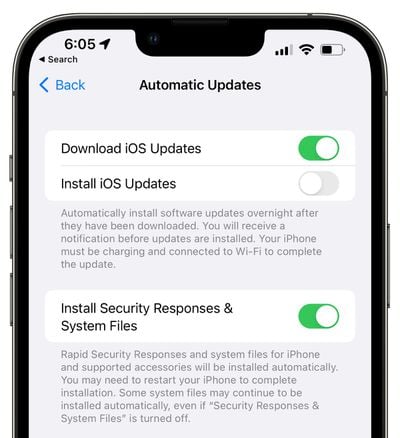
ios 16 security updates
When you update to iOS 16, Apple will set your device to install security updates automatically, but the feature can be turned off under General > Software Update > Automatic Updates.

Get important security improvements to your devices even faster. These improvements can be applied automatically between standard software updates.

Pasteboard Permissions

Apps in iOS 16 need explicit user permission before accessing the clipboard to copy and paste content. Apps will need to ask to use the copy and paste feature, similar to the way apps need permission to access the microphone, camera, location, and other sensitive data.

Passkeys

With iOS 16 and its sister updates, Apple is adding Passkeys that are designed to replace traditional passwords when signing into a website or app. Apple says that Passkeys are more secure than passwords, protecting users from phishing, malware, and other attacks that attempt to gain account access. Passkeys were not implemented in the iOS 16 beta, but will be introduced later this year.
passkeys ios 16 2
Passkeys work through a key system. One key is public and stored on the website server, while the second key is private and kept on-device. On the iPhone and other devices with biometric authentication, ‌Face ID‌ or ‌Touch ID‌ is used to authorize the passkey to authenticate the user to a website or app.

The key from the website and the key from the Apple device must match to allow for a login, and since the device key is private and only available to the user, it cannot be stolen, leaked, or phished.

Passkeys use ‌iCloud‌ Keychain, which requires two-factor authentication for further protection. Passkeys sync across all of a user's devices through ‌‌iCloud‌‌ Keychain, which is end-to-end encrypted with its own cryptographic keys.

Passkey synchronization across devices offers redundancy in case an iPhone is lost, but should all of a person's Apple devices become lost and the passkeys along with them, Apple created an ‌iCloud‌ keychain escrow function to recover passkey information. There is a multi-step authentication process to go through to recover an ‌‌iCloud‌‌ Keychain with passkeys, or users can set up a person to serve as an account recovery contact.

Passkeys sound complicated, but in practice, it will be as simple as using ‌‌Touch ID‌‌ or ‌‌Face ID‌‌ to create a passkey to go along with a login.

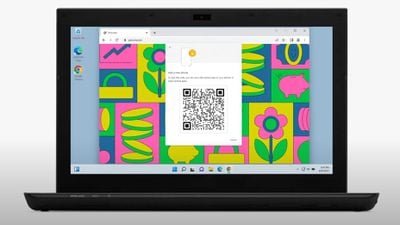
Apple has been working with members of the FIDO Alliance, including Google and Microsoft, to ensure that passkeys can also be used with non-Apple devices and across platforms. On non-Apple devices, Passkeys will work through QR codes that will authenticate using the ‌iPhone‌, but it will require support from other companies and needs to be adopted across the tech world.

Lockdown Mode

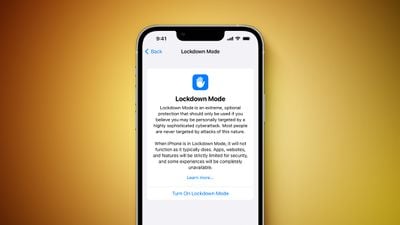
iOS 16 adds Lockdown Mode, which has an "extreme" level of security for activists, journalists, and others who are targeted by sophisticated cyberattacks. Lockdown Mode strictly limits or disables the functionality of many of the iPhone's features as well as locking down apps and websites.
Lockdown Mode Feature
Lockdown Mode blocks most attachment types in Messages, blocks FaceTime calls from non-contacts, limits web browsing functions, prevents configuration profiles from being installed, and more, with a full list available in our Lockdown article.

Lockdown Mode is not for the average user and most people should not turn it on given how restrictive it is. The feature is disabled by default and can be activated in the Privacy and Security section of the Settings app.

Guide Feedback

Have questions about the new security and privacy features in iOS 16, know of a feature we left out, or want to offer feedback on this guide? Send us an email here.


Related Forum: iOS 16

Popular Stories

apple pro tell logo

Apple Launching Five New Products Today

Thursday November 5, 2026 12:59 am PST by
Apple is launching five new products on Friday, November 6, following pre-orders that opened last week, including its first touchscreen MacBook Pro models. The following new products will be available from today: iPad mini with OLED display and A20 Pro chip iMac with M6 chip 14-inch MacBook Pro with M6 chip 14-inch MacBook Pro with OLED touchscreen 16-inch MacBook Pro with OLED...
duo aquarium

More Fun iPhone Duo Apps: 30 New Picks to Try

Friday November 6, 2026 3:27 pm PST by
When the iPhone Duo launched, we shared a list of some of the fun apps developers created for the new form factor. Two weeks out, developers are continuing to come up with fresh ideas, so we thought we'd share some of our favorites. Games Marbles Unhinged ($2.99) - Marbles Unhinged is a marble maze designed for the Duo. When you fold it, the floor turns into a ramp. If you stand the top...
silver iphone 18 pro

Apple Rumored to Drop the iPhone's Action Button Next Year

Friday November 6, 2026 6:07 am PST by
Apple plans to merge the iPhone's Action button with the Camera Control starting next year, according to the leaker known as "Instant Digital." In a new post on Weibo, the leaker claimed that a single press of the combined button would open the camera, while a long press would trigger the function assigned to the Action button. They explicitly clarified that the dedicated Action button would ...

Top Rated Comments

JayAgostino Avatar
56 months ago

Is there a lockdown mode against Apple? 🤔
Yes, all you have to do is not purchase Apple products. Problem solved! :)
Score: 15 Votes (Like | Disagree)
56 months ago
How about Face ID for the files app? Kinda blows my mind that apple has yet to implement that.
Score: 8 Votes (Like | Disagree)
56 months ago
Passkey looks damn sweet but if we're forced to use it I'm afraid it might be even more painful to get out of the apple ecosystem
Score: 7 Votes (Like | Disagree)
56 months ago

People really have to be dumb to believe Apple cares about your privacy. Lets see: 24/7 tracking of cell phone even when off, CSAM spying on all devices, Apple in cahoots with the NSA, and much more.

you forgot to add China and other governments, looks like you have solid proof because you sound confident about this.
Score: 7 Votes (Like | Disagree)
Apple_Robert Avatar
56 months ago
Really looking forward to iOS 16.
Score: 7 Votes (Like | Disagree)
56 months ago

Locked Hidden and Recently Deleted Photo Albums

In the iOS 16 Photos app, the Hidden and Recently Deleted albums are not able to be opened up without biometric authentication through Face ID, Touch ID, or a passcode.

I feel like this is gonna be useful to avoid awkward moments.

Your nudes will be safe...


Rapid Security Response

With iOS 16, Apple can send out security updates without needing to update the entire operating system. in iOS 15, security updates are tied to iOS updates and require a full update, but iOS 16 will make it easier for Apple to distribute security updates, and it will make them quicker to download.
I think this will complicate jailbreaks.


Pasteboard Permissions

Apps in iOS 16 need explicit user permission before accessing the clipboard to copy and paste content. Apps will need to ask to use the copy and paste feature, similar to the way apps need permission to access the microphone, camera, location, and other sensitive data.
I nagged Apple on feedbacks to implement this.

I think apps should also ask for permission before they access your carrier information through CoreTelephony API. For example, TikTok scans for your carrier data everytime you open it, and blocks certain content to you based on your carrier, which is a form of geolocking/censorship. They obviously use that as a factor in ad targeting too.
Score: 5 Votes (Like | Disagree)
Latest Stories
Early Apple Black Friday Deals on Apple Watch, MacBook Air, and More
17 hours ago
'Backglow' Lets You Customize New MacBook Pro's Glowing Apple Logo
17 hours ago
Top Stories: Apple Product Launches, iOS 27.3 Beta, and More
1 day ago
More Fun iPhone Duo Apps: 30 New Picks to Try
2 days ago
Hands-On With Apple's New OLED Touchscreen MacBook Pro
2 days ago
Apple Store With All-New Design Opening Soon in Southern California
2 days ago
Control the Glowing Apple Logo on Your New MacBook Pro
2 days ago
Apple Shares New 'Apple Card: Apply and Use in Minutes' Ad
2 days ago
Apple Says More Than 100,000 Apps Optimized for iPhone Duo, Here's What's Still Missing
2 days ago
Early Black Friday Deals Kickoff With Steep Discounts on Apple Watch Ultras and More
2 days ago
The MacRumors Show: iOS 27.3 Looks Like a Huge Update
2 days ago
Best Buy's Black Friday Event Begins With Sitewide Savings on Apple, TVs, More
2 days ago
Apple Releasing Yet Another Two New Products Next Week
2 days ago
MacBook Air Drops to Lowest Price in Months With Amazon's $250 Discount
2 days ago
Apple Rumored to Drop the iPhone's Action Button Next Year
2 days ago
Apple's Extended Return Policy Now in Effect for 2026 Holiday Season
2 days ago
Apple Music Classical Updated With New Icon and Refreshed Design
2 days ago
OLED iPad Mini, M6 iMac, and New MacBook Pros Available From Today
2 days ago
Apple Surveys iPhone Duo Buyers About Crease and Camera
3 days ago
Apple's First Touchscreen Mac is Now Arriving to Customers
3 days ago
Claude Gets Personal Finance Feature With Bank Account Linking
3 days ago
Apple Arcade Adds Crossy Road Rush and NBA 2K27
3 days ago
Apple's New HomeView Smart Home Hub: Here's How Much RAM It Has
3 days ago
iPad Mini vs. iPad Air Buyer's Guide: Now Just $50 Apart
3 days ago
First iOS 27.3 and macOS Golden Gate 27.3 Public Betas Now Available
3 days ago
Apple Announces a New Mac Sales Record
3 days ago
Paid $200 for Logic Pro? Apple Says You Won't Get This New Feature
3 days ago
Instagram's Edits Video Editor is Now Available on Mac
3 days ago
Prevent Siri and Search From Accessing Specific iPhone Apps
3 days ago
Best Early Black Friday Deals on iPhone 18 Pro and iPhone Duo
3 days ago







































