

iOS 17 Maps Features - MacRumorsOpen MenuShow RoundupsShow Forums menuVisit ForumsOpen Sidebar
Skip to Content

iOS 17 Maps Features

With iOS 17, Apple introduced new features for the Maps app. The changes in the Maps app aren't as notable as some of the additions we've seen with prior software updates, but there is at least one long-awaited function.

iOS 17 General Maps Feature
This guide rounds up everything that's been changed or added in the iOS 17 Maps app.

Offline Maps

Maps can be downloaded so that you can use them offline in iOS 17, which is useful when there is no cellular or WiFi connection. You can save a specific area of a map to your device, allowing it to be accessed while offline.
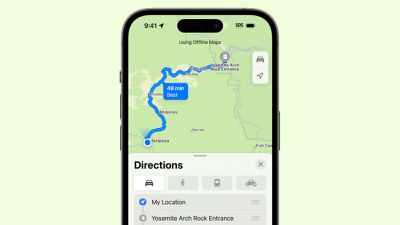
Apple Maps Offline
Saving retains all information like business hours and ratings, plus it allows for turn-by-turn directions, so the Maps app basically works like it does when it has a connection, with the exception of real-time traffic information.

You can search for any location in the Maps app or set a pin and then choose the "Download" option to get an offline map. Tapping on the download button brings up a drag and drop interface where you can select how much of the map you want to download.
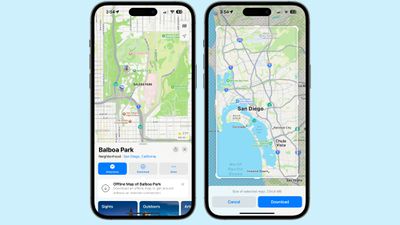
offline maps ios 17
Apple allows for downloads of full cities and surrounding areas, so you can, for example, download a map of Los Angeles that includes the area all the way up to Bakersfield and down to San Diego. Apple lists the size of each downloaded map, with size depending on the area you've selected and what's in that area. A small selection may only be 200MB, but a larger area that has a lot of roads and businesses could be 3GB or more.

Limited Service Warnings

If you look up directions for a route that goes through an area that often has no cellular signal, the Maps app will recommend that you download the map for offline usage.
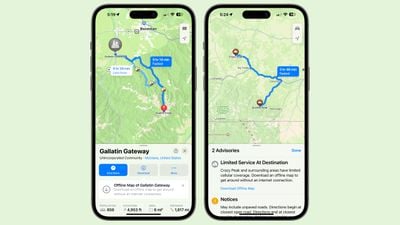
ios 17 maps limited service warning
As of right now, this feature is available for National Parks located in the United States.

Electric Vehicle Charging Stations

Apple Maps now displays real-time charging station availability along Maps routes for electric vehicle owners. Users can choose a preferred charging station to see only those compatible with their vehicle.

Interface Update

When you're getting turn-by-turn directions, the Maps app shows tappable icons for driving, walking, transit, and other options rather than a dropdown menu. The arrival time and avoidance preferences options are still in the same dropdown menu as they were in iOS 16.
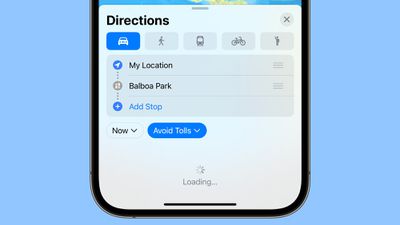
ios 17 maps interface

Volume

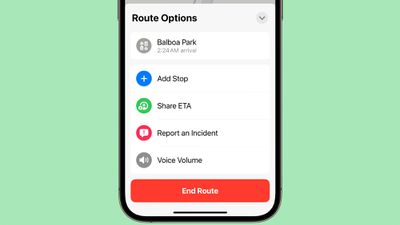
In the turn-by-turn directions interface, you can tap on the ^ button to see a new Voice Volume option that allows you to adjust the volume of the spoken directions. Options include Softer, Normal, and Louder.
ios 17 maps app voice adjust
The new volume option joins Add Stop, Share ETA, and Report an Incident.

Read More

More information on all of the new features in the iOS 17 update can be found in our iOS 17 roundup.


Related Forums: iOS 17, iPadOS 17

Popular Stories

iCloud iPhone 17 Pro

iPhone Users Who Pay for iCloud Storage Get Two New Perks on iOS 27

Thursday July 2, 2026 6:10 am PDT by
If you pay for certain iCloud+ storage plans beyond the 5GB that Apple offers for free, you will receive two more perks on iOS 27 at no additional cost. A summary of the two new iCloud+ perks on iOS 27:Increased daily usage limits for some new Apple Intelligence features, including image generation in the revamped Image Playground app. HomeKit Secure Video cameras receive generated video...
iPhone 4 on Black Feature

Apple Facing One of Its Worst Leaks Since the iPhone 4

Thursday July 2, 2026 9:53 am PDT by
Apple supplier Tata Electronics recently suffered a cyberattack that resulted in thousands of confidential files being published on the dark web, and this reportedly included some photos and documents related to the upcoming iPhone 18 Pro. We have elected not to share any of the leaked photos in this story due to the illegal nature in which they were obtained, but they can easily be found...
American Express Gold Apple Pay Feature

American Express Announces New Apple Pay Feature

Tuesday June 30, 2026 10:27 am PDT by
American Express today announced that you can now redeem Membership Rewards points when checking out with Apple Pay on the web and in apps on the iPhone and iPad. When checking out with Apple Pay on iOS 18 or iPadOS 18 or later, tap on your eligible American Express card (Platinum, Gold, Green, and others) and select the Membership Rewards points option. You can use points to cover all or...

Top Rated Comments

TheYayAreaLiving 🎗️ Avatar
37 months ago
You have to admit. Apple Maps have come a long way. The details are astonishing! Just mind-blown. :eek:

MacRumors content image
Score: 28 Votes (Like | Disagree)
TheYayAreaLiving 🎗️ Avatar
37 months ago

Sadly, I still prefer GMaps. I only use Maps when driving because they work with the HUD.
Don't hate me but Google Maps gets way too crowded and it's a whole lot of distraction. Sometimes I feel like it's just too cluttered.
Score: 20 Votes (Like | Disagree)
jooish Avatar
37 months ago
Anyone else switch to Apple Maps the day it came out and never look back?
Score: 18 Votes (Like | Disagree)
HobeSoundDarryl Avatar
37 months ago
I have enjoyed Offline Maps in Google Maps for upwards of maybe 7 years now. It is really terrific- especially if one visits places where wifi & cellular are iffy/unknown... but also if one just wants to miser cellular data. This is a great feature to finally add.
Score: 18 Votes (Like | Disagree)
37 months ago
I know everyone's mileage varies, but I've ALWAYS been an Maps user. It's driven me literally cross country (Florida to Alaska), top to bottom of UK, French Polynesia, etc and it has never gotten me lost/stranded/or though a stupid route. Knock on wood it continues.
Score: 10 Votes (Like | Disagree)
DocMultimedia Avatar
37 months ago
Unfortunately Apple maps is still tied to Yelp (unless that is gone in 17). Anytime I'm looking for restaurants I only use Google maps, since Yelp is brutally dated.
Score: 10 Votes (Like | Disagree)













