

iOS 17 Notes and Reminders Features - MacRumorsOpen MenuShow RoundupsShow Forums menuVisit ForumsOpen Sidebar
Skip to Content

iOS 17 Notes and Reminders Features

Apple's iOS 17 update has a handful of new features for the Notes and Reminders app, making them more useful for those who prefer the default Apple apps. There are no major overhauls, but the additions do add to the utility of the apps and are changes that some have wanted for some time.
iOS 17 General Notes Feature
This guide highlights everything that's new in both the Notes and Reminders apps.

Notes

Linking Notes

It's now possible to link one note to another note, useful for connecting two related notes to one another for Wiki-style documentation.
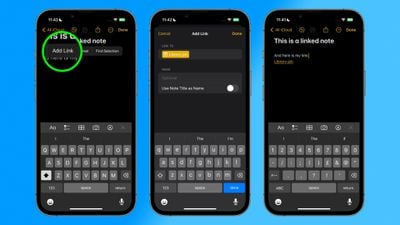
linking notes ios 17

Inline PDFs and Scanned Documents

The Notes app supports inline PDFs, which means you can insert a PDF into Notes and then read, annotate, and collaborate on PDFs.
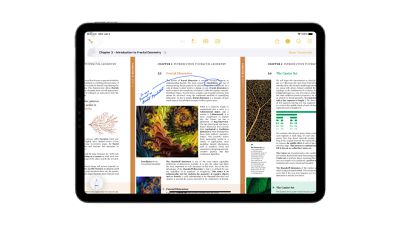
ipados 17 pdfs in notes
This functionality also works for scanned documents, and it is available on both the iPhone and the iPad.

Updated Formatting

Notes has gained an option for creating block quotes, plus there's a new Monostyled format to choose.

Pages

A Note from the iPhone or ‌iPad‌ can be opened up in the Pages app, providing additional layout and formatting options.

Reminders

Grocery Sorting

When you create a list with the new "Groceries" list type, you can input various foods and sundries and have them organized automatically by category. The organization makes it easier to find what you need when you're at the grocery store.
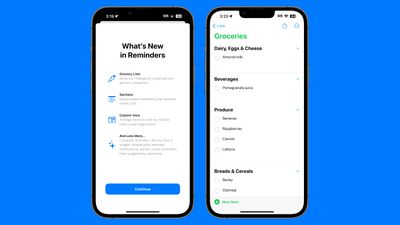
ios 17 reminders app
Available category types include Produce, Breads & Cereals, Frozen Foods, Snacks & Candy, Meat, Dairy, Eggs & Cheese, Bakery, Baking Items, Household Items, Personal Care & Health, and Wine, Beer & Spirits.

If the ‌iPhone‌ doesn't recognize where an item should go, it remains uncategorized. It does recognize specific brands and types of food like "Sour Patch Kids," so it is a fairly robust solution for grocery shopping. You can also create your own categories in the grocery list.

Custom Sections

Sections or categories are turned on by default for the Grocery list, but any Reminder list created in iOS 17 can have sections added to it.
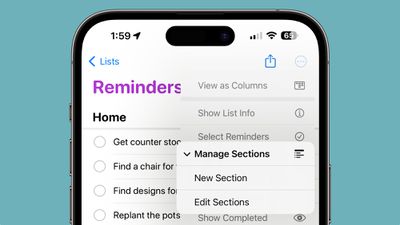
reminders sections
In any list, tap on the three dots to get to the options interface. From there, tap on New Section to add a section to the list. You'll need to manually organize items in the list in each section, but it can be done with simple drag and drop gestures.

Column View

In the same options interface, there's a new "View as Columns" option that will show each section in a side-by-side view. You can swap between column and list view in the options menu.
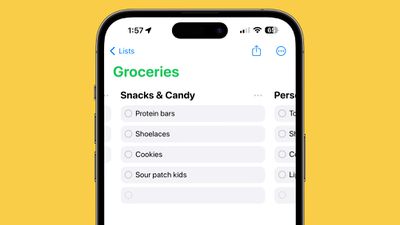
reminders ios 17 column view

Interactive Widgets

iOS 17 brings interactive widgets to the Lock Screen and the Home Screen, and Reminders is one of the built-in apps that can best take advantage of this feature. Reminders in the Reminders widget can be checked off right from the ‌Home Screen‌ or the Lock Screen without having to open up the Reminders app.
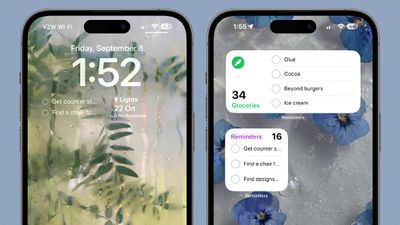
reminders widget

Early Reminders

If you add a reminder with a specific date, you can opt to receive an early reminder to get a warning ahead of time. You can get a notification 1 day before, 2 days before, 1 week before, 2 weeks before, 1 month before, 3 months before, and 6 months before, plus there's also an option to set a custom early reminder time.
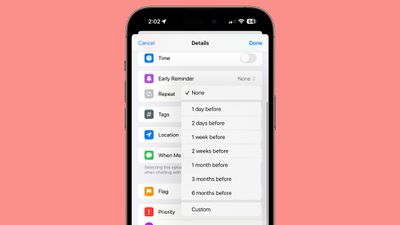
early reminder ios 17

Read More

Additional info on the new features in the iOS 17 update can be found in our iOS 17 roundup.

Related Forums: iOS 17, iPadOS 17

Popular Stories

Apple Card iPhone 16 Pro Feature

Apple Card Promo to Offer Free AirPods Pro 3

Friday May 15, 2026 8:59 am PDT by
Starting as early as next week, customers who sign up for an Apple Card at Apple's retail stores in the U.S. will receive $249 cash back when they purchase AirPods Pro 3, according to Bloomberg's Mark Gurman. The promotion has yet to be officially announced by Apple, so exact terms and conditions are not available at this time. AirPods Pro 3 are priced at $249 in the U.S., so customers who...
Apple WWDC25 iOS 26 CarPlay Light mode 250609

Six Popular iPhone Apps Now Available on CarPlay

Thursday May 14, 2026 9:10 am PDT by
Apple's CarPlay system for accessing iPhone apps on a vehicle's dashboard screen has received six popular apps in recent weeks: ChatGPT, Perplexity, Grok, Google Meet, WhatsApp, and the indie artist streaming platform Audiomack. Make sure you have the latest version of each app and they will automatically appear on CarPlay. ChatGPT Starting with iOS 26.4, CarPlay supports voice-based...
ipad mini 7 blue

OLED iPad Mini: Release Date, Pricing, and What to Expect

Thursday May 14, 2026 5:08 am PDT by
According to the latest rumors, Apple is close to launching its next-generation iPad mini. So what should we expect from the successor to the iPad mini 7 that Apple released over a year ago? Read on to find out. Processor and Performance Apple is working on a next-generation version of the iPad mini (codename J510/J511) that features the A19 Pro chip, according to information found in code...

Top Rated Comments

TheYayAreaLiving 🎗️ Avatar
35 months ago
I love the newly designed revamped Notes App. Note App itself has come a very long way. I will say, that I do miss the old version of the Notes icon tho. 😭


Attachment Image
Score: 15 Votes (Like | Disagree)
fatTribble Avatar
35 months ago
I find that tweaks to frequently used apps like these are often the most useful.

I do a lot with Notes.
Features like opening a Note in Pages is something I’ve wanted for awhile, for example.

Kudos Apple!
Score: 11 Votes (Like | Disagree)
jonnyb098 Avatar
35 months ago
Wallpapers please!?


Attachment Image
Score: 9 Votes (Like | Disagree)
BornAgainMac Avatar
35 months ago
Notes replaced Evernote for me and glad to be getting new features. Reminders replaced todoist for my todo list app. Originally, I used Things then upgraded to Todoist and in the last year Reminders has what I really need.

I have not used a Grocery list shopping application since the first year of the App Store. I would use this functionality with Reminders.
Score: 9 Votes (Like | Disagree)
35 months ago
Notes is one of the most underrated iOS apps. It started off as a super basic little notepad thing, complete with fake handwriting font, but every single release for 10 years it's gotten better and better. Images, formatting, checklists, sketch support, tables, shared collaborative notes, hashtags. I use it for so many things at this point -- and it's all synced with my Mac. This is the kind of low-key thing that keeps me in the Apple ecosystem.
Score: 8 Votes (Like | Disagree)
surfzen21 Avatar
35 months ago
OOOOOH! Im a fan of linking Notes.

I have a bunch of notes that are very long lists so I break then up monthly.

Being able to link them all in a chain will be very nice.
Score: 8 Votes (Like | Disagree)














