iOS 17 Safari Features: Profiles, Locked Private Browser, Shared Passwords, Updated Tracking Prevention and More - MacRumorsOpen MenuShow RoundupsShow Forums menuVisit ForumsOpen Sidebar
Skip to Content

iOS 17 Safari Features: Profiles, Locked Private Browser, Shared Passwords, Updated Tracking Prevention and More

With every update to the iOS operating system, Apple adds new features to the built-in apps like Safari. In iOS 17, Safari gains new privacy functionality, improvements to search, updated Siri integration, and more.
iOS 17 General Safari Feature
This guide highlights all of the iOS 17 Safari feature additions.

Profiles

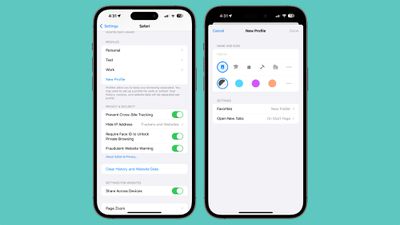
In iOS 17, Apple expanded on Tab Groups with a Profile feature that is designed to let you separate your browsing for different use cases. You can create a "Work" profile and a "Personal" profile, for example, so all of your work-related browsing is kept separate from your personal browsing.
ios 17 safari profiles
Each profile has separate cookies, browsing history, extensions, and website data. You can turn off cookies and pop-ups on one profile, for instance, leaving them on for another profile. Profiles also have separate Favorites and Tab Groups.
safari profiles set up ios 17
Profiles can be set up by following these instructions:

  1. Open up the Settings app.
  2. Scroll down to Safari.
  3. Tap on New Profile.
  4. Select an icon, name, and background color for the profile.
  5. Choose your settings for Favorites and Tabs.
  6. Tap Done.

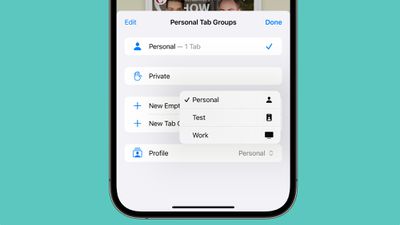
From there, you can edit profiles by tapping into them in the Settings app. In Safari, tap on the Tabs icon with two overlapping squares, then tap on the middle icon and choose the "Profile" option to change which profile is active.

Locked Private Browsing Window

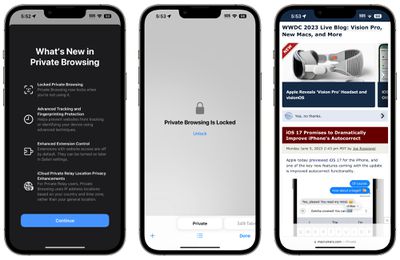
Private browsing windows are now locked and require secondary authentication to unlock and access. If you hand your unlocked phone over to someone and they attempt to open your Safari private browsing tab, access will be denied without a second Face ID/Touch ID scan or a passcode.
safari private browsing ios 17
The ‌Face ID‌/‌Touch ID‌ requirement keeps the private browsing tab private even if someone else has access to your iPhone or iPad. The private browsing tab is locked by default in iOS 17, but the ‌Face ID‌/‌Touch ID‌ requirement can be turned off by following these steps:

  1. Open the Settings app.
  2. Tap on Safari.
  3. Scroll down to Require ‌Face ID‌ (or ‌Touch ID‌) to Unlock Private Browsing.
  4. Tap the toggle to turn it off and confirm with a ‌Face ID‌/‌Touch ID‌ scan. When disabled, the toggle will be gray.

Private Search Engine

In iOS 16 you can choose a default search engine to use with Safari, but in iOS 17, you can choose separate search engines for standard browsing and private browsing.
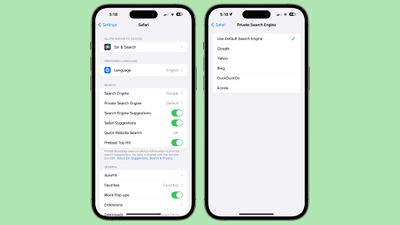
ios 17 private search engine
Options include Google, Yahoo, Bing, DuckDuckGo, and Ecosia. Leaving it on Default will use the same search engine that's set for standard browsing.

  1. Open up the Settings app.
  2. Scroll down to Safari.
  3. Tap on Private Search Engine.
  4. Tap on one of the Search Engine options to select it.
  5. Exit out of the Settings.

Tracking URLs

URLs in iOS 17 can be stripped of all tracking information appended to the end of the URL so that websites cannot track your browsing using URL identifiers. This function is enabled automatically for private browsing in iOS 17, but it can be turned on for all browsing.
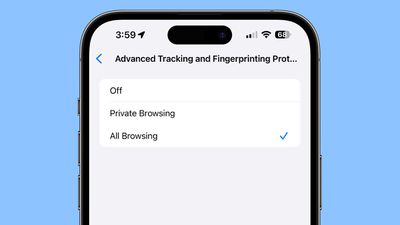
safari tracking all browsing ios 17
Here's how to remove URL-based tracking for all browser windows:

  1. Open up the Settings app.
  2. Scroll down to Safari.
  3. Tap on Advanced.
  4. Tap on Advanced Tracking and Fingerprinting Protection.
  5. Toggle on "All Browsing."

Turning this on will ensure that all URLs opened in Safari will strip the additional tracking information that's sometimes pasted on to the end of a URL.

Hide IP Address From Websites

In iOS 17, there is an option to hide IP address from both trackers and websites or only trackers when using the iCloud Private Relay feature. With Trackers and Websites selected, IP address will be kept cloaked and websites will not be able to determine your location using that information.
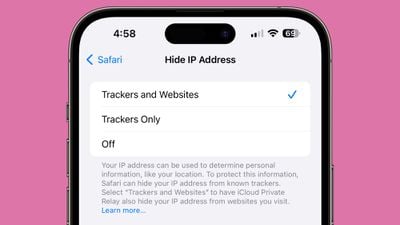
ios 17 safari hide ip address
In iOS 16, ‌iCloud‌ Private Relay was designed to hide IP address primarily from known trackers, so this is an expansion of the feature.

Search Improvements

Search is more responsive in iOS 17, so it brings up search results more quickly. It also brings up a wider range of search suggestions for you to choose from.
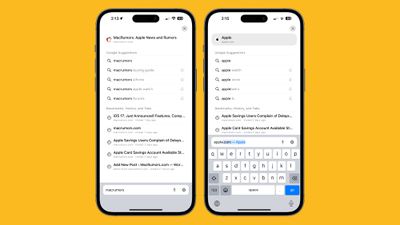
ios 17 safari search
Apple has added favicons to top website search suggestions, and search results that come from your bookmarks, tabs, and search history are clearly marked.

Listen to Page

‌Siri‌ in iOS 17 can read a website to you, which is useful if you come across a long-form article or other content that you want to listen to while you do something else. The feature works as long as Reader View is available on a website.
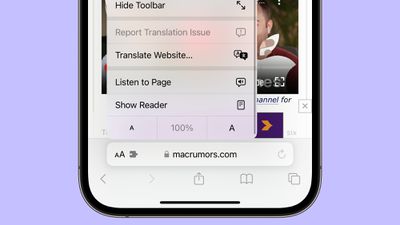
ios 17 safari listen to page

  1. Open up Safari.
  2. Navigate to the content that you want ‌Siri‌ to read.
  3. Tap on the Aa icon in the address bar.
  4. Select the Listen to Page option.

From there, ‌Siri‌ will begin to read the content on the page. You can pause by tapping on the Pause Listening option, and resume with the Resume Listening option. If you lock your display, you will get dedicated playback controls.

‌Siri‌ will also read a page if you open up a website to a selected article and ask ‌Siri‌ to "Read this to me."

Shared Passwords and Passkeys

In iOS 17 (and iPadOS 17/macOS Sonoma) there is an option to securely share passwords and passkeys with friends and family members. With the sharing feature, passwords for shared media accounts, utilities, bills, and more can be provided to multiple people.
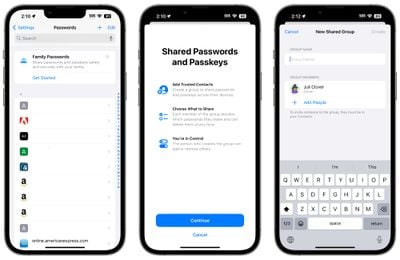
ios 17 shared passwords
Each person can access, add to, and change passwords that are shared, with setup available by going to the Passwords section of the Settings app and choosing "Get Started" under the "Family Passwords" heading.

This is not strictly a Safari feature, but it does make logging into sites where you use shared login information simpler.

Privacy Settings

Note that privacy-focused settings that include Block All Cookies, Privacy Preserving Ad Measurement, and Check for Apple Pay have been relocated from the "Privacy & Security" section of the Safari settings to the "Advanced" section, which is more hidden.
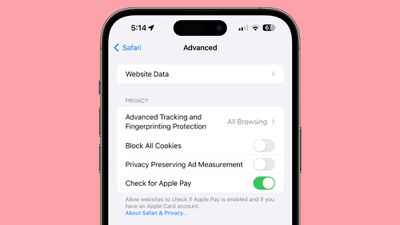
ios 17 privacy settings safari

Read More

A rundown on all of the new features in the iOS 17 update can be found in our comprehensive iOS 17 roundup.
Tag: Safari
Related Forums: iOS 17, iPadOS 17

Popular Stories

Switch to Safari

Apple Explains Why Chrome Users Should 'Switch to Safari'

Tuesday October 13, 2026 5:29 am PDT by
Apple has launched a new "Switch to Safari" marketing campaign that encourages Chrome users to switch to Safari as their web browser of choice on the Mac. "Safari is a more powerful and private browser than Chrome," says Apple. Apple has a new "Switch to Safari" page on its website that outlines more than 10 reasons that Chrome users should switch to Safari, including faster performance...

safari iphone duo webkit

Apple Wants to Fix Safari's Cramped Layout on iPhone Duo

Saturday October 24, 2026 9:58 pm PDT by
Apple is considering changes to Safari on the iPhone Duo that would give websites access to more of the outer display, although the company has yet to settle on an approach. The challenge is allowing pages to occupy the area beneath Safari's side-mounted controls without making parts of a website inaccessible. In an Friday, October 23 WebKit post, Apple's Jen Simmons explained that an...
Switch to Safari

Apple Addresses Web Security Threat, Working on macOS Update With Additional Fix

Sunday October 25, 2026 4:07 pm PDT by
Earlier this month, a security researcher discovered that private cryptographic keys associated with eight of Indian company eMudhra's intermediate certificate authority (CA) certificates were weak. The compromised keys could have allowed attackers to impersonate legitimate websites, potentially putting users' sensitive information at risk. However, there is currently no evidence that the keys...

Top Rated Comments

TheYayAreaLiving 🎗️ Avatar
43 months ago
Nice features! Safari is my favorite browser in iOS.
Score: 17 Votes (Like | Disagree)
43 months ago
I love Safari because it protects my privacy and consumes less power. 😊
Score: 11 Votes (Like | Disagree)
ShivneelSingh Avatar
43 months ago
“Profiles” is a very welcome feature.
Score: 10 Votes (Like | Disagree)
Flamingdeathbolts Avatar
43 months ago
And that’s why I won’t mind paying extra $$ for Apple products! Love the privacy features coming
Score: 9 Votes (Like | Disagree)
Apple Fan 2008 Avatar
43 months ago
Getting rid of URL tracking is awesome!
Score: 8 Votes (Like | Disagree)
43 months ago

The line between privacy and revenue gets more and more blurred everyday.

If we are being honest, we can’t have growth in both categories.

It’s a give and take situation.
Apple gains more revenue because it pursues increased privacy for its customers who value what they get from Apple. that is growth in both categories.
Score: 6 Votes (Like | Disagree)
Latest Stories
Siri AI Rumored to Become 'More Like an Agent' as Early as Next Year
9 hours ago
Apple Taking New Approach to Developing iOS 28 and macOS 28
10 hours ago
Early Apple Black Friday Deals on Apple Watch, MacBook Air, and More
1 day ago
'Backglow' Lets You Customize New MacBook Pro's Glowing Apple Logo
1 day ago
Top Stories: Apple Product Launches, iOS 27.3 Beta, and More
2 days ago
More Fun iPhone Duo Apps: 30 New Picks to Try
2 days ago
Hands-On With Apple's New OLED Touchscreen MacBook Pro
2 days ago
Apple Store With All-New Design Opening Soon in Southern California
2 days ago
Control the Glowing Apple Logo on Your New MacBook Pro
2 days ago
Apple Shares New 'Apple Card: Apply and Use in Minutes' Ad
2 days ago
Apple Says More Than 100,000 Apps Optimized for iPhone Duo, Here's What's Still Missing
2 days ago
Early Black Friday Deals Kickoff With Steep Discounts on Apple Watch Ultras and More
2 days ago
The MacRumors Show: iOS 27.3 Looks Like a Huge Update
2 days ago
Best Buy's Black Friday Event Begins With Sitewide Savings on Apple, TVs, More
2 days ago
Apple Releasing Yet Another Two New Products Next Week
2 days ago
MacBook Air Drops to Lowest Price in Months With Amazon's $250 Discount
3 days ago
Apple Rumored to Drop the iPhone's Action Button Next Year
3 days ago
Apple's Extended Return Policy Now in Effect for 2026 Holiday Season
3 days ago
Apple Music Classical Updated With New Icon and Refreshed Design
3 days ago
OLED iPad Mini, M6 iMac, and New MacBook Pros Available From Today
3 days ago
Apple Surveys iPhone Duo Buyers About Crease and Camera
3 days ago
Apple's First Touchscreen Mac is Now Arriving to Customers
3 days ago
Claude Gets Personal Finance Feature With Bank Account Linking
3 days ago
Apple Arcade Adds Crossy Road Rush and NBA 2K27
3 days ago
Apple's New HomeView Smart Home Hub: Here's How Much RAM It Has
3 days ago
iPad Mini vs. iPad Air Buyer's Guide: Now Just $50 Apart
3 days ago
First iOS 27.3 and macOS Golden Gate 27.3 Public Betas Now Available
3 days ago
Apple Announces a New Mac Sales Record
3 days ago
Paid $200 for Logic Pro? Apple Says You Won't Get This New Feature
3 days ago
Instagram's Edits Video Editor is Now Available on Mac
3 days ago








































