What's New With the Camera App in iOS 18 - MacRumorsOpen MenuShow RoundupsShow Forums menuVisit ForumsOpen Sidebar
Skip to Content

What's New With the Camera App in iOS 18

With the iOS 18 update, Apple added new features to almost all of its built-in apps, including the Camera app. The iOS 18 Camera app includes a few small but useful improvements for timed photos, portraits, and more.
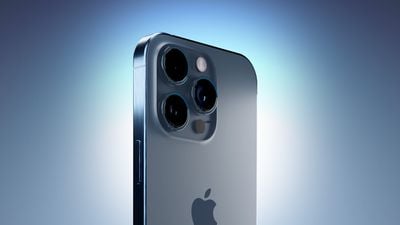
iPhone 15 Blue Three Quarters Perspective Camera Closeup Feature

Timers

Along with the existing 3-second and 10-second timers, there's now an added 5-second timer that provides more flexibility.
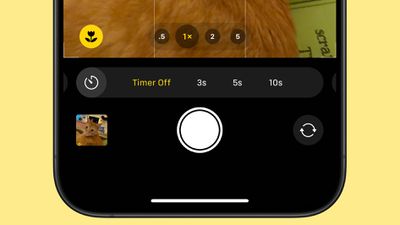
ios 18 camera timer 5 seconds

Flash Settings

Flash settings can be adjusted by touching and holding on the flash button in the Camera app. It brings up Auto, On, and Off options.
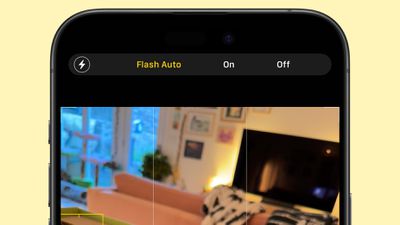
ios 18 camera flash controls
These settings could be accessed in the flash options when tapping on the carrot to get to different photo controls, but a long press is quicker. A tap still turns flash off and on.

Music When Taking Photos and Videos

When you're taking a video music playing on your iPhone will no longer be paused and will continue playing. In the Settings app, there's an "Allow Audio Playback" toggle that you can turn on that ensures music will continue playing on the iPhone's speaker when a video is recording.
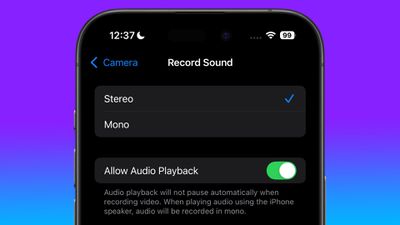
allow audio playback camera setting
In prior versions of iOS, using the Camera app to capture video automatically paused any audio playing.

Apple also says that music will continue to play via Bluetooth connections when capturing a photo or video.

Next-Generation Portrait Enhancements

On the iPhone 15 and later models, iOS 18 adds Portrait Lighting controls and support for Night mode portraits when in Photos mode.
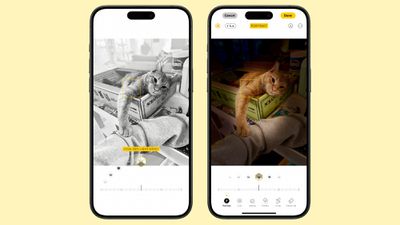
ios 18 next generation portraits
For context, Apple last year added next-generation Portraits functionality that automatically captures portrait information when using the standard photo taking mode. Previously, you needed to use the specific Portrait mode to get a Portrait shot, but that's no longer the case.

The new feature lets you take a photo without changing modes, and then choose to add depth of field Portrait effects afterward.

Read More

Additional information on new features that Apple has added in iOS 18 can be found in our iOS 18 roundup.


Related Forums: iOS 18, iPadOS 18

Popular Stories

macOS 27 on MacBook Pro

Apple Says macOS 27 Won't Be Compatible With These Macs

Wednesday June 3, 2026 8:29 am PDT by
During WWDC 2025, Apple revealed that macOS 26 Tahoe would be the final major macOS version for Intel-based Macs. macOS 27 will be compatible with Apple silicon Macs only, meaning that you will need a Mac with an M-series chip or a MacBook Neo with an A18 Pro chip in order to install the software update. Apple will unveil macOS 27 during its WWDC 2026 keynote this Monday, June 8, and the...
MacBook Neo on Yellow Feature

MacBook Neo is So Popular That Apple Reportedly Doubled Production

Wednesday June 3, 2026 9:24 am PDT by
On an earnings call in late April, Apple's CEO Tim Cook said that customer response to the MacBook Neo was "off the charts," and the popularity of the laptop has reportedly led the company to significantly boost production. Apple supply chain analyst Ming-Chi Kuo this week said he believes that MacBook Neo shipments to Apple were doubled from an initial target of 5 million units to 10...
iphone 18 pro blue%402x

iPhone 18 Pro: Dark Cherry, Light Blue, and Dark Gray Chassis Leaked [Update]

Thursday June 4, 2026 5:18 am PDT by
Update: Since publication, new information has come to light suggesting the images have been AI-manipulated and are not in fact iPhone 18 Pro chassis parts. The original article follows. The color options Apple is reportedly planning for the upcoming iPhone 18 Pro and ‌iPhone 18 Pro‌ Max have appeared online today in the form of images of chassis parts of unknown authenticity....

Top Rated Comments

spaxxedout Avatar
23 months ago
I wish the volume buttons could function as zoom buttons now that the capture button is here.
Score: 6 Votes (Like | Disagree)
23 months ago
LET ME CHOOSE MY OWN TIMER TIME. Also, let me choose if I want multiple pics taken on the self timer or just one pic.
Score: 5 Votes (Like | Disagree)
23 months ago
It’d be better if the toggle for audio playback while recording a video ends up in the camera app, rather than settings. Too much bouncing around.
Score: 5 Votes (Like | Disagree)
eperitus Avatar
23 months ago
Why is it so hard to find the timer in the first place? I’ve had this phone for 3 years and finally discovered the timer appears on the BOTTOM after you click a tiny dropdown on the very TOP of the camera app. It used to be easier than this.
Score: 3 Votes (Like | Disagree)
EM2013 Avatar
23 months ago
Can we get the toggle back for saving a photo copy without hdr on?
Score: 3 Votes (Like | Disagree)
MacBH928 Avatar
23 months ago
In early 2000s when they put cameras on Nokia phones I was wondering to myself "why would any one want a camera in a phone?" . Looks like I mis judged people.

Today, the camera seems to be the most important aspect of the phone and I still do not get why. I still think iphone 5 camera was good.
Score: 3 Votes (Like | Disagree)