Five Ways iOS 26 Improves Your iPhone's Battery - MacRumorsOpen MenuShow RoundupsShow Forums menuVisit ForumsOpen Sidebar
Skip to Content

Five Ways iOS 26 Improves Your iPhone's Battery

Apple made several battery-related changes in iOS 26, introducing features that make it easier to tell which apps are draining battery and new ways to extend battery life.

iOS 26 Battery Glass Feature

Battery Design Changes

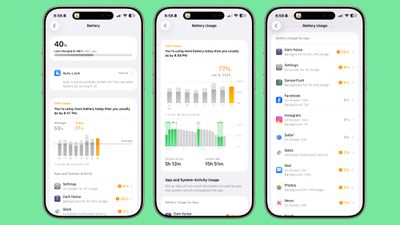
Apple updated the Battery section of the Settings app in ‌iOS 26‌, and the new design provides a more in-depth look at how iPhone usage impacts battery and how much battery apps are draining.
ios 26 battery overhaul 1
The top of the Battery interface features an overview of your current battery and the time that you last charged. If your iPhone is charging, it also lets you know how much time you have left until the battery is full.

Rather than showing battery usage over 24 hours and 10 days, Apple now displays a weekly view of average battery use along with a comparison of how much battery you're currently using compared to your typical average.

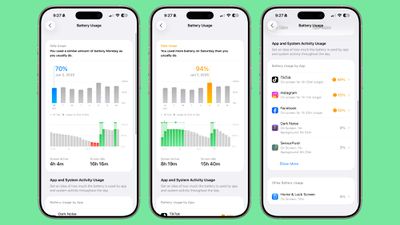
The new comparison feature lets you know if you're using more, the same, or less battery life than you do on most days. It shows which apps used more battery and by how much, which makes it easier to tell what's draining your battery. You can opt in to notifications that will let you know if your usage is above normal.

The App battery section includes specific details on what caused battery drain, letting you know if an app ran in the background longer, was on your screen longer, or sent more notifications than normal. Apps that are draining a lot of battery are shown in orange so they stand out.

You can tap back through the previous 7 days to see how much battery you used on a given day, with a breakdown for active use and screen idle use. It also shows when you charged and for how long.
ios 26 battery overhaul 2
There's still a Battery Health section where you can see charge cycles and maximum capacity and a Charge Limit section where you can limit charging to 80 percent. Apple also added a new Power Mode option where you can toggle on Low Power Mode or the new Adaptive Power Mode.

Adaptive Power Mode

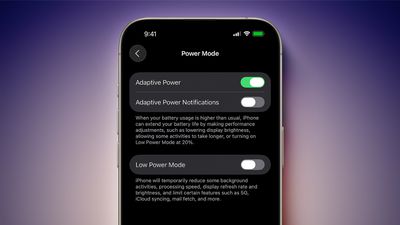
Adaptive Power Mode is a new setting that joins Low Power Mode for power management. It is designed to make small performance adjustments that will improve your battery life when your usage is higher than normal.
iOS 26 Adaptive Power Notifications
On days when you need your iPhone to last longer, you can turn on Adaptive Power. Apple says that it will intelligently make tweaks like lowering display brightness, allowing some activities to take longer, or by automatically turning on Low Power Mode at 20 percent.

Adaptive Power is an opt-in feature that can be found in the Battery section of the Settings app. If you turn it on, it will work automatically when your iPhone detects that you're using an abnormal amount of battery life.

Because Adaptive Power uses Apple Intelligence, it requires an iPhone 15 Pro or newer.

Adaptive Power Notifications

There is an option to turn on Adaptive Power Notifications, so you can be alerted when your iPhone detects higher usage and enables the Adaptive Power features. If you don't turn on notifications, Adaptive Power works quietly behind the scenes without letting you know.

Charging Time

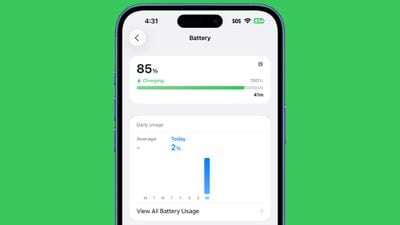
When your iPhone is connected to a charger, you can now tap the display to wake it up and it will provide a readout of how much time you need to wait until your device is fully charged or charged to the limit that you've set.
iphone battery time to charge
To get it to work, plug your iPhone in (or put it on a wireless charger). With the display off, tap to wake the iPhone and the time remaining will show up above the clock.

You can also open up the Settings app and go to the Battery section to see the time remaining until a full charge.

Low Power Mode Popup

When your battery level dips to 20 percent, you'll see a low battery warning in the Dynamic Island. If you tap it, you can turn on Low Power Mode.

ios 26 beta 5 battery icon

More Descriptive Icons

If charging is on hold because of optimized charging settings or temperature reasons, the battery icon at the top right of the iPhone will be gray instead of green.

Read More

There are a lot of other new features in ‌iOS 26‌, and we've got a dedicated iOS 26 roundup that lists them all.

Related Roundups: iOS 26, iPadOS 26
Related Forum: iOS 26

Popular Stories

bug security vulnerability issue fix larry

Apple Fixes Possibly Exploited CoreGraphics Flaw on Older iPhones

Tuesday October 27, 2026 5:16 am PDT by
Among the flurry of iOS 27.2 releases on Monday, Apple also pushed a wave of software updates for its older operating systems, including a fix for a CoreGraphics vulnerability that Apple says may have been exploited in targeted attacks. The releases include iOS 26.7.2, iPadOS 26.7.2, iOS 18.7.11, iPadOS 18.7.11, macOS Tahoe 26.7.2, macOS Sequoia 15.8.2, and tvOS 26.6.1. iOS 18.7.11 and...

duo aquarium

More Fun iPhone Duo Apps: 30 New Picks to Try

Friday November 6, 2026 3:27 pm PST by
When the iPhone Duo launched, we shared a list of some of the fun apps developers created for the new form factor. Two weeks out, developers are continuing to come up with fresh ideas, so we thought we'd share some of our favorites. Games Marbles Unhinged ($2.99) - Marbles Unhinged is a marble maze designed for the Duo. When you fold it, the floor turns into a ramp. If you stand the top...
apple pro tell logo

Apple Launching Five New Products Today

Thursday November 5, 2026 12:59 am PST by
Apple is launching five new products on Friday, November 6, following pre-orders that opened last week, including its first touchscreen MacBook Pro models. The following new products will be available from today: iPad mini with OLED display and A20 Pro chip iMac with M6 chip 14-inch MacBook Pro with M6 chip 14-inch MacBook Pro with OLED touchscreen 16-inch MacBook Pro with OLED...

Top Rated Comments

15 months ago
ios26 will destroy your battery life with all the gimmick animations & transparency. The best thing you can do for your phone is not update to ios26
Score: 18 Votes (Like | Disagree)
klasma Avatar
15 months ago
None of these will improve the actual iPhone battery. ;)
Score: 17 Votes (Like | Disagree)
15 months ago
Adaptive Power doesn't need Apple Intelligence enabled to work, it just happens to be exclusive to the same iPhones that have Apple Intelligence.
Score: 15 Votes (Like | Disagree)
Mac Fly (film) Avatar
15 months ago
All rise, the Honorable Nipplebattery™ presiding.


Attachment Image
Score: 13 Votes (Like | Disagree)
MacUserFella Avatar
15 months ago
Thank god, Liquid Glass and Apple Intelligence will be the death of my iPhone’s battery
Score: 13 Votes (Like | Disagree)
klasma Avatar
15 months ago

All rise, the Honorable Nipplebattery™ presiding.


Looks more like a condom to me.
Score: 10 Votes (Like | Disagree)
Latest Stories
Apple Store Subscription Sign-Up Controversy Exposed
1 hour ago
Siri AI Rumored to Become 'More Like an Agent' as Early as Next Year
11 hours ago
Apple Taking New Approach to Developing iOS 28 and macOS 28
13 hours ago
Early Apple Black Friday Deals on Apple Watch, MacBook Air, and More
1 day ago
'Backglow' Lets You Customize New MacBook Pro's Glowing Apple Logo
1 day ago
Top Stories: Apple Product Launches, iOS 27.3 Beta, and More
2 days ago
More Fun iPhone Duo Apps: 30 New Picks to Try
2 days ago
Hands-On With Apple's New OLED Touchscreen MacBook Pro
2 days ago
Apple Store With All-New Design Opening Soon in Southern California
2 days ago
Control the Glowing Apple Logo on Your New MacBook Pro
2 days ago
Apple Shares New 'Apple Card: Apply and Use in Minutes' Ad
2 days ago
Apple Says More Than 100,000 Apps Optimized for iPhone Duo, Here's What's Still Missing
3 days ago
Early Black Friday Deals Kickoff With Steep Discounts on Apple Watch Ultras and More
3 days ago
The MacRumors Show: iOS 27.3 Looks Like a Huge Update
3 days ago
Best Buy's Black Friday Event Begins With Sitewide Savings on Apple, TVs, More
3 days ago
Apple Releasing Yet Another Two New Products Next Week
3 days ago
MacBook Air Drops to Lowest Price in Months With Amazon's $250 Discount
3 days ago
Apple Rumored to Drop the iPhone's Action Button Next Year
3 days ago
Apple's Extended Return Policy Now in Effect for 2026 Holiday Season
3 days ago
Apple Music Classical Updated With New Icon and Refreshed Design
3 days ago
OLED iPad Mini, M6 iMac, and New MacBook Pros Available From Today
3 days ago
Apple Surveys iPhone Duo Buyers About Crease and Camera
3 days ago
Apple's First Touchscreen Mac is Now Arriving to Customers
3 days ago
Claude Gets Personal Finance Feature With Bank Account Linking
3 days ago
Apple Arcade Adds Crossy Road Rush and NBA 2K27
3 days ago
Apple's New HomeView Smart Home Hub: Here's How Much RAM It Has
3 days ago
iPad Mini vs. iPad Air Buyer's Guide: Now Just $50 Apart
3 days ago
First iOS 27.3 and macOS Golden Gate 27.3 Public Betas Now Available
3 days ago
Apple Announces a New Mac Sales Record
3 days ago
Paid $200 for Logic Pro? Apple Says You Won't Get This New Feature
3 days ago










































