iOS 26: Everything New With FaceTime - MacRumorsOpen MenuShow RoundupsShow Forums menuVisit ForumsOpen Sidebar
Skip to Content

iOS 26: Everything New With FaceTime

All of Apple's communication apps received updates with iOS 26, including FaceTime. There's a redesigned interface that puts more emphasis on your contacts, new translation features, and more.

iOS 26 Glass FaceTime Feature

Live Translation

Along with the Phone and Messages apps, ‌FaceTime‌ supports Live Translation as long as you have a phone that works with Apple Intelligence.

ios 26 live translation facetime
With Live Translation, you can video chat with someone who speaks a different language than you do. The ‌FaceTime‌ app displays live captions that are translated into your language as the person speaks. Your response can also be translated back into their language as long as they also have a device that supports ‌Apple Intelligence‌ and runs ‌iOS 26‌, iPadOS 26, or macOS 26.

You'll need to download language packs to use Live Translation, and it works with a limited number of languages. ‌FaceTime‌'s Live Translation feature works with English, French, German, Portuguese (Brazil), and Spanish (Spain).

To use Live Translation on a ‌FaceTime‌ call, initiate the call and then tap on the button with three dots. From there, tap on the Live Translation option and select the to and from languages. Everything spoken will be translated and displayed in the same way Live Captions are displayed. To stop a translation, just tap on the Stop button.

Interface Updates

Apple updated the ‌FaceTime‌ interface in ‌iOS 26‌. Rather than a list of names of recent and suggested contacts, you'll see a card-style view that includes a full image of your contact that they've shared, if one is available. If they've sent you a video message, that will automatically play in the background as you scroll for an animated look. You can tap on one of the cards to place a ‌FaceTime‌ Audio or ‌FaceTime‌ Video call, depending on how you last contacted them.
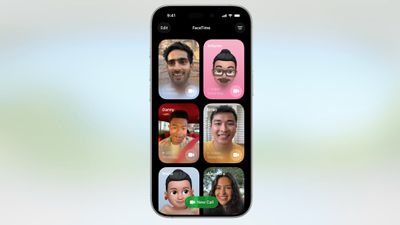
ios 26 facetime interface
Long pressing on a card brings up an option to delete it.

The "New Call" button is at the bottom of the ‌FaceTime‌ app rather than at the top, and filtering options can be accessed by tapping on the menu button at the top right. When you're on a call, the buttons are now at the bottom right of the display.

ios 26 facetime on call
Like all of Apple's other apps, ‌FaceTime‌ adopts the Liquid Glass aesthetic. Contact cards feature rounded corners, buttons have a rounded design, and the New Call button and some of the other interface buttons have a glass-like design.

Call Screening

Like the Phone app, ‌FaceTime‌ has new call filtering options. There's still a Silence Unknown Callers toggle, but missed calls and voicemails from unsaved numbers will now be sorted into an Unknown Callers list that's hidden from view unless you select it.
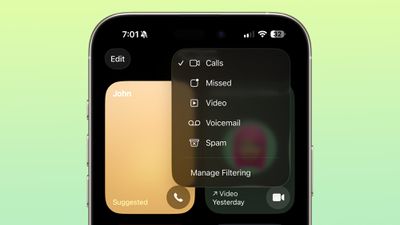
ios 26 facetime call filtering
Calls that are identified as spam will be silenced and automatically added to a new Spam list.

Call filtering is opt-in, so if you often get calls from unknown numbers, you can turn it on. If you don't want to miss any calls, you can leave it off. The toggle for spam and unknown callers can be found in the ‌FaceTime‌ section of the Settings app under Call Filtering.

In the ‌FaceTime‌ app, you can get to the different filtered sections by tapping on the menu button in the upper right of the app. Sections include Calls, Missed, Video, Voicemail, Unknown Callers, and Spam.

Sensitive Content Blocking

In ‌iOS 26‌, the Sensitive Content Warning and Communication Safety features are available for ‌FaceTime‌ video calls. When nudity is detected, the ‌FaceTime‌ video will pause and a warning about nude content will be displayed.
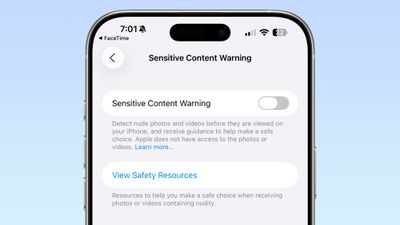
ios 26 facetime sensitive content
Communication Safety is a feature that is designed for the accounts of children and teens, and it provides warnings if images and videos of nudity are detected. Communication Safety is on by default for accounts created for children up to age 17.

Adults can use Communication Safety features too, in the form of Sensitive Content Warnings. Sensitive Content Warnings are an opt-in feature that prevents users of all ages from being subject to unwanted nude photos and videos.

Both options blur nudity in the Messages app and pause video in ‌FaceTime‌. There is no situation where an adult will see their ‌FaceTime‌ calls paused for nudity unless they have turned on the Sensitive Content Warning feature.

Sensitive Content Warnings can be turned on in the Privacy and Security section of the Settings app. Adults can also opt to turn on Communication Safety in the Screen Time section of the Settings app.

Sensitive Content Warnings and Communication Safety use on-device machine learning to analyze photos and videos. Apple does not receive an alert that nudity was detected, and does not have access to any photos or videos.

Read More

We have a dedicated iOS 26 roundup that goes into detail on all of the new features that are available in the update.


Related Roundups: iOS 26, iPadOS 26
Related Forum: iOS 26

Popular Stories

bug security vulnerability issue fix larry

Apple Fixes Possibly Exploited CoreGraphics Flaw on Older iPhones

Tuesday October 27, 2026 5:16 am PDT by
Among the flurry of iOS 27.2 releases on Monday, Apple also pushed a wave of software updates for its older operating systems, including a fix for a CoreGraphics vulnerability that Apple says may have been exploited in targeted attacks. The releases include iOS 26.7.2, iPadOS 26.7.2, iOS 18.7.11, iPadOS 18.7.11, macOS Tahoe 26.7.2, macOS Sequoia 15.8.2, and tvOS 26.6.1. iOS 18.7.11 and...
apple pro tell logo

Apple Launching Five New Products Today

Thursday November 5, 2026 12:59 am PST by
Apple is launching five new products on Friday, November 6, following pre-orders that opened last week, including its first touchscreen MacBook Pro models. The following new products will be available from today: iPad mini with OLED display and A20 Pro chip iMac with M6 chip 14-inch MacBook Pro with M6 chip 14-inch MacBook Pro with OLED touchscreen 16-inch MacBook Pro with OLED...
duo aquarium

More Fun iPhone Duo Apps: 30 New Picks to Try

Friday November 6, 2026 3:27 pm PST by
When the iPhone Duo launched, we shared a list of some of the fun apps developers created for the new form factor. Two weeks out, developers are continuing to come up with fresh ideas, so we thought we'd share some of our favorites. Games Marbles Unhinged ($2.99) - Marbles Unhinged is a marble maze designed for the Duo. When you fold it, the floor turns into a ramp. If you stand the top...

Top Rated Comments

ipedro Avatar
16 months ago
The only new feature I want in FaceTime is for it to detect that someone is out in public and insist that they turn off their mutha****in speakerphone. 😒

Score: 16 Votes (Like | Disagree)
fizzyfizz Avatar
16 months ago
Wish they'd include an option to swipe away my own face when chatting. I mean, why do I need to see a little video of myself?!

Score: 10 Votes (Like | Disagree)
cybercommand Avatar
16 months ago
Apple needs to hurry up and get their act together when it comes to languages. It’s been years.
Score: 10 Votes (Like | Disagree)
16 months ago

The only new feature I want in FaceTime is for it to detect that someone is out in public and insist that they turn off their mutha****in speakerphone. 😒
Amen bro. the absolute worst of the worst. people have no manners
Score: 8 Votes (Like | Disagree)
16 months ago
Why not Spanish spoken in Mexico
Score: 6 Votes (Like | Disagree)
16 months ago

“‌FaceTime‌ supports Live Translation as long as you have a phone that works with Apple Intelligence ('https://www.macrumors.com/guide/apple-intelligence/').”

Interesting. Yesterday, I was driving to town in a no service area, and asked Siri, “Siri, shuffle playlist 90’s favourites.”

She replied, “To do that you’ll need to be online.”

😟
Other greatest hits from useless Siri:

"To do that, you'll need to unlock your phone"

"Here is what I found on the internet (for whatever you asked)"

Siri is beaten by Google Assistant on a 5-year-old Android 12 $99 Budget phone. it's embarrassing and terrible
Score: 4 Votes (Like | Disagree)
Latest Stories
Siri AI Rumored to Become 'More Like an Agent' as Early as Next Year
5 hours ago
Apple Taking New Approach to Developing iOS 28 and macOS 28
7 hours ago
Early Apple Black Friday Deals on Apple Watch, MacBook Air, and More
1 day ago
'Backglow' Lets You Customize New MacBook Pro's Glowing Apple Logo
1 day ago
Top Stories: Apple Product Launches, iOS 27.3 Beta, and More
1 day ago
More Fun iPhone Duo Apps: 30 New Picks to Try
2 days ago
Hands-On With Apple's New OLED Touchscreen MacBook Pro
2 days ago
Apple Store With All-New Design Opening Soon in Southern California
2 days ago
Control the Glowing Apple Logo on Your New MacBook Pro
2 days ago
Apple Shares New 'Apple Card: Apply and Use in Minutes' Ad
2 days ago
Apple Says More Than 100,000 Apps Optimized for iPhone Duo, Here's What's Still Missing
2 days ago
Early Black Friday Deals Kickoff With Steep Discounts on Apple Watch Ultras and More
2 days ago
The MacRumors Show: iOS 27.3 Looks Like a Huge Update
2 days ago
Best Buy's Black Friday Event Begins With Sitewide Savings on Apple, TVs, More
2 days ago
Apple Releasing Yet Another Two New Products Next Week
2 days ago
MacBook Air Drops to Lowest Price in Months With Amazon's $250 Discount
2 days ago
Apple Rumored to Drop the iPhone's Action Button Next Year
2 days ago
Apple's Extended Return Policy Now in Effect for 2026 Holiday Season
2 days ago
Apple Music Classical Updated With New Icon and Refreshed Design
2 days ago
OLED iPad Mini, M6 iMac, and New MacBook Pros Available From Today
3 days ago
Apple Surveys iPhone Duo Buyers About Crease and Camera
3 days ago
Apple's First Touchscreen Mac is Now Arriving to Customers
3 days ago
Claude Gets Personal Finance Feature With Bank Account Linking
3 days ago
Apple Arcade Adds Crossy Road Rush and NBA 2K27
3 days ago
Apple's New HomeView Smart Home Hub: Here's How Much RAM It Has
3 days ago
iPad Mini vs. iPad Air Buyer's Guide: Now Just $50 Apart
3 days ago
First iOS 27.3 and macOS Golden Gate 27.3 Public Betas Now Available
3 days ago
Apple Announces a New Mac Sales Record
3 days ago
Paid $200 for Logic Pro? Apple Says You Won't Get This New Feature
3 days ago
Instagram's Edits Video Editor is Now Available on Mac
3 days ago








































