iOS 26: New Lock Screen Features - MacRumorsOpen MenuShow RoundupsShow Forums menuVisit ForumsOpen Sidebar
Skip to Content

iOS 26: New Lock Screen Features

When you're not using your iPhone, the Lock Screen is what you see most often. Liquid Glass is everywhere in iOS 26, and it starts right when you pick up your device. The Lock Screen got a Liquid Glass overhaul, plus a few other new features.
iOS 26 Lock Screen Features
Here's what you'll see first when you upgrade to ‌iOS 26‌.

Liquid Glass

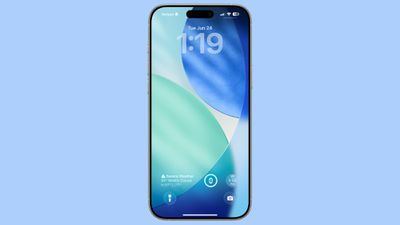
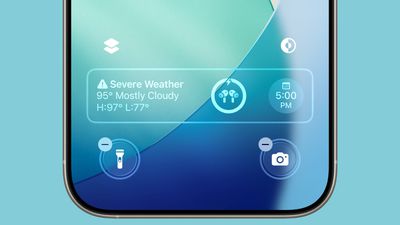
The two customizable control buttons on the Lock Screen are larger and have a floating, glass-like appearance like the other Liquid Glass interface options in ‌iOS 26‌. The clock has a frosted glass appearance with the new "Glass" option, using lighting effects to make it look like glass in the real world.
ios 26 home screen
Glass can be selected for any of the clock fonts, and you can choose a color to tint the glass. Apple has multiple preset options, or you can select your own.

When you tilt your iPhone, light reflects and glints with the movement, for a realistic glass effect.
ios 26 b2 widgets
Notifications that are on your Lock Screen have a Liquid Glass aesthetic with a frosted glass look that leaves your wallpaper visible behind them.

Clock

In addition to having a Liquid Glass aesthetic, the clock can be resized to better match your iPhone's wallpaper using a new adaptive feature. When you're customizing your Lock Screen, you can grab the corner of the time and drag it down to expand it.
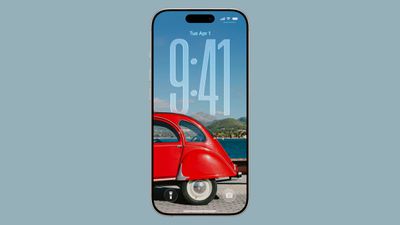
ios 26 lock screen time
Adjusting the size of the time only works with the first font option, and only with the standard Arabic, Western numbering.
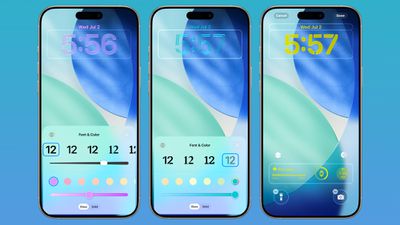
lock screen time colors ios 26
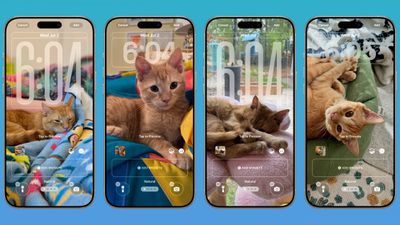
With photo wallpapers, the time can automatically expand to fill in missing space, and it can change based on the image if you have Photo Shuffle set. The subject in photo wallpapers is meant to always be visible, and can overlap the time in unique ways in ‌iOS 26‌.

ios 26 lock screen time features
There is a Photos watch face for the Apple Watch that also supports time that changes size and position based on the wallpaper.

Wallpaper

There is a new default wallpaper that was designed for ‌iOS 26‌. It's multiple shades of blue, with the same floating glass aesthetic that the rest of ‌iOS 26‌ features. The wallpaper can subtly shift with iPhone movement.
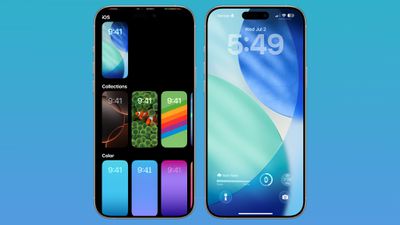
ios 26 lock screen wallpaper
It's a small detail, but the icons for selecting different wallpaper categories have been updated to better match the Liquid Glass design.

Spatial Scenes

Aside from the Liquid Glass time, Spatial Scenes are the biggest change to the Lock Screen. 2D photos that you set as wallpaper can be turned into 3D spatial images that separate the subject of the photo from the background using depth information.
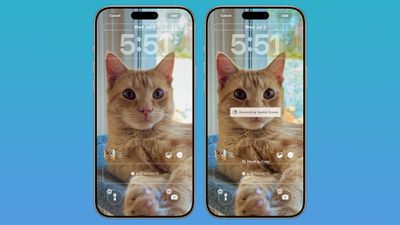
ios 26 wallpaper spatial scene
When you move your iPhone, Spatial Scenes shift and move along with it, making the images feel alive. Spatial Scenes is a feature in the ‌Photos‌ app too, and it can be added to any image that you've taken with your iPhone, including older ones.

Tap on the small icon with a mountain and a sun to activate the Spatial Scenes setting when choosing a photo wallpaper.

Widgets

Lock Screen widgets can be placed on the top of the display under the time, or at the bottom of the display. In earlier versions of iOS, you could only put widgets at the top of the screen. With the adaptive clock and new wallpaper options, widgets can also shift down automatically to ensure the subject of an image is always visible.
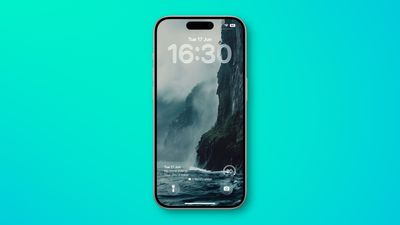
ios 26 bottom widgets lock screen

Apple Music

Apple added a new Lock Screen widget for Apple Music search, but there are no other new Lock Screen widget options. What is new, though, is a new full screen Now Playing interface that shows album art. Artwork expands and animates right on the Lock Screen.
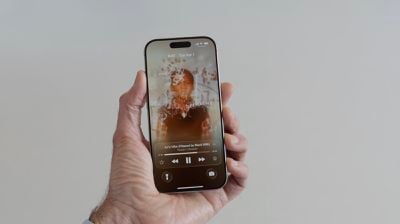
iOS 26 Lock Screen Full Screen Album Art

Read More

We have a dedicated iOS 26 roundup that goes into detail on all of the new features that are available in the update.


Related Roundups: iOS 26, iPadOS 26
Related Forum: iOS 26

Popular Stories

bug security vulnerability issue fix larry

Apple Fixes Possibly Exploited CoreGraphics Flaw on Older iPhones

Tuesday October 27, 2026 5:16 am PDT by
Among the flurry of iOS 27.2 releases on Monday, Apple also pushed a wave of software updates for its older operating systems, including a fix for a CoreGraphics vulnerability that Apple says may have been exploited in targeted attacks. The releases include iOS 26.7.2, iPadOS 26.7.2, iOS 18.7.11, iPadOS 18.7.11, macOS Tahoe 26.7.2, macOS Sequoia 15.8.2, and tvOS 26.6.1. iOS 18.7.11 and...
apple pro tell logo

Apple Launching Five New Products Today

Thursday November 5, 2026 12:59 am PST by
Apple is launching five new products on Friday, November 6, following pre-orders that opened last week, including its first touchscreen MacBook Pro models. The following new products will be available from today: iPad mini with OLED display and A20 Pro chip iMac with M6 chip 14-inch MacBook Pro with M6 chip 14-inch MacBook Pro with OLED touchscreen 16-inch MacBook Pro with OLED...
duo aquarium

More Fun iPhone Duo Apps: 30 New Picks to Try

Friday November 6, 2026 3:27 pm PST by
When the iPhone Duo launched, we shared a list of some of the fun apps developers created for the new form factor. Two weeks out, developers are continuing to come up with fresh ideas, so we thought we'd share some of our favorites. Games Marbles Unhinged ($2.99) - Marbles Unhinged is a marble maze designed for the Duo. When you fold it, the floor turns into a ramp. If you stand the top...

Top Rated Comments

AndyUnderscoreR Avatar
18 months ago
There's barely a single screenshot there that would pass the WCAG Color Contrast Checker.

I won't be installing IOS26 unless there's an option to ensure you always have a readable screen.
Score: 17 Votes (Like | Disagree)
18 months ago
Well yes it’s cool and all, but I would like a review for people with less than perfect eyesight. Hope they will have a option not to go with this as it seems difficult to focus on the text and images.
Score: 16 Votes (Like | Disagree)
klasma Avatar
18 months ago

When you're not using your iPhone, the Lock Screen is what you see most often.
That must be a sad life. ;)

Score: 12 Votes (Like | Disagree)
18 months ago
gotta a feeling that message boards will light up (with complaints) once iOS 26 goes public
Score: 12 Votes (Like | Disagree)
Justin Cymbal Avatar
18 months ago

Widgets

Lock Screen widgets can be placed on the top of the display under the time, or at the bottom of the display. In earlier versions of iOS, you could only put widgets at the top of the screen. With the adaptive clock and new wallpaper options, widgets can also shift down automatically to ensure the subject of an image is always visible.

The ability to display more than just two widgets on the lock screen would be a nice feature to have (in a future version of iOS)

Now that we can place widgets on either the top or bottom of the lock screen, it would be nice to be able to place them on BOTH the top and bottom - to enable the ability to have 4 widgets simultaneously displayed on the lock screen
Score: 7 Votes (Like | Disagree)
18 months ago
Screaming Windows Vista from 2007. The company of innovation became the company of copycat.
Score: 6 Votes (Like | Disagree)
Latest Stories
Siri AI Rumored to Become 'More Like an Agent' as Early as Next Year
4 hours ago
Apple Taking New Approach to Developing iOS 28 and macOS 28
6 hours ago
Early Apple Black Friday Deals on Apple Watch, MacBook Air, and More
1 day ago
'Backglow' Lets You Customize New MacBook Pro's Glowing Apple Logo
1 day ago
Top Stories: Apple Product Launches, iOS 27.3 Beta, and More
1 day ago
More Fun iPhone Duo Apps: 30 New Picks to Try
2 days ago
Hands-On With Apple's New OLED Touchscreen MacBook Pro
2 days ago
Apple Store With All-New Design Opening Soon in Southern California
2 days ago
Control the Glowing Apple Logo on Your New MacBook Pro
2 days ago
Apple Shares New 'Apple Card: Apply and Use in Minutes' Ad
2 days ago
Apple Says More Than 100,000 Apps Optimized for iPhone Duo, Here's What's Still Missing
2 days ago
Early Black Friday Deals Kickoff With Steep Discounts on Apple Watch Ultras and More
2 days ago
The MacRumors Show: iOS 27.3 Looks Like a Huge Update
2 days ago
Best Buy's Black Friday Event Begins With Sitewide Savings on Apple, TVs, More
2 days ago
Apple Releasing Yet Another Two New Products Next Week
2 days ago
MacBook Air Drops to Lowest Price in Months With Amazon's $250 Discount
2 days ago
Apple Rumored to Drop the iPhone's Action Button Next Year
2 days ago
Apple's Extended Return Policy Now in Effect for 2026 Holiday Season
2 days ago
Apple Music Classical Updated With New Icon and Refreshed Design
2 days ago
OLED iPad Mini, M6 iMac, and New MacBook Pros Available From Today
2 days ago
Apple Surveys iPhone Duo Buyers About Crease and Camera
3 days ago
Apple's First Touchscreen Mac is Now Arriving to Customers
3 days ago
Claude Gets Personal Finance Feature With Bank Account Linking
3 days ago
Apple Arcade Adds Crossy Road Rush and NBA 2K27
3 days ago
Apple's New HomeView Smart Home Hub: Here's How Much RAM It Has
3 days ago
iPad Mini vs. iPad Air Buyer's Guide: Now Just $50 Apart
3 days ago
First iOS 27.3 and macOS Golden Gate 27.3 Public Betas Now Available
3 days ago
Apple Announces a New Mac Sales Record
3 days ago
Paid $200 for Logic Pro? Apple Says You Won't Get This New Feature
3 days ago
Instagram's Edits Video Editor is Now Available on Mac
3 days ago