Safari in iOS 26: Everything New From Design to Privacy - MacRumorsOpen MenuShow RoundupsShow Forums menuVisit ForumsOpen Sidebar
Skip to Content

Safari in iOS 26: Everything New From Design to Privacy

Apple updated many of its built-in apps in iOS 26, and Safari is one of the apps that has several notable changes. There's a new look, an updated layout, and a new feature set.

iOS 26 Safari Features
This guide features all of the changes you can expect to see in Safari when ‌iOS 26‌ launches to the public this fall.

Liquid Glass Design

Safari adopts the same Liquid Glass design as the rest of Apple's apps, and you'll primarily see it in the address bar, tab view, and buttons.
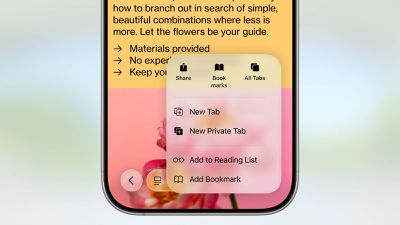
safari liquid glass
The buttons and tab bar have the Liquid Glass translucent look, and more of the background of each website is visible beneath them. The tab bar is more compact and it takes up less space, and everything is rounder.

When you scroll down, the tab bar collapses down and you just see a small bar with the website URL, so the entire focus is on the website content. Scrolling back up returns the tab bar to its full size.

Updated Layout

There is a new compact design option in ‌iOS 26‌, but Apple left the option to use the previous Top and Bottom tab view layouts if you prefer those. Layout options are available in the Safari section of the Settings app.
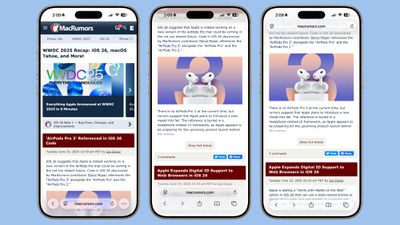
ios 26 safari design light mode
Compact tucks away the share, bookmark, and tab options behind the three-dot button on the left of the tab bar. It's a cleaner look, but it may be frustrating if you often need to access features like the tab menu. There is a back arrow, which splits into forward and back arrow options when you're navigating through content. Settings like Translate and Reader mode are still available by tapping on the small icon next to the URL.
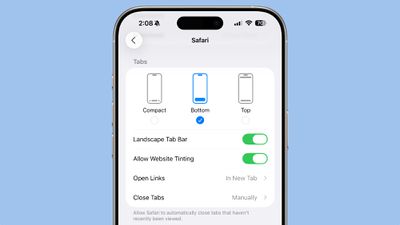
ios 26 safari options
The Top and Bottom views offer the same setup that's available in iOS 18, but with a new Liquid Glass look. Both bars are slimmed down, and no longer take up the full width of the display.
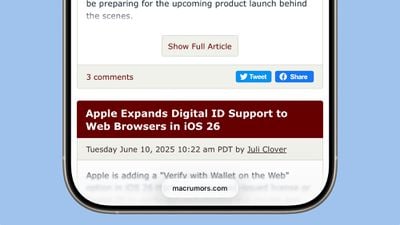
ios 26 safari menu collapsed
Tab management has been overhauled with the same design changes. The "+" button to open a new tab is still located on the left, and there's now a blue checkmark when you're done interacting with tabs. In the center of the tab view, there's a slider bar that shows your current number of open tabs in the tab group that you're in.
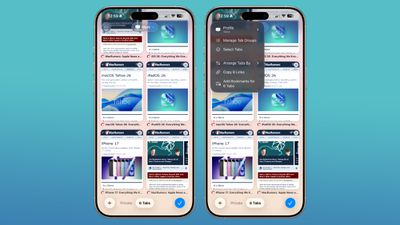
ios 26 safari tabs
Swiping from left to right allows you to quickly swap between your tab groups. Changing profiles can be done with a dropdown menu at the top of the display, and other tab management tools are available by tapping on the "···" icon.

Web Apps

When you add a website to your Home Screen in ‌iOS 26‌, it will always open as a web app. Web apps have been supported on the ‌Home Screen‌ in earlier versions of iOS, but web developers needed to configure them to operate as web apps.
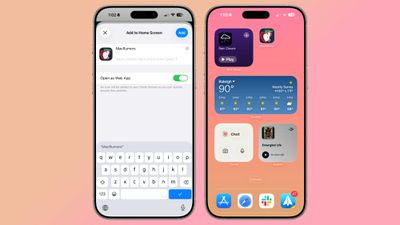
ios 26 web apps
If websites weren't configured properly, they would open in Safari when added to the ‌Home Screen‌. Now a website will open as a dedicated web app, even if it hasn't been explicitly set up to work that way.

There is an Open as Web App option that can be toggled off when adding a website to a ‌Home Screen‌ if you prefer that websites open up in Safari.

Tracking Prevention

Advanced fingerprinting protection now extends to all browsing by default, rather than only being turned on by default for private web browsing. Apple's fingerprinting protection features are meant to keep websites from tracking your device usage across websites.
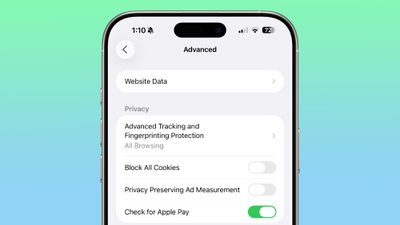
ios 26 tracking protection

HDR Images

‌iOS 26‌ adds HDR image support to Safari. HDR images have a wider dynamic range for brighter whites and deeper blacks, along with improved color gamut. P3 HDR images will now appear as intended in Safari on iPhones with XDR displays.

SVG Icons

Safari supports the SVG file format for icons wherever icons appear in the interface, including the start page, web apps, Safari tabs, menus, and more.

SVGs are superior to PNGs because they can be scaled up without a loss of quality, and in Safari, icons often need to appear at multiple different sizes.

WebGPU

Safari in ‌iOS 26‌ includes WebGPU, a feature that Apple has been testing in Safari Technology Preview. WebGPU is similar to WebGL, but it maps more directly to Metal and the underlying iPhone hardware. WebGPU isn't a user facing feature that you'll be able to use directly, but there will be benefits from it.

Web-based games will be able to achieve higher frame rates and better effects with lower CPU load, plus photo editors, 3D modeling sites, CAD viewers, and websites that do on-device ML should run faster while using less battery. WebGPU requires an iPhone 15 Pro or later.

Digital Credentials API

Apple added support for the W3C Digital Credentials API to Safari, which means a website is able to request identity documents like a driver's license from Apple Wallet for private and secure identity and age verification.
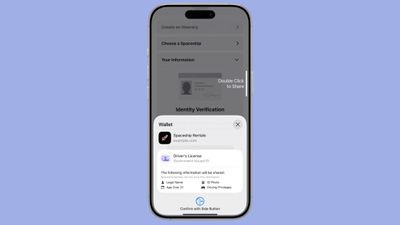
ios 26 id verify on web
The Verify with Wallet on the Web feature in ‌iOS 26‌ uses the Digital Credentials API and takes advantage of biometric authentication. Websites can ask customers for information like date of birth without receiving unnecessary extra data, and customers can approve the data sharing with Face ID or Touch ID.

The first websites that will support the Verify with Wallet on the Web feature include Chime, Turo, Uber Eats, and U.S. Bank.

Privacy Improvements

The ‌iOS 26‌ version of Safari prevents known fingerprinting scripts from accessing web APIs that can reveal device characteristics like screen dimensions, cutting down on the ways that advertisers can track you across websites. These scripts are also blocked from setting long-lived storage like cookies, and from reading query parameters that could be used for navigational tracking.

Reporting Website Compatibility Issues

A new feature lets you report an issue if you're having trouble with a webpage. In the Page menu, Apple is adding a "Report a Website Issue" option that lets you share information with Apple to improve Safari.

Release Timing

‌iOS 26‌ is available to developers right now, and Apple plans to release a public beta in July. After a few months of testing, ‌iOS 26‌ will launch alongside new iPhones in September.

Read More

We have a dedicated iOS 26 roundup that goes into detail on all of the new features that are available in the update.
Related Roundups: iOS 26, iPadOS 26
Tag: Safari
Related Forum: iOS 26

Popular Stories

Switch to Safari

Apple Explains Why Chrome Users Should 'Switch to Safari'

Tuesday October 13, 2026 5:29 am PDT by
Apple has launched a new "Switch to Safari" marketing campaign that encourages Chrome users to switch to Safari as their web browser of choice on the Mac. "Safari is a more powerful and private browser than Chrome," says Apple. Apple has a new "Switch to Safari" page on its website that outlines more than 10 reasons that Chrome users should switch to Safari, including faster performance...


safari iphone duo webkit

Apple Wants to Fix Safari's Cramped Layout on iPhone Duo

Saturday October 24, 2026 9:58 pm PDT by
Apple is considering changes to Safari on the iPhone Duo that would give websites access to more of the outer display, although the company has yet to settle on an approach. The challenge is allowing pages to occupy the area beneath Safari's side-mounted controls without making parts of a website inaccessible. In an Friday, October 23 WebKit post, Apple's Jen Simmons explained that an...
Switch to Safari

Apple Addresses Web Security Threat, Working on macOS Update With Additional Fix

Sunday October 25, 2026 4:07 pm PDT by
Earlier this month, a security researcher discovered that private cryptographic keys associated with eight of Indian company eMudhra's intermediate certificate authority (CA) certificates were weak. The compromised keys could have allowed attackers to impersonate legitimate websites, potentially putting users' sensitive information at risk. However, there is currently no evidence that the keys...

Top Rated Comments

klasma Avatar
18 months ago
Those floating controls are gimmicky. They make it harder to discern UI chrome from content, making the UI look more busy, while still obstructing the content beneath them, so having little benefit.

I also hope there will be an option to tone down the HDR. On YouTube, HDR videos are often too bright compared to SDR, and no way to turn it off.
Score: 15 Votes (Like | Disagree)
klasma Avatar
18 months ago

Probably. Safari can break a web site now without it.

I love Safari all around, I do, but I just don't use it because in the year 2025, it still causes a mess with so many things, and no one is developing around Safari with its small market share. That's why MicroSuck rebuilt edge to basically be re-skinned Chrome with a better security base to it. Enterprise trusts it, and website treat it like Chrome.

Why Apple doesn't do the same. Instead, they force good browser to adopt webkit to run on IOS and cripple them.
Everything being Chrome means that Google dictates how the web works. Safari is the single most important browser (Firefox being a far second) limiting Google’s control over the web.
Score: 12 Votes (Like | Disagree)
18 months ago
I despise when a link opens the app instead of the site yet Apple still gives you no option to control it.
Score: 10 Votes (Like | Disagree)
turbineseaplane Avatar
18 months ago
I still don't love a lot of this


Attachment Image

Attachment Image
Score: 10 Votes (Like | Disagree)
JamesMcFlyJR Avatar
18 months ago
Bring back the Compact Tab Bar in macOS Safari!!!

its crazy they shrunk the iOS safari bar even more but removed the compact tab bar in safari on macOS. smh
Score: 9 Votes (Like | Disagree)
jz0309 Avatar
18 months ago
Another great article/feature review! Appreciate it!
Score: 9 Votes (Like | Disagree)
Latest Stories
Siri AI Rumored to Become 'More Like an Agent' as Early as Next Year
2 hours ago
Apple Taking New Approach to Developing iOS 28 and macOS 28
3 hours ago
Early Apple Black Friday Deals on Apple Watch, MacBook Air, and More
22 hours ago
'Backglow' Lets You Customize New MacBook Pro's Glowing Apple Logo
22 hours ago
Top Stories: Apple Product Launches, iOS 27.3 Beta, and More
1 day ago
More Fun iPhone Duo Apps: 30 New Picks to Try
2 days ago
Hands-On With Apple's New OLED Touchscreen MacBook Pro
2 days ago
Apple Store With All-New Design Opening Soon in Southern California
2 days ago
Control the Glowing Apple Logo on Your New MacBook Pro
2 days ago
Apple Shares New 'Apple Card: Apply and Use in Minutes' Ad
2 days ago
Apple Says More Than 100,000 Apps Optimized for iPhone Duo, Here's What's Still Missing
2 days ago
Early Black Friday Deals Kickoff With Steep Discounts on Apple Watch Ultras and More
2 days ago
The MacRumors Show: iOS 27.3 Looks Like a Huge Update
2 days ago
Best Buy's Black Friday Event Begins With Sitewide Savings on Apple, TVs, More
2 days ago
Apple Releasing Yet Another Two New Products Next Week
2 days ago
MacBook Air Drops to Lowest Price in Months With Amazon's $250 Discount
2 days ago
Apple Rumored to Drop the iPhone's Action Button Next Year
2 days ago
Apple's Extended Return Policy Now in Effect for 2026 Holiday Season
2 days ago
Apple Music Classical Updated With New Icon and Refreshed Design
2 days ago
OLED iPad Mini, M6 iMac, and New MacBook Pros Available From Today
2 days ago
Apple Surveys iPhone Duo Buyers About Crease and Camera
3 days ago
Apple's First Touchscreen Mac is Now Arriving to Customers
3 days ago
Claude Gets Personal Finance Feature With Bank Account Linking
3 days ago
Apple Arcade Adds Crossy Road Rush and NBA 2K27
3 days ago
Apple's New HomeView Smart Home Hub: Here's How Much RAM It Has
3 days ago
iPad Mini vs. iPad Air Buyer's Guide: Now Just $50 Apart
3 days ago
First iOS 27.3 and macOS Golden Gate 27.3 Public Betas Now Available
3 days ago
Apple Announces a New Mac Sales Record
3 days ago
Paid $200 for Logic Pro? Apple Says You Won't Get This New Feature
3 days ago
Instagram's Edits Video Editor is Now Available on Mac
3 days ago