Everything New in Calendar and Reminders in iOS 27 - MacRumorsOpen MenuShow RoundupsShow Forums menuVisit ForumsOpen Sidebar
Skip to Content

Everything New in Calendar and Reminders in iOS 27

The Calendar and Reminders apps look about the same as they did in iOS 26, but there are a couple of useful new Apple Intelligence features that make both apps more intuitive in iOS 27.


Natural Language for Calendar

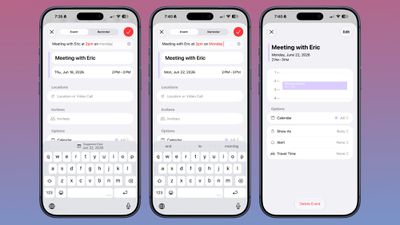
‌Apple Intelligence‌ in Calendar lets you add events by describing them in natural language. It identifies people, dates, and places while you are typing, and you can tap to add that info.
ios 27 calendar natural language
It's not as fluid as Fantastical, but it's better than before. You can't just open the Calendar app and type "meeting at 2pm with Eric on July 14" and have it filed correctly as you do in Fantastical because it doesn't have the same automatic date swapping.

Calendar adds an event on the date that's selected, and by default, that's the current date. To use natural language to select another date, you can type in something like "meeting at 2pm with Eric on September 2," but you need to tap on the September 2 suggestion at the top of the keyboard.

The Calendar app automatically sets the event to the time that you type in with natural language, so you don't need to tap for that.

Natural Language for Reminders

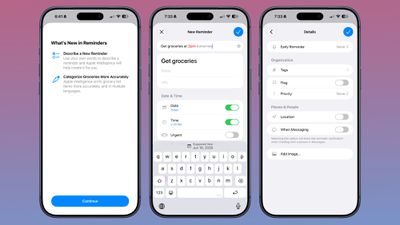
In Reminders, you can now describe a reminder in natural language and it autofills the metadata that you mention. It can add date, time, and location automatically.
ios 27 reminders
You can write in a reminder like "get the groceries at 6pm tonight" or "send the photos to John tomorrow at 4pm" and it adds the correct times to your reminder.

With natural language support, Apple removed the menu bar at the bottom of the interface for adding a new reminder. Adding extra features like an image or metadata such as a flag can now be done through the "Details" interface.

Calendar Event Editing

The event editing interface is simpler to use, and it's quicker to get to time adjustments. If you adjust the frequency of an event, Calendar can intelligently apply changes to all events. Siri can also be used for editing calendar events.

Holiday-Aware Alarms in China

The Calendar app tracks holidays, and can alert you the day before a holiday to ask if you want to change the time of the wake-up alarm that you have set. With ‌iOS 27‌, this feature now extends to China.

Large Widgets

The Calendar and Reminders apps both have a new extra-large widget size that takes up an entire app page.

Siri AI

‌Siri‌ has full access to your calendar and can add events to it with natural language requests. What you can't do with the natural language entry, you can do with ‌Siri‌ AI.

‌Siri‌ is much more capable than before, and it does a better job correctly adding events to the calendar on the day and time you intend, and with parameters, like repeating events.

Just describe the event you want to create and ‌Siri‌ can get it done. ‌Siri‌ can add events to your calendar from other apps, like Mail and Messages.

‌Siri‌ is able to search across the Calendar app and Reminders, so it knows your schedule and what's on your to-do list.

Visual Intelligence

Visual Intelligence in ‌iOS 27‌ supports adding multiple events to your calendar at one time from a schedule. If you have a document with a list of dates, like a child's sports practice schedule, you can take a picture and add them to the Calendar app all at once.

Reminders Grocery Lists

In ‌iOS 27‌, the Reminders app has improved grocery list sorting. It also supports more languages than before.

Shortcuts for Reminders

There are new Reminders actions in the Shortcuts app, including Create Group, Create List, Create Section, Delete Groups, Delete Lists, and Delete Sections. There's also a new "Get What's On Screen" option that can be used with Reminders.

Apple Intelligence Requirements

To use the ‌Apple Intelligence‌ features in ‌iOS 27‌, you need an iPhone 15 Pro or later.

Related Roundups: iOS 27, iPadOS 27
Related Forum: iOS 27

Popular Stories

iOS 27

iOS 27.2 Features: Everything New in iOS 27.2

Monday October 26, 2026 3:56 pm PDT by
Apple released iOS 27.2, uniting the iPhone Duo and other iPhone models on the same version of iOS. iOS 27.2 is the first major iOS 27 update, and it adds several useful new features. Siri AI Improvements Siri AI can recall past conversations you had with it, so you can ask Siri about something it told you before, like a restaurant it previously recommended. It's also able to draw on more...
iOS 27

Apple Releases iOS 27.2 Release Candidate

Monday October 19, 2026 10:26 am PDT by
Apple today seeded the release candidate of an upcoming iOS 27.2 update to developers for testing purposes, with the update coming a week after Apple released the fourth iOS 27.2 beta. Apple also seeded the iPadOS 27.2 RC. Registered developers can download the beta updates by opting in under Settings > General > Software Update and selecting the iOS 27 developer beta. The beta was used...
iOS 27

Apple Releases iOS 27.2 With New Siri AI Languages

Monday October 26, 2026 11:32 am PDT by
Apple today released iOS 27.2 and iPadOS 27.2, the first major updates to the iOS 27 and iPadOS 27 operating systems that came out in September. iOS 27.2 is available for all iPhones able to run iOS 27, including the iPhone Duo, while iPadOS 27.2 is available for all iPads able to run iPadOS 27, including the newly announced OLED iPad mini. The iOS 27.2 update expands Siri AI to new...

Top Rated Comments

Populus Avatar
20 weeks ago

To use the Apple Intelligence features in iOS 27, you need an iPhone 15 Pro or later.
Yeah but the question here is: do we need Apple Intelligence for those features, such as the natural language in calendar and reminders apps?
Score: 6 Votes (Like | Disagree)
20 weeks ago
They need to fix Contacts.

It is terrible and each of their changes for two years have just made it worse and less useful.

I am not going to get excited about Calendar since I stopped using it years ago. Apparently Apple took their third-string developers and put them on the most core apps.
Score: 5 Votes (Like | Disagree)
FontGeek Avatar
20 weeks ago
The more I read about SiriAI, the more I’m thinking it solves all the things that make people say, “I feel like it SHOULD be able to do this”
Score: 4 Votes (Like | Disagree)
Apple_Robert Avatar
20 weeks ago
Instead of typing an event in Calendar, press the side Siri button and tell Siri to create an event for whatever day and time. Works 99% of the time for me that way.
Score: 3 Votes (Like | Disagree)
foqus Avatar
20 weeks ago
I stopped using Calendar years ago for two reasons: my government job blocks Apple Calendar (along with all iCloud stuff), and more importantly, with Google calendar I can set the events to nice, BRIGHT colors...with Apple they are all dull and subdued UNLESS SELECTED, which blows. I like bright colors.
Score: 3 Votes (Like | Disagree)
20 weeks ago
How about alerts for recurring calendar events that actually work.. and not just for the first occurrence. Or is that just me?
Score: 2 Votes (Like | Disagree)
Latest Stories
Siri AI Rumored to Become 'More Like an Agent' as Early as Next Year
6 hours ago
Apple Taking New Approach to Developing iOS 28 and macOS 28
7 hours ago
Early Apple Black Friday Deals on Apple Watch, MacBook Air, and More
1 day ago
'Backglow' Lets You Customize New MacBook Pro's Glowing Apple Logo
1 day ago
Top Stories: Apple Product Launches, iOS 27.3 Beta, and More
1 day ago
More Fun iPhone Duo Apps: 30 New Picks to Try
2 days ago
Hands-On With Apple's New OLED Touchscreen MacBook Pro
2 days ago
Apple Store With All-New Design Opening Soon in Southern California
2 days ago
Control the Glowing Apple Logo on Your New MacBook Pro
2 days ago
Apple Shares New 'Apple Card: Apply and Use in Minutes' Ad
2 days ago
Apple Says More Than 100,000 Apps Optimized for iPhone Duo, Here's What's Still Missing
2 days ago
Early Black Friday Deals Kickoff With Steep Discounts on Apple Watch Ultras and More
2 days ago
The MacRumors Show: iOS 27.3 Looks Like a Huge Update
2 days ago
Best Buy's Black Friday Event Begins With Sitewide Savings on Apple, TVs, More
2 days ago
Apple Releasing Yet Another Two New Products Next Week
2 days ago
MacBook Air Drops to Lowest Price in Months With Amazon's $250 Discount
2 days ago
Apple Rumored to Drop the iPhone's Action Button Next Year
2 days ago
Apple's Extended Return Policy Now in Effect for 2026 Holiday Season
2 days ago
Apple Music Classical Updated With New Icon and Refreshed Design
2 days ago
OLED iPad Mini, M6 iMac, and New MacBook Pros Available From Today
3 days ago
Apple Surveys iPhone Duo Buyers About Crease and Camera
3 days ago
Apple's First Touchscreen Mac is Now Arriving to Customers
3 days ago
Claude Gets Personal Finance Feature With Bank Account Linking
3 days ago
Apple Arcade Adds Crossy Road Rush and NBA 2K27
3 days ago
Apple's New HomeView Smart Home Hub: Here's How Much RAM It Has
3 days ago
iPad Mini vs. iPad Air Buyer's Guide: Now Just $50 Apart
3 days ago
First iOS 27.3 and macOS Golden Gate 27.3 Public Betas Now Available
3 days ago
Apple Announces a New Mac Sales Record
3 days ago
Paid $200 for Logic Pro? Apple Says You Won't Get This New Feature
3 days ago
Instagram's Edits Video Editor is Now Available on Mac
3 days ago








































