iOS 27 Home App: 10+ New HomeKit Features - MacRumorsOpen MenuShow RoundupsShow Forums menuVisit ForumsOpen Sidebar
Skip to Content

iOS 27 Home App: 10+ New HomeKit Features

Apple updated the Home app with some useful new features that rely on Apple Intelligence. The updates improve the way HomeKit Secure Video cameras work on Apple's HomeKit platform.

iOS 27 10 HomeKit Features

Apple Intelligence Summaries

The Home app generates written summaries for motion alerts and what's detected, using AI to determine what's been recorded. It can recognize people, animals, vehicles, packages, and general motion, giving a summary of what's happening even if you're not looking at the video footage.

It is intelligent enough to give detail, so you'll see alerts like "a person walked through the room," "two people were in the room," "a dog sat on the floor," or "a cat played in the room."

‌HomeKit Secure Video‌ cameras have facial recognition, so they can also recognize people who are in your Photo Library, sending alerts and summaries with names.

Grouped Footage

Along with analyzing footage, the Home app can now group footage from separate cameras capturing the same event. If a person walks by one camera and continues on to another, the Home app knows those two events are related. During video playback, you can see relevant footage from multiple cameras with a summary of something that happened across the entire home.

Highlights

If there are noteworthy recordings available, they are shown in a separate section above the general recordings in the camera view.

The Home app supports natural language search for camera footage, so if you're looking for something like when a package was delivered, you can search for it. It can recognize objects, colors, and more. Search works in the Home app and directly in Spotlight.

Notification Summaries

Notifications update in real-time and related alerts are combined instead of being shown as separate notifications. The net result is fewer Home app notifications. Summaries can be turned on in the Home app settings on a per-camera basis, plus there are options for multiple languages.

Video Previews

Long pressing on an incoming video notification plays a preview clip of the footage and includes access to nearby accessories like lights that you might want to turn on quickly.

Reduce Notifications

There is an ‌Apple Intelligence‌ section in the Home app where you can turn on video summaries and cut down on notifications. The Reduce Notifications toggle combines related activities like someone arriving and unlocking the door.

4K Recording

‌HomeKit Secure Video‌ cameras are no longer limited to 1080p recording. If supported, cameras can stream and record at up to 4K.

Energy Monitoring

Accessories able to track energy usage like smart plugs now display that information in the Home app in the Energy tab. There is no way to create automations based on the data as of now.

Remote Apple TV Updates

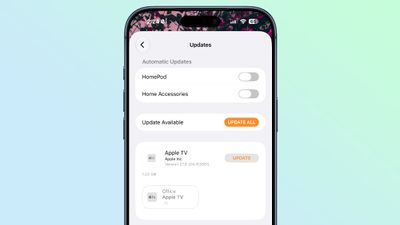
It's now possible to update the Apple TV remotely using the Home app, similar to how HomePod updates are installed.
ios 27 apple tv home app

Reliability

Apple says capturing and storing ‌HomeKit Secure Video‌ footage is more reliable than it was before and it is less likely to miss activity.

Connectivity for Thread home accessories has also been improved with Apple adopting Thread 1.4, and ‌HomeKit‌ accessories now pair faster. Apple also says smart home accessory updates are faster than before.

When adding a new device to the Home app, there's a simplified interface that's useful for configuring Matter accessories in particular.

Compatibility and Requirements

The ‌Apple Intelligence‌ features in the Home app require a device that supports ‌Apple Intelligence‌, which includes the iPhone 15 Pro and later. The Home features also need an Apple TV running tvOS 27 or a ‌HomePod‌ running the ‌HomePod‌ Software 27. Apple is also working on a home hub that could launch as soon as this year, and it too would likely work for the ‌Apple Intelligence‌ features.

‌HomeKit Secure Video‌ requires an iCloud+ plan. The 50GB plan supports a single camera, the 200GB plan supports up to five cameras, and the 2TB and above plans support unlimited cameras.

4K video recording does not require ‌Apple Intelligence‌.

Availability

iOS 27 is available to developers and public beta testers, so you can try it out now ahead of its September launch.


Related Roundups: iOS 27, iPadOS 27
Related Forum: iOS 27

Popular Stories

iOS 27 Next to iPhone

Here's When iOS 27 Rolls Out Today in Every Time Zone [Update: It's Out]

Sunday September 13, 2026 3:00 am PDT by
Update 10:04 a.m.: iOS 27 is rolling out now, though it may take a bit for all users to see it, so keep checking! Apple is about to release iOS 27, which will finally deliver more advanced Siri AI capabilities as well as a variety of other refinements, improvements, and new features to iPhones. It's Apple's biggest software update of the year, and Apple announced at Wednesday's iPhone event...
iPhone Handoff Feature

iOS 27 Introduces New 'iPhone Handoff' Feature

Wednesday September 2, 2026 12:35 pm PDT by
Apple has added a new "iPhone Handoff" feature to iOS 27 that will allow you to switch between two iPhones while using the same phone number on each device. This functionality was briefly mentioned during the WWDC 2026 keynote in June, on a slide that listed hundreds of new features coming in iOS 27 and corresponding software updates, but Apple never shared any further details at the time. ...
iOS 27 Icon iPhone

iOS 27 Available Now With These 8 New Features

Monday September 14, 2026 9:00 am PDT by
Update — 10 a.m. Pacific Time: Apple has released iOS 27. During its iPhone 18 Pro and iPhone Duo event last week, Apple announced that iOS 27 will be released widely on Monday, September 14. iOS 27 should be available around 10 a.m. Pacific Time / 1 p.m. Eastern Time today via the Settings app, under General → Software Update. Below, we have highlighted eight new features and...

Top Rated Comments

12 weeks ago
Finally HomeKit caught up with 4k recording, it should have been years ago honestly
Score: 5 Votes (Like | Disagree)
KENESS Avatar
12 weeks ago
HomeKit is just so... fragile. Every update terrifies me.

And right when I get complacent because everything has been reliable for a while, boom, 26.4 comes along and ruins it. Now suddenly my Home Hubs "haven't been responding for a while" every single time I go into the Home app. Wait about a minute, and then it is fine again. This is across 3 different homes, and began on all three literally the instant I did the 26.4 update. :/
Score: 5 Votes (Like | Disagree)
Radeon85 Avatar
12 weeks ago
It's about time we could update the Apple TV remotely. I've been asking for this for years. It was annoying having to turn on multiple TVs just to update them.
Score: 5 Votes (Like | Disagree)
dannys1 Avatar
12 weeks ago
But can new Siri interface with Home data better?

Can we ask it to turn on 3 different things in one request? Can we ask it what multiple sensors are saying? Can we almost speak automations to it "What does sensor X say? If it says X can you do Y?"
Score: 5 Votes (Like | Disagree)
12 weeks ago
Could be summarised as 1. 4K recording; 2. Remote update of Apple TV; 3. Miscellaneous changes to shoehorn AI into the app.
Score: 3 Votes (Like | Disagree)
12 weeks ago

HomeKit is just so... fragile. Every update terrifies me.

And right when I get complacent because everything has been reliable for a while, boom, 26.4 comes along and ruins it. Now suddenly my Home Hubs "haven't been responding for a while" every single time I go into the Home app. Wait about a minute, and then it is fine again. This is across 3 different homes, and began on all three literally the instant I did the 26.4 update. :/
No idea what you are doing? I have 200+ devices and it's rock solid. Wired Apple TV 4K as main hub. TURN OFF Auto select hubs and it's been rock solid for 2 years.

BUT it still has a lot of other issues.
No search for devices.
Saying a scene has failed but not why ( I've hard switched a light off normally )
No debug status anywhere.

The Ui is still poop since the removed swiping from room to room.

Edit* Actually the "not responded in a while" was always a Wifi issue - even if you are hardwired. I had it with my old netgear Mesh... upgraded to unifi and It's great now.
Score: 2 Votes (Like | Disagree)