

iOS 27 Weather App: All the New Features - MacRumorsOpen MenuShow RoundupsShow Forums menuVisit ForumsOpen Sidebar
Skip to Content

iOS 27 Weather App: All the New Features

There are no new AI features in the iOS 27 Weather app, but Apple did make improvements to the layout. It's now easier to see at-a-glance information for weather conditions.
apple weather app icon

Highlights

The top of the Weather app now has a Highlights section that shows you need-to-know weather information for the day.
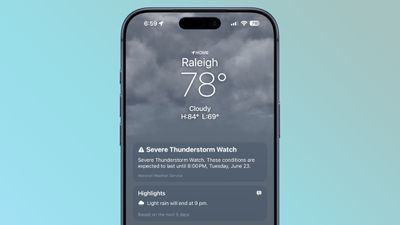
ios 27 weather highlights

Conditions

There are new views for the Conditions section of the main Weather app interface. In addition to viewing temperature and current condition on an hourly basis, you can toggle over to a precipitation or wind view.
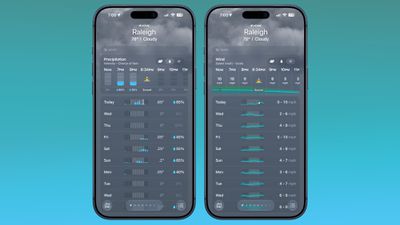
ios 27 weather app conditions
Precipitation shows you an hour-by-hour chance of rain forecast, while wind displays a breakdown of wind speed.

10-Day View

The 10-day view also changes when you swap between the different condition options so you can see precipitation and wind overviews for the next 10 days without having to tap into a more detailed view.

Widgets

There's a new extra large size available for Home Screen widgets, which is applicable to the Weather app. You can set the Weather app to take up an entire app page.
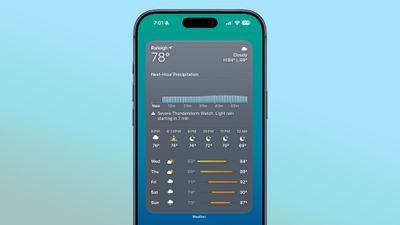
ios 27 weather app widget

Availability

‌iOS 27‌ is available to developers and public beta testers right now, and a public launch is planned for September 2026.

More iOS 27 Features

There are a long list of new features in ‌iOS 27‌, with details available in our iOS 27 roundup.

Related Roundups: iOS 27, iPadOS 27
Related Forum: iOS 27

Popular Stories

iOS 27 Next to iPhone

Here's When iOS 27 Rolls Out Today in Every Time Zone [Update: It's Out]

Sunday September 13, 2026 3:00 am PDT by
Update 10:04 a.m.: iOS 27 is rolling out now, though it may take a bit for all users to see it, so keep checking! Apple is about to release iOS 27, which will finally deliver more advanced Siri AI capabilities as well as a variety of other refinements, improvements, and new features to iPhones. It's Apple's biggest software update of the year, and Apple announced at Wednesday's iPhone event...
iOS 27 Icon iPhone

iOS 27 Available Now With These 8 New Features

Monday September 14, 2026 9:00 am PDT by
Update — 10 a.m. Pacific Time: Apple has released iOS 27. During its iPhone 18 Pro and iPhone Duo event last week, Apple announced that iOS 27 will be released widely on Monday, September 14. iOS 27 should be available around 10 a.m. Pacific Time / 1 p.m. Eastern Time today via the Settings app, under General → Software Update. Below, we have highlighted eight new features and...
iPhone Handoff Feature

iOS 27 Introduces New 'iPhone Handoff' Feature

Wednesday September 2, 2026 12:35 pm PDT by
Apple has added a new "iPhone Handoff" feature to iOS 27 that will allow you to switch between two iPhones while using the same phone number on each device. This functionality was briefly mentioned during the WWDC 2026 keynote in June, on a slide that listed hundreds of new features coming in iOS 27 and corresponding software updates, but Apple never shared any further details at the time. ...

Top Rated Comments

12 weeks ago

I wish the sun inside the app icon turned into the moon in dark mode.
That makes no sense.
Score: 16 Votes (Like | Disagree)
jz0309 Avatar
12 weeks ago
What about better accuracy?
Score: 15 Votes (Like | Disagree)
12 weeks ago
The radar still sucks.
Score: 15 Votes (Like | Disagree)
12 weeks ago
Apple weather app is still consistently the worst weather app around! Nothing new to see here.
Score: 11 Votes (Like | Disagree)
DocMultimedia Avatar
12 weeks ago
Alas, many still miss Dark Sky due to the lack of contrast/clarity in the Apple version. I use Carrot and Acme as my primary weather apps.
Score: 10 Votes (Like | Disagree)
Reason077 Avatar
12 weeks ago
I’m frustrated by the direction of the weather app in recent years. Yes, they’ve added a lot more features and data, but it’s just not as good as it used to be as a basic weather app. Everything tiny sized, grey-on-grey design lacking contrast and making everything hard to read (see screenshot above).

On WatchOS it’s even worse. I really wish we could go back to the Weather app from WatchOS 9 or so when you could see conditions throughout the day (not just the current temperature) at a glance. Now you have to scroll through pages and pages of similar-looking data which is all quite difficult and slow to interpret. Sometimes it’s hard to even figure out what screen you’re looking at. Is this wind, humidity, UV??! By adding more data and features, they made the basic functionality worse!
Score: 10 Votes (Like | Disagree)














