

With the addition of both fast charging and wireless charging to Apple's 2017 iPhone lineup, there are more ways than ever to charge your iPhone. Every method is different -- some are faster and more expensive, while others are slower but more convenient. We did this testing in 2017 for the iPhone X, but it is still relevant for newer iPhones. USB-C charging is always going to be faster than wireless charging by a notable amount but wireless charging has improved with MagSafe.
We tested several charging accessories from both Apple and third-party manufacturers with the iPhone X to see how charging speeds compare across different charging methods.
Accessories Tested
- Apple's default 5W iPhone charger (Free with iPhone, $19 alone)
- 5W wireless charger from Choetech ($16)
- 7.5W Belkin Boost Up Wireless Charging Pad from Apple ($59.95) (Tested at 5W and 7.5W)
- Apple's default 12W iPad charger (Free with iPad, $19 alone)
- 18W USB-C power adapter from Choetech ($17.99)
- 29W USB-C power adapter from Apple (Free with 12-inch MacBook, $49 alone)
- 30W USB-C power adapter from Anker ($30)
- 87W USB-C power adapter from Apple (Free with 15-inch MacBook, $79 alone)
The 5W and 12W chargers from Apple were paired with a standard Lightning cable from Apple, priced starting at $19. All USB-C charging accessories were paired with a USB-C to Lightning cable from Apple, priced starting at $25.
Methodology
We used the same iPhone X for all tests, plugged into the same outlet. Between tests, the battery was drained to one percent, and then battery percent was checked at 15 minutes, 30 minutes, 45 minutes, and 60 minutes while charging.
For all tests, the iPhone X was placed into Airplane mode with no apps running. The display was deactivated except for the four time checks. Tests were conducted without a case on the iPhone X.
Results
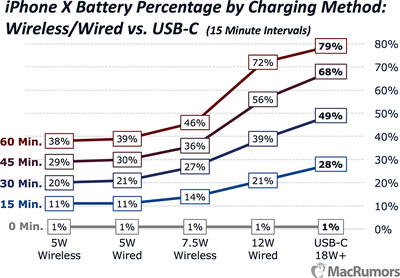
The absolute fastest way to charge an iPhone 8, iPhone X, or iPhone 8 Plus is with a USB-C power adapter and an accompanying USB-C to Lightning cable. Charging with USB-C activates a "fast-charge" feature that's designed to charge the iPhone to around 50% in 30 minutes, and I saw about that level of charge in all of my USB-C tests.
5W wireless charging and 5W wired charging with the standard iPhone adapter were the slowest methods that I tested. 7.5W wireless testing was faster than 5W wireless charging, but not by much.

Charging at 12W with the iPad adapter wasn't ultimately too far off of the fast charging results at the end of an hour, making this one of the better compromises between cost and speed.
USB-C
I tested both Apple's 29W and 87W USB-C chargers that come with the 12-inch MacBook and the 15-inch MacBook Pro, respectively, along with much cheaper 18W and 30W chargers from Choetech and Anker. I saw little difference in charging speeds between 18W and 87W.

At the 30 minute mark in all tests, my phone was charged to between 45 and 49%, and at 60 minutes, I reached 77 to 79% battery life. The slowest charger was the Anker 30W, but the overall difference was so small that I think it can be chalked up to random variance. My charts are using 1 charging result, but I did test many of these chargers multiple times with the same general results.
Apple's 29W MacBook charger costs $49 and the USB-C to Lightning cable costs $25, so you're looking at about $75 for this charging method, but luckily, third party USB-C power adapters work the same way and are more affordable. That 18W Choetech charger I tested, for example, is just $18, while the one from Anker is $30.

There are cheaper non-official USB-C to Lightning cables on Amazon, but given the problems we've seen with some third-party USB-C cables, it may be best to stick with verified Apple hardware as far as the cable goes. I didn't test third-party Lightning to USB-C cables, but I wouldn't expect to see major speed differences.

If you go with Apple's cable and something like the 18W Choetech charger, you can get a fast charge setup for just over $40. If you want to try your luck with a non-official cable, you can get fast charging for under $30.
Standard iPad and iPhone Chargers
All of Apple's iPhones ship with a standard 5W power adapter and USB-A to Lightning cable, and charging with the standard setup is excruciatingly slow comparative to other charging methods. It's not faster than 7.5W wireless charging and it can't compare to charging with power adapters that put out more juice. At 30 minutes, for example, it had only charged my iPhone to 21 percent, and I only made it to 39 percent after 60 minutes.

Apple's 12W iPad charger is much quicker, though, and it's affordable at $19. With the 12W iPad charger and a standard Lightning cable, I saw charging speeds that weren't too far off of what I got when charging with a USB-C power adapter. At the 30 minute mark, my iPhone charged to 39 percent, and at the 60 minute mark, I hit 72 percent.
That's not too bad for a setup that's one of the most affordable I found, and there are a lot of 12W equivalent third-party charging options on the market, including several with multiple ports and other conveniences.
Wireless Chargers
In general, wireless charging is slower than wired charging, but it's undeniably convenient, and if you're charging for a lengthy period of time, say at your desk at work or overnight on the night stand, the slower charging doesn't matter.
That said, 7.5W wireless charging, which was activated in iOS 11.2, was faster than the standard 5W wired charging method in my testing. There's also a noticeable but slight speed difference between 5W wireless charging and 7.5W wireless charging.

I tested this difference using the 7.5W wireless charger from Belkin, which Apple sells, on both iOS 11.2 and iOS 11.1.2, which limited iPhone charging to 5W. The Belkin 5W charging result on iOS 11.1.2 is the result included in my graph.
I also tested a Choetech 5W charger that was much slower than the Belkin at 5W, so much so that I wasn't sure it was an accurate representation of 5W charging. From 1%:
- 15 minutes: 9%
- 30 minutes: 19%
- 45 minutes: 27%
- 60 minutes: 35%
There wasn't a huge difference between 5W and 7.5W charging in my experience, but 7.5W is faster. If you're buying a wireless charger, it's worthwhile to get a 7.5W+ charger that offers faster charging for the iPhone, but which chargers are compatible with 7.5W wireless charging remains something of a mystery.

We know the Belkin and Mophie chargers that Apple sells offer the faster wireless charging option, but it's not entirely clear if other higher-watt chargers from third-party manufacturers are able to charge the iPhone X, 8, and 8 Plus at higher speeds.
For a separate post on wireless charging options, we've been investigating third-party wireless chargers, and it's looking like there may be a restriction put in place by Apple to limit 7.5W charging to approved manufacturers. As an example, on the Amazon page for this charger from Choetech, which says it is 7.5W, there is this message:
We get notice from Apple engineer that current IOS only support 5w qi wireless charging currently, 7.5w wireless charging is encrypted and never released to 3rd party manufacturer.
We've heard similar information from other manufacturers, but it's all very nebulous and not something Apple has clearly outlined at this point. For that reason, if you want confirmed 7.5W wireless charging, go with the Belkin, the Mophie, or another charger that specifically states that it's compatible with Apple's 7.5W charging.

Just because a wireless charger offers more than 5W, it's not necessarily going to offer 7.5W charging speeds when used with an iPhone. If you're using wireless charging on the night stand or when sitting at a desk for long periods of time, 5W is perfectly adequate, and the third-party chargers are much more affordable than the Belkin and Mophie chargers.
On the subject of wireless charging, I also tested to see if case thickness impacts charging speed. I tested with a naked iPhone X, an iPhone X in Apple's Silicone case, and an iPhone X with one of the thickest backs I could find, the glitter-filled iPhone X case from Casetify. Charging speeds were almost identical in all three tests, and while the Casetify case was maybe about 2 percent slower, that can perhaps be chalked up to margin of error. There was zero difference with the thinner Apple case.
If your case works with wireless charging at all (and most do, with the exception of those that have rear magnets or are made from aluminum), it's going to charge at the same speed or nearly the same speed as a naked iPhone.
Conclusion
To get fast charging on iPhone X, iPhone 8, and iPhone 8 Plus, you don't need anything over 18W, and you don't need a USB-C power adapter that's from Apple. The third-party options work just as well, but you will probably want to pick up Apple's USB-C to Lightning cable over the alternatives.
Fast charging is going to get you the best charging times, but for less money, you can get the 12W iPad charger and use it with a standard Lightning cable to charge your iPhone almost as fast as you can charge it with fast charging. There's only about a 10 percent difference between the 12W iPad charger and USB-C charging.

It's not really worth it using the 5W charger that the iPhone ships with if you can help it, because it's incredibly slow.
Wireless charging is also a comparatively slow charging method, but it's convenient to be able to set your iPhone right next to you on a wireless charger and pick it up when necessary without the need to hassle with a cord.
















































