How Apple's iOS 12 Password AutoFill Feature Works With 1Password - MacRumorsOpen MenuShow RoundupsShow Forums menuVisit ForumsOpen Sidebar
Skip to Content

How Apple's iOS 12 Password AutoFill Feature Works With 1Password

Apple in iOS 12 introduced a new Password AutoFill API for apps like 1Password and LastPass, designed to allow password management apps to provide stored usernames and passwords for not only websites but also third-party apps.

1Password has introduced support for Password AutoFill in a beta capacity ahead of the launch of iOS 12, giving us a look at just how simple and easy Password AutoFill makes entering login details.

Note: This 1Password feature is not widely available yet because it is implemented in a beta version of the app, but it will be available for everyone when the 1Password app is updated following the release of iOS 12.

Set Up

Once a password management app that supports Password AutoFill has been installed, the feature needs to be enabled on an iOS device.

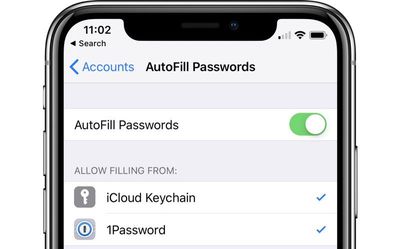
Go to Settings > Passwords & Accounts > AutoFill Passwords and toggle on the AutoFill Passwords option while also making sure your password management app, such as 1Password, is selected.
autofillpasswordssetup
You can use third-party password management apps right alongside iCloud Keychain, or you can choose to disable iCloud Keychain and use just a password management app.

How it Works

The Password AutoFill feature lets a third-party app function just like iCloud Keychain, with your sensitive data protected but easily accessible within apps when you need your login information.

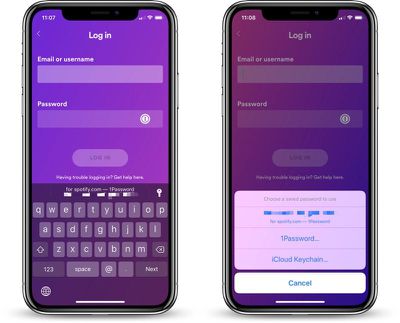
When you encounter a login field in an app or on the web, tapping in the entry field will display the stored username and password from your password management app if you've saved one.

From there, you can tap the information to enter it into the app or website's login window, such as in the Spotify example below.
passwordautofillspotify
There are instances where 1Password does not have saved information entirely right or where you have multiple logins, such as in the case of multiple Twitter or Instagram accounts.

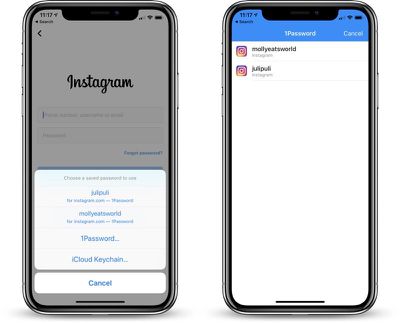
In these situations, if you tap on the key icon and then select the "1Password" option, you can view all of the available accounts for a particular service.

In the case of Instagram, this means that when I'm logging into the Instagram app, I see my two Instagram accounts listed in 1Password and I can tap either one to enter my login information.
passwordautofillinstagram
For apps that 1Password cannot automatically identify, you will be able to access your entire password vault to find the login information that you need.

Where it Works

What's great about the Password AutoFill API is that it does not require developers to implement any kind of integrations with your password management app to function, as was required in previous versions of iOS for this kind of functionality.

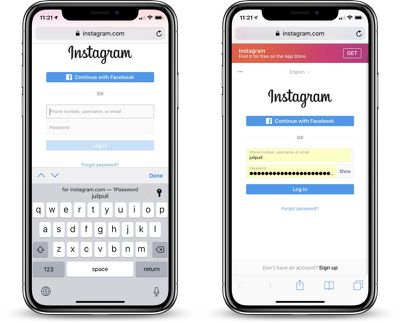
1Password's Password AutoFill feature, for example, works automatically in most apps and websites, with your 1Password archive available no matter where you're logging in.
passwordautofillonweb
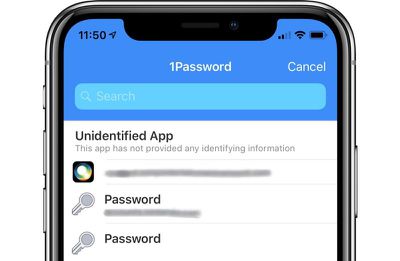
As a caveat, 1Password will not recognize some apps and you'll see a message that the app is "Unidentified" with no identifying information provided. In this situation, you can still access your 1Password vault to search for the password that's required.
1passwordunidentified

One-Time Passwords

When logging into apps and websites that require two-factor authentication, using a one-time password is also simplified.

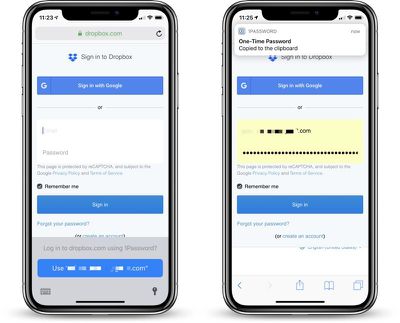
If your two-factor authentication setup is linked to 1Password, when you log into an app or website that requires two-factor authentication, your password is entered in the field and your one-time authentication password is automatically copied and pasted to the clipboard for easy entry.
passwordautofill1timepass
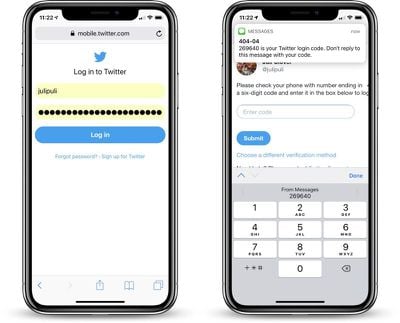
For apps that use your phone number for authentication purposes, iOS 12 introduces a feature that takes a code from an incoming iMessage and copies it to the clipboard, so two-factor authentication is simplified no matter the method.
ios12automaticsecuritycode

Password AutoFill on Apple TV

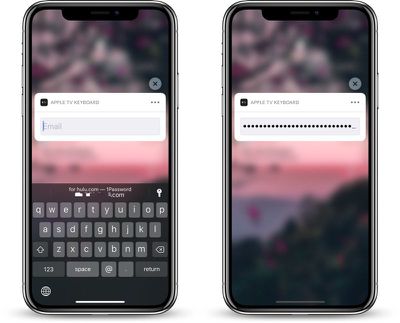
Password AutoFill extends to the Apple TV using the continuity keyboard that permits the iPhone to be used to enter passwords and login information on the Apple TV.

For this to work, both the Apple TV and the iOS device need to be signed into the same iCloud account, and from there, the process is identical to using Password AutoFill on the iPhone.
passwordautofill1passappletv
In a text entry field, when prompted to use the iPhone to enter login information, passwords stored in a password management app and linked to Password AutoFill will be able to be entered on the Apple TV.

Note: tvOS 12 and iOS 12 are required for Password AutoFill to work on the Apple TV.

Security

Every time your password management account is activated, you will need to confirm your identity with either Face ID or Touch ID to enter a password.

If Face ID or Touch ID fails, you will need to enter a password. In the case of 1Password, this means that if biometric authentication does not work, you will need to use the master password.

Release Date

1Password's Password AutoFill update will be available following the release of iOS 12, which we expect to see debut next month, shortly ahead of the launch of new iPhones. 1Password is available on Macs and iOS devices for as little as $2.99 per month for an individual account. A free 30 day trial is available from the 1Password website.


Popular Stories

duo aquarium

More Fun iPhone Duo Apps: 30 New Picks to Try

Friday November 6, 2026 3:27 pm PST by
When the iPhone Duo launched, we shared a list of some of the fun apps developers created for the new form factor. Two weeks out, developers are continuing to come up with fresh ideas, so we thought we'd share some of our favorites. Games Marbles Unhinged ($2.99) - Marbles Unhinged is a marble maze designed for the Duo. When you fold it, the floor turns into a ramp. If you stand the top...
apple pro tell logo

Apple Launching Five New Products Today

Thursday November 5, 2026 12:59 am PST by
Apple is launching five new products on Friday, November 6, following pre-orders that opened last week, including its first touchscreen MacBook Pro models. The following new products will be available from today: iPad mini with OLED display and A20 Pro chip iMac with M6 chip 14-inch MacBook Pro with M6 chip 14-inch MacBook Pro with OLED touchscreen 16-inch MacBook Pro with OLED...
iOS 28 AI

Apple Taking New Approach to Developing iOS 28 and macOS 28

Sunday November 8, 2026 7:42 am PST by
Apple has made a change to its development process for iOS 28, macOS 28, and corresponding software updates, according to Bloomberg's Mark Gurman. In his Power On newsletter today, he said Apple separates development of each year's new operating systems into three major stages. Typically, he said each stage consists of four weeks of coding followed by a four-week "convergence" period where...

Top Rated Comments

justperry Avatar
107 months ago

1Password is available on Macs and iOS devices for as little as $2.99 per month ('https://1password.com/sign-up/') for an individual account. A free 30 day trial is available ('https://1password.com/sign-up/') from the 1Password website.

Hate these subs, no thanks, the built in keychain does a good job for most of us.
Score: 35 Votes (Like | Disagree)
107 months ago
This is awesome. I don't use 1password because they store the passwords and have already had major breaches. But Enpass, which I use, stores passwords locally only (well really on cloud drives) and they have said they will support this. I don't know why it's taken the industry so long to do this.


Perhaps you've confused us with other password managers, we have not had any breaches at all.

Even if someone did access our servers maliciously they wouldn't have access to your decrypted data. They would need to guess each individual users Master Password and Secret Key combination in order to decrypt it. This would cost significant amounts of time and money, enough time and money that you'd have to be a specifically targeted person where the payoff would be worth it.

No one at AgileBits has access to any user's decrypted data, our servers don't have access, only you have access to the decrypted data. The only way to get that decrypted data is knowing your Master Password and Secret Key. Neither of which AgileBits has, only you have those pieces of information.
Score: 15 Votes (Like | Disagree)
107 months ago
1Password allowed this?
Apple provided the API. 1Password added it to their beta.
Score: 14 Votes (Like | Disagree)
107 months ago
I hope LastPass gets the same integration.
Score: 11 Votes (Like | Disagree)
107 months ago
I don't agree with "major breeches", but they have had their share of flaws. They fix them quickly, but they exist.

https://team-sik.org/sik-2016-038/
https://team-sik.org/sik-2016-039/
https://team-sik.org/sik-2016-040/
https://team-sik.org/sik-2016-041/
https://team-sik.org/sik-2016-042/
Our official response to those is here

https://support.1password.com/kb/201702a/

Note that we fixed those months before they were ever disclosed to the public. It also does not apply to our 1Password.com service and were specific to our Android application. These do not qualify as a breach either.
Score: 9 Votes (Like | Disagree)
107 months ago
Blatant pushing of 1Password by Apple. Personally I will stick with LastPass which I think is unbeatable in the field of password managers.
These features are available to any app developer, including LastPass. Want to make your own password manager and have this feature? You can do it. This is not specific to 1Password, though we were the first to provide it in beta apparently, which is causing all of the Apple media to pick up on it. But don't mistake this as any sort of favoritism, we were just there first and got the media coverage. Certainly something we're thankful for, but I'm not going to claim we're the only password manager that will support this.
Score: 7 Votes (Like | Disagree)
Latest Stories
Apple Store Subscription Sign-Up Controversy Exposed
7 hours ago
Siri AI Rumored to Become 'More Like an Agent' as Early as Next Year
17 hours ago
Apple Taking New Approach to Developing iOS 28 and macOS 28
19 hours ago
Early Apple Black Friday Deals on Apple Watch, MacBook Air, and More
2 days ago
'Backglow' Lets You Customize New MacBook Pro's Glowing Apple Logo
2 days ago
Top Stories: Apple Product Launches, iOS 27.3 Beta, and More
2 days ago
More Fun iPhone Duo Apps: 30 New Picks to Try
2 days ago
Hands-On With Apple's New OLED Touchscreen MacBook Pro
3 days ago
Apple Store With All-New Design Opening Soon in Southern California
3 days ago
Control the Glowing Apple Logo on Your New MacBook Pro
3 days ago
Apple Shares New 'Apple Card: Apply and Use in Minutes' Ad
3 days ago
Apple Says More Than 100,000 Apps Optimized for iPhone Duo, Here's What's Still Missing
3 days ago
Early Black Friday Deals Kickoff With Steep Discounts on Apple Watch Ultras and More
3 days ago
The MacRumors Show: iOS 27.3 Looks Like a Huge Update
3 days ago
Best Buy's Black Friday Event Begins With Sitewide Savings on Apple, TVs, More
3 days ago
Apple Releasing Yet Another Two New Products Next Week
3 days ago
MacBook Air Drops to Lowest Price in Months With Amazon's $250 Discount
3 days ago
Apple Rumored to Drop the iPhone's Action Button Next Year
3 days ago
Apple's Extended Return Policy Now in Effect for 2026 Holiday Season
3 days ago
Apple Music Classical Updated With New Icon and Refreshed Design
3 days ago
OLED iPad Mini, M6 iMac, and New MacBook Pros Available From Today
3 days ago
Apple Surveys iPhone Duo Buyers About Crease and Camera
3 days ago
Apple's First Touchscreen Mac is Now Arriving to Customers
3 days ago
Claude Gets Personal Finance Feature With Bank Account Linking
4 days ago
Apple Arcade Adds Crossy Road Rush and NBA 2K27
4 days ago
Apple's New HomeView Smart Home Hub: Here's How Much RAM It Has
4 days ago
iPad Mini vs. iPad Air Buyer's Guide: Now Just $50 Apart
4 days ago
First iOS 27.3 and macOS Golden Gate 27.3 Public Betas Now Available
4 days ago
Apple Announces a New Mac Sales Record
4 days ago
Paid $200 for Logic Pro? Apple Says You Won't Get This New Feature
4 days ago







































