

Most iPhone users will be aware of their device's built-in calculator, but not everyone will know some of the tricks that you can perform with the app that can save you time. Here are some of our favorite tips.
1. Swipe to Delete Numbers
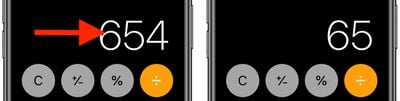
It's a common misconception that if you type the wrong number into the Calculator app, you have to start the whole sum all over again. Happily, that isn't the case: Simply swipe right or left with a finger across the number display to remove the last number you typed, and repeat the action if necessary to remove several numbers.
2. Scientific calculator
The default calculator app includes a built-in scientific calculator that you can use to perform logarithms, square roots, trigonometric calculations, and more advanced math equations.
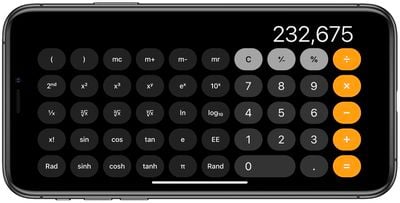
To access the scientific calculator, simply rotate your iPhone to landscape mode. If it's not showing up, make sure the portrait orientation lock is disabled in Control Center. To switch back to the regular calculator, rotate your phone to portrait mode.
3. Copy and Paste
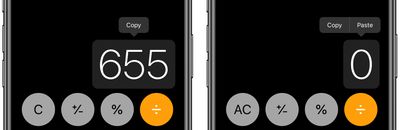
You don't need to memorize the results of your calculations to input them into other apps. Use the clipboard functions instead - just long press on the number field to copy or paste the result.
4. Copy Last Result
If you've switched to another app, you can still quickly paste the last figure that you calculated without returning to the calculator to copy it.
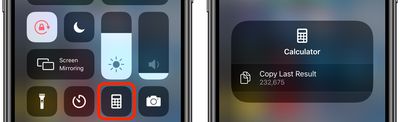
Using either a swipe up or a swipe down, launch the Control Center on your iPhone, then long press the Calculator button, and you'll see a handy option to Copy Last Result.
5. Spotlight Calculations
Did you know that calculator functions are built into Spotlight Search on your iPhone?
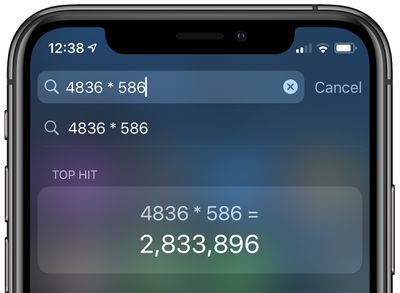
Simply swipe down from the Home screen to bring up Spotlight, and you can perform basic calculations by typing them directly into the Search field at the top of the screen without having to open the Calculator app.
Bonus Tip for Apple Watch Users
The Calculator app on Apple Watch comes with a couple of additional features that make short work of calculating how much you should tip and how much each person in a group owes if you're splitting a bill.
The steps below show you how it's done. Note that the two features can be used together, but you can also use them independently by selecting a 0% tip and changing the number of people, or changing the tip and leaving the People field set to 1.
- Launch the Calculator app on your Apple Watch.
- Enter the total amount of the bill.
- Tap the TIP button in the top-right corner, just left of the divide button.
- With the Tip field highlighted in green, turn your watch's Digital Crown to change the percentage.
- To split the bill between a group of people, tap People and then use the Digital Crown to change the number (the maximum is 50).

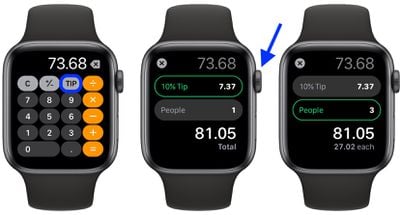
You'll see the total amount below the two fields change to reflect your tip adjustments, and the amount below that will change depending on how many people are paying.
Here's another little tip: If you don't use the TIP function, you can actually change the button on the calculator layout to a standard percentage (%) function. Simply press firmly on the main calculator screen and tap either Tip Function or Percent.
















Top Rated Comments