

Vision Pro Not Fitting Well? Here Are Apple's Tips for Improving It - MacRumorsOpen MenuShow RoundupsShow Forums menuVisit ForumsOpen Sidebar
Skip to Content

Vision Pro Not Fitting Well? Here Are Apple's Tips for Improving It

Fit is the most important aspect of the Vision Pro, because if it's not on your head in the right way, it will feel heavy and uncomfortable, plus the displays might look blurry. Apple today published several support documents on getting a good fit with the Vision Pro and what to do if you have light leakage, eye setup issues, and other problems.
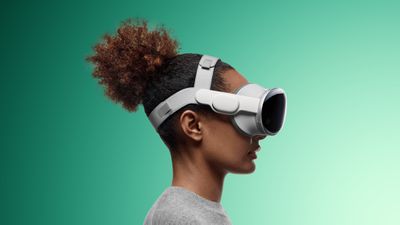
Apple Vision Pro Dual Loop Band Teal Feature 2

Selecting a Band

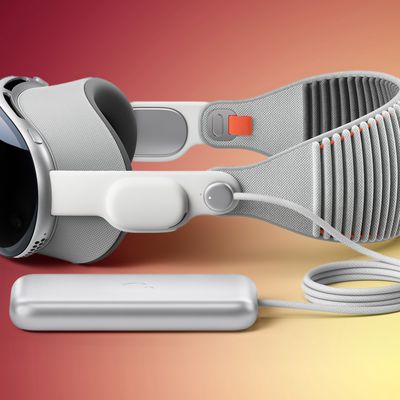
There are two bands for the Vision Pro, the Solo Knit Band and the Dual Loop Band. With either band, the Vision Pro should feel balanced across the cheeks and forehead, and it should be snug but not too tight. A head band that is too tight can cause skin sensitivity, general discomfort, or marks and indentations on the face, but Apple says that some "temporary, light markings" are expected after general usage.

Users should select the band that feels the most comfortable, and then adjust from there.

Solo Knit Band Adjustments

  • Rotate the Fit Dial counterclockwise and pull the device by the frame away from the face to loosen the band if it's too tight. If it won't loosen enough, you might need a larger size.
  • If the band feels too loose, turn it clockwise to tighten it. If it won't tighten more, a different size might be required.
  • If you feel pressure on your forehead, raise the Solo Knit Band by pulling it up slightly on the back of the head.
  • To fix pressure on the cheeks, lower the Solo Knit Band by pulling it slightly down on the back of the head.
  • To relieve pressure across the bridge of the nose, swap to the Light Cushion marked with a + or use the Dual Loop Band.

Dual Loop Band Adjustments

  • If the head band is too tight, hold the Vision Pro to your face and loosen the upper and lower straps of the Dual Loop Band with the other hand. Pull the device by the frame away from your face.
  • To relieve pressure on the forehead, hold the frame, loosen the lower strap, and tighten the upper strap.
  • To relieve pressure on the cheeks, hold the frame, pull down the lower strap, and loosen the upper strap.
  • To relieve pressure across the bridge of the nose, swap to the Light Cushion marked with a + or use the Solo Knit Band.

Light Seal Cushion Fit

  • If your eyelashes brush against the Vision Pro or you get a notification that your eyes are too close, swap to the Light Cushion marked with a +. If that does not fix it, a different Light Seal size might be required.
  • If your eyes are too far from the displays, swap to the thinner Light Seal Cushion. If that does not work, a different Light Seal Size might be required.

Realign Displays

If you feel pressure on the bridge of your nose and adjustments to the band don't help, Apple suggests using the Realign Displays feature under Settings > Eyes and Hands.

To move the displays slightly away from the nose, press the Top Button to move the displays outward. Press and hold the Digital Crown to move the displays inwards for ideal visual alignment.

Fixing Light Leakage

Apple says to determine whether you're experiencing light leakage, you should use the Vision Pro in both a brightly lit and dimly lit room.

If the Vision Pro experience improves in a dimly lit room, there is a light leakage problem that needs to be addressed by adjusting the fit of the Vision Pro head band or choosing a different Light Seal Cushion.

If the dimly lit room does not improve the experience, Apple says there may be light originating from the display causing some reflections within the optical system.

Some light leakage around the nose is normal.

Tips for Getting a Good Fit

  • Apple suggests that facial jewelry like nose rings or eyebrow rings should be removed before you put on Apple Vision Pro.
  • Uneven facial discomfort, such as pressure on the forehead, cheeks, or nose, is an indication that a different Light Seal or Light Seal Cushion might be required. Other signs include light leakage, eyelashes brushing on the display, and alerts about eye position.
  • Make sure that hair does not get caught in either the band or the cable to avoid tugging.
  • The Vision Pro is not designed to be worn by children under the age of 13 and it may not fit.

Solving Eye Setup Issues

If the Vision Pro eye setup feature cannot be completed, Apple has several solutions.

  • Ensure that the fit is correct and follow the directions of any alerts that are shown on the display.
  • If you're experiencing issues with eye setup, Apple warns that eyelash extensions and items near the eyes like rhinestones or glitter can cause problems.
  • Eyes that are too wet or too dry might impact eye setup.
  • Debris on the Vision Pro display or ZEISS Optical Inserts can cause issues.
  • Cosmetic contact lenses are not compatible with Vision Pro and need to be removed.
  • Hard contact lenses might not work with Vision Pro.
  • Medical conditions like eyelid drooping, changes in eye alignment, or uncontrolled eye movements can make it difficult for the Vision Pro to detect your eyes. There are several Accessibility features that can help.

More Help

Apple says that if the fit tips do not help, that users should visit a local Apple Store to get help. It is important to do this quickly because the exchange process must begin within 14 days of receiving the Vision Pro and accessories.

Related Roundup: Apple Vision Pro
Buyer's Guide: Vision Pro (Neutral)
Related Forum: Apple Vision Pro

Popular Stories

apple vision pro orange

Apple's Vision Pro Layoffs Were Broader Than First Reported

Tuesday September 1, 2026 4:18 am PDT by
Recent layoffs of Apple employees working on the Vision Pro were broader than previously thought, Bloomberg's Mark Gurman reports. Last month, Gurman said that Apple cut around 100 jobs from the Vision Products Group, with those cuts centered on the headset's gaming and immersive video teams. Gurman now says the layoffs also reached Vision Pro staff across the rest of the company, including ...
watchos 27

Apple Seeds watchOS 27, visionOS 27, and tvOS 27 Release Candidates

Wednesday September 9, 2026 12:06 pm PDT by
Apple today seeded the release candidate versions of watchOS 27, visionOS 27, and tvOS 27 to developers and public beta testers. The release candidates are the final versions of the updates that will be seeded to the public as long as no final bugs are found during this last round of testing. The updates can be installed through the Software Update section in the Settings app on each...
Apple Immersive Video Utility Vision Pro

Apple Guts Vision Pro Gaming and Immersive Video Teams, Trims Siri Staff

Friday August 21, 2026 12:16 pm PDT by
In addition to cutting dozens of Vision Pro employees who worked on features like immersive video and gaming, Apple is laying off people who worked on Siri and AI, reports Bloomberg. Apple is "largely shutting down" the Vision Pro team focused on gaming, and it is paring down the team that makes immersive video content. Approximately 100 employees who were part of the Vision Products Group...

Top Rated Comments

34 months ago
I thought this was MACrumors…. But i seem to keep getting redirected to a scuba diving forum…

People are talking about straps for best fit and hand gestures… 🤔
Score: 11 Votes (Like | Disagree)
Velin Avatar
34 months ago
Version two really needs to improve on this. First step: delete the front glass. The digital eyes are creepy as F.

Save weight, improve the internal OLED lenses, cut the price, make this thing much more comfortable and consumer-price friendly while delivering the most lifelike image possible.
Score: 9 Votes (Like | Disagree)
Chuckeee Avatar
34 months ago
Duct Tape. Always the answer when in doubt.
Score: 6 Votes (Like | Disagree)
34 months ago

Is anyone getting a perfect seal down by the nose? I’ve tried on several light seals and bands and light keeps leaking in there.
Ive had alot of water get in before but if you tighten it up… it seems to do the trick.

I guess this is something they will really work on for the second gen… maybe even offer custom moldings.
Score: 6 Votes (Like | Disagree)
34 months ago

Fit is the most important aspect of the Vision Pro, because if it's not on your head in the right way, it will feel heavy and uncomfortable, plus the displays might look blurry. Apple today published several support documents on getting a good fit ('https://support.apple.com/en-us/117730') with the Vision Pro and what to do if you have light leakage ('https://support.apple.com/en-us/HT213953'), eye setup issues ('https://support.apple.com/en-us/HT214019'), and other problems.

MacRumors content image

Selecting a Band

There are two bands for the Vision Pro, the Solo Knit Band and the Dual Loop Band. With either band, the Vision Pro should feel balanced across the cheeks and forehead, and it should be snug but not too tight. A head band that is too tight can cause skin sensitivity, general discomfort, or marks and indentations on the face, but Apple says that some "temporary, light markings" are expected after general usage.

Users should select the band that feels the most comfortable, and then adjust from there.

Solo Knit Band Adjustments


* Rotate the Fit Dial counterclockwise and pull the device by the frame away from the face to loosen the band if it's too tight. If it won't loosen enough, you might need a larger size.
* If the band feels too loose, turn it clockwise to tighten it. If it won't tighten more, a different size might be required.
* If you feel pressure on your forehead, raise the Solo Knit Band by pulling it up slightly on the back of the head.
* To fix pressure on the cheeks, lower the Solo Knit Band by pulling it slightly down on the back of the head.
* To relieve pressure across the bridge of the nose, swap to the Light Cushion marked with a + or use the Dual Loop Band.

Dual Loop Band Adjustments


* If the head band is too tight, hold the Vision Pro to your face and loosen the upper and lower straps of the Dual Loop Band with the other hand. Pull the device by the frame away from your face.
* To relieve pressure on the forehead, hold the frame, loosen the lower strap, and tighten the upper strap.
* To relieve pressure on the cheeks, hold the frame, pull down the lower strap, and loosen the upper strap.
* To relieve pressure across the bridge of the nose, swap to the Light Cushion marked with a + or use the Solo Knit Band.

Light Seal Cushion Fit


* If your eyelashes brush against the Vision Pro or you get a notification that your eyes are too close, swap to the Light Cushion marked with a +. If that does not fix it, a different Light Seal size might be required.
* If your eyes are too far from the displays, swap to the thinner Light Seal Cushion. If that does not work, a different Light Seal Size might be required.

Realign Displays

If you feel pressure on the bridge of your nose and adjustments to the band don't help, Apple suggests using the Realign Displays feature under Settings > Eyes and Hands.

To move the displays slightly away from the nose, press the Top Button to move the displays outward. Press and hold the Digital Crown to move the displays inwards for ideal visual alignment.
Fixing Light Leakage

Apple says to determine whether you're experiencing light leakage, you should use the Vision Pro in both a brightly lit and dimly lit room.

If the Vision Pro experience improves in a dimly lit room, there is a light leakage problem that needs to be addressed by adjusting the fit of the Vision Pro head band or choosing a different Light Seal Cushion.

If the dimly lit room does not improve the experience, Apple says there may be light originating from the display causing some reflections within the optical system.

Some light leakage around the nose is normal.
Tips for Getting a Good Fit


* Apple suggests that facial jewelry like nose rings or eyebrow rings should be removed before you put on Apple Vision Pro.
* Uneven facial discomfort, such as pressure on the forehead, cheeks, or nose, is an indication that a different Light Seal or Light Seal Cushion might be required. Other signs include light leakage, eyelashes brushing on the display, and alerts about eye position.
* Make sure that hair does not get caught in either the band or the cable to avoid tugging.
* The Vision Pro is not designed to be worn by children under the age of 13 and it may not fit.

Solving Eye Setup Issues

If the Vision Pro eye setup feature cannot be completed, Apple has several solutions.

* Ensure that the fit is correct and follow the directions of any alerts that are shown on the display.
* If you're experiencing issues with eye setup, Apple warns that eyelash extensions and items near the eyes like rhinestones or glitter can cause problems.
* Eyes that are too wet or too dry might impact eye setup.
* Debris on the Vision Pro display or ZEISS Optical Inserts can cause issues.
* Cosmetic contact lenses are not compatible with Vision Pro and need to be removed.
* Hard contact lenses might not work with Vision Pro.
* Medical conditions like eyelid drooping, changes in eye alignment, or uncontrolled eye movements can make it difficult for the Vision Pro to detect your eyes. There are several Accessibility features ('https://support.apple.com/guide/apple-vision-pro/get-started-with-accessibility-features-tan426c48bdc/visionos') that can help.

More Help

Apple says that if the fit tips do not help, that users should visit a local Apple Store to get help. It is important to do this quickly because the exchange process must begin within 14 days of receiving the Vision Pro and accessories.
Article Link: Vision Pro Not Fitting Well? Here Are Apple's Tips for Improving It ('https://www.macrumors.com/guide/vision-pro-fit/')
You’re not wearing it the right way!!!!
Score: 5 Votes (Like | Disagree)
arkitect Avatar
34 months ago

Man oh mighty, this product sure is bringing out the entitlement in people. Can't we all just appreciate it for what it is?
How exactly are people being entitled if they expect a better version?

That makes no sense.

Are we only allowed to uncritically adulate Apple Inc?

Count me out of your Apple circle club.

This is a Beta product. Pointing out its current flaws — of which there are many — does not make us entitled.
Score: 4 Votes (Like | Disagree)












