What You Need to Know About Traveling With Apple Vision Pro - MacRumorsOpen MenuShow RoundupsShow Forums menuVisit ForumsOpen Sidebar
Skip to Content

What You Need to Know About Traveling With Apple Vision Pro

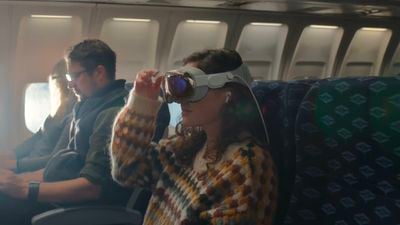
Traveling is perhaps one of the best uses of the Apple Vision Pro headset, as it can be used on airplanes and has a specific Travel Mode. Apple today published several support documents that provide some important details on traveling with the Vision Pro, activating the built-in Travel Mode, and storing it when it's not in use.
Apple Vision Pro Travel Mode

How to Travel With Vision Pro

The cover that comes with the Vision Pro should be placed on it to protect the glass before it is packed up, but Apple says users should also make sure there are no loose objects like keys or coins nearby that could scratch the internal displays.

Apple recommends the ‌Apple Vision Pro‌ Travel Case, which is $200, a soft padded bag, or a "similar protective solution" to protect the Vision Pro from impacts and "excessive vibration." Apple's Travel Case is rather large, so it might be difficult to bring as a carry-on because of the space that it takes up.

If the Vision Pro won't be used for an extended period, it should be disconnected from the battery, and Apple says that the ZEISS Optical Inserts should be packed separately so they don't accidentally detach.

How to Use Vision Pro in Travel Mode

Travel Mode is specifically designed for using the Vision Pro while on a flight. It can be activated from the Control Center by following these steps:

  1. Look up and then tap on the arrow near the top of the display to open Control Center.
  2. Tap on the Control Center button to see more options.
  3. Tap on the Travel Mode button.
  4. Tap Turn on Travel Mode to confirm.

Exiting Travel Mode can be done by going back to Control Center and tapping "Turn Off."

Apple says that the Vision Pro cannot be set up on an airplane, and also Personas are not available when Travel Mode is turned on.

Travel Mode Tips

Apple says that users should follow these guidelines when using Travel Mode:

  • Remain seated while Travel Mode is on, and remove the Vision Pro before standing up. Features that help you stay aware of your surroundings are disabled when Travel Mode is activated.
  • Take off the Vision Pro during taxiing, takeoff, and landing. Also remove it if there is turbulence on the flight.
  • Avoid looking out the airplane's windows, because it can impact the Vision Pro's ability to detect your surroundings.
  • If content appears tilted or off-center, long-press on the Digital Crown to re-center the view.

Storing Vision Pro

If the Vision Pro is not going to be in use for a while, Apple recommends taking these steps:

  • Attach the cover to the Vision Pro to prevent dust accumulation or damage, but make sure the cover is clean and free of debris first.
  • Disconnect the battery.
  • Place the Vision Pro on a stable, flat surface with the cover glass facing forward. Do not put the Vision Pro facing downward. Alternatively, place it in the Vision Pro Travel Case.
  • The Vision Pro can withstand temperatures ranging from -4º to 113º F. It should not be stored in areas that exceed this range.
  • Do not leave the Vision Pro in a car because temperatures in parked cars can get too warm.
  • Do not leave the Vision Pro in direct sunlight for any length of time.
  • Make sure the relative humidity of where the Vision Pro is stored is between 0 percent and 95 percent.

In day to day usage, Apple also suggests that users put the cover back on the Vision Pro whenever it's not being worn. Apple also warns against placing the Vision Pro with the glass facing downward, and says to put it on the polishing cloth rather than any rough or abrasive surface.

Picking up the Vision Pro should always be done with two hands, and it should never be picked up by the Light Seal or Audio Straps.

Related Roundup: Apple Vision Pro
Buyer's Guide: Vision Pro (Neutral)
Related Forum: Apple Vision Pro

Popular Stories

Apple Remnants Vision Pro

Apple Unveils Immersive Horror Film Coming Exclusively to Vision Pro

Tuesday October 13, 2026 5:26 am PDT by
Apple on Monday announced Remnants, an immersive horror film that will be released exclusively on the Vision Pro on Friday, October 16. The film will be in the Apple Immersive Video format, meaning it will be a 3D video recorded in 8K resolution with a 180-degree field of view and Spatial Audio. Apple shared a short video of people reacting to the film while wearing the Vision Pro....
apple vision pro orange

Apple Releases visionOS 27.2

Monday October 26, 2026 10:46 am PDT by
Apple today released visionOS 27.2, the first big update for the visionOS 27 operating system that runs on the Apple Vision Pro. visionOS 27.2 can be downloaded by opening the Settings app, selecting the General section, and choosing Software Update. Installing the update requires the headset to be removed, and a progress bar appears on the EyeSight display. The visionOS 27.2 update...
General visionOS watchOS and tvOS Betas Feature Redux

Apple Seeds watchOS 27.2, tvOS 27.2 and visionOS 27.2 Release Candidates

Monday October 19, 2026 10:25 am PDT by
Alongside new betas of iOS 27.2, iPadOS 27.2, and macOS Golden Gate 27.2, Apple has seeded the release candidate versions of watchOS 27.2, tvOS 27.2 and visionOS 27.2. The RCs come a week after Apple released the fourth betas. Registered developers can download the betas through the Settings app on each device. There's no word on what's being added in visionOS 27.2 and tvOS 27.2, but...


Top Rated Comments

timborama Avatar
36 months ago

Or even worse, there is an emergency and you need to get past them 😂
Not an issue, you rip it off of their head.
Score: 21 Votes (Like | Disagree)
36 months ago
It might just be me, but I get the impression that people who would use this on a plane aren't going to do so because it's better/easier/more convenient.

They seem like the kind of people who just want to be seen owning and using an AVP.
Score: 16 Votes (Like | Disagree)
dannyyankou Avatar
36 months ago

Many reports online of people getting sick from using this
Not surprised. It seems very disorienting and lonely. I imagine it's a very similar feeling to using your phone for an extended amount of time when riding in a car, those with motion sickness know what I'm talking about.
Score: 15 Votes (Like | Disagree)
Steve Jobs Turtleneck Avatar
36 months ago
it gave me a loose stool after using it, would not recommend walking with this
Score: 15 Votes (Like | Disagree)
36 months ago
H

It might just be me, but I get the impression that people who would use this on a plane aren't going to do so because it's better/easier/more convenient.

They seem like the kind of people who just want to be seen owning and using an AVP.
my most important concern when traveling is having an awareness of my surroundings.

Therefore I’d never wear any device like this while traveling by train, plane or vehicle.

There’s just too much crazy stuff happening these days to put yourself at risk of intentional or unintentional harm by someone else for the sake of a movie etc

I’ll stick to a good book 😀
Score: 13 Votes (Like | Disagree)
timborama Avatar
36 months ago

I wonder if they would use AI to intelligently allow emergency announcements and other unexpected events to override what you’re doing and pass through video and audio of said event or announcement.
You’re overthinking it… it’s no different than anyone wearing a sleep mask and earplugs.
Score: 12 Votes (Like | Disagree)
Latest Stories
Apple Store Subscription Sign-Up Controversy Exposed
41 minutes ago
Siri AI Rumored to Become 'More Like an Agent' as Early as Next Year
11 hours ago
Apple Taking New Approach to Developing iOS 28 and macOS 28
12 hours ago
Early Apple Black Friday Deals on Apple Watch, MacBook Air, and More
1 day ago
'Backglow' Lets You Customize New MacBook Pro's Glowing Apple Logo
1 day ago
Top Stories: Apple Product Launches, iOS 27.3 Beta, and More
2 days ago
More Fun iPhone Duo Apps: 30 New Picks to Try
2 days ago
Hands-On With Apple's New OLED Touchscreen MacBook Pro
2 days ago
Apple Store With All-New Design Opening Soon in Southern California
2 days ago
Control the Glowing Apple Logo on Your New MacBook Pro
2 days ago
Apple Shares New 'Apple Card: Apply and Use in Minutes' Ad
2 days ago
Apple Says More Than 100,000 Apps Optimized for iPhone Duo, Here's What's Still Missing
2 days ago
Early Black Friday Deals Kickoff With Steep Discounts on Apple Watch Ultras and More
2 days ago
The MacRumors Show: iOS 27.3 Looks Like a Huge Update
3 days ago
Best Buy's Black Friday Event Begins With Sitewide Savings on Apple, TVs, More
3 days ago
Apple Releasing Yet Another Two New Products Next Week
3 days ago
MacBook Air Drops to Lowest Price in Months With Amazon's $250 Discount
3 days ago
Apple Rumored to Drop the iPhone's Action Button Next Year
3 days ago
Apple's Extended Return Policy Now in Effect for 2026 Holiday Season
3 days ago
Apple Music Classical Updated With New Icon and Refreshed Design
3 days ago
OLED iPad Mini, M6 iMac, and New MacBook Pros Available From Today
3 days ago
Apple Surveys iPhone Duo Buyers About Crease and Camera
3 days ago
Apple's First Touchscreen Mac is Now Arriving to Customers
3 days ago
Claude Gets Personal Finance Feature With Bank Account Linking
3 days ago
Apple Arcade Adds Crossy Road Rush and NBA 2K27
3 days ago
Apple's New HomeView Smart Home Hub: Here's How Much RAM It Has
3 days ago
iPad Mini vs. iPad Air Buyer's Guide: Now Just $50 Apart
3 days ago
First iOS 27.3 and macOS Golden Gate 27.3 Public Betas Now Available
3 days ago
Apple Announces a New Mac Sales Record
3 days ago
Paid $200 for Logic Pro? Apple Says You Won't Get This New Feature
3 days ago