How to Access Controls for USB Restricted Mode in iOS 12 - MacRumorsOpen MenuShow RoundupsShow Forums menuVisit ForumsOpen Sidebar
Skip to Content

How to Access Controls for USB Restricted Mode in iOS 12

by

iOS 12 includes a new feature called USB Restricted Mode, which is designed to make your iPhone and iPad immune to certain hacking techniques used by law enforcement and other potentially malicious entities to gain access to an iOS device.

There are some iPhone access methods that use a USB connection, downloading data from your iPhone (or iPad) through the Lightning connector to crack the passcode.
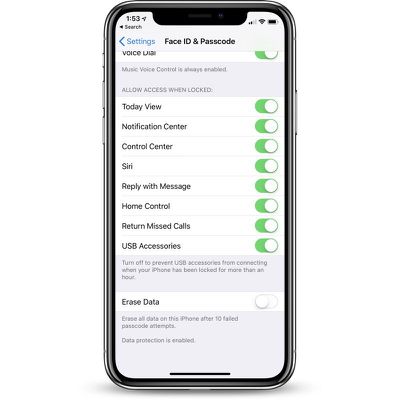
usbrestrictedmodedefault
iOS 12 prevents this by disabling data access to the Lightning port if it's been more than an hour since your iOS device was last unlocked.

This feature is enabled by default, but there are some situations where you might want to turn it off, such as when using CarPlay to drive long distances when you might not be able to unlock your iPhone for a few hours. Here's how to access the setting:

  1. Open the Settings app.
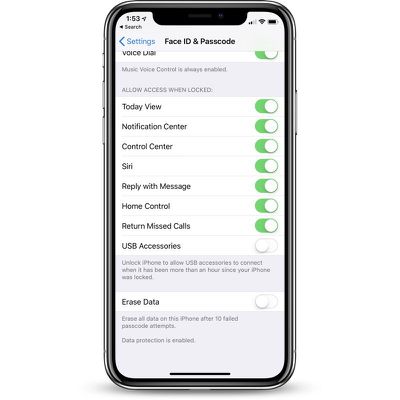
  2. Choose Touch ID & Passcode or Face ID & Passcode, depending on the device.
  3. Enter your passcode to access the settings. usbrestrictedmodepasscode
  4. Scroll down to the bottom of the app where it says "USB Accessories."
  5. Leave it toggled off to disable access to your iOS device if you want it to refuse USB connections if it's been more than an hour since the iPhone or iPad was unlocked.
  6. Toggle it on if you want USB accessories to be able to connect even if it's been more than an hour since the iPhone or iPad was unlocked. usbrestrictedmodedeactivated
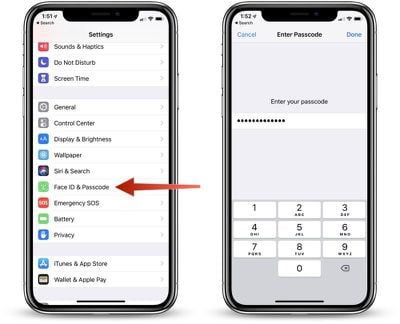
Most people are going to want to leave this toggle in its default off position for extra protection.

In normal usage, most of us unlock our iPhones every hour or two, and if you do need to plug your iPhone or iPad into a computer to access it, you can just enter your passcode to allow data access if it's been over an hour since the iPhone was last unlocked.

Right now, in the iOS 12 beta, these USB restrictions do appear to shut down access to a wired CarPlay interface after an hour, so that's one exception where people might want to turn this setting on to disable the restrictions on the USB port. From the iOS 12 beta notes:

"If you use iPod Accessory Protocol (iAP) USB accessories over the Lightning connector (such as CarPlay, assistive devices, charging accessories, or storage carts) or you connect to a Mac or PC you might need to unlock your device to recognize the accessory."

Note: Even if data access to USB port has been disabled because it's been over an hour since an iPhone was last unlocked, it continues to be able to charge through a standard Lightning cable because the power connection is not disabled.


Related Forum: iOS 12

Top Rated Comments

Porco Avatar
104 months ago
This is good, but why an hour? Why not a user-definable time period, or at least a few options? Hopefully Apple will offer more options in a future update.
Score: 9 Votes (Like | Disagree)
104 months ago
This is great, but I would love an option to have USB Restricted mode enabled all the time, even when the device is unlocked.

When travelling I see people charging their phones off random USB ports all the time - in stores, shopping centre charging stations, hostels, buses, trains etc. Providing a USB port or even a lighting connector is becoming more and more common (as opposed to a power outlet). And I know of at least one person who has had malware installed on their device in SE Asia from connecting their device to an untrustworthy USB port.

I guess this is a pretty niche issue, but still, would be nice to prevent anything from establishing a connection to my phone even when it's unlocked. Or perhaps something like what happens when you plug your phone into a new computer and it asks you if you want to trust it, but in this case, it would ask the same question for any new accessory if it attempts to do anything other than provide power.

For now I'll continue to charge via a power outlet for peace of mind.
Score: 7 Votes (Like | Disagree)
104 months ago
It’s a shame that there can’t be trusted devices that can get around the lock, like our own computers or cars.
Score: 5 Votes (Like | Disagree)
B4U Avatar
104 months ago
Please kindly re-post these tips again when iOS 12 is actually released.
Score: 4 Votes (Like | Disagree)
CarlJ Avatar
104 months ago
I guess this is a pretty niche issue, but still, would be nice to prevent anything from establishing a connection to my phone even when it's unlocked. Or perhaps something like what happens when you plug your phone into a new computer and it asks you if you want to trust it, but in this case, it would ask the same question for any new accessory if it attempts to do anything other than provide power.

For now I'll continue to charge via a power outlet for peace of mind.
Agreed that it would be nice to disallow any data interaction with any device not previously used, unless/until the user has confirmed via password. A settable time limit for locking down the port would also be useful. In the meantime, if you need to charge from random USB sources, something like this could help ('http://syncstop.com').
Score: 3 Votes (Like | Disagree)
104 months ago
“law enforcement and other potentially malicious entities”


I see what you did there. And I LOLed.
Score: 2 Votes (Like | Disagree)

Popular Stories

iCloud iPhone 17 Pro

iPhone Users Who Pay for iCloud Storage Get Two New Perks on iOS 27

Thursday July 2, 2026 6:10 am PDT by
If you pay for certain iCloud+ storage plans beyond the 5GB that Apple offers for free, you will receive two more perks on iOS 27 at no additional cost. A summary of the two new iCloud+ perks on iOS 27:Increased daily usage limits for some new Apple Intelligence features, including image generation in the revamped Image Playground app. HomeKit Secure Video cameras receive generated video...
iPhone 4 on Black Feature

Apple Facing One of Its Worst Leaks Since the iPhone 4

Thursday July 2, 2026 9:53 am PDT by
Apple supplier Tata Electronics recently suffered a cyberattack that resulted in thousands of confidential files being published on the dark web, and this reportedly included some photos and documents related to the upcoming iPhone 18 Pro. We have elected not to share any of the leaked photos in this story due to the illegal nature in which they were obtained, but they can easily be found...
American Express Gold Apple Pay Feature

American Express Announces New Apple Pay Feature

Tuesday June 30, 2026 10:27 am PDT by
American Express today announced that you can now redeem Membership Rewards points when checking out with Apple Pay on the web and in apps on the iPhone and iPad. When checking out with Apple Pay on iOS 18 or iPadOS 18 or later, tap on your eligible American Express card (Platinum, Gold, Green, and others) and select the Membership Rewards points option. You can use points to cover all or...