

In iOS 17.2, Siri can access data from the Health app, meaning you can ask Siri to read health information available in the Health app or write certain information. Keep reading to learn how it works.

Starting with iOS 17.2, Siri can access data from the Health app to answer your health and fitness queries. For example, you can ask how many hours of sleep you had the previous night, ask about the progress of closing your Activity rings for the day, or ask about your blood glucose level if you have a connected monitor.
In addition to iPhone, the new Siri health features can also be found on Apple Watch Series 9 and Apple Watch Ultra (2nd generation) models running watchOS 10.2, although Siri's access to health data is limited to the last week or so on Apple Watch.
Here are some examples of health queries that you can ask Siri:
- What's my heart rate?
- How many calories have I burned today?
- How is my Move ring doing today?
- How many steps have I taken this week?
- What's my blood oxygen level
- What's my average walking pace?
Here are some examples of health data that you can log with Siri:
- My weight is 183 pounds today.
- I've taken my daily medication.
- My period started today.
- My blood sugar is 140.
- Record my blood pressure as 117 over 80.
Enabling Siri Access to Health Data
For the new functionality to work, you must first enable it on your iPhone and/or Apple Watch. The following steps show you how it's done.
On iPhone:
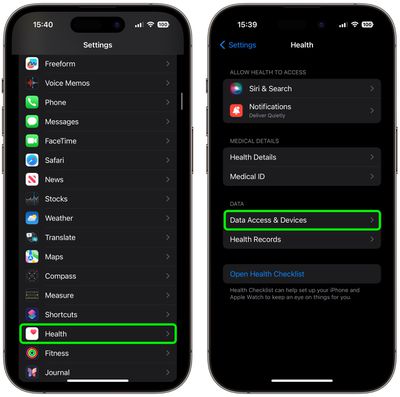
- Open the Settings app.
- Tap Health.
- Tap Data Access & Devices.

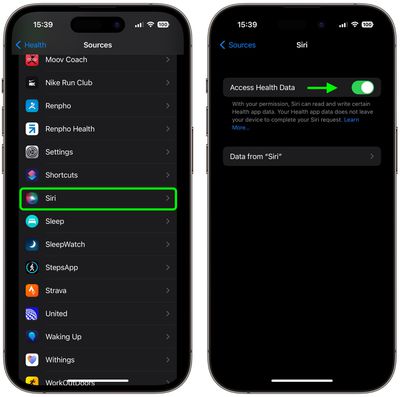
- Tap Siri.
- Toggle on the switch next to Access Health Data.
On Apple Watch:
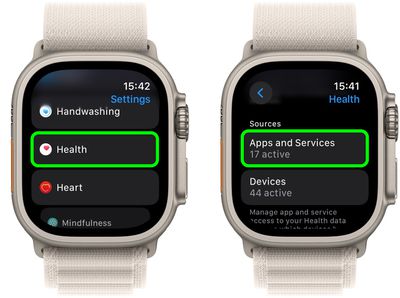
- Open the Settings app.
- Tap Health ➝ Apps and Services.
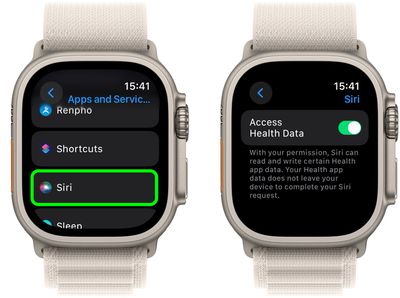
- Tap Siri.
- Toggle on the switch next to Allow Siri Access to Health Data.
Now that you have granted Siri access to your health data, you can start querying the personal assistant or begin using it to conveniently log data in the Health app.















