iOS 16.4: How to Activate iPhone's Always-On Display With a Focus - MacRumorsOpen MenuShow RoundupsShow Forums menuVisit ForumsOpen Sidebar
Skip to Content

iOS 16.4: How to Activate iPhone's Always-On Display With a Focus

by

With last year's launch of the iPhone 14 Pro series, Apple introduced its first always-on display, and it has continued to improve the feature with subsequent updates to iOS 16.
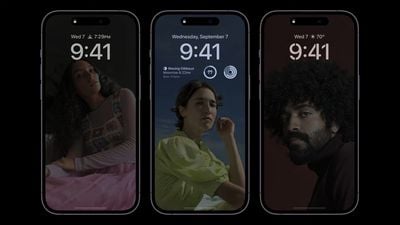
iphone 14 pro always on display
The first enhancement came with iOS 16.2, released in December 2022, which added the ability to hide darkened wallpapers and notifications, allowing users to have a more minimalistic always-on display that only shows the time and date.

Apple has since built on those customizations, and in iOS 16.4, it's now possible to link the activation of the always-on display with a Focus mode. In other words, users can now enable or disable the always-on display only when a specific Focus mode is turned on.

The following steps show you how it's done. Bear in mind that your iPhone will need to be running the iOS 16.4 beta for this feature to be available, otherwise you'll have to wait for the final version of iOS 16.4 to be released to the public.

How to Control iPhone's Always-On Display With a Focus

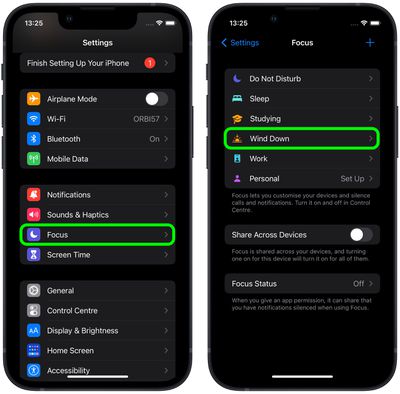
  1. Launch the Settings app on your ‌iPhone‌, then tap Focus.
  2. Select the Focus mode that you want to add Focus Filters to.
    focus

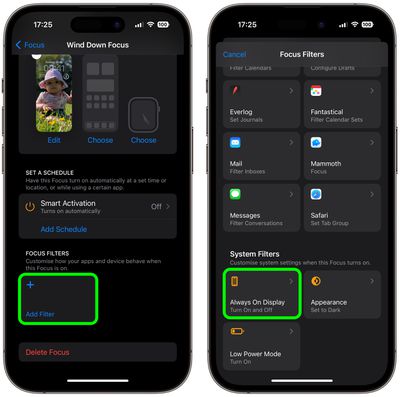
  3. Swipe down, and under "Focus Filters," tap Add Filter.
  4. Under "System Filters," tap Always On Display.
    focus

  5. Since you're enabling the Always On Display, leave the switch in the default ON position.
  6. Tap Add to include the filter in your Focus mode.
The always-on display will now be activated the next time you enable the associated Focus mode. When the Focus is disabled, the always-on display will be de-activated.

Note that you can also use Smart Activation to automatically turn on this specific Focus mode at opportune times throughout your day, based on signals like your location, app usage, and so on. Alternatively, you can set a schedule for your Focus based on time, location, or app.


Related Forum: iPhone

Popular Stories

iCloud iPhone 17 Pro

iPhone Users Who Pay for iCloud Storage Get Two New Perks on iOS 27

Thursday July 2, 2026 6:10 am PDT by
If you pay for certain iCloud+ storage plans beyond the 5GB that Apple offers for free, you will receive two more perks on iOS 27 at no additional cost. A summary of the two new iCloud+ perks on iOS 27:Increased daily usage limits for some new Apple Intelligence features, including image generation in the revamped Image Playground app. HomeKit Secure Video cameras receive generated video...
iPhone 4 on Black Feature

Apple Facing One of Its Worst Leaks Since the iPhone 4

Thursday July 2, 2026 9:53 am PDT by
Apple supplier Tata Electronics recently suffered a cyberattack that resulted in thousands of confidential files being published on the dark web, and this reportedly included some photos and documents related to the upcoming iPhone 18 Pro. We have elected not to share any of the leaked photos in this story due to the illegal nature in which they were obtained, but they can easily be found...
American Express Gold Apple Pay Feature

American Express Announces New Apple Pay Feature

Tuesday June 30, 2026 10:27 am PDT by
American Express today announced that you can now redeem Membership Rewards points when checking out with Apple Pay on the web and in apps on the iPhone and iPad. When checking out with Apple Pay on iOS 18 or iPadOS 18 or later, tap on your eligible American Express card (Platinum, Gold, Green, and others) and select the Membership Rewards points option. You can use points to cover all or...