

 Apple is always on the hunt for ways to make using your iPhone and iPad easier, and will often tweak the menu and button functions with each new version of iOS in order to make its software interfaces more consistent.
Occasionally though, these changes can stump longtime users, and going by the number of emails MacRumors has received on the subject, that's just what a small adjustment to the Photos app appears to have done in iOS 13.
In previous versions of Apple's operating system, adding some photos to an album involved selecting (or ticking) several photos in your Camera Roll and tapping an Add To button at the bottom of the interface.
In iOS 13, however, Apple has moved this facility to the share sheet. The following steps explain the new process of adding photos to an album, which should become second nature once you spot it.
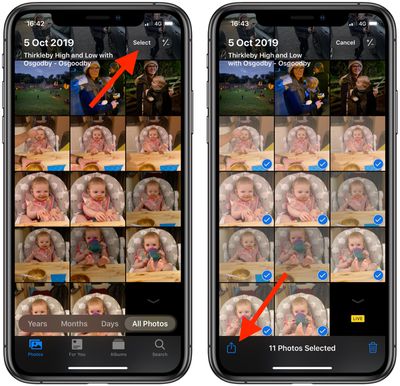
- Launch the Photos app on your iPhone or iPad.
- Tap Select in the top-right corner of the screen, then tap several photos that you want to add to an album.

- Tap the Share Sheet button (the square with an arrow pointing out) in the bottom-left corner of the screen.
- Swipe up on the share sheet to reveal the actions below the sharing icons.
- Tap Add to Album.
- On the next screen, under My Albums, tap an existing album to add your chosen photos to. Alternately, tap the New Album option above them, give your new album a name, then tap Save.
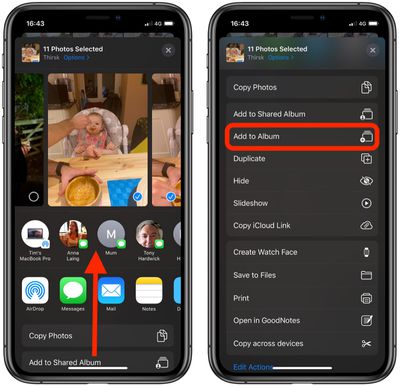

Frankly, it's probably time Apple renamed the share sheet and called it the "action sheet," because very often you'll now see just as many actions as share options listed in it (if not more).


















