 In iOS 13, Apple overhauled its native Reminders app in order to make the process of building to-do-style lists more intuitive and easier to organize. One way Apple achieves this is by introducing nested reminders.
Basically, this feature enables you to break down a reminder into smaller tasks with sub-items. If you have a reminder called "housework," for example, you could get more specific by adding reminders below it to wash the dishes and empty the tumble dryer. Breaking down a reminder into individual tasks like this often tends to make your lists more manageable and less daunting.
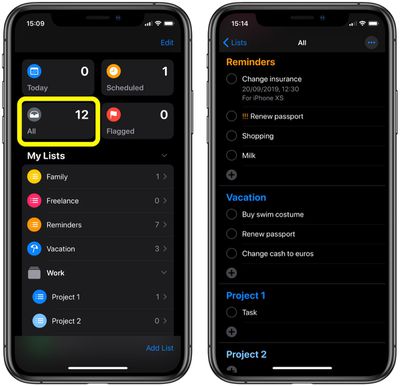
You can create nested reminders in any list, but we're demonstrating it in All section, which you'll find at the top of the app. This section shows all the reminders from your various lists in one scrollable screen. You can tap the plus buttons at the bottom of each list to add new reminders, and drag reminders around to rearrange them – even between lists.
To nest a reminder under the one above it, swipe rightwards on the one you want to nest and then tap the gray Indent button that appears. You can also just swipe right across the length of the reminder to achieve the same thing in one quick gesture.
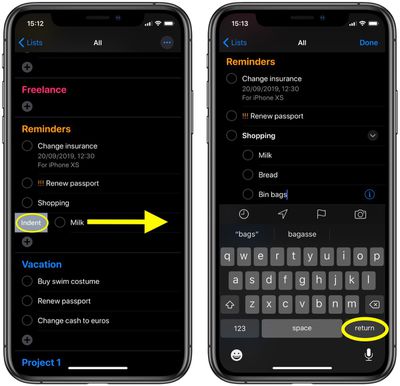
To continue nesting reminders, tap the indented reminder as if to edit its name, then tap return on the onscreen keyboard, and this will create a new reminder directly below at the same indentation. To remove the indent on a reminder, simply repeat the right swipe gesture on it.