How to Adjust iCloud Private Relay IP Address Settings - MacRumorsOpen MenuShow RoundupsShow Forums menuVisit ForumsOpen Sidebar
Skip to Content

How to Adjust iCloud Private Relay IP Address Settings

by

As part of iOS 15, Apple introduced iCloud Private Relay, a feature of all ‌iCloud‌+ paid plans that's designed to encrypt all of the traffic leaving your device so no one can intercept it or read it.
iCloud General Feature
Private Relay works by sending web traffic to a server that is maintained by Apple to strip the IP address. Once the IP info has been removed, Apple sends the traffic to a second server maintained by a third-party company that assigns a temporary IP address and then sends the traffic to its destination, a process that prevents your IP address, location, and browsing activity from being used to create a profile about you.

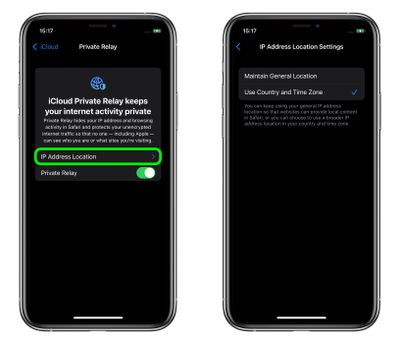
Once ‌iCloud‌ Private Relay is enabled, you can choose how the assigned IP address uses geographical information to conceal your actual location. If you still want to receive local content when you're browsing in Safari, the IP address can maintain your general location without being specific (the default setting), or if you want the relay to be more private, the IP address can simply include your country and time zone.

Whichever option you choose, here's how to set it in iOS 15.

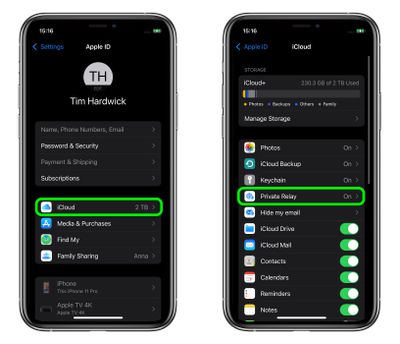
  1. Launch the Settings app on your iPhone or iPad.
  2. Tap your name at the top of the main settings menu.
  3. Tap iCloud.
  4. Tap Private Relay.
    settings

  5. Tap IP Address Location.
  6. Select Maintain General Location (the default) or Use Country and Time Zone.
    settings

Paid ‌‌‌iCloud‌‌‌+ plans also include a new Hide My Email feature that lets you create unique, random email addresses that forward to your personal inbox, and it allows for ‌‌‌iCloud‌‌‌ Mail addresses to be personalized with a custom domain name. To learn more about Hide My Email and how to enable it, check out our dedicated how-to guide.


Popular Stories

iCloud General Feature Redux

Apple Faces £3 Billion UK Trial Over iCloud Lock-In Claims

Thursday May 7, 2026 1:56 pm PDT by
Apple was not able to narrow the scope of a UK lawsuit accusing it of locking 40 million UK consumers into iCloud, to the detriment of third-party cloud storage providers. British consumer group Which? first filed the lawsuit in late 2024, and is asking for £3 billion for UK Apple customers. Apple wanted to exclude non-paying iCloud users from the lawsuit, but the tribunal denied Apple's...
Apple Card iPhone 16 Pro Feature

Apple Card Promo to Offer Free AirPods Pro 3

Friday May 15, 2026 8:59 am PDT by
Starting as early as next week, customers who sign up for an Apple Card at Apple's retail stores in the U.S. will receive $249 cash back when they purchase AirPods Pro 3, according to Bloomberg's Mark Gurman. The promotion has yet to be officially announced by Apple, so exact terms and conditions are not available at this time. AirPods Pro 3 are priced at $249 in the U.S., so customers who...
Apple WWDC25 iOS 26 CarPlay Light mode 250609

Six Popular iPhone Apps Now Available on CarPlay

Thursday May 14, 2026 9:10 am PDT by
Apple's CarPlay system for accessing iPhone apps on a vehicle's dashboard screen has received six popular apps in recent weeks: ChatGPT, Perplexity, Grok, Google Meet, WhatsApp, and the indie artist streaming platform Audiomack. Make sure you have the latest version of each app and they will automatically appear on CarPlay. ChatGPT Starting with iOS 26.4, CarPlay supports voice-based...