How to AirPlay Audio From Your Mac to HomePod - MacRumorsOpen MenuShow RoundupsShow Forums menuVisit ForumsOpen Sidebar
Skip to Content

How to AirPlay Audio From Your Mac to HomePod

by

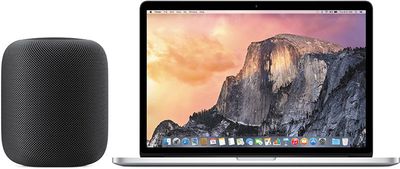
To play music from third-party music services like Spotify to your HomePod, you don't need an iOS device -- a Mac will work too. You can send any audio playing on your Mac right to your HomePod, and not just audio from iTunes.

To AirPlay from Mac to HomePod, your Mac and your HomePod need to be on the same Wi-Fi network.
homepodmac

Make Sure Volume is Enabled in Menu Bar

It's easiest to AirPlay sound to the HomePod from a Mac using the menu bar on your Mac, but to do that, you need to make sure your audio settings are readily accessible. By default, audio settings aren't available on the menu bar, so you'll need to fix that.

  1. Open up System Preferences.
  2. Choose Sound.
  3. Select the "Output" tab. homepodvolumemenubar
  4. Check the "Show volume in menu bar" box.
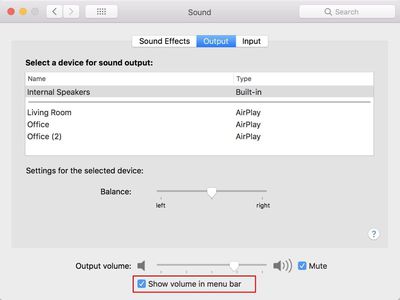
While it's easiest to use the menu bar, you can actually AirPlay to the HomePod using the Sound section of System Preferences. To do so, double click on the HomePod, which should be named after the room that it's in.

Selecting HomePod as an Audio Output Device from the Menu Bar

Once sound controls are accessible from the menu bar, it's simple to route the sound from your Mac to the HomePod.

  1. Click on the volume button in the menu bar.
  2. Under the "Output Device" list, choose the HomePod, which is labeled as the room that it's in. Mine is Office 2, because I have two AirPlay devices in my office. homepodmacmenubaroption
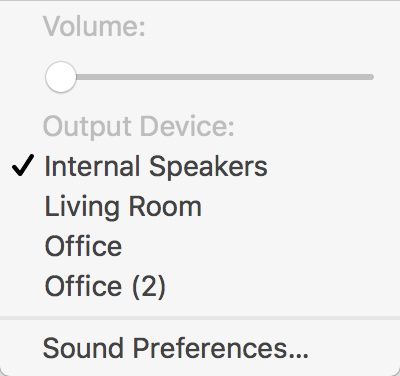
With the HomePod selected as the audio output device, all audio from your Mac will be sent to the HomePod. You can't pick and choose -- every sound from your Mac will be played on the HomePod instead of on your Mac's speakers.

When using the HomePod this way, as an external speaker for the Mac, there's no option to use Siri to do things like skip songs. tYou'll need to control playback on your Mac, but you can use the physical controls on the HomePod to adjust volume.

AirPlaying from iTunes

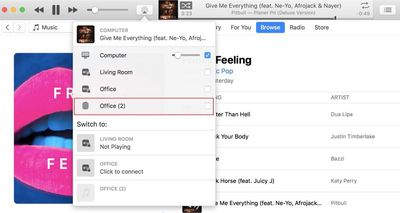
For the most part, you need to use the audio output settings to AirPlay music from a third-party service to the Mac, but if you're playing content from iTunes, you can use the built-in iTunes AirPlay controls.

  1. Open iTunes.
  2. Play a song from Apple Music or your music library. homepodairplayitunes
  3. In iTunes, click on the applesoundiconthing icon.
  4. Select the HomePod icon.

Because you can play Apple Music and iCloud Music Library content directly on the HomePod, there's probably not much need to AirPlay from iTunes to the HomePod, but the option is there if you need it.
Related Roundup: HomePod
Buyer's Guide: HomePod (Caution)

Top Rated Comments

keysofanxiety Avatar
110 months ago
I bought a Sonos One today. Now I can play music from my phone, Mac and even my PC. The sound is phenomenal and it’s so good not worrying about having to deal with a dumb AI 99% of the time. I asked Alexa “how old was Kurt Cobain when he died?”. She replied with his age and even the cause of death. This was Siri’s response to the same question...
Sounds like Siri misheard you. I tried the first time and it came up with this.


Not saying you’re a liar. Just saying it does pick up the right answer for this question, but on this occasion wasn’t picking up your speech correctly.

Attachment Image
Score: 8 Votes (Like | Disagree)
ChrisMoBro Avatar
110 months ago
I bought a Sonos One today. Now I can play music from my phone, Mac and even my PC. The sound is phenomenal and it’s so good not worrying about having to deal with a dumb AI 99% of the time. I asked Alexa “how old was Kurt Cobain when he died?”. She replied with his age and even the cause of death. This was Siri’s response to the same question...

Attachment Image
Score: 7 Votes (Like | Disagree)
haralds Avatar
110 months ago
Look at Rogue Amoeba's AirFoil to capture audio from an app or the system and redirect it to one or more AirPlay speakers while keeping the sound synchronized.
Score: 4 Votes (Like | Disagree)
keysofanxiety Avatar
110 months ago
For over a year I've been asking Siri how far away Kelnowa, BC is and it still can't figure it out. Google has no issues. Can you give it a try?
Nailed it.

Who wants to go to Canada anyway? :p


Attachment Image

Attachment Image

Attachment Image

Attachment Image

Attachment Image

Attachment Image

Attachment Image
Score: 3 Votes (Like | Disagree)
loby Avatar
110 months ago


Because you can play Apple Music and iCloud Music Library content directly on the HomePod, there's probably not much need to AirPlay from iTunes to the HomePod, but the option is there if you need it.
Article Link: How to AirPlay Audio From Your Mac to HomePod ('https://www.macrumors.com/how-to/airplay-audio-from-mac-to-homepod/')
Uh...not everyone wants to use iCloud or Apple Music, especially to play or store their music.

Airplay “is” a good feature “and” there “is” a need for this feature.
Score: 2 Votes (Like | Disagree)
technerdlogic Avatar
102 months ago
In September of 2018 it would appear that AirPlay 2 is still not an option on the Mac. As I am still experiencing lag when using it as an output and the sound is not as good compared to when I play it from my iPhone. I called Apple to confirm and their level one support barely knows what airplay even is. Told me everything should work and probably my HomePod needs repair. Load of crap. Side note: Apple low key has terrible customer service. They are nice and all but I don't think any of them own apple products because the few times I have had to call I had to hang up prematurely because the incompetence started to give me a headache. Can anyone confirm my they are still having trouble with this?
Score: 1 Votes (Like | Disagree)

Popular Stories

HomePodandMini feature green

iOS 27 Brings New Functionality to HomePod

Wednesday June 10, 2026 3:02 am PDT by
With the launch of iOS 27 and HomePod Software 27, Apple is adding support for AutoMix, Apple's AI-powered Apple Music feature that blends songs using matching key and tempo. Apple says it has improved AutoMix's underlying algorithms to generate new transition types, making for more seamless blends between tracks, so this should also benefit the newly introduced feature for HomePod....
apple price hike

Apple Just Increased Prices on MacBooks, iPads, and More

Thursday June 25, 2026 5:44 am PDT by
Apple today dramatically increased device prices across multiple product lines. Subscribe to the MacRumors YouTube channel for more videos. After temporarily taking it down earlier today, Apple's online store is back up with a series of product price increases. The changes are as follows: HomePod mini: $129, up from $99 (+$30) HomePod: $349, up from $299 (+$50) Apple TV: $199, up from...
HomePod mini and Apple TV Sage

Apple TV and HomePod Just Went Up in Price Amid Wait for New Models

Thursday June 25, 2026 8:04 am PDT by
While the Apple TV, HomePod, and HomePod mini have not been updated in several years, all three products received price increases worldwide today. Here is a summary of the price changes for these products in the United States:Apple TV (Wi-Fi): $129 → $199 Apple TV (Wi-Fi + Ethernet): $149 → $249 HomePod: $299 → $349 HomePod mini: $99 → $129Apple also raised prices on Macs, iPads, and more,...