

Thanks to the release of macOS Monterey, Apple has introduced full AirPlay support on Mac, which means you can now AirPlay content from an iPhone or iPad straight to your Mac, or even from one Mac to another Mac.

With Monterey installed, your Mac can also function as an AirPlay 2 speaker source, allowing you to wirelessly stream music or podcasts from an Apple device to a Mac or use the computer as a secondary speaker for multi-room audio.
The following steps show you how to AirPlay music and video from an iOS device to Mac. Note that AirPlay to Mac only works with the 2018 or later MacBook Pro or MacBook Air, 2019 or later iMac or Mac Pro, the iMac Pro, and the 2020 or later Mac mini. You'll also need your iOS devices to be running iOS 15 or later: You can check in on your device by going into Settings -> General -> Software Update).
How to AirPlay Music From iOS to Mac
- Make sure your Mac is powered on and you're signed into macOS using the same Apple account as your iOS device.
- Start playing a song or podcast on your iPhone or iPad.
- Tap the AirPlay icon in the app's media interface.
- Select your Mac from the list of AirPlay devices.

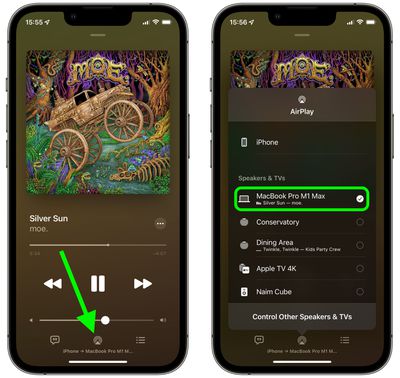
Your music or podcast should start playing through your Mac's speakers or any external speakers connected to your Mac.
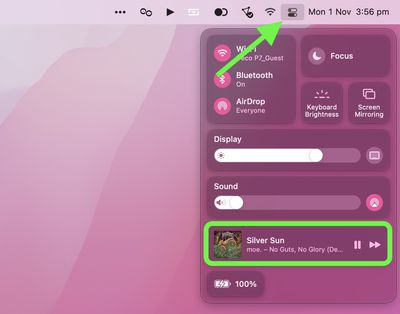
You can control playback on your Mac by opening the Control Center via its menu bar icon in the top-right corner of the screen.
How to AirPlay Video From iOS to Mac
- Make sure your Mac is powered on and you're signed into macOS using the same Apple account as your iOS device.
- Start playing a video on your iPhone or iPad.
- Tap the AirPlay icon in the app's media interface.
- Select your Mac from the list of AirPlay devices.
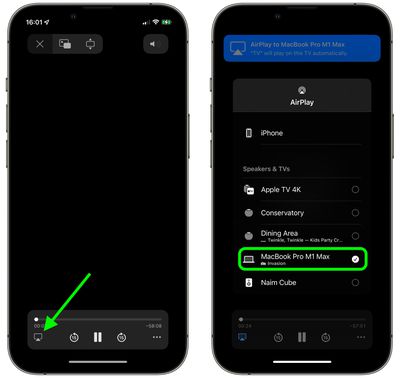
The video should automatically play on your Mac's display in fullscreen mode. You can control playback directly on your Mac by moving the mouse and selecting the onscreen playback controls.



















