Since 2014, Apple has included a little-known feature in iOS called Live Listen that allows an iPhone or iPad to serve as a remote microphone for an MFI-compatible hearing aid.
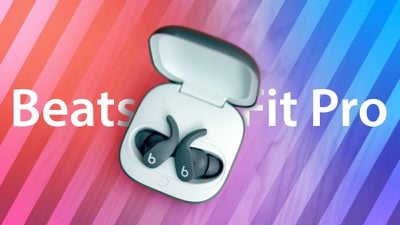
In iOS 14.3 and later, Live Listen supports Beats Fit Pro, Apple's sporty Beats-branded earphones, making it possible to use your iOS device as a directional mic and have the audio relayed to your ears.
As an accessibility feature, the idea behind Live Listen is for it to be used by people who are hard of hearing or need extra help separating voices in a loud environment, but it can be useful in other ways, too.
If you're on a family vacation, for instance, you could use your iPhone or iPad as a makeshift baby monitor for when the baby's napping and you're in another room with the TV on. All you'd need to do is put the iOS device near the baby's crib and wear a single Beats Fit Pro earbud, which should have a strong enough Bluetooth range to allow you to listen in from afar.
Live Listen will work even when other audio is being played on your iPhone or iPad – so you could listen to a podcast, say, and still be keeping tabs on the baby. Just note that whatever it is that you're listening to will switch to mono output to match the Live Listen stream.
Live Listen is easy to set up and use once you know how. The following steps show you how it's done on an iPhone or iPad running iOS 14.3 and later.
How to Set Up Live Listen on iPhone and iPad
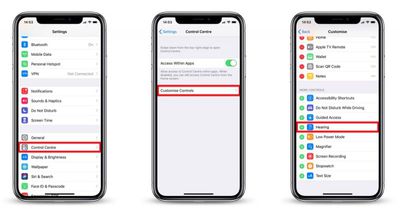
- Launch the Settings app on your iPhone or iPad.
- Tap Control Center.

- Tap Customize Controls.
- Scroll down and tap the green plus (+) button next to Hearing.
How to Use Live Listen on iPhone and iPad
- Put your Beats Fit Pro earbuds in and connect them to your iPhone or iPad in the usual way.
- Launch Control Center on your iOS device: On an iPad with a Home button, double-tap the Home button; on iPhone 8 or earlier, swipe up from the bottom of the screen; and on a 2018 iPad Pro or iPhone X or later model, swipe down from the upper right of the screen.
- Tap the Hearing icon.
- Tap Live Listen.
- Place your iPhone or iPad close to the person you want to hear, preferably in front of them.
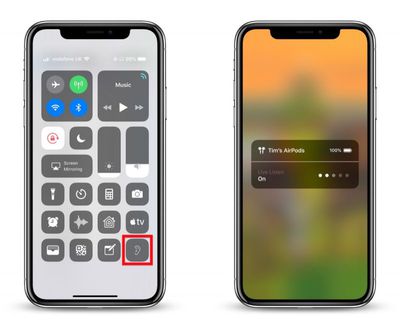
If the output to your Beats Fit Pro earbuds is too quiet or too loud, use the volume buttons on your iPhone or iPad to adjust the volume level.
If you see the message "Unavailable for current route" when you try to turn on Live Listen, restarting your iOS device and then forgetting and re-connecting your Beats Fit Pro earbuds in the Settings app's Bluetooth menu should fix the issue.