

Live Activities Taking Over Your Apple Watch? Here's the Fix - MacRumorsOpen MenuShow RoundupsShow Forums menuVisit ForumsOpen Sidebar
Skip to Content

Live Activities Taking Over Your Apple Watch? Here's the Fix

by

In watchOS 26, the Smart Stack for your Apple Watch is pretty clever. The collection of widgets can be pulled up with a scroll of the Digital Crown, and shows you relevant information throughout your day. But sometimes, its eagerness to help can be a bit much, especially when it comes to Live Activities.
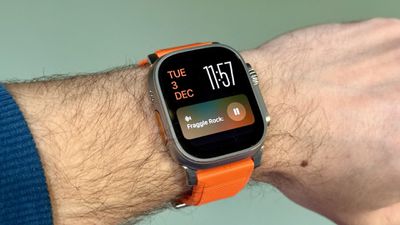
live activities watch
You're probably familiar with this scenario: You raise your wrist expecting to see your customized watch face, but it's been replaced by media playback controls because someone's watching your Apple TV, or a timer you set earlier for cooking that still has ages left to run. Live Activities in the Smart Stack can clearly be useful, but having them automatically take over your display isn't always ideal. Here's how to take back control:

  1. Open Settings on your Apple Watch.
  2. Tap Smart Stack.
  3. Select Live Activities.
  4. Toggle off the switch next to Auto-Launch Live Activities.
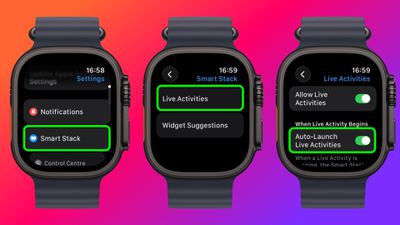
settings

After disabling auto-launch, Live Activities will still be available in your Smart Stack when you want them – you'll just need to manually scroll to see them instead of having them pop up automatically.

If you want more granular control, you're in luck. From the same settings screen you can control which Apple apps display Live Activities. Using the Watch app on your iPhone, you can also manage Live Activities settings for third-party apps. This lets you keep the notifications you find useful while preventing the less important ones from interrupting your watch face.

Pro Tip: If it's just those persistent media controls that bug you, head to Media Apps in the same settings menu and turn off Live Activities completely, or alternatively under "Auto-Launch," select Off or Smart Stack for a more focused watch face experience.


Top Rated Comments

the 12th Doctor Avatar
14 weeks ago
Here’s some pictures from 10 years ago…knock it tf off Smart Stack. I get it. I’ve gotten fat.
Score: 8 Votes (Like | Disagree)
Return Zero Avatar
14 weeks ago
My problem is still the Smart Stack automatically activating when the crown is turned accidentally. The fact they don't let you deactivate this is asinine, especially considering 1) they completely changed the core functionality of both buttons a while back, and 2) they've added so much more customization to almost everything else.
Score: 8 Votes (Like | Disagree)
mr_matalino Avatar
14 weeks ago
I can’t tell you how bad I needed this article!!!
Score: 6 Votes (Like | Disagree)
rotvaldi Avatar
14 weeks ago
They replaced the large sports buttons with small circular ones, which are difficult to press while moving during physical activity.
Score: 5 Votes (Like | Disagree)
ProbablyDylan Avatar
14 weeks ago

Stand up!!!! xD
"WOW! You sure slept badly, huh?"
"HEY! Did you notice it's super loud in here?"
"Don't forget to breathe!"

🙄
Score: 3 Votes (Like | Disagree)
14 weeks ago
I will no longer wear an Apple Watch, or any “Smartwatch” due to the constant notifications. Ninety percent of the time, I look at my wrist for the time. I’m back to wearing analog watches and very happy doing so.
Score: 2 Votes (Like | Disagree)

Popular Stories

airpods pro 3 pink

New Apple Card Holders Can Get Free AirPods Pro 3, But There's a Catch

Monday May 18, 2026 8:11 am PDT by
Apple today launched a new promotion offering new Apple Card holders the chance to earn back the cost of AirPods Pro 3 through monthly cash rebates, but there is a recurring spend requirement attached. Customers who open a new Apple Card account and purchase AirPods Pro 3 directly from Apple by June 15 will qualify. Starting July 1 and running through April 30, 2027, cardholders can earn $25 ...
Foldable iPhone 2023 Feature 1

Foldable iPhone Production Stalls Amid Hinge Issues

Monday May 18, 2026 7:29 am PDT by
Trial production of Apple's long-anticipated foldable iPhone, likely called the "iPhone Ultra," has run into a significant engineering hurdle centered on hinge reliability, according to a known leaker. The leaker known as "Instant Digital" posted on Weibo that the foldable device's hinge is consistently failing to meet Apple's quality control standards under conditions of prolonged,...
wwdc apple park in person

Apple Announces WWDC 2026 Schedule, Sends Media Invites

Monday May 18, 2026 10:23 am PDT by
Apple today provided a schedule for its 2026 Worldwide Developers Conference, which starts on June 8 and ends on June 12. Apple also sent out invites to members of the media who have been invited to attend an in-person keynote viewing at Apple Park. Both the invites and schedule confirm that the keynote will begin at the standard time, 10:00 a.m. Pacific Time or 1:00 p.m Eastern Time....














