

Apple Watch Ultra: How to Activate, Cancel, and Disable the Siren - MacRumorsOpen MenuShow RoundupsShow Forums menuVisit ForumsOpen Sidebar
Skip to Content

Apple Watch Ultra: How to Activate, Cancel, and Disable the Siren

by

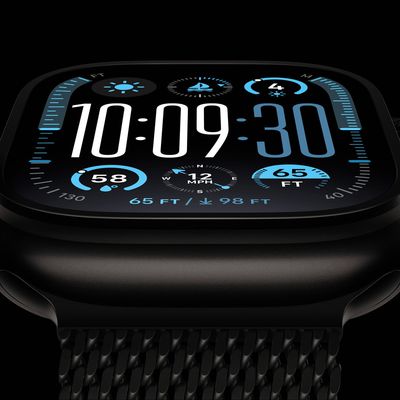
If you ever become lost, injured, or have some other emergency situation and want to draw attention to your location, ‌Apple Watch Ultra‌ includes an 86-decibel siren that you can use.
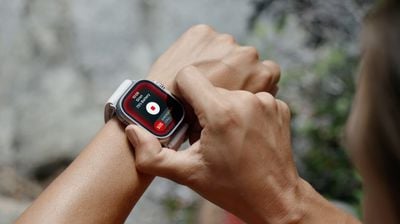
ultra siren watch
The siren uses a unique sound signature that incorporates two distinct alternating patterns, which can repeat for several hours. The first pattern suggests distress, while the second mimics the universally recognized SOS pattern, and the siren can be heard up to 600 feet or 180 meters away.

As such, it's pretty loud, so don't turn it on in enclosed environments or hold your watch close to your ears when the Siren is sounding.

How to Turn on Siren on Apple Watch Ultra

You can turn on the Siren using the Action button or the side button.

Using the Action Button:

  1. Press and hold the Action button until the Siren slider appears.
  2. Drag the Siren slider to start a countdown.
  3. After the countdown, the Siren starts.

Alternatively, you can press and hold the Action button to start the countdown, then continue holding the Action button until Siren starts. If you don't want the Siren going off using this continual hold action, go to Settings -> Action Button, and switch off the toggle next to Hold to Turn On.
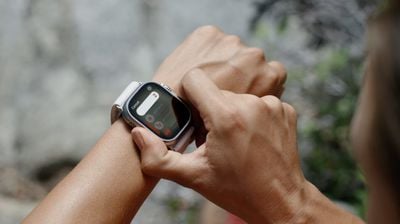
siren countdown

Using the Side Button

  1. Press and hold the Side button until the Siren slider appears.
  2. Drag the Siren slider to start a countdown.
  3. After the countdown, the Siren starts.

How to Cancel the Siren on Apple Watch Ultra

You can cancel the Siren during the countdown. If you're holding the Action button, simply release it to cancel. If you initiated the countdown by dragging the Siren slider, cover the watch display with the palm of your hand for at least three seconds to cancel.
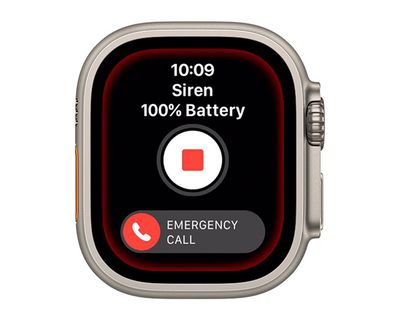
watch
To cancel the Siren while it's sounding, simply tap the central Stop button in the Siren app.

How to Disable the Siren Action Button Function

If you're concerned about the possibility of accidentally activating the Siren via a long press of the Action button, you can disable the function. Here's how.

  1. Launch the Settings app on your Apple Watch Ultra.
  2. Tap Action Button.
  3. Scroll down and under "Siren" toggle off the switch next to Hold to Turn On.
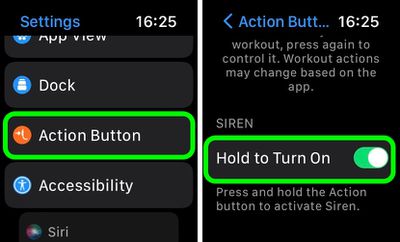
settings

Once that's done, holding down the Action button won't activate the Siren. Note that you can still activate the Siren by way of the Action Button, but now you have to hold the button and then swipe across the Siren slider, making it much harder to unintentionally sound the alert.

Related Roundup: Apple Watch Ultra 3
Related Forum: Apple Watch

Top Rated Comments

AlexisV Avatar
50 months ago


Attachment Image
Score: 4 Votes (Like | Disagree)
50 months ago

This seems like a feature that could and should be included in every Apple Watch
Survival is an apple watch ultra exclusive feature
Score: 2 Votes (Like | Disagree)
FloridaScrubJay Avatar
50 months ago
Hope it is not used as an alternative for the flight attendant call button on airplanes. 😳
Score: 2 Votes (Like | Disagree)
OliOliOliOli Avatar
50 months ago

If you ever become lost, injured, or have some other emergency situation and want to draw attention to your location, ‌Apple Watch Ultra‌ includes an 86-decibel siren that you can use.

MacRumors content image

The siren uses a unique sound signature that incorporates two distinct alternating patterns, which can repeat for several hours. The first pattern suggests distress, while the second mimics the universally recognized SOS pattern, and the siren can be heard up to 600 feet or 180 meters away.

As such, it's pretty loud, so don't turn it on in enclosed environments or hold your watch close to your ears when the Siren is sounding.

How to Turn on Siren on Apple Watch Ultra

You can turn on the Siren using the Action button or the side button.
Using the Action Button:

[LIST=1]
* Press and hold the Action button until the Siren slider appears.
* Drag the Siren slider to start a countdown.
* After the countdown, the Siren starts.

Alternatively, you can press and hold the Action button to start the countdown, then continue holding the Action button until Siren starts. If you don't want the Siren going off using this continual hold action, go to Settings -> Action Button, and switch off the toggle next to Hold to Turn On.

MacRumors content image

Using the Side Button

[LIST=1]
* Press and hold the Side button until the Siren slider appears.
* Drag the Siren slider to start a countdown.
* After the countdown, the Siren starts.

How to Cancel the Siren on Apple Watch Ultra

You can cancel the Siren during the countdown. If you're holding the Action button, simply release it to cancel. If you initiated the countdown by dragging the Siren slider, cover the watch display with the palm of your hand for at least three seconds to cancel.

MacRumors content image

To cancel the Siren while it's sounding, simply tap the central Stop button in the Siren app.

Article Link: Apple Watch Ultra: How to Use the Built-In Siren to Signal for Help ('https://www.macrumors.com/how-to/apple-watch-ultra-use-siren/')
It’s strange, that’s is also a great option for womens in dangerous situations and no one mention it…
Score: 1 Votes (Like | Disagree)
Madhatter32 Avatar
50 months ago
If you actually need this feature you are in a world of hurt.
Score: 1 Votes (Like | Disagree)
50 months ago
A great feature to obnoxiously let everyone in your surrounding know you bought an apple Watch ultra
Score: 1 Votes (Like | Disagree)

Popular Stories

watchos 27

Apple Seeds New watchOS 27 Beta for Apple Watch Ultra 3

Thursday June 25, 2026 12:16 pm PDT by
Apple today seeded a new beta of watchOS 27 for the Apple Watch Ultra 3, with the update coming over two weeks after the launch of the first beta. This beta is only available for the Apple Watch Ultra 3, which did not get the second beta update that came out earlier this week. The beta can be downloaded through the Watch app on the iPhone with a free developer account. The Apple Watch will...
iPhone 18 Pro and Pro Max Feature

'Apple Upgrade' Program Reportedly Launching Next Week

Tuesday July 21, 2026 8:30 am PDT by
Apple and Klarna are partnering on a new "Apple Upgrade" leasing program set to launch in the U.S. on Tuesday, July 28, according to Bloomberg's Mark Gurman. The program will allow you to finance most iPhone, iPad, Mac, and Apple Watch models, with a 24-month term for iPhones and Apple Watches and a 36-month term for iPads and Macs. Customers will be able to pay off the device early during...
iPhone 18 Pro Deep Red Feature

iPhone 18 Pro Launching in Two Months With These 12 New Features

Tuesday July 21, 2026 6:22 am PDT by
It is now mid-July, and that means the iPhone 18 Pro and iPhone 18 Pro Max are now just two months away. The devices are expected to look similar to the iPhone 17 Pro and iPhone 17 Pro Max, but there will still be many year-over-year changes, with rumored features including a smaller Dynamic Island, 5G via satellite, and more. Apple is expected to unveil the iPhone 18 Pro, iPhone 18 Pro Max, ...













