What You Can Do With Apple Watch When Your Paired iPhone is Out of Range - MacRumorsOpen MenuShow RoundupsShow Forums menuVisit ForumsOpen Sidebar
Skip to Content

What You Can Do With Apple Watch When Your Paired iPhone is Out of Range

by

Apple Watch uses both Wi-Fi and Bluetooth to transfer data to the iPhone. It defaults to a Bluetooth connection whenever possible because it conserves power, but if your iPhone is not in Bluetooth range, Apple Watch will switch over to compatible Wi-Fi if it is available.

For Wi-Fi to work on Apple Watch, it needs to be 802.11b/g/n on a 2.4GHz band. It will not connect to the faster speed 5GHz Wi-Fi, nor will it connect to public networks requiring logins, subscriptions, or profiles. It will also not work if your paired iPhone has never connected to the local Wi-Fi network before. This is because Apple Watch cannot configure new Wi-Fi networks on its own. It can connect to networks that you have set up on the paired phone.
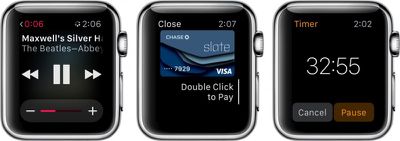
Apple Watch Out of Bluethooth Range
When your paired iPhone is out of range, and it is not connected to the same Wi-Fi network, there are a number of features that are still available:

  • You can play music from a synced playlist. Add music via the Apple Watch app on your iPhone and sync Apple Watch by placing it on the charger. You can store up to 2GB of music.
  • You can use the clock, alarm, timer, and stopwatch. All functions for each of those apps are available when your iPhone is out of range.
  • You can track stand, move, and exercise actions through the Activity app. This information will sync with your iPhone when you are back in range.
  • You can track workouts in the Workout app. It is a good idea to calibrate your Apple Watch first in order to get the most accurate reading.
  • You can display photos from a synced photo album. Add albums via the Apple Watch app on your iPhone. Photos sync immediately.
  • Use Apple Pay at participating retail stores to make purchases. When the payment kiosk is in range, open the Apple Pay app to make a transaction.

There are also a few additional things you can do if your paired iPhone is out of range but you are still on the same Wi-Fi network. For example, if your phone was at your desk, but you are five flights up in the same office building on the same network, or if you were on campus and you left your phone in your locker (assuming the Wi-Fi is compatible and doesn't require logins, subscriptions, or profiles).

  • You can send and receive texts via iMessage.
  • If you know someone else with an Apple Watch, you can send and receive Digital Touch messages.
  • You can use Siri to check your calendar, set reminders, and more.
  • You can check Weather, Email, Reminders, the Calendar app, and all native apps.
  • Check your current location using Apple Maps.
  • You can also access most third-party apps.
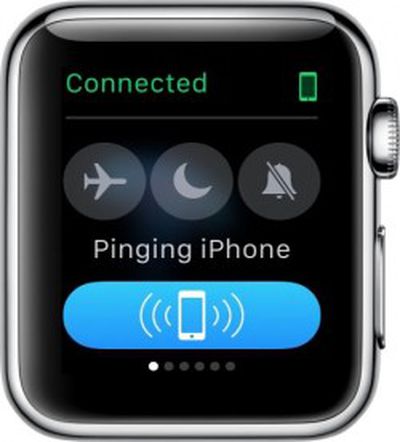
Apple Watch Ping 1If you forget where you left your iPhone while wandering the halls, you can ping it using Apple Watch. Swipe up from the watch face and swipe to the first Glances screen. Then, tap the Ping button. This will activate a loud audio signal on your iPhone, even if the ringer is set to silent. If you use a long tap, it'll also cause the flash on the iPhone to trigger. This feature is great for times when you’ve lost your iPhone. Keep in mind that Apple Watch must be connected to your iPhone either via Bluetooth or Wi-Fi for this feature to work.

If, for some reason, your Apple Watch disconnects from your paired iPhone, follow our how-to guide to fix the problem.

Apple Watch works best when paired to your iPhone via Bluetooth. Data transfers between both devices are smoother, faster, and take up less energy. However, you can still work when your paired iPhone is not in Bluetooth range, as long as they are both on the same Wi-Fi network. An added bonus is that Apple Watch has about a half-dozen useful features that work, even when it is not connected to your iPhone at all.


Related Roundup: Apple Watch 12
Buyer's Guide: Apple Watch (Buy Now)
Related Forum: Apple Watch

Top Rated Comments

ck2875 Avatar
149 months ago
If only I could still get important notifications when my paired iPhone is out of range of my Apple Watch.

MacRumors content image
Score: 3 Votes (Like | Disagree)
149 months ago
This device shouldn't even need the iPhone paired to do any of these wifi tasks, you log in with your Apple ID and you're golden.

If I'm a masochist I should be able to run about with a bluetooth 3G dongle and just use the watch independently, as my sole communications device.

Apple will never do this though.
This actually will work. As long as your iPhone has connected to the dongle once and has stored the Wifi credentials... those credentials will get passed to your Watch and your Watch will connect on its own to the dongle and use it.

EDIT: It depends on what you mean by "sole communications device". You won't be able to make cellular phone calls. But you will be able to use iMessage and receive emails.
Score: 1 Votes (Like | Disagree)
149 months ago
So if my home network is 5ghz, it won't work? Even if I have a 2.4ghz network with the same name and password on the same router?
Yes, it works. This is my setup at home.

People are wrong about logins. The Watch can login to any network that your iPhone automatically logs in on... even without your iPhone. I've done quite a lot of testing of this.
Score: 1 Votes (Like | Disagree)
Iconoclysm Avatar
149 months ago
How does the Apple Watch communicate for Apple Pay without an iPhone? I thought Apple Pay relied on NFC and the watch doesn't have built-in NFC?

(I'm sure there's an answer... I just don't know it.)
Answer - the watch has built in NFC
Score: 1 Votes (Like | Disagree)
Alonso Quijano Avatar
149 months ago
How does the Apple Watch communicate for Apple Pay without an iPhone? I thought Apple Pay relied on NFC and the watch doesn't have built-in NFC?

(I'm sure there's an answer... I just don't know it.)
The Apple Watch has the same NFC chip as the iPhone 6 and 6+, so it is capable of NFC payments on its own.

This enables people who have the iPhone 5 (like me) and above to use Apple Pay.
Score: 1 Votes (Like | Disagree)

Popular Stories

apple watch series 3 design

Apple Offers Steps to Fix Daylight Saving Time Bug on Apple Watch

Sunday November 1, 2026 3:34 am PST by
Apple has published a support document describing what to do if your Apple Watch continues to show time that's off by one hour after daylight savings time changes. "This incorrect time appears only on the Always On display when your wrist is down," says Apple. "When you activate the display by tapping it or raising your wrist, the time changes to the correct hour." To fix the issue, Apple says ...
siri recap live rewind

watchOS 27.3 Brings Live Rewind and Siri Recap to Apple Watch

Tuesday November 3, 2026 10:35 am PST by
With the first beta of watchOS 27.3, Apple is introducing new Audio Intelligence features it previewed for the Apple Watch Series 12 and Ultra 4 earlier this year. Powered by the S11 chip, Audio Intelligence includes Live Rewind, Siri Recap, Sound Recognition, and Shazam Music Recognition. Sound Recognition and Shazam are already on the watch, but Live Rewind and Siri Recap are now available ...
apple watch series 3 design

Apple Watch Users in Europe Report Daylight Saving Glitch

Monday October 26, 2026 5:26 am PDT by
Some Apple Watch users running watchOS 27 are reporting a daylight saving glitch after clocks went back in the UK and Europe on Sunday. In a MacRumors forums thread, five users – several in the UK and central Europe – say their watch shows the correct time when activated, but the Always-On display keeps showing summer time, leaving it an hour fast. The problem has also been reported in...
Latest Stories
Siri AI Rumored to Become 'More Like an Agent' as Early as Next Year
8 hours ago
Apple Taking New Approach to Developing iOS 28 and macOS 28
9 hours ago
Early Apple Black Friday Deals on Apple Watch, MacBook Air, and More
1 day ago
'Backglow' Lets You Customize New MacBook Pro's Glowing Apple Logo
1 day ago
Top Stories: Apple Product Launches, iOS 27.3 Beta, and More
1 day ago
More Fun iPhone Duo Apps: 30 New Picks to Try
2 days ago
Hands-On With Apple's New OLED Touchscreen MacBook Pro
2 days ago
Apple Store With All-New Design Opening Soon in Southern California
2 days ago
Control the Glowing Apple Logo on Your New MacBook Pro
2 days ago
Apple Shares New 'Apple Card: Apply and Use in Minutes' Ad
2 days ago
Apple Says More Than 100,000 Apps Optimized for iPhone Duo, Here's What's Still Missing
2 days ago
Early Black Friday Deals Kickoff With Steep Discounts on Apple Watch Ultras and More
2 days ago
The MacRumors Show: iOS 27.3 Looks Like a Huge Update
2 days ago
Best Buy's Black Friday Event Begins With Sitewide Savings on Apple, TVs, More
2 days ago
Apple Releasing Yet Another Two New Products Next Week
2 days ago
MacBook Air Drops to Lowest Price in Months With Amazon's $250 Discount
2 days ago
Apple Rumored to Drop the iPhone's Action Button Next Year
2 days ago
Apple's Extended Return Policy Now in Effect for 2026 Holiday Season
2 days ago
Apple Music Classical Updated With New Icon and Refreshed Design
3 days ago
OLED iPad Mini, M6 iMac, and New MacBook Pros Available From Today
3 days ago
Apple Surveys iPhone Duo Buyers About Crease and Camera
3 days ago
Apple's First Touchscreen Mac is Now Arriving to Customers
3 days ago
Claude Gets Personal Finance Feature With Bank Account Linking
3 days ago
Apple Arcade Adds Crossy Road Rush and NBA 2K27
3 days ago
Apple's New HomeView Smart Home Hub: Here's How Much RAM It Has
3 days ago
iPad Mini vs. iPad Air Buyer's Guide: Now Just $50 Apart
3 days ago
First iOS 27.3 and macOS Golden Gate 27.3 Public Betas Now Available
3 days ago
Apple Announces a New Mac Sales Record
3 days ago
Paid $200 for Logic Pro? Apple Says You Won't Get This New Feature
3 days ago
Instagram's Edits Video Editor is Now Available on Mac
3 days ago








































