How to Batch Convert Images Using macOS Preview - MacRumorsOpen MenuShow RoundupsShow Forums menuVisit ForumsOpen Sidebar
Skip to Content

How to Batch Convert Images Using macOS Preview

by

Preview appThere are many third-party apps available for Mac that will batch convert images for you (Permute is one example). And then there's Preview, the powerful file viewer that's built into macOS.

Preview will happily convert several images for you in one go. If you have lots of photos on your Mac in Apple's HEIC format, for instance, you can use Preview to quickly convert them to the more accessible JPEG format.

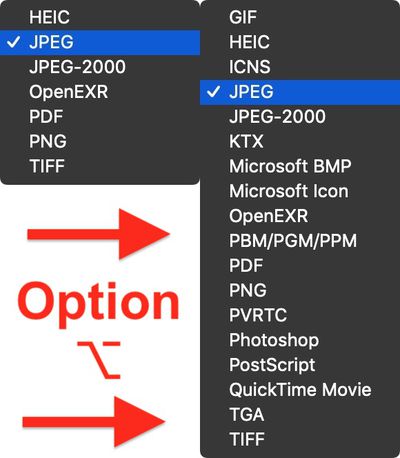
In fact, what's not obvious to many users is that Preview is capable of converting files in 18 different image formats, including the following:

  • GIF
  • HEIC
  • ICNS
  • JPEG
  • JEPG-2000
  • KTX
  • Microsoft BMP
  • Microsoft Icon
  • OpenEXR
  • PBM/PGM/PPM
  • PDF
  • PNG
  • PVRTC
  • Photoshop
  • PostScript
  • QuickTime Movie
  • TGA
  • TIFF

The secret to accessing all of the available format export options in Preview is with the Option (⌥) key. Keep reading to learn how it's done.

How to Batch Convert Images in Preview

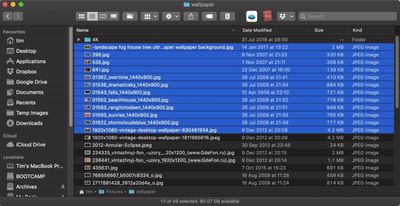
  1. In a Finder window, hold down the Command (⌘) key and individually click all the images you want to convert; if they're grouped together consecutively, hold down Shift and click the first and then the last file, and all of them will be selected.
    how to batch convert images in preview03

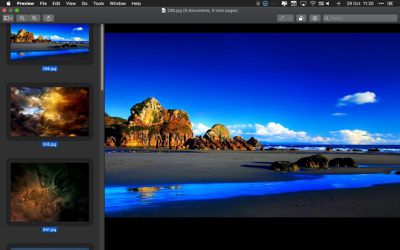
  2. Double-click one of the selected images to open them all in Preview. If Preview isn't your default image viewer, right-click (Ctrl-click) instead and choose Open With -> Preview from the dropdown menu.
  3. Click inside the Preview sidebar. (if it's not showing, click the View Menu button and select Thumbnails.) Alternatively, if you're using the Contact Sheet view, drag a box over all the images to select them.
    batch convert images in Preview

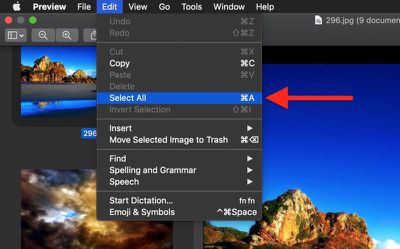
  4. Select Edit -> Select All from the Preview menu bar, or use the Command-A keyboard shortcut to select all the open images.
    how to batch convert images in preview 03

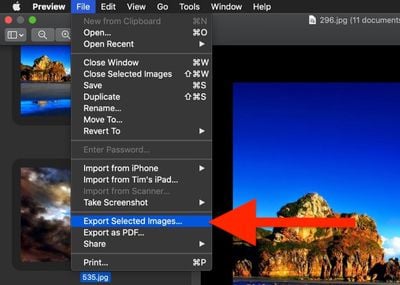
  5. Select File -> Export Selected Images... from the menu bar.
    how to batch convert images in preview02

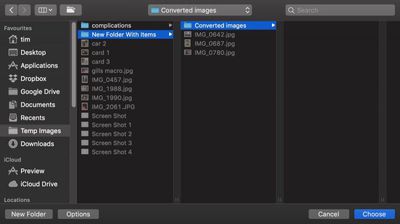
  6. Choose a location to export your converted images.
    how to batch convert images in preview 08

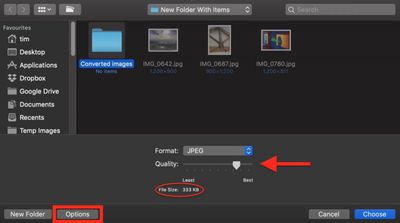
  7. Click the Options button in the Export window.
    how to batch convert images in preview04

  8. Drag the Quality slider to the desired level (keep an eye on the file size).
  9. Select an image type from the Format dropdown. Pro tip: Hold down the Option (⌥) key when you click the Format button to reveal several more image formats available to you.
    how to batch convert images in preview05

  10. Click Choose.

A progress indicator bar will replace Preview's Export window. Once it has completed you'll find your exported images in the chosen location and format, ready for use in your projects.

Note that you can also batch resize images using the method outlined above. After Step 4, select Tools -> Adjust Size... from the menu bar, input the resolution you want all the selected images to take, and click Resize. Note: You may need to select all the images again for export.


Tag: Preview

Top Rated Comments

fairuz Avatar
105 months ago
Preview is one of those secretly really powerful Mac apps for which there's no good replacement elsewhere. At least not that I've seen.

Score: 3 Votes (Like | Disagree)
105 months ago
Is there a way to do file conversions like this that preserves the meta data (original image date, etc.)?
Score: 3 Votes (Like | Disagree)
105 months ago
These How-To articles are the best of MacRumors.
Agreed. I would totally visit a MacRumors spinoff site... MacHints (or maybe something catchier?)

@MacRumors: could you guys at least tag these all with "Hints" or something?
Score: 3 Votes (Like | Disagree)
Solomani Avatar
105 months ago
These How-To articles are the best of MacRumors.
Score: 3 Votes (Like | Disagree)
outskirtsofinfinity Avatar
105 months ago
How do you know which buttons have "hidden" features that are revealed using the Option button? Is there a GUI style convention (say, the way the button is shaded when you hover over it, or something?) that suggests that more hidden options are available? Or is it just impossible to tell and you have to try the Option button everywhere you go to try to reveal hidden treasure... i.e., is it considered more of an "easter egg" kind of thing to delight the ones that stumble across these treasures and allow them to write a 'macOS Secrets revealed' kind of book or article? It just seems so stupid... it's something I'd expect from some hopeless nerd Android programmer (or the self indulgent programmers of the Tesla user interface), not from Apple. E.g., how's my mother in law supposed to figure it out?
Score: 2 Votes (Like | Disagree)
AlumaMac Avatar
105 months ago
If anyone can tell me how to access all of Preview's format conversion options in Automator, I'd be very grateful.

Looks like Automator hasn't been updated and I doubt it will. You could add a terminal command to your Automator Workflow that runs the 'sips' command to do additional filetype conversions. (i.e. sips -s format jpeg filename.gif --out newfilename.jpg)
Score: 2 Votes (Like | Disagree)

Popular Stories

apple pro tell logo

Apple Launching Five New Products Today

Thursday November 5, 2026 12:59 am PST by
Apple is launching five new products on Friday, November 6, following pre-orders that opened last week, including its first touchscreen MacBook Pro models. The following new products will be available from today: iPad mini with OLED display and A20 Pro chip iMac with M6 chip 14-inch MacBook Pro with M6 chip 14-inch MacBook Pro with OLED touchscreen 16-inch MacBook Pro with OLED...
duo aquarium

More Fun iPhone Duo Apps: 30 New Picks to Try

Friday November 6, 2026 3:27 pm PST by
When the iPhone Duo launched, we shared a list of some of the fun apps developers created for the new form factor. Two weeks out, developers are continuing to come up with fresh ideas, so we thought we'd share some of our favorites. Games Marbles Unhinged ($2.99) - Marbles Unhinged is a marble maze designed for the Duo. When you fold it, the floor turns into a ramp. If you stand the top...
silver iphone 18 pro

Apple Rumored to Drop the iPhone's Action Button Next Year

Friday November 6, 2026 6:07 am PST by
Apple plans to merge the iPhone's Action button with the Camera Control starting next year, according to the leaker known as "Instant Digital." In a new post on Weibo, the leaker claimed that a single press of the combined button would open the camera, while a long press would trigger the function assigned to the Action button. They explicitly clarified that the dedicated Action button would ...
Latest Stories
Early Apple Black Friday Deals on Apple Watch, MacBook Air, and More
14 hours ago
'Backglow' Lets You Customize New MacBook Pro's Glowing Apple Logo
14 hours ago
Top Stories: Apple Product Launches, iOS 27.3 Beta, and More
21 hours ago
More Fun iPhone Duo Apps: 30 New Picks to Try
1 day ago
Hands-On With Apple's New OLED Touchscreen MacBook Pro
2 days ago
Apple Store With All-New Design Opening Soon in Southern California
2 days ago
Control the Glowing Apple Logo on Your New MacBook Pro
2 days ago
Apple Shares New 'Apple Card: Apply and Use in Minutes' Ad
2 days ago
Apple Says More Than 100,000 Apps Optimized for iPhone Duo, Here's What's Still Missing
2 days ago
Early Black Friday Deals Kickoff With Steep Discounts on Apple Watch Ultras and More
2 days ago
The MacRumors Show: iOS 27.3 Looks Like a Huge Update
2 days ago
Best Buy's Black Friday Event Begins With Sitewide Savings on Apple, TVs, More
2 days ago
Apple Releasing Yet Another Two New Products Next Week
2 days ago
MacBook Air Drops to Lowest Price in Months With Amazon's $250 Discount
2 days ago
Apple Rumored to Drop the iPhone's Action Button Next Year
2 days ago
Apple's Extended Return Policy Now in Effect for 2026 Holiday Season
2 days ago
Apple Music Classical Updated With New Icon and Refreshed Design
2 days ago
OLED iPad Mini, M6 iMac, and New MacBook Pros Available From Today
2 days ago
Apple Surveys iPhone Duo Buyers About Crease and Camera
2 days ago
Apple's First Touchscreen Mac is Now Arriving to Customers
3 days ago
Claude Gets Personal Finance Feature With Bank Account Linking
3 days ago
Apple Arcade Adds Crossy Road Rush and NBA 2K27
3 days ago
Apple's New HomeView Smart Home Hub: Here's How Much RAM It Has
3 days ago
iPad Mini vs. iPad Air Buyer's Guide: Now Just $50 Apart
3 days ago
First iOS 27.3 and macOS Golden Gate 27.3 Public Betas Now Available
3 days ago
Apple Announces a New Mac Sales Record
3 days ago
Paid $200 for Logic Pro? Apple Says You Won't Get This New Feature
3 days ago
Instagram's Edits Video Editor is Now Available on Mac
3 days ago
Prevent Siri and Search From Accessing Specific iPhone Apps
3 days ago
Best Early Black Friday Deals on iPhone 18 Pro and iPhone Duo
3 days ago