

 In early versions of Mac OS, users looking for a way to quickly rename multiple files simultaneously (commonly referred to as batch renaming) had to use the command line or download and install a third-party tool dedicated to the task.
Since OS X Yosemite however, Apple has integrated several useful batch renaming capabilities directly into Finder.
To rename several files of the same kind on your Mac at once, follow the steps below. In our example we're going to be batch renaming some photos.
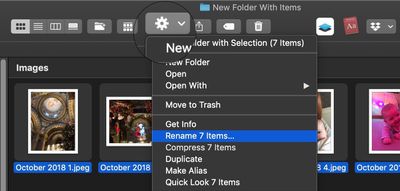
- Open a Finder window and locate the files you want to rename.
- Drag a selection box over the files with your mouse or hold the Shift key and click them one by one.

- Click the Action button in the Finder toolbar. Alternatively, right-click (or Ctrl-click) one of the selected files in the Finder window.
- Select Rename [XX] Items in the menu.
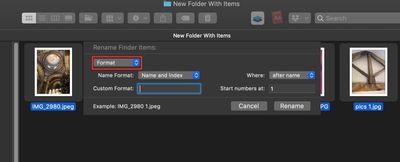
- Select Format from the first dropdown menu in the Rename Finder Items panel.
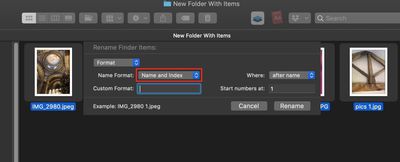
- In the next dropdown, select a Name format. We're going to use Name and Index, but you can optionally select Name and Counter or Name and Date.
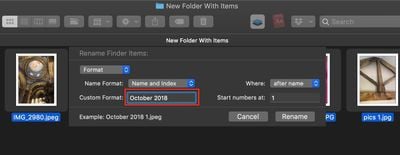
- Enter a common name for your files in the Custom Format field.
- Enter a starting number for the file series in the Start numbers at field. Note that if you selected a number format, you can use the Where dropdown to choose whether the sequential numbers appear before or after the common name of your files.
- Make sure you're happy with the preview example at the bottom of the Rename panel, then click Rename.

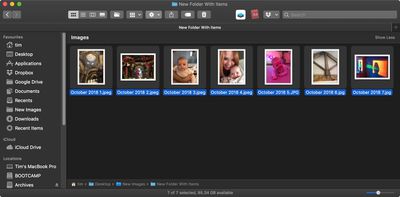
The selected files will now be renamed with your chosen nomenclature. Note that if you're note happy with the change, you can select Edit -> Undo Rename in the Finder menu bar or press the keys Command-Z to revert the files back to their original names.
How to Add Text to Existing File Names
Finder's renaming tool also lets you add supplementary text to filenames without changing their original titles.
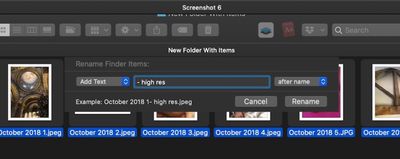
Simply select the files whose names you want to adjust and bring up the Rename Finder Items panel as described above, only select Add Text from the from the first dropdown instead. Then just type in the additional text in the input field.
How to Search and Replace Text in File Names
Finder also allows you to rename only certain files whose names include a certain piece of identifying text. This is particularly convenient if you have tens or hundreds of files in a folder with different names and you only want to change those files that contain a particular word.
Select all the files in a folder (make sure they're all of the same kind, or this won't work), bring up the Rename Finder Items panel in the same way as before, but this time select Replace Text in the first dropdown.
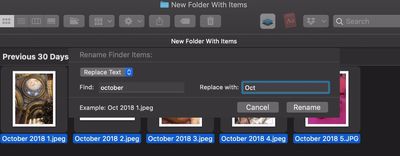
Now simply type the identifying text you want to replace into the Find field, and enter the text you want to replace it with in the Replace With field, then click Rename.
















Top Rated Comments
It’s like Apple built in a few Automator scripts into Finder, because I had 2 scripts saved from back in 2006 for exactly this purpose: batch renaming files, and replacing words in filenames with other words. I’m not a programmer or anything, but Apple made Automator so easy to use!!
I used my Automator for naming imported photos using a specific format I liked (YYYY-MM-DD, photo number starting from 001, then Custom text/title), as well as renaming songs in music albums a certain way (01. Artist Name - Song Name), etc.
This looks good too; better in some ways, but worse in others.