How to Make Icons and Fonts Bigger on Apple Watch - MacRumorsOpen MenuShow RoundupsShow Forums menuVisit ForumsOpen Sidebar
Skip to Content

How to Make Icons and Fonts Bigger on Apple Watch

by

The Apple Watch screen is small. So small that it can be difficult for some people to read messages and other text on the device. Also, even though the Home screen icons get bigger when they are centered on the screen, you might find yourself accidentally tapping the wrong one more often than you'd like.

Apple has included a couple of accessibility features that make dynamic text larger on the screen, and there are options to make all of the icons stay big on the Home screen instead of shrinking and growing when they are not centered. We have a tutorial to show you how to enable these features.
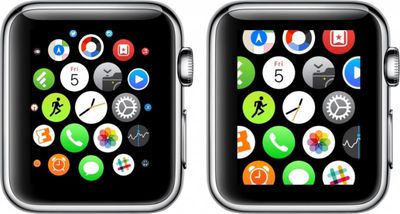
Apple Watch Home Screen

Reduce Motion

The same feature that helps keep people from getting motion sickness in iOS 8 makes app icons larger on the Home screen on Apple Watch. It makes it a little bit easier to tap those tiny icons.

  1. On Apple Watch, navigate to the Home screen and then open the Settings app.
  2. Select General. Then scroll down to Accessibility.
  3. Tap Reduce Motion and toggle the switch to the on position.

Or

  1. Open the Apple Watch app on your iPhone and go to My Watch.
  2. Select General, and then Accessibility.
  3. Tap Reduce Motion and toggle the switch to the on position.

Now, the icons on your Home screen will remain at their fullest size instead of shrinking down as they move away from the center of the screen, as seen in the image at the top of this post.

Tip: If an app is centered on the screen, you don't even have to tap it to open it. Instead, rotate the Digital Crown to open the app. The hard part is being able to tell which app is centered.

Larger Font

You can increase the size of the font for apps that are compatible with dynamic text. Apple's stock Mail, Messages, and Settings apps all have dynamic text.
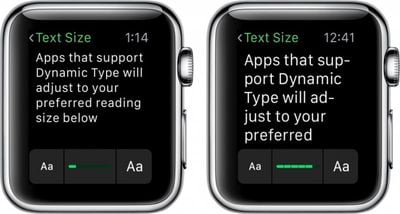
Apple Watch Larger Font

  1. On Apple Watch, navigate to the Home screen and open the Settings app.
  2. Select Brightness & Text Size. Then select Text Size.
  3. Rotate the Digital Crown up or down to increase or decrease the font size.

Or

  1. Open the Apple Watch app on your iPhone and go to My Watch.
  2. Select Brightness & Text.
  3. Drag the slider bar to the left or right to increase or decrease the font size.

You can also turn on Bold Text in the Brightness and Text sections in the Apple Watch Settings app or the Apple Watch app on iPhone to make text just a little bit easier to see.

Reduce Transparency

The iOS 8-style background transparency used in apps like Siri and Glances might also affect your ability to see things clearly on the Apple Watch. You can reduce the transparency to up the contrast and make text and graphics crisper against a solid black background, which may make it easier on your eyes.
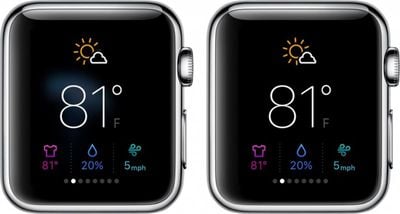
Apple Watch Glances

  1. Open the Apple Watch app on your iPhone and go to My Watch
  2. Select General. Then select Accessibility.
  3. Tap Reduce Transparency and toggle the switch to the on position.

With all of the above-mentioned options, it should make it a bit easier for you to read emails and messages, as well as navigate the Home screen icons.


Related Roundup: Apple Watch 12
Buyer's Guide: Apple Watch (Buy Now)
Related Forum: Apple Watch

Top Rated Comments

WildCowboy Avatar
149 months ago
If you would like to discuss the general topic of how-to articles at MacRumors, there's a forum feedback thread ('https://forums.macrumors.com/threads/getting-sick-of-macrumors-click-and-bait-articles.1892084/') where you're welcome to do so.

If you would like to discuss adjusting font and icon sizes on your Apple Watch, this is the place.
Score: 2 Votes (Like | Disagree)

Popular Stories

apple watch series 3 design

Apple Offers Steps to Fix Daylight Saving Time Bug on Apple Watch

Sunday November 1, 2026 3:34 am PST by
Apple has published a support document describing what to do if your Apple Watch continues to show time that's off by one hour after daylight savings time changes. "This incorrect time appears only on the Always On display when your wrist is down," says Apple. "When you activate the display by tapping it or raising your wrist, the time changes to the correct hour." To fix the issue, Apple says ...


siri recap live rewind

watchOS 27.3 Brings Live Rewind and Siri Recap to Apple Watch

Tuesday November 3, 2026 10:35 am PST by
With the first beta of watchOS 27.3, Apple is introducing new Audio Intelligence features it previewed for the Apple Watch Series 12 and Ultra 4 earlier this year. Powered by the S11 chip, Audio Intelligence includes Live Rewind, Siri Recap, Sound Recognition, and Shazam Music Recognition. Sound Recognition and Shazam are already on the watch, but Live Rewind and Siri Recap are now available ...
apple watch series 3 design

Apple Watch Users in Europe Report Daylight Saving Glitch

Monday October 26, 2026 5:26 am PDT by
Some Apple Watch users running watchOS 27 are reporting a daylight saving glitch after clocks went back in the UK and Europe on Sunday. In a MacRumors forums thread, five users – several in the UK and central Europe – say their watch shows the correct time when activated, but the Always-On display keeps showing summer time, leaving it an hour fast. The problem has also been reported in...
Latest Stories
Siri AI Rumored to Become 'More Like an Agent' as Early as Next Year
8 hours ago
Apple Taking New Approach to Developing iOS 28 and macOS 28
10 hours ago
Early Apple Black Friday Deals on Apple Watch, MacBook Air, and More
1 day ago
'Backglow' Lets You Customize New MacBook Pro's Glowing Apple Logo
1 day ago
Top Stories: Apple Product Launches, iOS 27.3 Beta, and More
2 days ago
More Fun iPhone Duo Apps: 30 New Picks to Try
2 days ago
Hands-On With Apple's New OLED Touchscreen MacBook Pro
2 days ago
Apple Store With All-New Design Opening Soon in Southern California
2 days ago
Control the Glowing Apple Logo on Your New MacBook Pro
2 days ago
Apple Shares New 'Apple Card: Apply and Use in Minutes' Ad
2 days ago
Apple Says More Than 100,000 Apps Optimized for iPhone Duo, Here's What's Still Missing
2 days ago
Early Black Friday Deals Kickoff With Steep Discounts on Apple Watch Ultras and More
2 days ago
The MacRumors Show: iOS 27.3 Looks Like a Huge Update
2 days ago
Best Buy's Black Friday Event Begins With Sitewide Savings on Apple, TVs, More
2 days ago
Apple Releasing Yet Another Two New Products Next Week
2 days ago
MacBook Air Drops to Lowest Price in Months With Amazon's $250 Discount
2 days ago
Apple Rumored to Drop the iPhone's Action Button Next Year
2 days ago
Apple's Extended Return Policy Now in Effect for 2026 Holiday Season
3 days ago
Apple Music Classical Updated With New Icon and Refreshed Design
3 days ago
OLED iPad Mini, M6 iMac, and New MacBook Pros Available From Today
3 days ago
Apple Surveys iPhone Duo Buyers About Crease and Camera
3 days ago
Apple's First Touchscreen Mac is Now Arriving to Customers
3 days ago
Claude Gets Personal Finance Feature With Bank Account Linking
3 days ago
Apple Arcade Adds Crossy Road Rush and NBA 2K27
3 days ago
Apple's New HomeView Smart Home Hub: Here's How Much RAM It Has
3 days ago
iPad Mini vs. iPad Air Buyer's Guide: Now Just $50 Apart
3 days ago
First iOS 27.3 and macOS Golden Gate 27.3 Public Betas Now Available
3 days ago
Apple Announces a New Mac Sales Record
3 days ago
Paid $200 for Logic Pro? Apple Says You Won't Get This New Feature
3 days ago
Instagram's Edits Video Editor is Now Available on Mac
3 days ago







































