

Bookmark Multiple Tabs in Safari on iPhone - MacRumorsOpen MenuShow RoundupsShow Forums menuVisit ForumsOpen Sidebar
Skip to Content

Bookmark Multiple Tabs in Safari on iPhone

by

In Safari on iPhone, it's not unusual for the number of tabs you have open to quickly get out of hand. Here's how to temporarily clean things up without losing your tabs.

safari tabs hand
If you have no use for all your open tabs, you can simply select one, then press and hold on the tabs button in the bottom-right corner of the screen. This will bring up an option to "Close All [x] Tabs," X being the number open.

Using the close all tabs option is one solution for restoring order to your browser session, but that's no good if you're not finished looking at the open tabs, especially if you're busy researching a project or a vacation, let's say.

You could always bookmark the open web pages for later reference. But you don't have to bookmark each tab one by one – that could take a while depending on how many are open.

Fortunately, Safari lets you bookmark multiple tabs in a just couple of taps and save them all in a new or existing bookmark folder. Here's how it works.

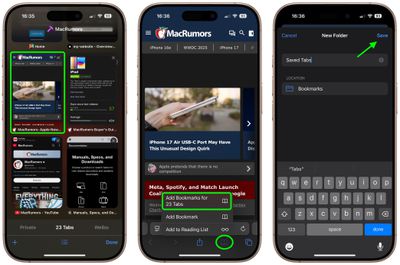
Select one of your open tabs, and in the main browsing window, long press the Bookmark icon (it looks like an open book).
safari
Once you've tapped this option, you'll be asked to save the tabs in a new bookmarks folder. You can also choose the location where you want the new folder to live.

To access your bookmarks in Safari at any time, simply tap the Bookmarks icon in the main browsing interface to reveal all of your saved favorites and folders.


Tag: Safari

Top Rated Comments

EightyEight Avatar
14 months ago
Hey MacRumors, please:
More useful article like this.
Less Gurman wild speculation.
Score: 5 Votes (Like | Disagree)
twistedpixel8 Avatar
14 months ago
“22 tabs” pfff… rookie numbers.
Score: 4 Votes (Like | Disagree)
14 months ago
On iPad this can be found by tapping the name of your tab group in the upper left.

So tap the two squares to show all open tabs, then tap the group name in the opposite side and the option to bookmark is at the very bottom of the list.
Score: 2 Votes (Like | Disagree)
14 months ago
Very useful tip. Did not know that this feature existed. Will try it out next time I have many tabs open on my phone.
Score: 1 Votes (Like | Disagree)
Reason077 Avatar
14 months ago

“In Safari on iPhone, it's not unusual for the number of tabs you have open to quickly get out of hand. “
I don’t actually have this problem on iPhone thanks to the “close tabs automatically after 1 day” feature.

I just wish there was a similar feature on macOS where I do have this problem!

I also wish macOS Safari had an option to block specific websites from opening links in new tabs. Certain websites habitually open all links in new tabs which can quickly result in dozens of tabs if you’re not careful to keep closing them.
Score: 1 Votes (Like | Disagree)
14 months ago
I, like a dummy, was trying to do this on my iPad and couldn’t figure out for the life of me why I couldn’t find a solution. I guess this only works for iPhone then…
Score: 1 Votes (Like | Disagree)

Popular Stories

MacBook Pro Low Angle Wide Lens

macOS 27: Two More Changes Leaked Ahead of WWDC Next Month

Sunday May 10, 2026 9:45 am PDT by
macOS 27 will have a "slight redesign" compared to macOS Tahoe, according to the latest word from Bloomberg's Mark Gurman. In his Power On newsletter today, Gurman said the design changes will help to improve the readability of macOS Tahoe's Liquid Glass interface:If you've used Tahoe, you're likely familiar with some of the quirks — particularly the transparency effects and shadows that...
Apple Card iPhone 16 Pro Feature

Apple Card Promo to Offer Free AirPods Pro 3

Friday May 15, 2026 8:59 am PDT by
Starting as early as next week, customers who sign up for an Apple Card at Apple's retail stores in the U.S. will receive $249 cash back when they purchase AirPods Pro 3, according to Bloomberg's Mark Gurman. The promotion has yet to be officially announced by Apple, so exact terms and conditions are not available at this time. AirPods Pro 3 are priced at $249 in the U.S., so customers who...
Apple WWDC25 iOS 26 CarPlay Light mode 250609

Six Popular iPhone Apps Now Available on CarPlay

Thursday May 14, 2026 9:10 am PDT by
Apple's CarPlay system for accessing iPhone apps on a vehicle's dashboard screen has received six popular apps in recent weeks: ChatGPT, Perplexity, Grok, Google Meet, WhatsApp, and the indie artist streaming platform Audiomack. Make sure you have the latest version of each app and they will automatically appear on CarPlay. ChatGPT Starting with iOS 26.4, CarPlay supports voice-based...













