Boost iPhone Audio Features With This Simple Bluetooth Tip - MacRumorsOpen MenuShow RoundupsShow Forums menuVisit ForumsOpen Sidebar
Skip to Content

Boost iPhone Audio Features With This Simple Bluetooth Tip

by

In iOS and iPadOS, Apple includes an option for users to specify the Bluetooth accessories they connect using pre-defined individual labels.
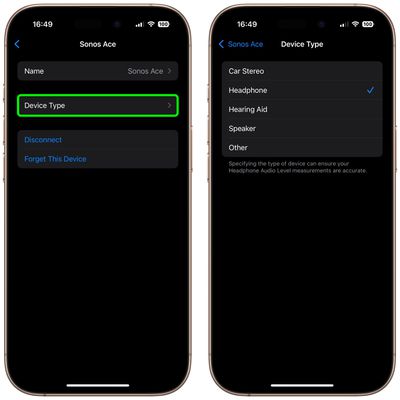
device type bluetooth
Labeling your Bluetooth accessories helps to identify connected devices and improve audio notifications. Apple says that classifying Bluetooth accessories like this can also ensure that real-time Headphone Audio Level measurements are accurate.

When using headphones with an iPhone, for example, you can check the audio level in decibels by viewing the Hearing control in Control Center. In the Health app, you can also review the history of your headphone listening habits.

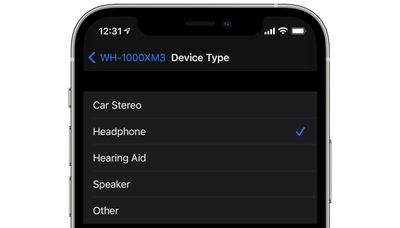
Apple provides five categories with which to label your Bluetooth accessories: Car Stereo, Headphone, Hearing Aid, Speaker, and Other. Here's how to access them.

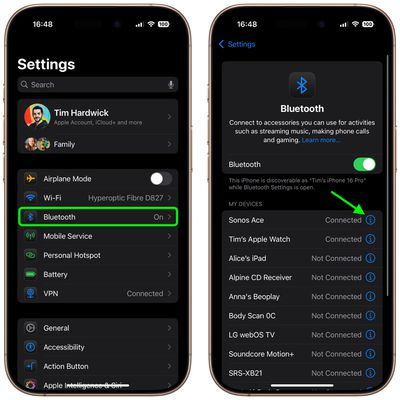
  1. Launch the Settings app on your iPhone or iPad.
  2. Select Bluetooth.
  3. Tap the info button (the encircled 'i') next to a Bluetooth device in the list that you want to label.
    settings

  4. Tap Device Type.
  5. Select a label if the accessory is not already correctly identified.
    settings

Note that iOS recognizes AirPods and AirPods Max as headphones, so there isn't an option to change their Bluetooth label. (The same goes for Apple Watch.) However, you can still change the name of Apple earphones and headphones as they appear in Bluetooth device lists.


Top Rated Comments

DutchApplePie Avatar
18 months ago
It would be nice when playing music in a car through bluetooth if notification sounds would come from the phone instead of momentarily lowering the music volume.
Score: 7 Votes (Like | Disagree)
ambientdaw Avatar
18 months ago
My experience with Bluetooth pairing with speakers from my iPhone and Mac is nothing short of miserable. Sometimes it works but it is 50/50 at best.
Score: 2 Votes (Like | Disagree)
klasma Avatar
18 months ago

What would you want to change them to?..
I would want Apple to document what the effect of each setting is, and letting me decide if I want my AirPods to work like e.g. a speaker. Instead it's "Tell us what you have (but for AirPods we already know), and we'll decide what is good for you."
Score: 1 Votes (Like | Disagree)
18 months ago
Have set it up for some of my Bluetooth accessories. Will try enabling them for the rest of them and see.
Score: 1 Votes (Like | Disagree)
18 months ago
What we need is mic gain controls like we have on the Mac, why is this not available in iOS?! 🤦🏼
Score: 1 Votes (Like | Disagree)
thejadedmonkey Avatar
18 months ago
I've always wondered, is a stereo with a bluetooth input the same as a speaker, in Apple land? Or should I select "Other" for my stereo?
Score: 1 Votes (Like | Disagree)

Popular Stories

iOS 27 Next to iPhone

Here's When iOS 27 Rolls Out Today in Every Time Zone [Update: It's Out]

Sunday September 13, 2026 3:00 am PDT by
Update 10:04 a.m.: iOS 27 is rolling out now, though it may take a bit for all users to see it, so keep checking! Apple is about to release iOS 27, which will finally deliver more advanced Siri AI capabilities as well as a variety of other refinements, improvements, and new features to iPhones. It's Apple's biggest software update of the year, and Apple announced at Wednesday's iPhone event...
iOS 27 Icon iPhone

iOS 27 Available Now With These 8 New Features

Monday September 14, 2026 9:00 am PDT by
Update — 10 a.m. Pacific Time: Apple has released iOS 27. During its iPhone 18 Pro and iPhone Duo event last week, Apple announced that iOS 27 will be released widely on Monday, September 14. iOS 27 should be available around 10 a.m. Pacific Time / 1 p.m. Eastern Time today via the Settings app, under General → Software Update. Below, we have highlighted eight new features and...
Apple iCloud Plus expansion hero

iCloud+ Now Includes Apple TV, Apple Arcade, and Curated Apple Music Stations in Over 100 Countries

Tuesday September 15, 2026 1:43 am PDT by
Apple today announced a new subscription initiative that turns paid iCloud+ subscriptions into a broader services bundle in more than 100 countries. In select countries, Apple says every paid iCloud+ plan, including the cheapest 50GB tier, now includes Apple TV and Apple Arcade "at no additional cost," while family sharing extends the storage, TV and Arcade access to up to five people....